


 Video Converter Ultimate
 Screen Recorder
 Oprava videa
Offline a online konverzní proces: Nejlepší způsob, jak převést OGV na FLV
Při používání videí OGV vás tento ztrátový formát komprese videa může rozčilovat, protože se po úpravách rozostří. Situace se však zlepší, pokud před sdílením online nejprve převedete OGV do formátu FLV; jedinou výzvou pak bude najít snadno použitelný, a přitom výkonný program pro převod videa. Naštěstí pro vás máme ten nejlepší nástroj pro offline i online použití, se kterým můžete snadno převést OGV na FLV. Pro vaše pohodlí stačí postupovat podle kroků uvedených v tomto článku.

Část 1. Jak snadno převést OGV na FLV [Offline]
Upřímně řečeno, na internetu je k dispozici mnoho video konvertorů, ale jen málokterý z nich podporuje převod z OGV. Jelikož uvedený formát není mezi běžnými uživateli videí rozšířený, tvůrci konvertorů jej často nezařazují mezi podporované formáty. Právě z tohoto důvodu se skvěle hodí Video Converter Ultimate. Plně podporuje vstupní soubory OGV a umožní vám rychle převést videa OGV do formátu FLV. Stojí také za zmínku, že dokáže vaše OGV soubory nejen převádět, ale i upravovat pomocí praktických nástrojů. Vše, co potřebujete, najdete ve Video Converter Ultimate. Proto vám nabízíme zcela jednoduchý postup, kterým se můžete řídit:
Krok 1: Než budete moci software používat, musíte jej nejprve nainstalovat do počítače. Proveďte to kliknutím na jedno z tlačítek Free Download níže, podle toho, jaký operační systém používáte. Počkejte, až se soubor .exe nebo .dmg stáhne, a po dokončení jej otevřete, abyste spustili instalační proces. Po dokončení instalace můžete program spustit kliknutím na Start Now.
Zdarma ke staženíPro Windows 7 nebo novějšíBezpečné stažení
Zdarma ke staženíPro MacOS 10.7 nebo novějšíBezpečné stažení
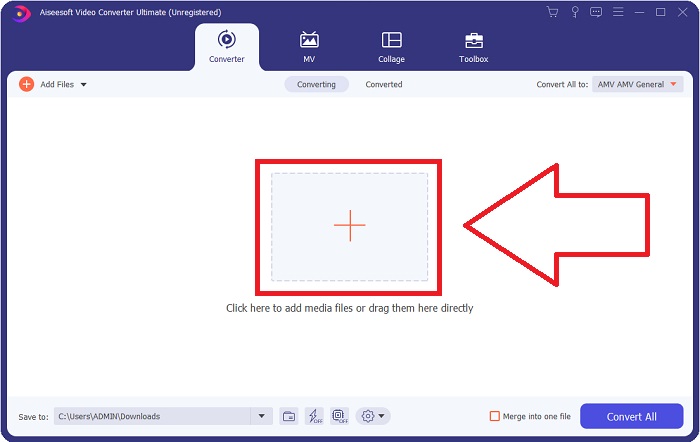
Krok 2: Jakmile se vám zobrazí okno programu, uvidíte rozhraní s tlačítkem + uprostřed. Pro import video souboru, který chcete převést, na něj klikněte, nebo soubor přímo přetáhněte do programu metodou drag and drop.
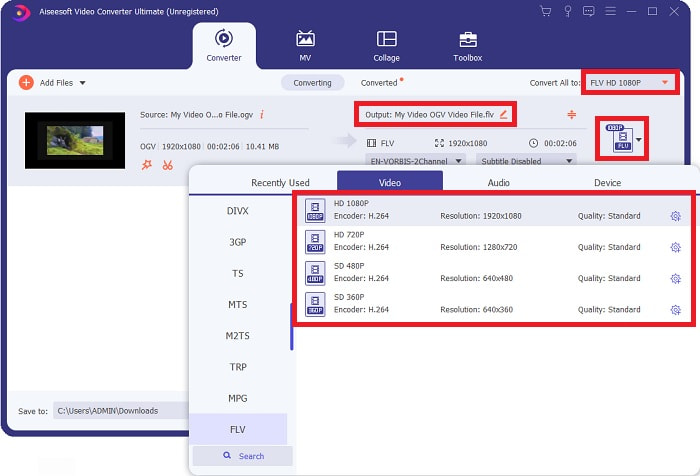
Krok 3: Vpravo uvidíte, v jakém formátu je váš aktuální video soubor. Klikněte na něj a zobrazí se vám všechny formáty, ze kterých můžete vybírat. V tomto případě sjeďte dolů a vyberte FLV, případně jej můžete vyhledat pomocí vyhledávacího pole dole. Na pravé straně této karty si také můžete zvolit kvalitu videa, kterou chcete pro převedený soubor.
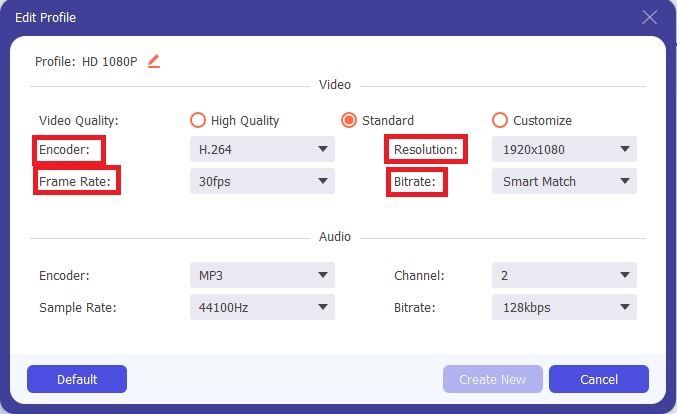
Krok 4: Pokud hledáte více možností, najdete je kliknutím na ikonu ozubeného kola vedle zvolené kvality videa. Díky tomu můžete dále upravit rozlišení videa a další parametry, jako je snímková frekvence, vzorkovací frekvence, datový tok (bitrate) a kodér. Jakmile budete spokojeni, klikněte v pravém dolním rohu na tlačítko Create New, abyste změny uložili.
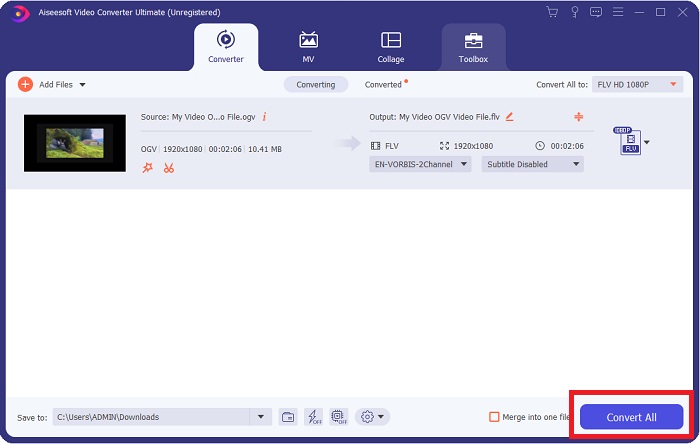
Krok 5: Jakmile dokončíte všechny úpravy, můžete spustit samotný převod kliknutím na tlačítko Convert All v pravém dolním rohu a počkejte, než se proces dokončí.
Část 2. Další dostupná metoda pro převod OGV na FLV [online]
Pokud vám čas nedovolí a potřebujete převést svůj soubor OGV do FLV co nejrychleji, nemusíte se obávat, protože pro vás máme další řešení. Můžete použít online verzi uvedeného programu, která vám i nadále poskytne maximální pohodlí a plynulý proces převodu. FVC Free Video Converter Online je webový nástroj, který dokáže snadno převést soubory OGV na FLV a přitom nabízí stejné možnosti nastavení rozlišení a kvality zvuku. K jeho použití postupujte následovně:
Krok 1: Klikněte na tento odkaz a budete přesměrováni přímo do online převodníku. Uprostřed stránky je tlačítko s nápisem Add Files to Convert. Klikněte na něj, abyste stáhli spouštěč, který potřebujete k importu video souboru, jenž chcete převést.
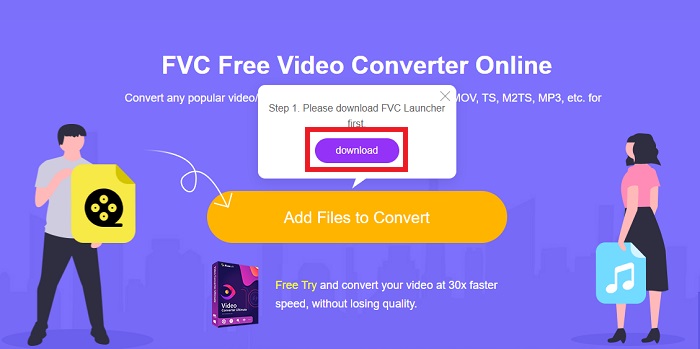
Krok 2: Po dokončení můžete nyní svůj soubor nahrát opětovným kliknutím na uvedené tlačítko. Pokud se upload podaří, zobrazí se vám rozhraní. Zde pak můžete ve spodní části okna mezi dalšími formáty vybrat FLV.
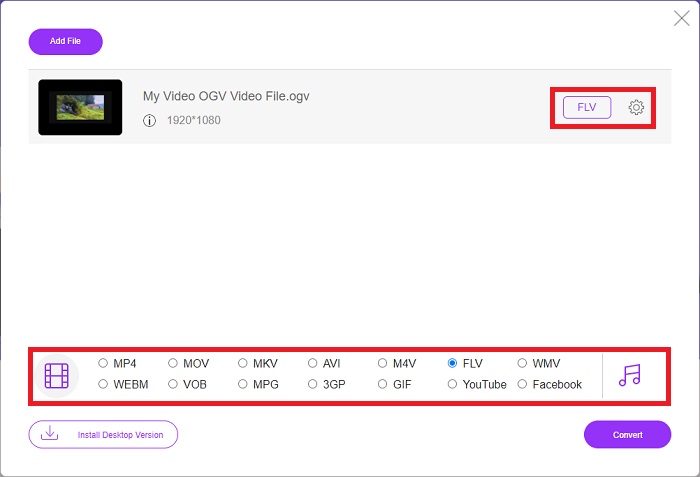
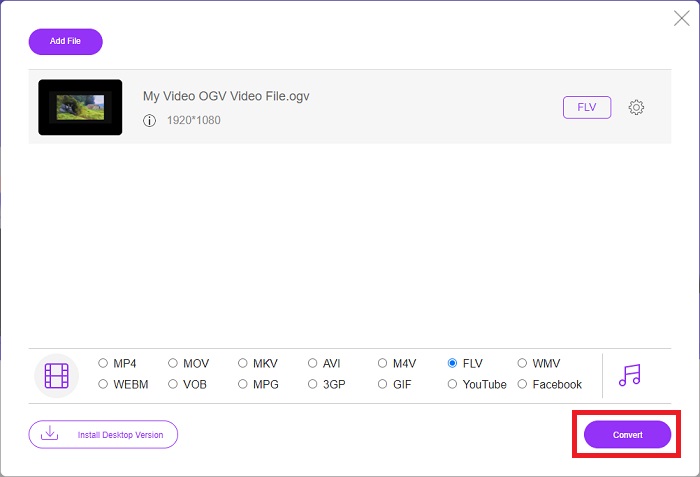
Krok 3: Stejně tak můžete zcela vpravo najít ikonu ozubeného kola, pomocí které můžete své video dále upravit. Po kliknutí na ni se zobrazí nastavení videa a audia, kde můžete měnit kodéry, rozlišení, snímkovou frekvenci a další parametry. Klikněte na OK a poté v pravém dolním rohu na tlačítko Convert, čímž spustíte proces převodu.
Část 3. Rozšířené znalosti o OGV a FLV
Chcete-li se o obou porovnávaných souborech dozvědět více, zde vám poskytneme všechny potřebné informace, které si budete chtít přečíst:
Metoda kódování videa Ogg Vorbis se většinou může propojit se soubory s příponou .ogv. Ogg Vorbis je open source, nepatentovaný formát komprese zvuku. Formát kontejneru pro audio, video a informační soubory je známý jako Ogg, zatímco technologie komprese zvuku Vorbis je pojmenována po. Formát souboru OGV je kontejner pro video soubory. Video streamy spojené s jedním nebo více video kodeky, jako je Theora a DivX, lze nalézt v souborech OGV. Uživatelé mohou pomocí těchto souborů přehrávat nahraný materiál uvnitř souboru obsahu na několika mediálních zařízeních.
Na druhou stranu soubor videa uložený ve formátu kontejneru Adobe Flash Video (FLV) je soubor FLV. Adobe Flash Player jej používá především k nabízení online video obsahu, jako jsou filmy a televizní epizody. Je také důležité poznamenat, že se jedná o otevřený formát podporovaný řadou aplikací jiných než Adobe/Macromedia. Pro konkrétnější srovnání obou jsme vytvořili tabulku právě pro vás.
| Ogg Vorbis (OGV) | Adobe Flash Video (FLV) | |
| Přípona souboru | .ogv | .flv |
| Vývojář | Nadace Xiph.Org | Adobe Systems Incorporated |
| Podpůrné programy | MPlayer Classic, VLC Media Player, Jriver Media Center, MPUI | RealPlayer, Apple QuickTime Player, Mplayer, VLC Media Player |
| Výhody | OGG má tu výhodu, že je bez patentů, je obecně uznáván a nativně podporován většinou prohlížečů. Pokud tedy chcete na svůj web nahrát film, je tento formát dobrou volbou. | Krása Flashe spočívá v tom, že může pomoci webům, které chtějí začlenit pohyb a interaktivní obsah. Postup je přímočarý a v konečném důsledku může mít významný dopad. Všichni také používali Flash pro základní hry v jeho nejlepších letech. |
| Nevýhody | Navzdory širokému použití má video formát OGG několik nevýhod. Safari a Internet Explorer to například podporují jen částečně; uživatelé tedy nemusí správně zobrazit vaše video v těchto prohlížečích. | Nevýhodou samozřejmě je, že formát FLV je v posledních letech stále nepopulárnější. Vytvoření obsahu FLV může trvat dlouho a být drahé. Další nevýhodou je, že Flash materiál nelze přehrávat na iOS zařízeních, což výrazně omezuje jeho schopnost přilákat nové následovníky. |
Část 4. Časté dotazy o převodu OGV a FLV
Jsou OGG a OGV totéž?
Je vhodnou podmnožinou video média typu Ogg video/Ogg s příponou souboru. ogv. Jiné aplikace Ogg využívají příponu souboru. ogv s typem média application/ogg od. ogx je nadmnožina video/ogg.
Je kvalita FLV lepší než MP4?
O formátu MP4 se říká, že obsahuje vysoce kvalitní digitální kódování videa a audia. Názor veřejnosti na FLV je méně jednoznačný, ačkoli výhody a nevýhody FLV bývají jen zřídka zaměřené přímo na kvalitu formátu. Díky vyššímu stupni komprese má MP4 menší ztrátu kvality. Zde se můžete podívat na způsoby, jak převést soubory FLV na MP4.
Je FLV bezztrátový nebo ztrátový jako OGV?
Formát souboru FLV pro Flash Video podporuje dvě verze kodeku sdílení obrazovky (Video na obrazovce), což je metoda kódování vysílání obrazovky. Tyto formáty jsou založeny na bitmapových dlaždicích a jsou ztrátové, když jsou barevné hloubky redukovány a komprimovány pomocí Zlib.
Závěr
Bez ohledu na to, kolik času máte na převod svých video souborů, software i jeho protějšek online nástroje vám dodají to nejpohodlnější. Stručně řečeno, Video Convert Ultimate a Free Video Converter jsou ty, které musí být první věcí, na kterou myslíte, když přijde na konverzi videa, abyste ušetřili čas procházením internetu a hledáním toho nejlepšího. Zde vám předáme to nejlepší.
-
 Nejlepší způsoby, jak převést VOB na FLV [zdarma a online v ceně]
 Chcete převést soubor VOB na soubor FLV? Úlohu můžete snadno dokončit pomocí převaděče pro stolní počítače nebo online. Přečtěte si tuto příručku a naučte se, jak snadno a rychle převést VOB na FLV.
-
 Nejlepší 4 bezplatné aplikace pro převod RMVB na FLV na počítači nebo online
 Tento článek vám řekne nejlepší software pro převádění RMVB na FLV a webové aplikace, které dokáží převést soubory RMVB (RealMedia Variable Bitrate) na video FLV.
-
 Jak komprimovat soubor OGV bez ztráty kvality
 Nemůžete ostatním odesílat velké soubory OGV? Tento článek vám představí 2 snadné způsoby, které vám pomohou snadno komprimovat soubory OGV.
