


 Video Converter Ultimate
 Screen Recorder
 Oprava videa
Jak rychle odstranit vodoznak z videa
Need to remove a watermark from a video in an easy way? Well, you need to use the perfect tool. For instance, users want to remove this watermark text or logo to watch a video in a complete experience. However, this task is complicated for some editors because not all provide an effective watermark remover on their toolset. Ideally, you'll need to purchase an expensive editor for this task, and somehow, not all perform well. But today, we will present the best solution to your problem, whether you are using a computer or an iOS device. Additionally, all the software we offer you has sifted out carefully. So without further ado, let's dive into this article to know how to remove the watermark on any video.

Část 1. Konečné řešení pro odstranění vodoznaku z jakéhokoli videa na Windows a Mac
Learning how to remove a watermark from a video is a simple task for the best video editor Video Converter Ultimate. For you, there is no need to have vast experience in editing because this tool provides an interactive interface and easy-to-understand. Moreover, it also offers numerous advanced features you can use like merging, cutting, color correction, reverser, enhancer, and more.
Pokud jde o dnešek, mnoho uživatelů si tento nástroj již stáhlo a všichni jsou spokojeni, protože to udělali. Působivé, že? Chcete tento nástroj vyzkoušet? V takovém případě se podívejme na níže uvedené kroky a zjistěte, zda je tento nástroj nejlepším řešením našeho problému s vodoznakem.

FVC Video Converter Ultimate
5 689 200+ stažení- Je to nejlepší volba pro všechny, kteří chtějí odstranit svůj vodoznak z jakýchkoli videí.
- Tento ultimátní nástroj je jediný, který funguje jako konvertor, ořezávač, slučovač, řezačka.
- K dispozici ke stažení na všech desktopových platformách, jako jsou Windows a Mac.
- Je snadno použitelný, přesto je to nejvyhledávanější ohledně problému na jejich videu.
Zdarma ke staženíPro Windows 7 nebo novějšíBezpečné stažení
Zdarma ke staženíPro MacOS 10.7 nebo novějšíBezpečné stažení
Step 1. Download the ultimate tool on your computer, choose whether you are using a Windows or Mac. After the downloading process, follow the installation process and click Start Now to run the tool on your system.
Zdarma ke staženíPro Windows 7 nebo novějšíBezpečné stažení
Zdarma ke staženíPro MacOS 10.7 nebo novějšíBezpečné stažení
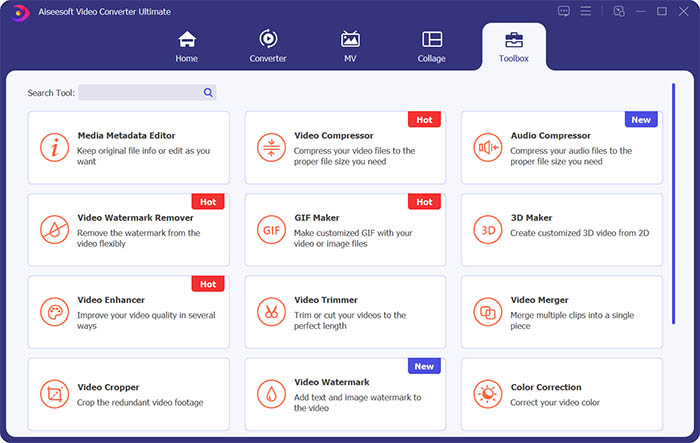
Step 2. Go to the Toolbox section and click Video Watermark Remover to erase the watermark from the video.
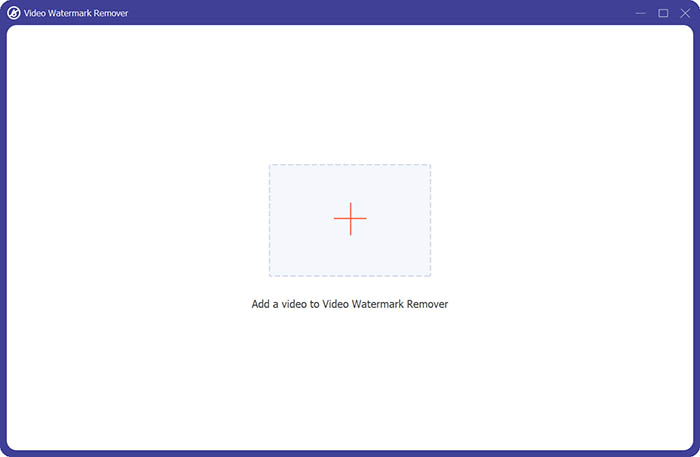
Step 3. Next, you need to click the central plus sign to import the video you want to remove the watermark.
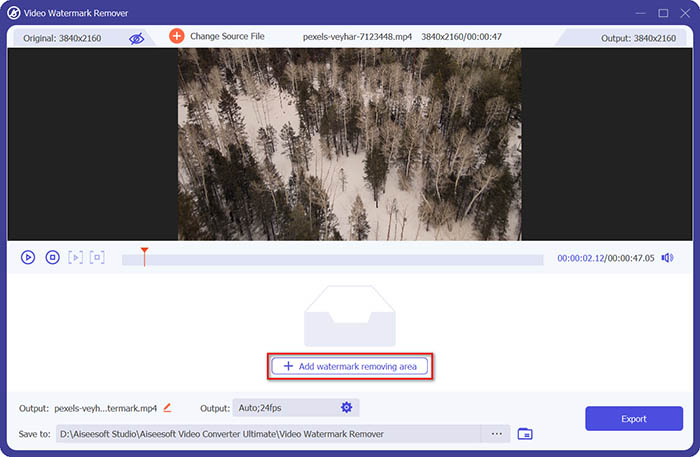
Step 4. After adding the video to the watermark remover, you should click the Add watermark removing area button to select the watermark area.
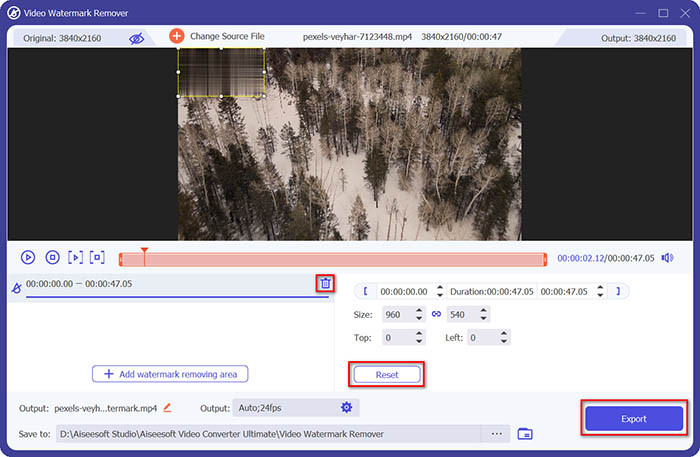
Step 5. Finally, you can click the Export button to get the video without the watermark.
Část 2. Jak odstranit vodoznak z jakéhokoli videa na iPhone
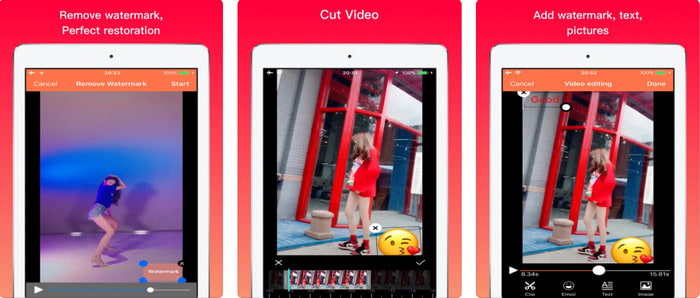
Video Eraser - Remove Logo 4+ already helps a lot of iOS users with their problems in regards to watermark. This app is free to download on every Appstore, but it also provides an app-in purchase to purchase the pro version. Although the tool offers an effective way of removing the watermark, it still encounters some problems, like the video quality won't be the same after you export it here. The watermark is blurred rather than removed. Also, uploading the file here became a problem because it takes much time even though the video is under 30 seconds. But if you want to learn how to remove watermark from video on iPhone, follow the steps below.
Step 1. Download the tool on the App Store, then open it, and press + to import the video with a watermark.
Step 2. Click the information button and click Remove Watermark, click the watermark, and press Start.
Step 3. After the process, the watermark is removed from the video.
Část 3. Jak se zbavit vodoznaku na jakýchkoli videích na webu
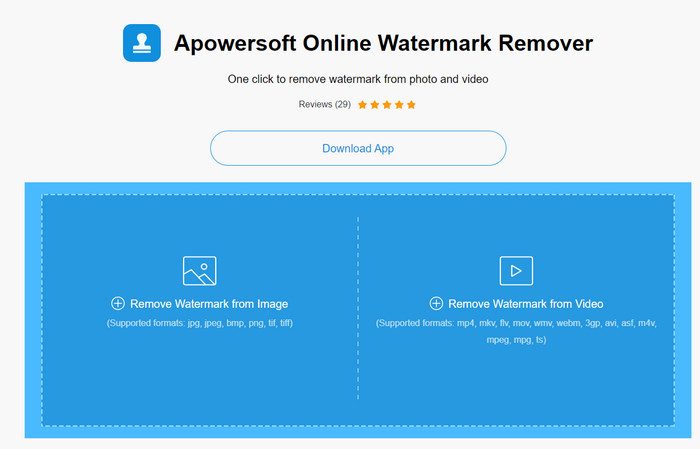
Apowersoft Online Watermark Remover is a free and accessible web tool you can use to remove watermarks. This online tool provides an effective way of removing the watermark even though you didn't download it because it is web-based. Even though it is an effective watermark remover, you will need to have a stable internet connection to finish the process, or else you'll need to repeat to one. So now, if you are on a tight budget and want to learn how to remove watermark from video online, then this is the tool for you.
Step 1. Search the Apowersoft Online Watermark Remover on your favorite web browser and open it.
Step 2. Press Remove Watermark from Video to upload the file with watermark on it. Wait for the uploading process to take place.
Step 3. On the video, hold the left click on your mouse and drag it on the watermark; once it is inside the broken line, you can now release it. Press Erase to begin the removing process, click Download to save it on your computer.
Část 4. Nejčastější dotazy o odstraňování vodoznaků z videí
Proč se musím zbavit vodoznaku na videu?
Abychom si video užili jako celek, musíme odstranit otravný vodoznak. Je použitelný pouze pro osobní použití, ale mohlo by to mít za následek, že jej použijete k tomu, abyste jej zveřejnili online a získali z práce toho druhého.
Jaké jsou další způsoby odstranění vodoznaků?
Pokud chcete, můžete vodoznak zakrýt nebo nahradit svým vodoznakem. Tento proces se překrývá; nejlépe to funguje pouze v případě, že je vodoznak malý nebo na straně videa. Nebo můžete video vystřihnout s vodoznakem a sloučit jej s jiným videem. Tento proces řezání funguje nejlépe pouze tehdy, když je vodoznak vyskakovací. Existují dva různé způsoby odstranění vodoznaků: rozmazání a oříznutí videa. Tyto dva pracují s nástroji, které jsme představili výše.
Jak přidat vodoznak do Photoshopu?
If you want to add a watermark on Photoshop, click this link and read it thoroughly to grasp the idea.
Závěr
With the tool presented in this article, you can easily remove the watermark from the video for free, or you can also use the ultimate tool and purchase it. Although the watermark remover available in this article are easy to use, we still believe that the Video Converter Ultimate presents the most straightforward interface yet most effective one. So, if you want to have the, you can click the download button above to test it out and see if it suits you well.
-
 Nejlepší 2 způsoby, jak převést DivX do formátu MKV [Vyřešeno]
 Proč potřebuji převádět DivX na MKV? Jaké převodníky mohu použít? Máte stejnou myšlenku? Pak vám tento článek pomůže dozvědět se více o DivX a MKV.
-
 2 Ultimate MPG převodníky pro převod MPG do WMV zdarma
 Chcete zdarma převést MPG do WMV? V tom případě máte štěstí, protože jsme zjistili, že existují dva nástroje, které můžete použít k převodu souborů MPG.
-
 Jak změnit iTunes M4V na MKV na Mac a Windows [Nejrychlejší způsob]
 Pokud potřebujete převést M4V na MKV na Mac, musíte si přečíst tento článek. Protože poskytujeme fakta o převodnících, které vám pomohou s procesem převodu.
