


 Video Converter Ultimate
 Screen Recorder
 Oprava videa
Snadné způsoby, jak převést VOB do souboru WMV na Windows a Mac
Nowadays, a lot of file formats have emerged on the internet. One widely used file format is VOB, which is usually used in DVDs. However, VOB files are not being used much in this modern-day, and many devices do not support this kind of file format. Therefore, you need a file that will support many devices, a WMV file. WMV file is a licensed property of Windows and is widely supported by it. Moreover, in this article, we listed ways how you will be able to convert VOB to WMV files easily.

Část 1. Převod VOB na soubor WMV na Windows a Mac
Since VOB files are not much accessible these days, you need a file format supported widely by different devices or systems. The Windows System is widely using one famous file: the WMV file. So we recommend to you this ultimate converter that can convert your VOB file to WMV file easily.
FVC Video Converter Ultimate is one of the best VOB to WMV converters. This application is a file converter that lets you convert your VOB file to WMV file format. FVC Video Converter Ultimate has impressive features that allow you to edit your file, enhance it, and even compress it without ruining its quality. Moreover, it is beginner-friendly because it has an easy-to-use interface so that you will not have a hard time converting files. This converter allows you to convert your VOB file to a WMV file on Windows and Mac.
Klady
- Umožňuje převádět různé soubory, včetně VOB, WMV, MP4, MOV, AVI a dalších.
- Video můžete upravovat, vylepšovat a komprimovat, abyste jej úžasně vylepšili.
- Dostupné na platformách jako Windows a Mac.
- Má snadno použitelné rozhraní.
Nevýhody
- Než jej budete moci používat, musíte si jej zakoupit.
Here are the steps on how will you be able to convert VOB to WMV file on FVC Video Converter Ultimate:
Step 1. To download this converter, click the download button below. You will see two buttons to choose from. Click the Windows button if you are a windows user. Then click the macOS button if you are a Mac user. Follow the process further, then run the application.
Zdarma ke staženíPro Windows 7 nebo novějšíBezpečné stažení
Zdarma ke staženíPro MacOS 10.7 nebo novějšíBezpečné stažení
Step 2. After opening the application, click Add Files button to upload your VOB file in the converter. A new tab will appear where you can select your VOB file. Then proceed to the next step.
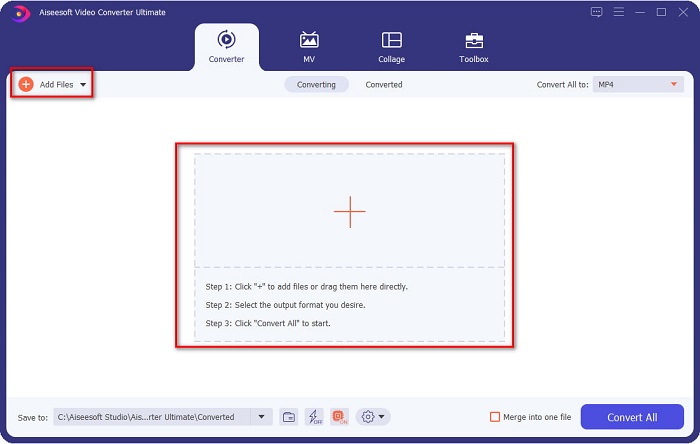
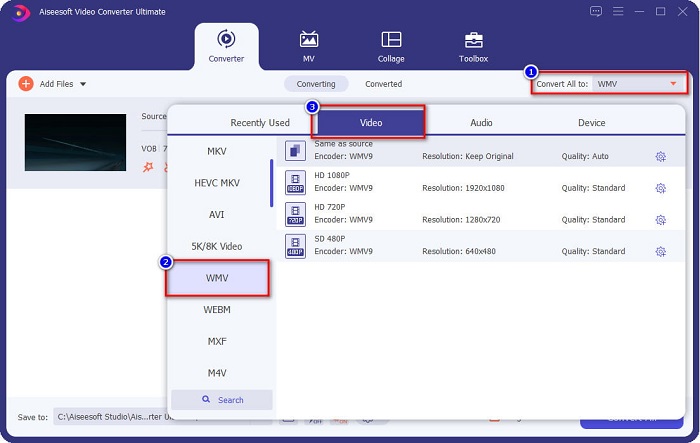
Step 3. To convert your VOB file to a WMV file, click the Convert All to button located at the upper right corner of your screen. A list of file formats will appear, then select the WMV file format to convert your VOB file to the WMV file format.
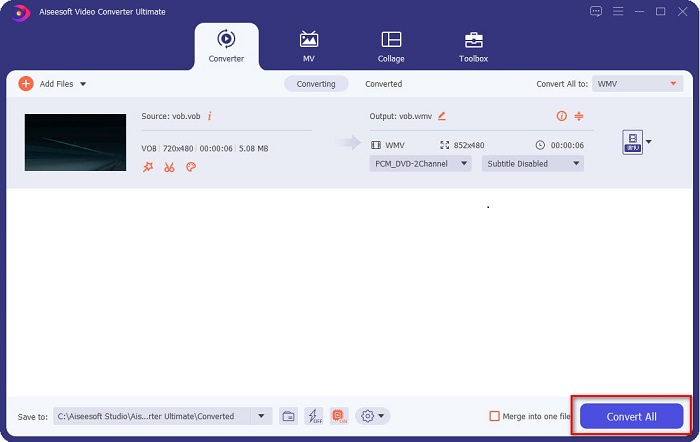
Step 4. After selecting the WMV format, click Convert All to convert your VOB to the WMV file format. Wait for a few minutes, and that's it! Following these simple steps, your VOB file has now been converted to a WMV file.
Část 2. Převod VOB do WMV pomocí bezplatného online převodníku VOB do WMV
While some of you might be looking for a free converter, we have a solution for you! Convertio can convert VOB to WMV files online and for free. This converter allows you to convert large files online. In addition to that, there are varieties of video or audio formats that you can convert online, including VOB, WMV, MP4, FLV, MP3, ASF, and many more. Moreover, you do not need to download anything using this converter because it's an online converter. However, this converter is internet-dependent, meaning it relies on the fastness of the internet, on how long it will convert your file. Nonetheless, it still has an awe-inspiring performance and is used by many people.
Here are the steps on how to convert VOB to WMV online:
Step 1. Search in your browser Convertio, to be directed in their webpage.
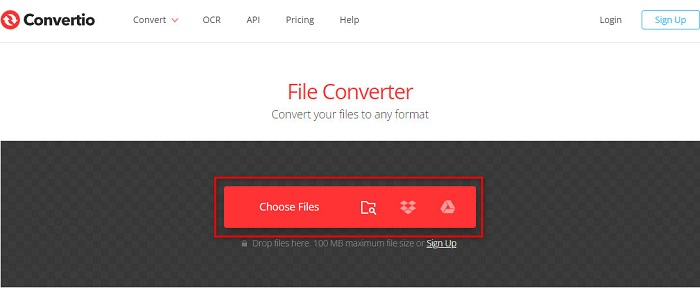
Step 2. Click the Choose Files button; it will direct you to your computer files. Select your VOB file, and then your file will appear in the list.
Step 3. After selecting your VOB file, click the drop-down button beside the three aligned dots to choose what type of file your VOB file will be converted to.
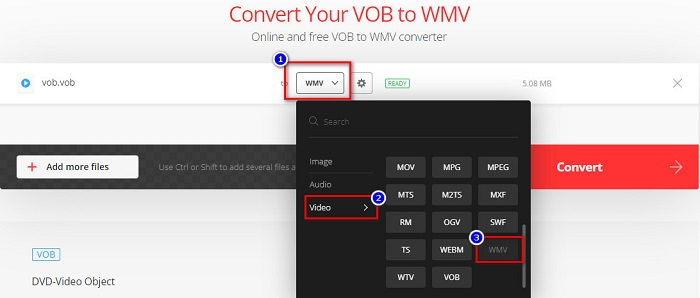
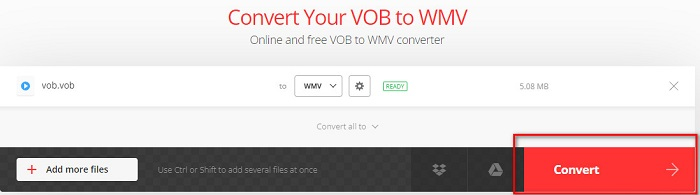
Step 4. Lastly, click the Convert button to convert your VOB file to WMV file format. The speed of your conversion depends on the fastness of your internet connection. Therefore, it may take longer because it is an online converter.
Část 3. Proč potřebujete převést VOB do WMV
Proč potřebujete převést soubor VOB na soubor WMV? Nejprve musíme rozlišit jejich rozdíly.
VOB or Video Object are files that DVDs use. It contains the data, including the video, audio, and subtitle. VOB files, just like DVDs, have restrictions or copy protection to protect them from being copied directly. In addition, VOB files are commonly encrypted to prevent them from being copied. In contrast, WMV or Windows Media Video is developed by Windows for streaming videos online. Unlike the VOB format, WMV is more accessible because of its ability to use many encoders. This type of file usually runs on Windows software. Moreover, this file format uses a compressor, which means that the video quality will not be reduced or ruined when editing or playing it on media players. Therefore, if you weigh down which file format to use between these two, we recommend using the WMV file.
Část 4. Nejčastější dotazy o převodu VOB do WMV
Pokud převedu VOB do WMV, sníží se kvalita?
Ne. Existuje mnoho nástrojů pro převod souborů, které při převodu souborů nesníží jejich kvalitu, stejně jako FVC Video Converter Ultimate.
Mohu převést soubor VOB do formátu souboru MP4?
Yes. You can convert VOB to MP4 files by using the online and offline tools we recommended above. You can check this article VOB to MP4 – 3 Ways to Convert VOB Files to MP4 for Free in Bulk for more information on converting VOB files to MP4 files.
Můžete přehrávat soubory VOB do Windows Media Player?
Playing this type of file in Windows Media Player can cause problems if necessary codecs are not supported. Or you can read on Best VOB Players to get more available players to enjoy your VOB files.
Závěr
There are a lot of ways to convert your VOB file to a WMV file, but there are only a few tools that can furtherly improve your video. Using online converters will save you time in downloading, but it also depends on your internet connection on how fast you can convert. That is why we recommend using FVC Video Converter Ultimate. It is not hard to download it, and it will surely meet your expectations in using it.
-
 Co je soubor VOB a jak zdarma změnit soubor VOB na GIF
 Chcete se dozvědět více o souborech VOB a jak je sdílet poté, co byly ripovány? nebo Proč potřebujete převést VOB na GIF? Pak si pozorně přečtěte tento článek.
-
 K dispozici jsou 3 praktické konvertory pro změnu souboru VOB na formát AVI [2021]
 Máte problém, protože přehrávání souborů VOB není podporováno? Pak se pokusíme jej převést pomocí 3 níže uvedených způsobů s podrobnými kroky pro každý převodník.
-
 Vynikající metody pro použití při převodu VOB na MOV
 Online stahování videa je pohodlné, ale co když je video ve formátu VOB a váš přehrávač jej nepodporuje? Tento příspěvek vás naučí, jak převést VOB na MOV.
