


 Video Converter Ultimate
 Screen Recorder
 Oprava videa
Rychlý průvodce snadným převodem WMV na MKV na počítačích Mac a Windows
Pokud jste filmový nadšenec a chcete formát souboru, který zvládne různé zvukové stopy s titulky, možná budete chtít převést soubor WMV na soubor MKV. A pokud máte potíže s hledáním převodníku WMV na MKV kompatibilního s Windows a Mac, našli jsme ty nejlepší převodníky, které můžete použít online i offline. Tento článek vám představuje nejlepší převodníky pro převod WMV na MKV v systémech Mac a Windows.

Část 1. Proč převést WMV na MKV
WMV nebo Windows Media Video je formát souboru, který téměř všechny přehrávače médií široce podporují. Jedná se o souborový formát, do kterého lze ukládat videoklipy, animace, televizní epizody a filmy. Navíc jde o komprimovaný soubor; proto má malou velikost souboru. Proč tedy potřebujete převádět WMV na MKV? MKV nebo Matroska je souborový kontejner, který může obsahovat neomezený počet stop zvuku, videa a titulků.
Tento formát souboru je navíc odolný vůči budoucnosti, což znamená, že v budoucnu nebude zastaralý. Dokáže také zpracovat více proudů titulků a zvukových stop v mnoha jazycích. Proto, pokud jste filmový nadšenec, možná budete chtít převést soubor WMV do formátu souboru MKV.
Část 2. Převod WMV na MKV pomocí nejlepšího offline převodníku
Tento konvertor je považován za nejlepší offline převodník dostupný na trhu. FVC Video Converter Ultimate je bezplatný offline nástroj, který dokáže poskytovat profesionálně vypadající výstupy bez složitého ovládání. Podporuje také různé formáty souborů, takže můžete převádět svůj soubor WMV na MKV, AVI, MP4, MOV, FLV a mnoho dalších. Pořád nejste spokojeni s tím, co umí? Pomocí tohoto převodníku můžete také upravovat video díky jeho pokročilým funkcím pro úpravu videa. Postupujte podle jednoduchých kroků níže a zjistěte, jak zdarma používat tento převodník WMV na MKV.
Krok 1. Stáhněte si aplikaci kliknutím na tlačítko Download níže. K dispozici jsou dvě možnosti – můžete si ji stáhnout pro Mac nebo Windows. Poté aplikaci otevřete.
Zdarma ke staženíPro Windows 7 nebo novějšíBezpečné stažení
Zdarma ke staženíPro MacOS 10.7 nebo novějšíBezpečné stažení
Krok 2. Po otevření aplikace klikněte na tlačítko Add Files nebo na tlačítko +, abyste nahráli svůj soubor v první nabídce softwaru. Poté se zobrazí nové okno, ve kterém vyberete svůj soubor WMV.
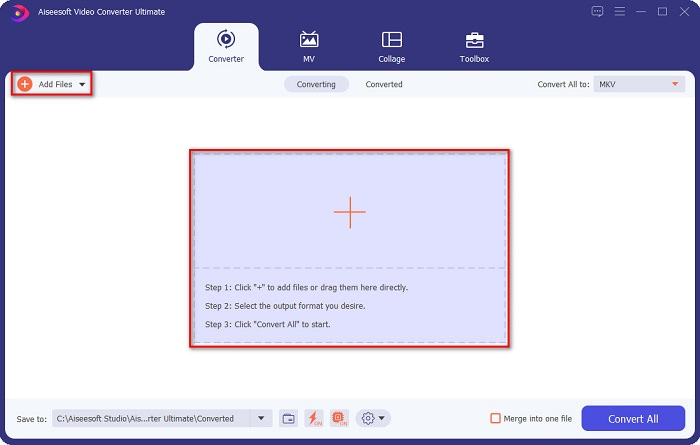
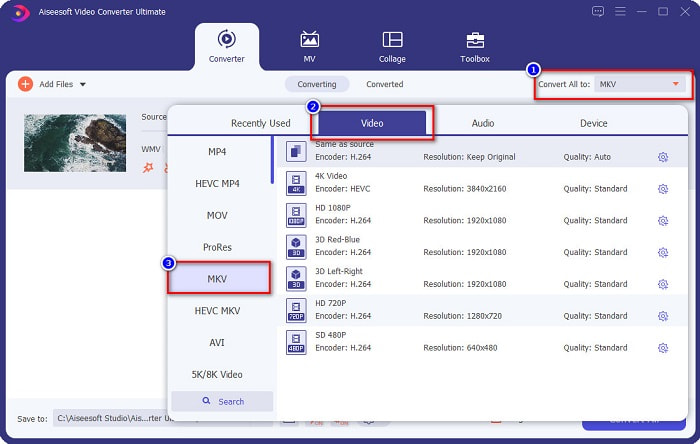
Krok 3. Pak klikněte na tlačítko Convert All to a vyberte požadovaný výstupní formát. Ve vašem případě zvolte formát MKV.
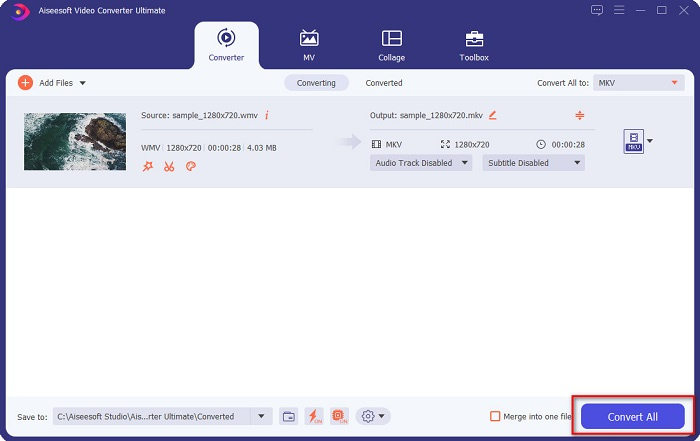
Krok 4. Nakonec klikněte na tlačítko Convert All, čímž převedete své WMV na soubor MKV. Poté jen pár sekund vyčkejte. A je hotovo! Mimochodem, můžete také snadno převést WMV na soubory MOV podle těchto jednoduchých kroků.
Část 3. Převod WMV na MKV pomocí 3 nejlepších online nástrojů
Není pochyb o tom, že online nástroje jsou nejlepší pro pohodlí, protože nebudete muset nic stahovat. Tato část představuje nejlepší převodníky WMV na MKV dostupné na webu.
FVC Online Video Converter zdarma
FVC Free Online Video Converter je online převodník s uživatelsky přívětivým rozhraním. Podporuje různé formáty souborů a dokáže převádět WMV na MKV, AVI, MOV, MP4, MP3, TS a další. Tento transcoder je však závislý na připojení k internetu, což znamená, že rychlost převodu závisí na kvalitě vašeho připojení. Přesto jde nepochybně o jeden z nejlepších online převodníků WMV na MKV.
Zde jsou kroky k převodu souborů WMV na MKV pomocí FVC Free Online Video Converter:
Krok 1. Přejděte na jejich webovou stránku kliknutím na tento odkaz nebo ve svém prohlížeči vyhledejte FVC Free Online Video Converter.
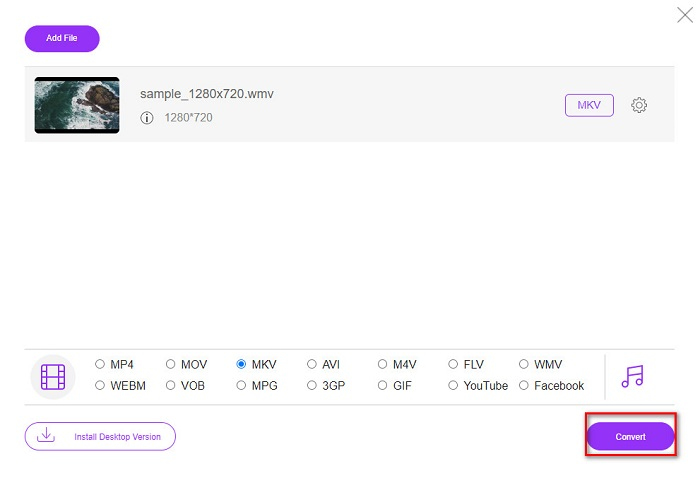
Krok 2. Dále klikněte na tlačítko Add Files to Convert a spusťte aplikaci. Jakmile je aplikace spuštěna, po zobrazení souborů v počítači vyberte svůj soubor WMV.
Stáhněte si desktopovou verzi a převádějte soubory hromadně.
Krok 3. Poté pro výběr požadovaného výstupního formátu klikněte na MKV umístěné pod druhým rozhraním softwaru.
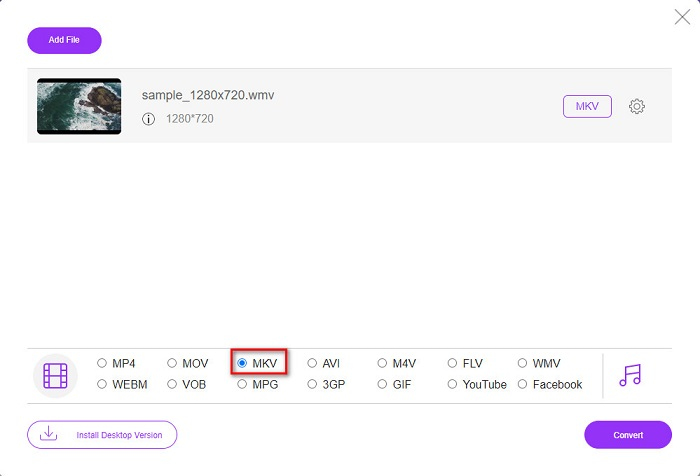
Krok 4. Pro dokončení klikněte na tlačítko Convert a převod vašeho souboru WMV na MKV začne. Počkejte, až převod skončí, a je to! Dodržením těchto kroků můžete jednoduše převést WMV na MKV online.
Convertio
Dalším online převodníkem, který je na webu populární, je Convertio. Tento bezplatný online převodník je také snadno použitelný. Přesto ale obsahuje reklamy, které vás mohou rušit. I tak je velmi pohodlný pro převod vašich souborů WMV na MKV.
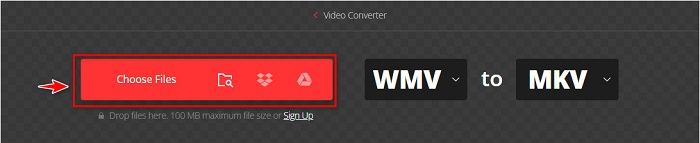
Krok 1. Ve svém prohlížeči vyhledejte Convertio. Poté v hlavním rozhraní softwaru klikněte na tlačítko Choose Files a vyberte svůj soubor WMV.
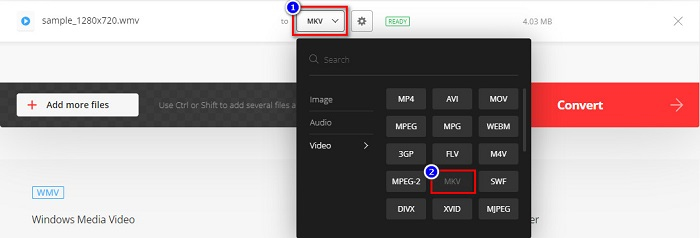
Krok 2. Poté klikněte na tlačítko drop-down a zvolte soubor MKV jako výstupní formát.
Krok 3. V posledním kroku klikněte na tlačítko Convert v pravém dolním rohu rozhraní softwaru. Poté se váš soubor začne převádět.

MConverter
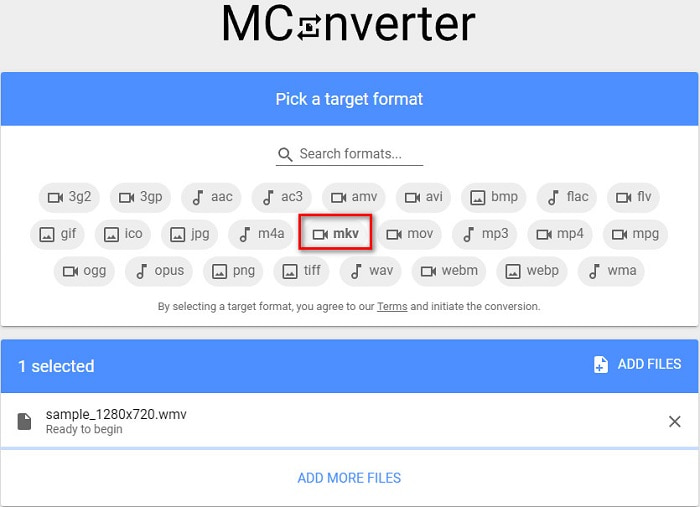
MConverter je online převodník WMV na MKV, který podporuje různé zvukové, obrazové a video soubory. Nabízí jednoduché kroky pro převod WMV na MKV. Existuje však omezení velikosti souboru, který lze tímto převodníkem zpracovat. I tak dokáže efektivně a snadno převést váš soubor WMV na MKV.
Krok 1. Do prohlížeče zadejte MConverter a budete přesměrováni na jejich webovou stránku.
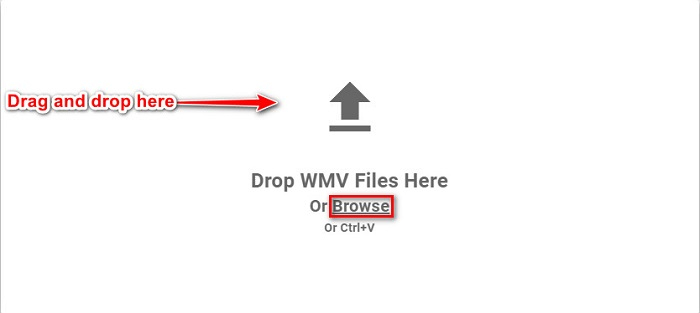
Krok 2. Poté přetáhněte svůj soubor WMV do obdélníkového pole, nebo můžete kliknout na slovo browse a vybrat soubor WMV.
Krok 3. Po výběru souboru WMV zvolte MKV jako výstupní formát kliknutím na tlačítko MKV. Jakmile kliknete na MKV, převod z WMV na MKV začne. Pak už jen počkejte, až se soubor převede.
WMV vs. MKV
WMV, produkovaný společností Microsoft, byl jedním z nejběžnějších video formátů v roce 2000. Lze jej vidět na webu a přehrávat v různých přehrávačích médií ve Windows. A je to také výchozí formát souboru videa programu Windows Media Player. V poslední době ji ale přebírají jiné formáty.
Formát multimediálního kontejneru Matroska, vydaný v roce 2002, je formát s otevřeným zdrojovým kódem, který může obsahovat řadu stop videa, zvuku, obrázků a titulků. Můžete jej tedy použít ke snadnému ukládání krátkých videoklipů, televizních pořadů a filmů. To je docela populární pro anime fan-subbing.
Část 4. Nejčastější dotazy o převodu WMV na MKV
Můžete hrát MKV na Mac?
Ne. macOS nepodporuje formát souboru MKV. Můžete však použít přehrávač třetí strany nebo převést soubor MKV do formátu, který Mac podporuje. MP4 je jedním z nejběžnějších formátů, které Mac podporuje. Pokud se chcete dozvědět více o převodu MKV na MP4, klikněte na tento odkaz.
Můžete komprimovat velikost souboru MKV souborů?
Ano. Soubory můžete zkomprimovat pomocí kompresoru. FVC Video Converter Ultimate má také funkci pro kompresi souborů.
Podporuje Windows Media Player soubory MKV?
Windows Media Player nepodporuje soubory MKV. Při přehrávání souboru MKV ve Windows Media Playeru se může stát, že poběží pouze zvuk nebo se objeví problémy s přehráváním. Abyste mohli přehrávat soubory MKV ve Windows Media Playeru, musíte si stáhnout a nainstalovat kodek MKV.
Závěr
Existuje mnoho způsobů, jak převést WMV na MKV na Mac a Windows, abychom to shrnuli. Online a offline nástroje, které jsou uvedeny výše, vykazují slibný výkon, pokud jde o převod souborů WMV do MKV. Pokud však chcete konvertor, který vám umožní mít skvělý výstupní formát, použijte FVC Video Converter Ultimate, protože má všechny speciální funkce, které potřebujete při převodu souborů.
-
 WMV do MP3 – Jak převést video na zvuk zdarma [Desktop/Online]
 Při sledování videa WMV shledáváte zvukovou část fascinující. Chcete jej tedy přehrát na svém MP3 přehrávači. Váš přehrávač však zjevně nepodporuje formát WMV. To vás nutí přemýšlet, zda existuje způsob, jak převést WMV na MP3.
-
 2 nejjednodušší způsoby převodu souborů WMV na FLV na PC / Mac
 Jak můžete převést WMV na FLV? Nejprve si musíte přečíst naše doporučení a najít svou oblíbenou metodu a poté postupovat podle našeho průvodce, abyste mohli svou práci provést rychle.
-
 [2 řešení] Jak zdarma převést videa WMV na soubory GIF
 Pokud chcete ořezat nádherné části videí WMV a vytvářet z nich GIF, můžete se v tomto článku dozvědět o 2 jednoduchých metodách přenosu videí WMV do GIF.

