


 Video Converter Ultimate
 Screen Recorder
 Oprava videa
[Osvědčeno] Jak bez námahy upravovat vlastnosti souborů WAV ve Windows 10/11 a Mac
Pokud chcete na počítači ukládat zvukový bitstream, pak je bez pochybností standardním zvukovým formátem, který musíte použít, WAV. Jako napodobení formátu RIFF ukládají soubory WAV svá metadata do bloků INFO. Ačkoli mohou uchovávat víc než jen zvuk, někdy jsou data v souborech WAV nepřesná. Jestliže jsou tedy údaje ve vašich souborech WAV chybné, použijte tuto příručku, abyste zjistili, jak upravit vlastnosti souborů WAV ve Windows 10/11 a na Macu pomocí podrobných, snadno sledovatelných kroků.

Část 1. Jak upravit vlastnosti souborů WAV pomocí nejlepších nástrojů ve Windows
Nejlepší editor metadat pro Windows a Mac - FVC Video Converter Ultimate
Naučit se upravovat vlastnosti souborů WAV na Windows 10/11 a Mac není velký problém s pomocí nejlepšího editoru metadat, který si můžete na uvedené platformě stáhnout. FVC Video Converter Ultimate představuje nejlepší konvertor a jeden ze špičkových editorů metadat, které můžete použít a stáhnout na plochu. Na rozdíl od ostatních nástrojů na trhu a tohoto seznamu tento nástroj představuje výkonný editor tagů na více než 1000 mediálních souborech, včetně WAV.
Kromě toho dokonce i vy máte nebo jste nezažili úpravu značek metadat; můžete to všechno rychle zjistit pomocí ultimátního převodníku. S tímto nástrojem nelze rychle překonat žádnou složitou práci, díky čemuž je software jedinečný a výkonný. Chcete vědět, jak nástroj používat? Můžete postupovat podle průvodce, který přidáme níže, a zkopírovat kroky k úspěšnému dokončení úkolu.
Krok 1. Klikněte prosím na tlačítko pro stažení uvedené níže a zvolte odpovídající verzi ke stažení. Poté nástroj nainstalujte, nastavte a spusťte.
Zdarma ke staženíPro Windows 7 nebo novějšíBezpečné stažení
Zdarma ke staženíPro MacOS 10.7 nebo novějšíBezpečné stažení
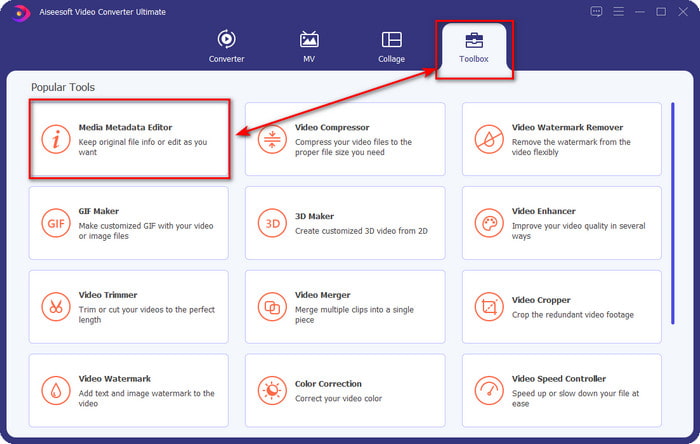
Krok 2. Jakmile software otevřete, přejděte do části Toolbox a tam v seznamu níže vyberte Media Metadata Editor.
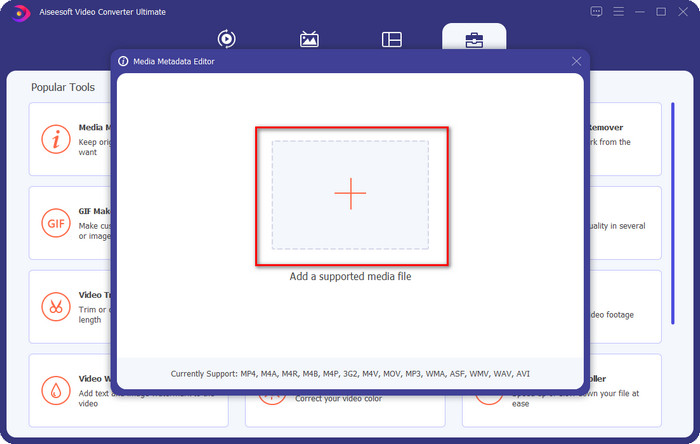
Krok 3. Přidejte soubor kliknutím na tlačítko + zobrazené na obrazovce, v počítači vyhledejte soubor WAV, kterému chcete přidat metadata, a pak stiskněte Open.
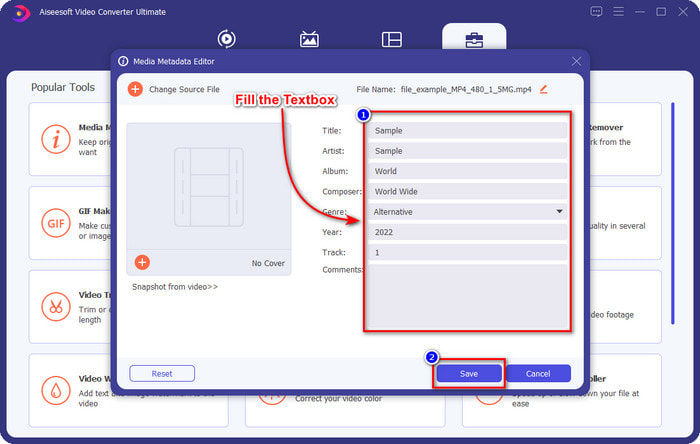
Krok 4. Upravte nebo smažte informace v textboxu; pokud se vám podaří vyplnit všechna pole, klikněte na Save, aby se změny použily. Tímto způsobem jste se s pomocí tohoto špičkového nástroje naučili, jak upravovat tagy v souborech WAV.
Drzost
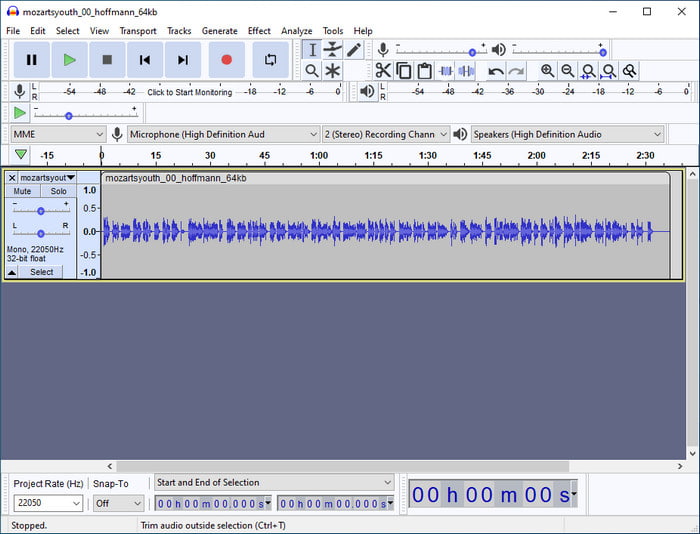
Jedním z nejlepších programů, které můžete použít ke vylepšení svého zvuku, je Audacity. Tento software pro Windows nabízí výkonný nástroj pro vylepšování a úpravy, který si zamilujete, a to zdarma. Kromě zlepšení zvukového souboru dokáže podle potřeby také měnit tagy ve vašem audio souboru. Pokud chcete vědět, jak upravovat vlastnosti souborů WAV pomocí tohoto nástroje, postupujte podle níže uvedeného návodu.
Krok 1. Stáhněte si Audacity pro Windows a otevřete jej.
Krok 2. Poté přetáhněte požadovaný soubor WAV, klikněte na Edit a v této nabídce zvolte Metadata.
Krok 3. Klepněte na každé políčko pod Value, abyste upravili tagy svého souboru WAV, poté klikněte na OK pro použití změn, klikněte na File a Save Project.
Část 2. Jak upravit vlastnosti souborů WAV pomocí Top Software na Macu
Music Tag Pro
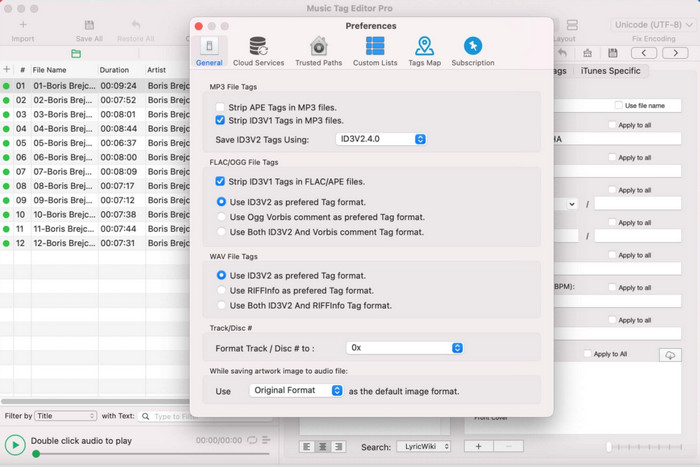
Music Tag Pro je software, který si můžete stáhnout na Mac, abyste mohli upravovat metadata zvukových a video souborů. Umožňuje také hromadně upravovat tagy metadat a efektivně tak měnit metadata souborů. Díky celkovému výkonu tohoto editoru tagů na Macu jej mnoho uživatelů rádo používá a v App Storu zanechávají řadu pozitivních hodnocení. Informace u vašich mediálních souborů jsou však do jisté míry omezené, ale i tak je s tímto nástrojem úprava proveditelná. Pokud jej chcete používat, tento návod vás naučí, jak upravit vlastnosti souborů WAV na Macu.
Krok 1. Vyhledejte nástroj v App Storu a stáhněte si jej.
Krok 2. Kliknutím na tlačítko Import přidejte soubory WAV.
Krok 3. Klikněte na soubory WAV, upravte tagy v jednotlivých sloupcích a po dokončení úprav souboru WAV klikněte na Save All.
Tag Editor pro Mac
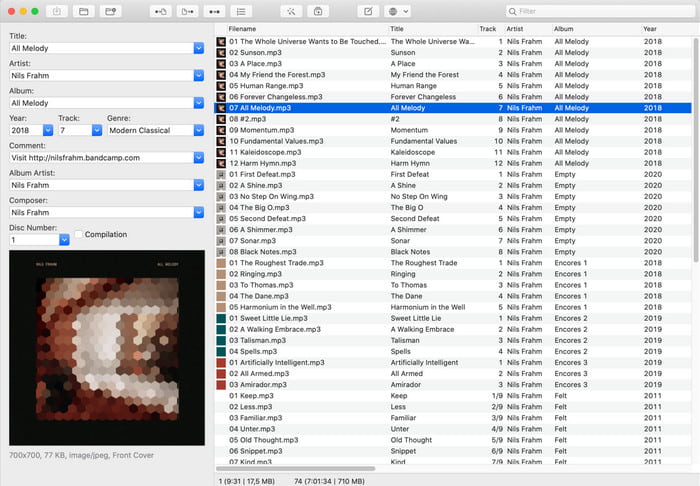
Tag Editor for Mac je užitečný software pro přidávání tagů k vašim zvukovým souborům, například WAV. S tímto softwarem můžete snadno přidat metadata k libovolnému zvukovému souboru, aniž by došlo k jejich zhoršení, stejně jako u špičkového nástroje. Tento program není uživateli chválen pouze za možnosti úpravy tagů, ale také za rychlou zákaznickou podporu, kterou poskytuje uživatelům, jež potřebují pomoc. Pokud potřebujete podrobný návod, jak pomocí něj upravovat vlastnosti souborů WAV, pokračujte ve čtení níže.
Krok 1. Otevřete App Store, stáhněte si Tag Editor a poté jej otevřete.
Krok 2. Klikněte nahoře na tlačítko + pro přidání souborů WAV; automaticky se zobrazí v níže uvedeném seznamu.
Krok 3. Klikněte na Edit pro změnu metadat a pro uložení změn klikněte na Save.
Část 3. Často kladené otázky o úpravách vlastností souborů WAV
Proč se kvalita zvuku WAV po úpravě metadat sníží?
Některé nástroje mohou snížit kvalitu zvuku vašeho souboru WAV; mnoho uživatelů si na tento problém stěžuje, i když neupravili jeho kvalitu. Pokud si tedy nejste jisti, jaký software používáte, je lepší si přečíst spolehlivou recenzi, abyste zjistili, zda po exportu neztratí kvalitu zvuku.
Mohu zobrazit metadata WAV?
Rozhodně ano, můžete. Klikněte na tento odkaz, pokud nevíte, jak zobrazit metadata svého mediálního souboru ve Windows, na Macu a pomocí online služeb.
Jsou na WAV nezbytná metadata?
Rozhodně ano. Metadata jsou důležitá u každého mediálního souboru, ať už audio nebo video. Přidání metadat do souboru WAV vám může pomoci a knihovna může jednotlivé soubory WAV uspořádat podle jména autora, názvu, času, data, místa a mnoha dalších údajů. Pokud vás přidávání metadat do souborů WAV stále nepřesvědčilo, doporučujeme přečíst si tento článek, abyste se dozvěděli více o metadatech.
Závěr
S pomocí tohoto článku nyní máme dostatek znalostí o tom, jak upravovat vlastnosti souborů WAV ve Windows 10/11 a na Macu. Pokud používáte oba systémy, můžete bezplatné i placené nástroje využít, podle potřeby. Ať už si vyberete jakýkoli, věříme, že úprava metadat je snadná. Jestliže však chcete mít po ruce cenově dostupný editor metadat, který dokáže tagy WAV upravovat bez námahy, musíte zvolit špičkový nástroj. FVC Video Converter Ultimate je cenově výhodný profesionální editor metadat, který můžete používat jak ve Windows, tak na Macu. Po stažení si můžete prohlédnout úžasné funkce, které tento nástroj nabízí, takže klikněte na tlačítko pro stažení a začněte jej používat.
-
 Jak velmi chytrým způsobem upravovat a opravovat metadata MP4
 Chcete vědět, jak opravit metadata MP4? V takovém případě si přečtěte celý obsah tohoto článku, abyste poznali triky, jak snadno opravit tagy MP4.
-
 4 nejlepší způsoby, jak opravit a upravit metadata MP3 ve Windows a Mac
 Chcete poznat tajemství snadné úpravy metadat MP3? Tento blog vás naučí různé techniky s různými nástroji, ke kterým máte snadný přístup.
-
 2 nejlepší způsoby úpravy metadat OGG, které byste měli vyzkoušet zdarma
 Potřebujete upravit metadata OGG? Úpravu značek snadno zvládnete pomocí správného softwaru. Pokud jej nemáte, přečtěte si tento článek.
