


 Video Converter Ultimate
 Screen Recorder
 Oprava videa
 Bezpečné stažení
Naučte se vše o tom, co je 3D nebo trojrozměrné
Chcete vědět, co je 3D? 3D nebo trojrozměrné filmy a obrázky jsou stále populárnější. Protože jsme v moderní době, je snadné vytvořit 3D film pomocí různých nástrojů. Nejprve však musíme pochopit vše o 3D: pozadí, definici a jak vytvořit 3D video.
V tomto článku se podíváme na 3D a jeho parametry. Pokud se tedy chcete dozvědět, co je to 3D, přečtěte si tento článek.

Část 1. Co je 3D
3D nebo trojrozměrné objekty ukazují šířku, výšku a hloubku. Denně vidíme 3D objekty, protože naše fyzické prostředí je samo o sobě trojrozměrné. Díky 3D vnímání, které my lidé máme, můžeme vnímat 3D objekty, nazývané také hloubkové vnímání. Když se podíváte kolem sebe, sítnice v našich očích tvoří dvourozměrný obraz a náš mozek tyto dva obrazy zpracovává jako 3D vizuály. Ale věděli jste? Máme my, lidé, nástroje, které používáme k vnímání hloubky?
Zde jsou lidské nástroje, které používáme k vnímání hloubky:
Stereoskopické vidění – Stereoskopické vidění je vnímání hloubky, které zajišťují obě oči. Je to jedna ze schopností mozku zaznamenávat trojrozměrné tvary a vizuály. Při tomto typu vidění vypadají objekty, které jsou blíže, odděleněji než objekty vzdálené.
Paralaxa – Tento typ vidění se měří úhly mezi dvěma přímkami. Když pohybujete hlavou ze strany na stranu, bližší objekty se posouvají více než vzdálené objekty.
Známá velikost – Pokud znáte skutečnou velikost objektu, dokážete přibližně odhadnout, jak velký se má jevit, i když je daleko. Stejně tak, pokud mají dva objekty stejnou skutečnou velikost, ale jeden se zdá větší, předpokládá se, že ten větší je blíže.
Akomodace – Když zaostříte na blízký objekt, čočky vašich očí se fyzicky mění. Tímto způsobem poznáte, jak daleko objekt je. Je to také mechanismus, kterým oko udržuje zaostření na objekt.
Letecká perspektiva – Při letecké perspektivě vidíte objekty menší, protože pohled je z velké dálky. Vzdálené objekty se také jeví s menším kontrastem a nižší sytostí barev.
V našem fyzickém světě existují také různé druhy 3D. 3D je také popisováno jako obraz, který dává iluzi hloubky různých vzdáleností, což se běžně používá v počítačových hrách, grafice, virtuální realitě a filmech.
Různé typy 3D:
3D počítačová grafika – 3D počítačová grafika dokáže generovat 3D objekty na displeji nebo v dvojrozměrném prostoru. Pixely v 2D grafice mají různé vlastnosti, jako je poloha, barva a jas. 3D pixely pak leží na ose Z. Když se pixely zkombinují se svou hloubkou, vznikne 3D povrch, nazývaný také textura.
3D filmy – 3D filmy jsou filmová díla, která mají prostorovou hloubku. S pomocí 3D brýlí můžeme sledovat 3D film. K vytvoření tohoto typu filmu tvůrci využívají stereoskopické vidění, což znamená, že se současně zobrazují dva obrazy, každý pro jedno oko.
3D tisk – 3D tisk je také známý jako aditivní výroba. Jde o proces vytváření trojrozměrného pevného objektu z digitálního souboru. Pomocí počítačem podporovaného navrhování (CAD) můžete vytisknout 3D objekt z digitálního modelu.
Část 2. Jak přehrávat 3D filmy
Nyní, když znáte význam 3D, dejte nám vědět, jak přehrávat 3D filmy pomocí té nejlepší softwarové aplikace, kterou můžete použít.
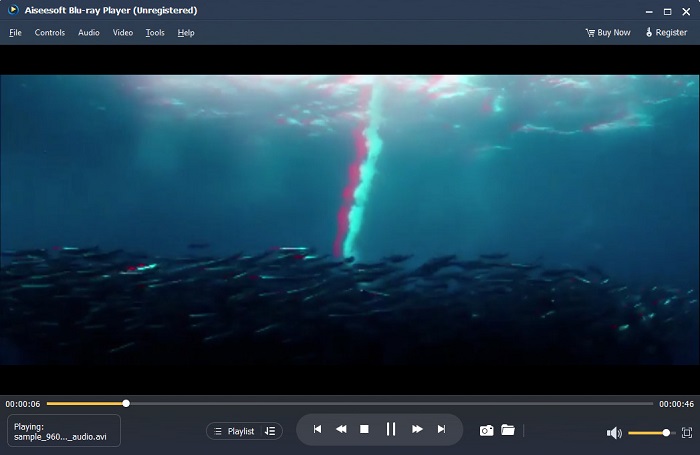
Blu-ray Player je desktopová aplikace, ve které můžete přehrávat jakýkoli typ videa. Pomocí tohoto nástroje můžete také přehrávat 3D filmy bez použití jakýchkoli zásuvných modulů. Mnoho lidí navíc tento přehrávač médií doporučuje kvůli jeho jednoduchému a čistému uživatelskému rozhraní. Tento výkonný přehrávač médií navíc dokáže přehrávat disky Blu-ray, složky Blu-ray, soubory DVD/složky/ISO, které jiné přehrávače médií nepodporují. Můžete si také užít sledování HD videí se 100% bezztrátovým zvukem a dramatickým HD prostorovým zvukem. Co je dokonce úžasné je, že si můžete vytvořit svůj playlist, takže nebudete mít problém oddělovat videa nebo audio, které chcete.
Jak přehrát 3D film v Blu-ray přehrávači:
Krok 1. Stáhněte si do zařízení přehrávač Blu-ray Player. Postupujte podle instalačního procesu a poté aplikaci spusťte.
Krok 2. V hlavním rozhraní softwaru klikněte na tlačítko Open File. Zobrazí se soubory ve vašem zařízení, kde vyberete svůj 3D film.
Krok 3. Poté se vaše video začne nahrávat. Nyní si můžete nasadit speciální 3D brýle a užít si sledování svého 3D filmu.
Část 3. Co je 3D TV a 3D brýle
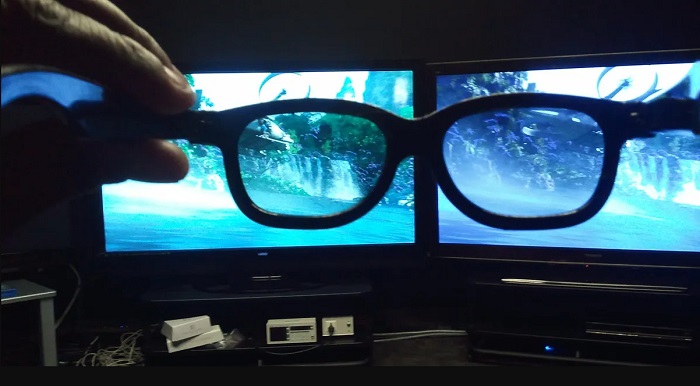
Existují dva typy 3D televizorů: 3D s aktivní závěrkou, aktivní 3D a pasivní 3D. Tato část rozliší jejich rozdíly a určí, jaký typ 3D brýlí použít při sledování Active-Shutter nebo Passive 3D TV.
Active-shutter neboli aktivní 3D je typ 3D televizoru, který střídavě zobrazuje na obrazovce vysoce kvalitní 3D obrazy. Aktivní 3D televize zobrazuje na obrazovce střídavě obrazy pro pravé a levé oko. 3D brýle pak střídavě zatemňují skla, aby vytvořily 3D efekt, který vidíte na obrazovce TV. Tím docílí toho, že každé oko vidí obraz určený právě pro něj. 3D brýle, které musíte používat při sledování aktivního 3D, jsou aktivní 3D brýle. Tento typ 3D brýlí potřebuje baterii, kterou používá k elektronickému zatemňování skel. Tyto brýle jsou vybaveny LCD skly, aby se mohly synchronizovat se střídajícími se snímky.
Naproti tomu pasivní 3D televizor je do určité míry podobný 3D technologii, která se používá v kinech. Tento typ 3D TV používá speciální filtry na obrazovce a pro sledování 3D využívá polarizační skla v brýlích. Dále pasivní 3D televize spojuje dva snímky do jednoho, střídavě v horizontálních řádcích pro levé a pravé oko. Brýle, které tyto 3D televize používají, jsou pasivní 3D brýle, které mají na každém skle odlišnou polarizaci. Jedno oko vidí pouze liché řádky a druhé pouze sudé řádky, čímž vzniká 3D obraz. Pasivní 3D brýle nepotřebují k fungování baterie.
Část 4. 2D vs. 3D
2D a 3D jsou skutečné rozměry v pracovním prostoru počítače. 2D nebo dvourozměrné jsou ploché objekty, které používají horizontální a vertikální rozměry (osa X a Y). Protože 2D má pouze dva rozměry, uvidíte čáru pouze tehdy, když je otočíte na stranu. Má pouze výšku a šířku, ale nemá hloubku. Zatímco na druhé straně 3D nebo trojrozměrný obsahuje výšku, šířku a hloubku. Trojrozměrné zobrazování potřebuje účinek dvou očí pracujících v tandemu, aby viděly trojrozměrný vjem. Pokud 2D používá osu X a Y, 3D přidá rozměr Z, což vám umožní vidět hloubku objektu.
Pokud se ptáte, co je dobré použít, 2D vs. 3D, odpověď je obojí. 2D a 3D mají různé výhody a nevýhody. Můžete například sledovat 2D videa nebo filmy kdekoli na jakémkoli zařízení, aniž byste museli nosit speciální 3D brýle. Nicméně 3D efekt, který produkují 3D filmy, je úžasný a zábavnější než 2D.
Část 5. Jak převést 2D film na 3D
Pokud chcete doma sledovat úžasný 3D film nebo klip bez jakýchkoli 3D brýlí, můžete svůj 2D film převést na 3D pomocí špičkového video konvertoru. Pokud tedy chcete převést svůj 2D film na 3D film, použijte tuto úžasnou softwarovou aplikaci.
FVC Video Converter Ultimate je aplikace, která je populární pro převod videí. Tento software neumí pouze převádět formáty souborů. Umožňuje vám také převést 2D video na 3D video, například na anaglyph 3D a 3D s dělenou obrazovkou. FVC Video Converter Ultimate je mezi uživateli známý tím, že podporuje téměř všechny formáty souborů, jako jsou MP4, MKV, AVI, FLV, WEBM, MOV, DIVX a dalších více než 1000 formátů. Nabízí také množství pokročilých editačních funkcí, jako je 3D maker, GIF maker, odstraňovač vodoznaku z videa atd.
Jak převést 2D filmy na 3D filmy pomocí FVC Video Converter Ultimate:
Krok 1. Nejprve si stáhněte FVC Video Converter Ultimate kliknutím na tlačítko Download níže.
Zdarma ke staženíPro Windows 7 nebo novějšíBezpečné stažení
Zdarma ke staženíPro MacOS 10.7 nebo novějšíBezpečné stažení
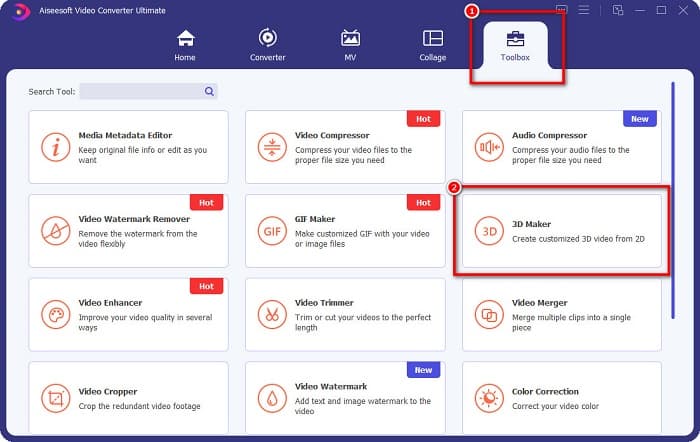
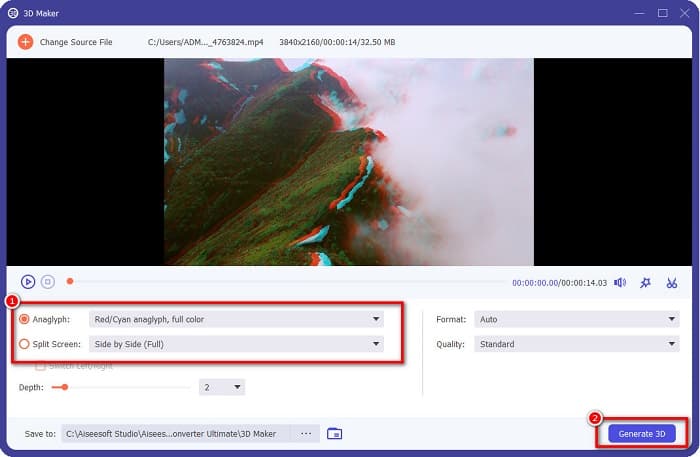
Krok 2. Otevřete aplikaci, poté přejděte na panel Toolbox a vyberte 3D Maker.
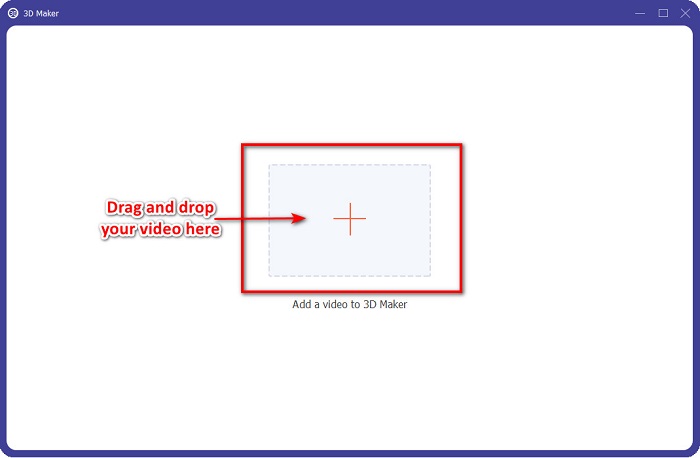
Krok 3. Klikněte na tlačítko se znakem + nebo přetáhněte své 2D video do rámečku v dalším rozhraní.
Krok 4. Poté si vyberte mezi možnostmi Anaglyph 3D nebo Split Screen 3D. Následně klikněte na tlačítko Generate 3D.
Související s:
Nejrychlejší způsoby převodu AVI do WMV [Nejlepší převodníky]
Snadný převod MOV do WMV pomocí těchto skvělých převodníků
Část 6. Nejčastější dotazy o Co je 3D
Můžete sledovat 3D videa na VLC Media Player?
Ano. VLC Media Player podporuje všechny formáty souborů. V přehrávači médií VLC můžete také přehrávat 3D filmy.
Můžete převést 3D videa na 2D?
FVC Video Converter Ultimate dokáže převést 3D videa na 2D. Pomocí tohoto konvertoru můžete také změnit formát souboru vašeho videa.
Co je více používané, 2D nebo 3D?
V dnešní době jsou ve filmovém průmyslu 3D filmy dominantnější než 2D filmy. Díky zajímavé grafice a realistické animaci jsou 3D filmy populárnější než 2D filmy.
Závěr
3D neboli trojrozměrný obraz je velmi rozšířený ve filmovém průmyslu a zejména v počítačové oblasti. Nyní, když víte, co je 3D, máte základní znalosti o tom, jak jej můžete vytvořit. Pokud chcete vytvořit 3D video jednoduše, použijte FVC Video Converter Ultimate.
-
 3 způsoby, jak převést MPG na 3GP na Windows a Mac [zdarma]
 Pokud hledáte způsoby, jak převést MPG na 3GP, přečtěte si tento článek a zjistěte nejlepší způsoby, jak převést MPG na 3GP v systémech Windows a Mac.
-
 Top 5 nejlepších bezplatných převaděčů MPEG do DivX pro Windows a Mac
 Snadno převeďte svůj soubor MPEG na soubor DivX pomocí nejlepších převodníků MPEG na DivX. Přečtěte si tento článek a dozvíte se o nich více podrobností.
-
 Nejlepší převodníky MOV do DivX zdarma pro Mac a Windows
 Máme pro vás řešení, pokud hledáte bezplatné převodníky MOV na DivX. Tento článek představuje nejlepší převodníky MOV na DivX pro Mac a Windows.
