


 Video Converter Ultimate
 Screen Recorder
 Oprava videa
 Bezpečné stažení
Jak nakonec odstranit vodoznak z exportovaných videí Renderforest
Renderforest je úplný balíček vynikajících animovaných šablon pro intra, outra, tituly, reklamy a podobně. Můžete začít od začátku nebo použít dostupné šablony zde. I když nejste odborníkem na střih videa, můžete to překonat pomocí této webové platformy. Vzhledem k jejímu využití a optimální výhodě si mnoho uživatelů vybralo tuto platformu k vytvoření vysoce kvalitního, efektivního, kompatibilního a spolehlivého designu, pokud využijete předplatné.
Takže si zde můžete zdarma stáhnout upravené video, pokud se zaregistrujete, ale bude mít vodoznak. Vodoznak představuje problém pro mnohé z nás, kteří zde video již exportovali, a také pro ty, kteří si nemohou dovolit předplatné tohoto nástroje. Níže uvedeme návody na odstranění vodoznaku z Renderforest pomocí nejcennějších nástrojů, které jsme shromáždili během našeho zkoumání. Pokud budete pokračovat ve čtení další části tohoto článku, můžeme se o ně s vámi podělit.

Část 1. 3 efektivní způsoby, jak odstranit vodoznak z videa Renderforest
FVC Video Converter Ultimate
FVC Video Converter Ultimate je výjimečný odstraňovač video vodoznaků, který vám krok za krokem ukáže, jak odstranit vodoznak Renderforest. Na tento nástroj se můžete spolehnout, pokud chcete bez potíží odstranit vodoznak ze svého videa. Kdybychom měli tento ultimátní nástroj porovnat s jinými, právě tento má díky podpoře AI technologie sílu odstranit vodoznak z vašeho videa. Přesto jde o nejlepší nástroj k odstranění vodoznaku z videa v jakémkoli formátu, který nahrajete. Čím je tento nástroj tak výjimečný? Nemusíte být technicky zdatní, abyste ho mohli používat; díky jednoduchému návodu a krokům níže můžete odstranit vodoznak, který Renderforest k videu připojuje.
Krok 1. Stáhněte si software do počítače kliknutím na příslušné tlačítko pro stažení. Klikněte na stažený soubor, nainstalujte jej a zvolte Start Now, abyste software ihned spustili.
Zdarma ke staženíPro Windows 7 nebo novějšíBezpečné stažení
Zdarma ke staženíPro MacOS 10.7 nebo novějšíBezpečné stažení
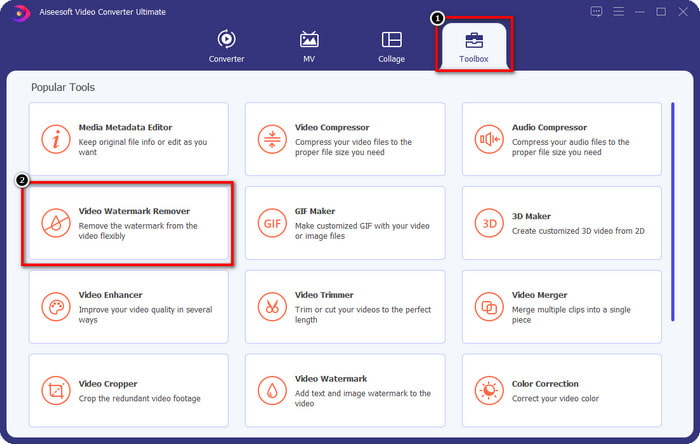
Krok 2. Po spuštění softwaru otevřete Toolbox a poté v něm klikněte na Video Watermark Remover.
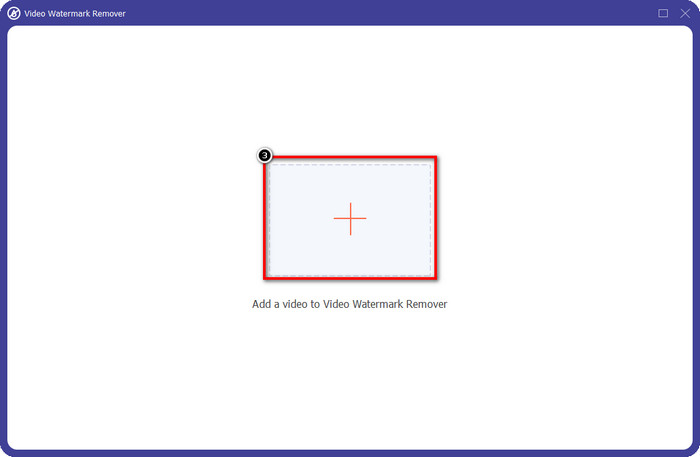
Krok 3. Klikněte na ikonu + na obrazovce a nahrajte video z Renderforest, které jste exportovali s vodoznakem.
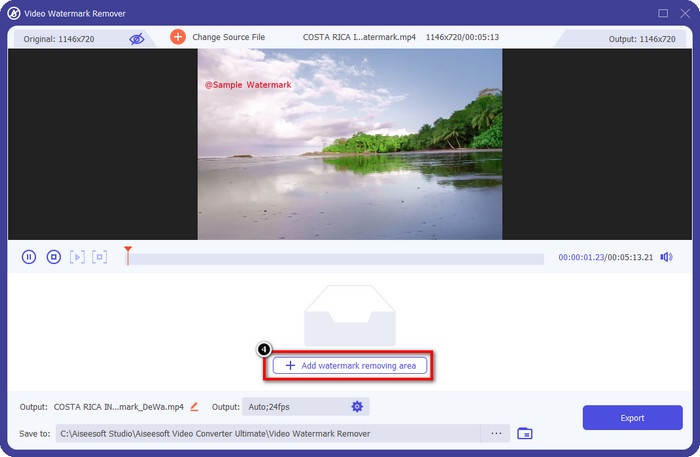
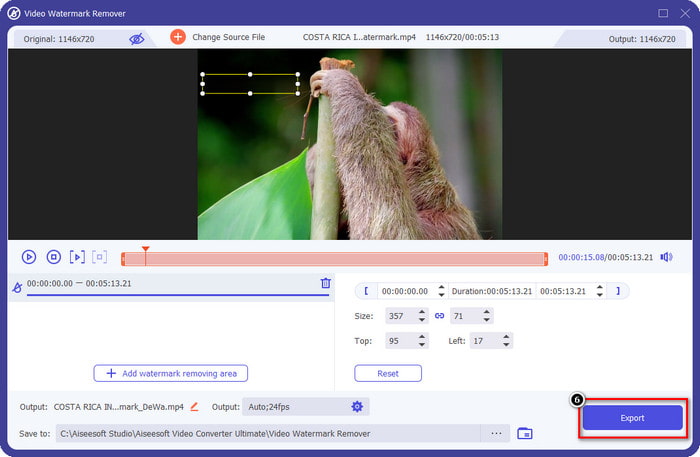
Krok 4. Stiskněte Add Removing Watermark Area, abyste začali odstraňovat vodoznak Renderforest.
Krok 5. V novém okně na obrazovce přetáhněte výběrové pole tak, aby přesně zakrylo vodoznak. V případě potřeby můžete výběrové pole libovolně upravit.
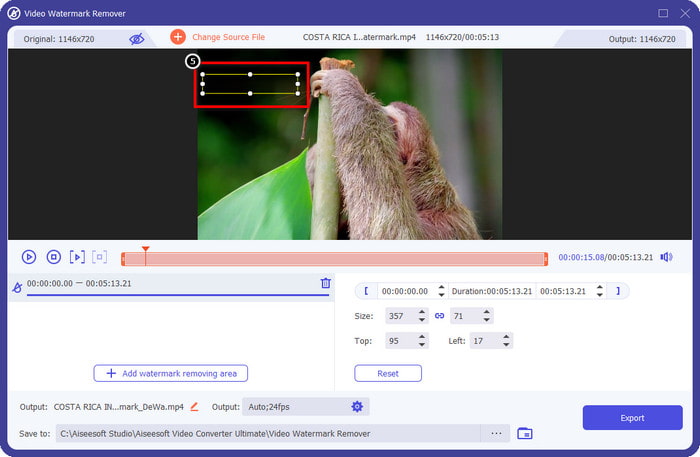
Krok 6. Jakmile výběrové pole rozpozná vodoznak ve vašem videu, klikněte na Export, aby se začalo s odstraňováním a uložením videa bez vodoznaku. Zpracování videa proběhne velmi rychle a vy pak můžete video používat bez rušivého vodoznaku.
Související:
Odstranit vodoznak Video Helper
Odebrat logo nyní
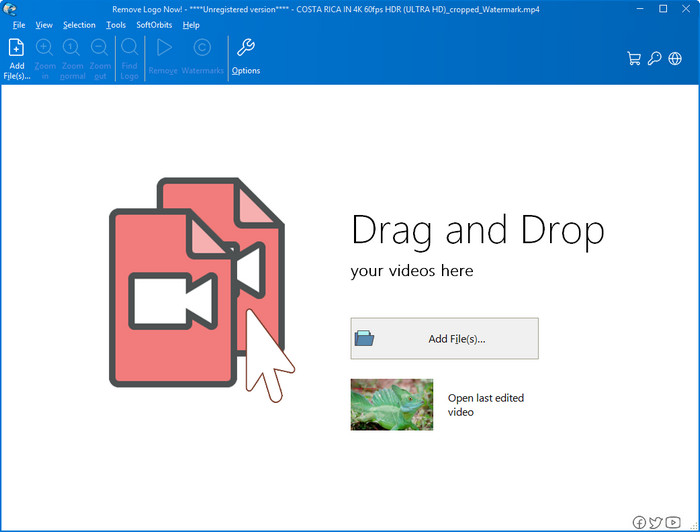
Dalším v našem seznamu je Remove Logo Now, který si vybudoval vynikající pověst jako nástroj pro odstraňování překrytých vodoznaků ve Windows. S tímto nástrojem nepotřebujete žádné odborné znalosti, abyste věděli, jak odstranit vodoznak Renderforest v počítači. Po odstranění vodoznaku jsou při bližším pohledu vidět stopy po místě, kde se vodoznak původně nacházel. Pokud se však na video nedíváte detailně, vodoznak ani zbytky na exportovaném videu nepostřehnete. Návod níže vás naučí, jak odstranit vodoznak z videa na zařízeních s Windows.
Krok 1. Stáhněte a nainstalujte Remove Logo Now do svého počítače a postupujte podle instalačního průvodce.
Krok 2. Spusťte software a klikněte na Add Files pro nahrání videa. Pro efektivnější nahrávání můžete video jednoduše přetáhnout do okna programu.
Krok 3. Vyberte, který nástroj chcete použít k označení vodoznaku. Po výběru jeden použijte k zvýraznění vodoznaku a klikněte na Remove.
Krok 4. Klikněte na Start, aby se spustil proces odstraňování vodoznaku, který tento nástroj poskytuje.
Video odstraňovač vodoznaků online

Nechcete si do počítače stahovat software, ale přesto chcete vědět, jak odstranit vodoznak Renderforest? Pak zkuste použít Video Watermark Remover Online. Tento plně automatizovaný odstraňovač vodoznaků můžete použít k odstranění vodoznaku z videa zdarma, aniž byste jej museli stahovat do počítače. Stejně jako u výše zmíněného nástroje, i když jste začátečník v editaci videí nebo odstraňování vodoznaků, zvládnete se tento nástroj naučit ovládat během pár minut. Postup použití najdete v návodu níže.
Krok 1. Otevřete online odstraňovač vodoznaků tak, že jej vyhledáte ve svém oblíbeném webovém prohlížeči.
Krok 2. Klikněte na ikonu upload cloud na hlavní stránce a vložte video, které jste exportovali z Renderforest.
Krok 3. Počkejte na dokončení nahrávání – nástroj automaticky odstraní vodoznak z videa, poté klikněte na Download, abyste získali video bez vodoznaku.
Část 2. Často kladené otázky o tom, jak odstranit vodoznak Renderforst
Kolik stojí předplatné za Renderforest?
Renderforest podporuje tři různé typy cen, které můžete využít; $ 14,99 pro Lite, $24,99 pro Pro a $29,99 pro Business každý měsíc. Tyto ceny mají navzájem odlišný účel; můžete přejít na jeho hlavní webovou stránku, abyste viděli, jaké položky jsou dostupné v rámci předplatného, které chcete využít.
Je možné odstranit vodoznak z Renderforest Video bez nástroje?
Ano, vodoznak ve vašem Renderforest můžete odstranit bez použití nástroje, a to tak, že si za software zakoupíte měsíční nebo roční poplatek. Takže když exportujete video soubor, nebude do něj přidán žádný vodoznak.
Což je nejlepší plán pro Renderforest; Měsíčně nebo Ročně?
Měsíční předplatné je dobrou volbou, pokud chcete nástroj použít několikrát, ale pokud se rozhodnete používat software po dlouhou dobu, je lepší využít roční plán, protože vás to bude stát méně než obnovení každý měsíc. Než však využijete, můžete Renderforest používat zdarma, když se zde přihlásíte ke svému účtu, a poté zkuste zdarma použít další šablony, které poskytuje.
Závěr
Tento článek skutečně poskytuje pádné důkazy pro bezplatné odstranění vodoznaku Renderforest pomocí tří nejužitečnějších odstraňovačů vodoznaků, které můžete použít. Pokud jste uživatelem Windows a chcete odstranit vodoznak na ploše, musíte zkusit použít Odstranit logo nyní. Ale pokud se vám nelíbí stahování softwaru, musíte zkusit použít Video Watermark Remover Online, protože tento nástroj můžete použít k efektivnímu odstranění vodoznaků.
Ale pokud jste uživatelem Windows nebo Mac a chcete účinný odstraňovač vodoznaku, pak je bezpochyby nejlepším odstraňovačem vodoznaku, který můžete použít, FVC Video Converter Ultimate. Je to dokonalý odstraňovač vodoznaku, který můžete použít k efektivnímu a profesionálnímu odstranění vodoznaku, který obtěžuje vaše video Renderforest.
-
 2 způsoby, jak rychle odstranit vodoznak VSDC na Windows a Mac
 Hledáte způsob, jak odstranit vodoznak VSDC z vašich videí? V tomto článku poskytujeme nástroje, které můžete použít k odstranění vodoznaku.
-
 Odstraňte vodoznak Animoto z videí snadno a efektivně
 Jak odstranit vodoznak Animoto z videa? Pokračujte ve čtení tohoto článku, protože jsme poskytli kompletní návod, jak na to.
-
 Jak odstranit vodoznak z videa pomocí Final Cut Pro [Kompletní průvodce]
 Máte problém s vodoznakem u videí? Nic víc, protože jsme poskytli návod, jak odstranit vodoznak z videa pomocí Final Cut Pro.
