


 Video Converter Ultimate
 Screen Recorder
 Oprava videa
 Bezpečné stažení
Nejlepší aplikace Photo Color Enhancer, kterou si musíte stáhnout do svých mobilních zařízení [zdarma]
Při zpracování obrázku je barva zásadní pro to, aby byl pro publikum a diváky atraktivní. V každém pixelu jsou uložena odpovídající barevná data. Bez ohledu na to, jak dobrý snímek pořídíte, někdy je potřeba jej dále zpracovat, abyste publiku ukázali úchvatné vizuály. Naštěstí můžete úpravy provádět i na zařízeních Android a iOS a tento článek představuje ty nejlepší aplikace v různých obchodech, odkud si je můžete stáhnout. Pokud chcete z pořízených snímků získat detailnější a vytříbenější podobu, přečtěte si tento text a hned si stáhněte aplikaci na vylepšení barev fotografií!

Část 1. Top 4 Photo Color Enhancers, které si můžete stáhnout z Playstore & Appstore
EnhanceFox – AI Photo Enhancer 12+
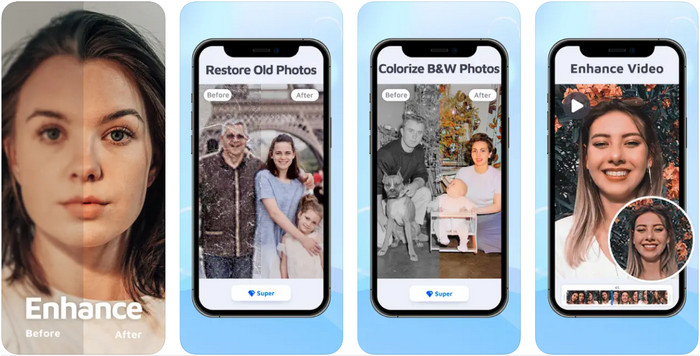
Tuto aplikaci pro vylepšení barev fotografií si můžete stáhnout do iOS a dolaďovat s ní grafický design. EnhanceFox dává uživatelům možnost udělat jejich snímky vytříbenějšími oproti původnímu výstupu. I když jste začátečník v úpravách obrázků, s touto aplikací se dokážete naučit pracovat tak, abyste své fotografie udělali krásnější než kdy dřív. Navíc dokáže převést rozmazané snímky na fotografie ve vysokém rozlišení díky umělé inteligenci tohoto nástroje. Přestože můžete používat bezplatnou verzi, pro plný přístup k aplikaci je potřeba zakoupit verzi Pro.
Klady
- Aplikaci si můžete zdarma stáhnout do svého iOS.
- Opravuje a přeměňuje obrázky na lépe vypadající.
- Tato aplikace je podporována AI.
Nevýhody
- Některé funkce nejsou v bezplatné verzi dostupné.
- Ke zpracování obrázku budete potřebovat připojení k internetu.
Remini - AI Photo Enhancer 4+
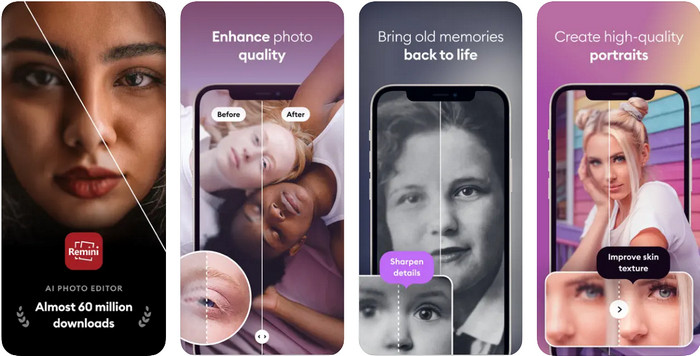
Remini patří mezi nejpopulárnější aplikace pro vylepšení barev fotografií, které si můžete stáhnout na iOS i Android. Její schopnost vylepšovat snímky zaujala mnoho uživatelů na obou platformách. Díky sadě editačních funkcí můžete s pomocí AI technologie během zlomku sekundy oživit staré či vintage fotografie. Kromě toho si můžete také vylepšit selfie, než je použijete. Ačkoli je potřeba aplikaci zakoupit, můžete si zvolit typ předplatného – týdenní, měsíční nebo roční.
Klady
- Proměňte svou fotografii obličeje na hladký a hedvábný obraz.
- Opravte ztracenou barvu na obrázcích, které máte, pomocí technologie AI.
- Zkrášlete svůj obrázek změnou nastavení v této aplikaci.
Nevýhody
- Cena každé funkce této aplikace má další platby.
- Po skončení předplatného automaticky obnoví poplatek za předplatné.
Colorized - Colored to Old Photos
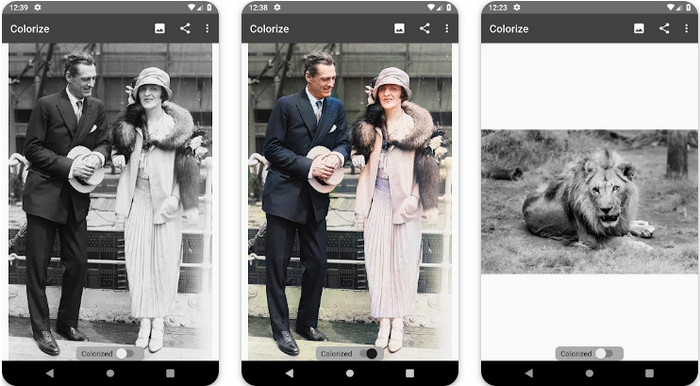
Colorize je inteligentní skenovací aplikace, kterou si můžete stáhnout do zařízení s Androidem a opravit s ní ztracené barvy na snímcích a provádět restaurování starých fotografií. S pomocí editačních funkcí této aplikace se můžete naučit, jak vylepšit barvu očí na fotkách, i když to jiné aplikace nepodporují. Díky technologii Photomyne dokáže tato aplikace proměnit vaše černobílé fotografie na barevné verze. Je přehledná a neuvěřitelně snadná na používání, i když upravujete snímek úplně poprvé. Stejně jako u další aplikace, kterou zmiňujeme, je potřeba nákup v aplikaci, než budete moci její funkce používat.
Klady
- Automaticky přidává barvy do černobílých obrázků pomocí Photomyne.
- Profesionálové nebo ne mohou snadno používat tento software, protože je postaven.
- Nastavení barev této aplikace je mnohem lepší než u jiných aplikací pro vybarvování obrázků.
Nevýhody
- Když do obrázku přidáte barvu, chybí mu některá místa.
- Při zpracování obrázek automaticky ořízne.
- Abyste předešli omezením, budete si muset aplikaci zakoupit.
Photoshop Express Photo Editor
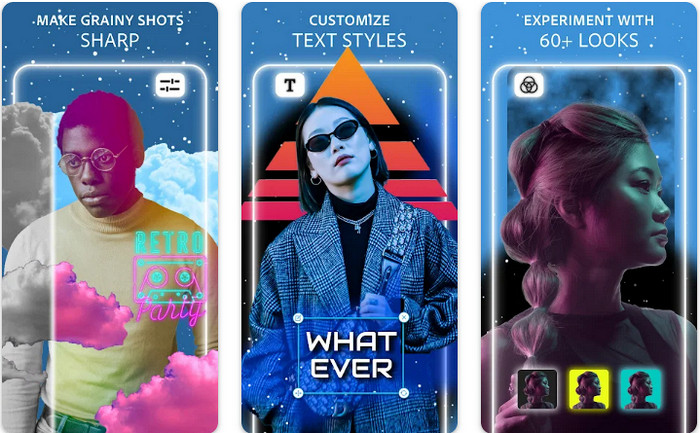
Photoshop Express Photo Editor je odlehčená verze profesionálního programu, který miliony odborníků a editorů používají k převodu snímků do HD kvality. Tento vylepšovač barev fotografií ve stylu Photoshopu můžete mít na Androidu i iOS. Vyřeší to problém? Ano, a bez námahy. Jak jsme již zmínili, tato aplikace je podobná Photoshopu ne vzhledem rozhraní, ale možnostmi úprav. Poskytuje uživatelům velmi detailní výstup tím, že přidává nebo upravuje PPI každého zachyceného snímku. Aplikace je však obtížnější na používání a možná budete muset věnovat čas studiu návodu. Přesto jde o kompletní softwarový balík, který kdy budete potřebovat.
Klady
- Software si můžete stáhnout nejen na desktop, ale i na mobilní zařízení.
- Podporuje profesionální funkce úprav, které můžete použít na své fotografie.
- Má podobnosti s Photoshopem, protože oba poskytují profesionální výstup.
- Můžete zde provádět mnoho typů úprav, které vám jiná aplikace nabídnout nemůže.
Nevýhody
- Aplikace může být drahá ve srovnání s jinými nákupy v aplikaci.
- Potřebuje vyřešit další drobné problémy.
Část 2. Nejlepší doporučené vylepšení kvality fotografií, které byste nemuseli stahovat [webová služba]
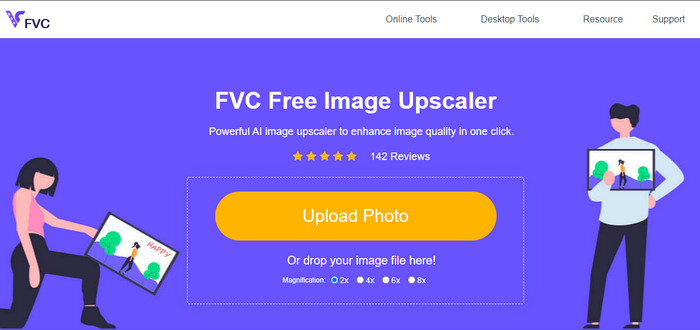
FVC Free Image Upscaler vám může pomoci problém vyřešit, aniž byste museli cokoli kupovat. Tento nástroj na vylepšení kvality fotografií je dostupný na webu, takže jej nemusíte stahovat, abyste jej mohli používat. Kromě toho můžete využít jeho výkonné funkce úprav pomocí umělé inteligence, která zanalyzuje, co je na vašem snímku špatně, a hned to opraví. Ve srovnání s ostatními aplikacemi, které jsme zmínili, je to zatím nejjednodušší jedním kliknutím ovladatelný vylepšovač, který budete potřebovat. Nahrajte fotografii, změňte zvětšení a získáte vylepšenou verzi obrázku. Pokud jej použijete, není potřeba žádné ladění ani zvláštní úpravy. Chcete to vyzkoušet? Klikněte na odkaz, který vás přímo přesměruje na web tohoto vylepšovače.
Část 3. Časté dotazy o Photo Color Enhancer
Musím se stát profesionálem, abych mohl používat zvýrazňovač barev fotografií?
Pokud používáte dobře vyvinutý software, budete muset mít představu, nikoli profesionál, o jeho vlastnostech a jejich funkci k obrazu. Existuje však zjednodušený software, což znamená, že je podporována umělá inteligence; někdy byste nemuseli provádět úpravy, nebo někdy ano. Pro začátečníky musíte použít snadno použitelný software, než svou hru posouváte k profesionálnímu vylepšení.
Co se stane s obrázkem, který vylepším barvu?
Obrázky s dobře vyvinutými barvami budou detailnější a ostřejší ve srovnání s obrázky, které podporují méně barev. Jejich pixel není vidět ve srovnání s fotografiemi, které mají nízkou podporovanou kvalitu.
Jaký formát obrázku podporuje nejlepší kombinaci barev obrázku?
JPEG a PNG podporují 16 milionů barev a jsou jedním z nejlepších obrazových formátů, které můžete použít pro různé účely. Ale HEIC podporuje pokročilé bity ve srovnání s těmito dvěma formáty obrázků.
Závěr
Jaký zvýrazňovač barev fotografií byste si vybrali z aplikace, kterou kontrolujeme? Díky všem informacím, které přidáváme, můžete rychle zjistit, kterou aplikaci byste si měli stáhnout do svého zařízení. I když mají různé výhody a nevýhody, stále mohou rychle vylepšit barvy vašich obrázků.
-
 Top 7 Pixels Enhancer pro všechny webové prohlížeče, které musíte použít
 Pokud chcete znát nejlepší vylepšovače pixelů, které lze použít, raději se podívejte na tento příspěvek. Tento článek uvádí sedm nejlepších vylepšení fotografických pixelů pro všechny webové prohlížeče.
-
 Nejlepší aplikace Photo Resizer online, offline, Android a iPhone
 Jaké jsou nejlepší aplikace pro změnu velikosti fotografií? Kliknutím na stránku se dozvíte pět nejvýkonnějších aplikací pro změnu velikosti fotografií, které můžete použít k vylepšení nebo změně velikosti souboru.
-
 Top 7 nejlepších online a offline zvětšovačů fotografií
 Chcete se naučit nejvýkonnější zvětšovací přístroje pro vaše zařízení se systémem Windows nebo Mac? Přečtěte si tento příspěvek, abyste poznali nejlepší zvětšovače fotografií, které stojí za to vyzkoušet.
