


 Video Converter Ultimate
 Screen Recorder
 Oprava videa
 Bezpečné stažení
3 způsoby, jak efektivně opravit kód chyby 232011
Hledáte způsob, jak vyřešit chybu s kódem 232011? Jedná se o běžnou chybu a skutečný zdroj frustrace každého diváka. Jakmile k ní dojde, může narušit plynulé sledování online videí, způsobovat problémy s přehráváním a výpadky. Nemusíte se ale bát, existuje několik účinných metod, jak tento problém odstranit a zlepšit celkový zážitek ze streamování. V této příručce si ukážeme, jak tuto chybu snadno opravit pomocí tří metod a poskytneme vám tipy, jak jí předcházet. Přečtěte si tento článek a užívejte si svá oblíbená videa bez potíží.

Část 1. Co je kód chyby 232011? Proč se to děje
Chybový kód 232011 je běžná chyba, se kterou se lze setkat v různých softwarových aplikacích a online službách. Svou povahou se podobá chybě „video nelze přehrát“, kód 150.
Obvykle k tomu dochází, když dojde k problému se síťovým připojením nebo nastavením, které brání aplikaci nebo službě v přístupu k nezbytným zdrojům.
Zde jsou komplexní informace o tom, proč k této chybě dochází:
◆ Problémy s připojením k síti: Jednou z možných příčin této chyby je problém se síťovým připojením. Může nastat, pokud má uživatel potíže s internetovým připojením, například slabý nebo nestabilní signál, přetížení sítě nebo omezení bránou firewall, která blokuje potřebnou komunikaci.
◆ Problémy na straně serveru: Chybový kód 232011 může vzniknout také v případě potíží na straně serveru. Patří sem výpadek serveru, probíhající údržba nebo technické problémy se serverem, na němž běží daná aplikace či služba.
◆ Nesprávná konfigurace: Další možnou příčinou jsou chybně nastavené konfigurační volby. Může k tomu dojít v důsledku špatného nastavení sítě, nesprávných IP adres nebo čísel portů či použití nekompatibilních protokolů mezi klientem a serverem.
◆ Problémy s kompatibilitou softwaru: Chybový kód 232011 se může objevit také kvůli problémům s kompatibilitou mezi různými softwarovými součástmi. Například jej mohou způsobovat konflikty s pluginy nebo rozšířeními prohlížeče, zastaralé či nekompatibilní verze softwaru nebo poškozené instalační soubory.
Část 2. Jak opravit kód chyby 232011
Existuje několik způsobů, jak efektivně vyřešit kód chyby 232011, protože je to běžný problém mnoha z nás. Zde jsou způsoby, jak tento problém vyřešit.
Metoda 1: Vymazání mezipaměti prohlížeče a souborů cookie
Vymazání mezipaměti prohlížeče a souborů cookie je nezbytné pro vyřešení problémů s videem způsobených poškozením dat. Poškozená mezipaměť nebo soubory cookie narušují fungování webových stránek, včetně chyb jako 23201. Mezipaměť ukládá dlouhodobé zdroje webových stránek a soubory cookie uchovávají uživatelské preference. Vymazání těchto souborů proto odstraní problémy a umožní prohlížeči načíst z webu čerstvá, bezchybná data. Zde je návod, jak můžete vymazat mezipaměť prohlížeče a soubory cookie:
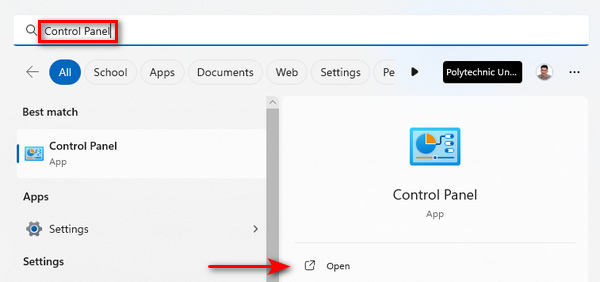
Krok 1. Nejprve do vyhledávacího pole zadejte Ovládací panely a otevřete je.
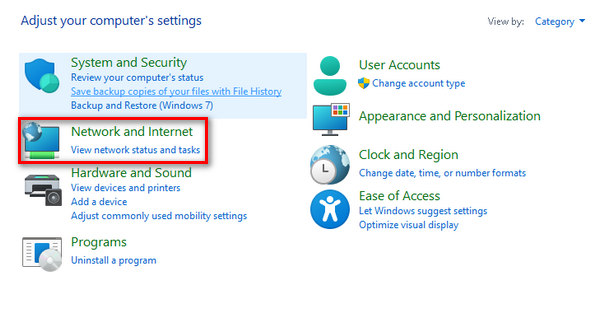
Krok 2. V Ovládacích panelech vyhledejte a vyberte možnosti Síť a internet.
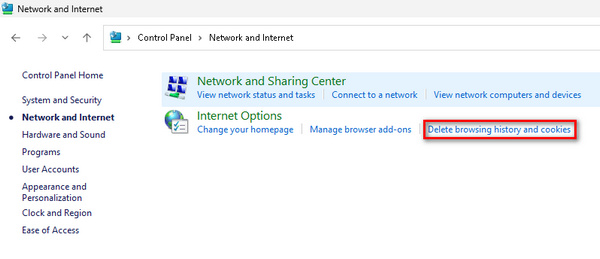
Krok 3. Najděte položky Odstranit historii prohlížení a Soubory cookie a klikněte na ně.
Krok 4. Nakonec se zobrazí okno, ve kterém můžete zaškrtnout položky, které chcete vymazat. Po výběru klikněte na tlačítko Odstranit a dokončete proces.
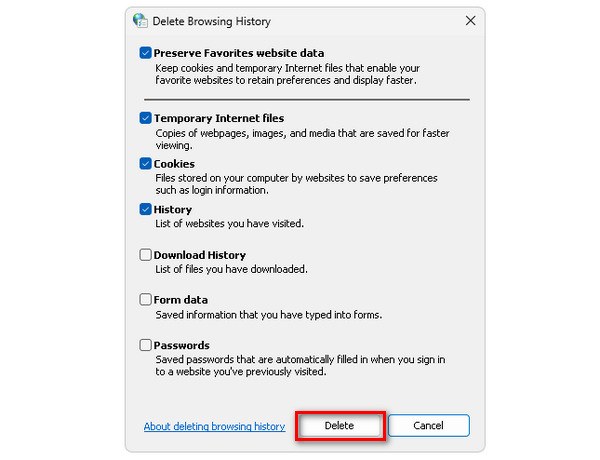
Vymazání mezipaměti a souborů cookie nejen zlepší celkový výkon počítače, ale také slouží jako řešení pro případná přerušení, včetně opravy kódu chyby 232011.
Metoda 2: Použití anonymního prohlížeče
Krok 1. Klikněte na tři tečky v pravém horním rohu okna prohlížeče.
Krok 2. V rozbalovací nabídce vyberte možnost Nové anonymní okno.
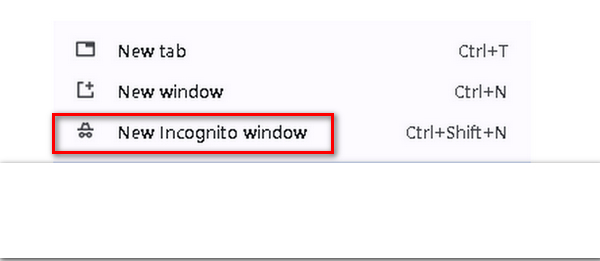
Krok 3. Otevře se nové okno, ve kterém můžete v „čistém“ prohlížeči přehrát video, u něhož se zobrazuje chybový kód 232011.
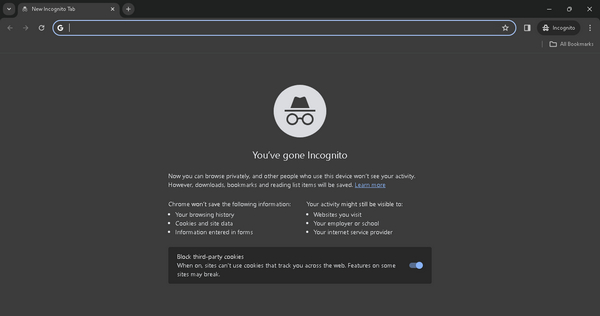
Použití režimu inkognito může pomoci vyřešit kód chyby 232011 tím, že poskytuje čisté prostředí pro prohlížení bez dat uložených v mezipaměti nebo konfliktních rozšíření.
Metoda 3: Použití nástroje Video Repair Tool
Pokud nic z výše uvedeného nepomohlo vyřešit problémy s prohlížečem a potíže se objevují při přehrávání videa offline, můžete k rychlé opravě použít specializovaný nástroj pro opravu videa třetí strany. Jedním z nejlepších nástrojů, které můžete k vyřešení tohoto problému použít, je FVC Video Repair. Tento nástroj umožňuje opravit běžné problémy s videem, včetně chybového kódu videa 232011. Navíc podporuje různé formáty videa, jako jsou MP4, MOV a 3GP, což zajišťuje univerzálnost. Jeho přehledné rozhraní využívající nejnovější technologie AI je uživatelsky velmi přívětivé i pro osoby bez technických znalostí. Postupujte následovně:
Krok 1. Nejprve přejděte na jejich oficiální webové stránky. Stáhněte a nainstalujte program do svého zařízení.
Zdarma ke staženíPro Windows 7 a novějšíBezpečné stažení
Zdarma ke staženíPro macOS 10.7 a novějšíBezpečné stažení
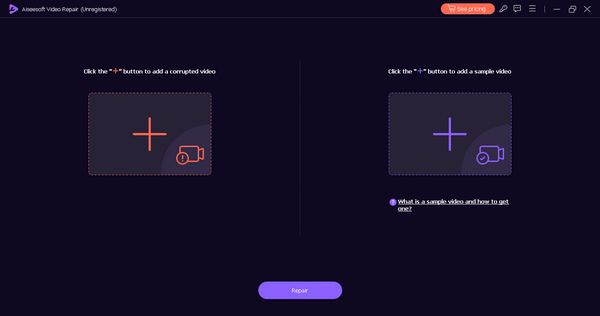
Krok 2. Poté přidejte video, které obsahuje chybový kód videa 232021, kliknutím na tlačítko Červené plus. Stejně tak klikněte na tlačítko Modré plus a přidejte ukázkové video.
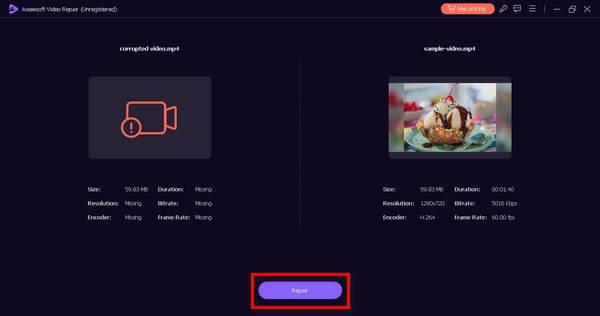
Krok 3. Následně klikněte na tlačítko Opravit a spusťte proces opravy videa.
Krok 4. Nakonec zkontrolujte, zda video již neobsahuje chybovou hlášku a lze jej přehrát, kliknutím na tlačítko Náhled. Pokud je vše v pořádku, můžete video uložit kliknutím na tlačítko Uložit.
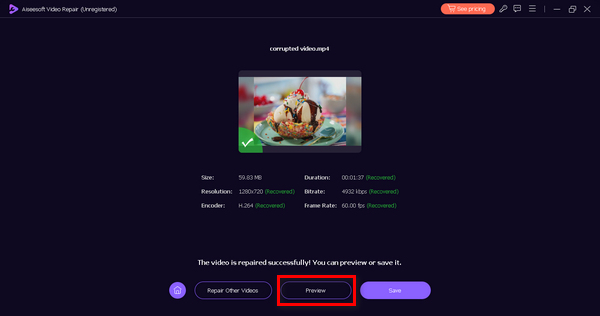
Tato offline metoda jistě dokáže opravit chybový kód 232011. Jen nezapomeňte poskytnout ukázkové video pro bezproblémovou opravu.
Část 3. Tipy, jak předejít chybě Kód 232011
Chcete-li zlepšit zážitek ze streamování videa a předejít tomu, abyste narazili na chybový kód 232011, je vhodné řídit se níže uvedenými tipy. Tato doporučení jsou navržena tak, aby řešila potenciální problémy související s připojením k internetu, výkonem prohlížeče a dalšími faktory, které mohou narušit plynulé přehrávání videí.
Tip 1. Udržujte stabilní připojení k internetu, abyste předešli výpadkům během přehrávání videa. To je zároveň řešení, jak opravit trhání a výpadky videa.
Tip 2. Udržujte svůj webový prohlížeč aktuální, abyste využili nejnovější vylepšení a opravy chyb a zlepšili výkon streamování videa.
Tip 3. Pravidelně čistěte mezipaměť a soubory cookie prohlížeče, aby se zabránilo tomu, že nahromaděná data budou ovlivňovat načítání a přehrávání videa.
Tip 4. Zakažte nebo odstraňte zbytečná rozšíření prohlížeče, která mohou narušovat přehrávání videa.
Tip 5. Ověřte rychlost svého internetového připojení pomocí online nástrojů a ujistěte se, že splňuje požadavky pro plynulé streamování.
Část 4. Nejčastější dotazy týkající se kódu chyby 232022
Jaký je kód chyby 233011 na 123movies?
Kód chyby 233011 na 123movies je problém specifický pro platformu a jeho význam lze určit pouze odkazem na oficiální zdroje podpory 123movies. Uživatelům se doporučuje, aby navštívili jejich webové stránky a kontaktovali zákaznickou podporu s žádostí o pomoc a vysvětlení této konkrétní chyby.
Jaký je kód chyby 232011 na 9anime?
Kód chyby 232011 na 9anime je jedinečný pro platformu 9anime. Chcete-li porozumět konkrétnímu důvodu tohoto chybového kódu, měli by uživatelé zkontrolovat oficiální kanály podpory 9anime nebo se obrátit na zákaznickou podporu a požádat o radu, jak problém vyřešit.
Jaký je kód chyby 232011 na Kissanime?
Podobně jako na jiných platformách je kód chyby 232011 na Kissanime specifický pro platformu. Pro přesné informace o významu a řešení tohoto chybového kódu by se uživatelé měli obrátit na oficiální zdroje podpory poskytované společností Kissanime nebo se obrátit na zákaznickou podporu.
Jak opravit kód chyby 232011 na Netflixu?
Pokud na Netflixu narazíte na kód chyby 232011, zkuste obnovit stránku, vymazat mezipaměť prohlížeče nebo restartovat zařízení. Kromě toho zkontrolujte rychlost internetu a vypněte jakékoli služby VPN nebo proxy, protože by mohly rušit streamování.
Závěr
Na závěr, vyřešení chyby s kódem 232011 je zásadní pro plynulé streamování videí. Tato příručka nabízí účinná řešení a preventivní tipy, které zlepší váš divácký zážitek. Dodržováním uvedených kroků můžete chybě předcházet a řešit ji, a zajistit si tak nerušené sledování online videí.
-
 Co je chyba 0xc10100bf ve videu a jak ji opravit
 Nepřehrává se vám video kvůli chybě 0xc10100bf a hledáte způsoby, jak to opravit? V tomto článku se dozvíte, co to je a jak to opravit.
-
 Jak opravit kód chyby videa 224003: Váš průvodce konečným řešením
 Zjistěte, jak řešit problémy s chybovým kódem 224003, který nelze přehrát, a vyřešte problém pro bezproblémový uživatelský zážitek. Vraťte se s naším průvodcem na správnou cestu!
-
 Odstraňování problémů s kódem chyby 232404 [2025 opravy]
 Objevte spolehlivá řešení pro tento soubor videa, který se nepřehrává, kód chyby 232404. Vyřešte to snadno pomocí našeho průvodce pro odborníky, který vás vrátí do práce.
