


 Video Converter Ultimate
 Screen Recorder
 Oprava videa
 Bezpečné stažení
2 rychlé způsoby, jak zmenšit velké soubory OGV [zdarma a online]
OGV files are often used for playing webpage video content using the HTML5 < video > tag. When you are going to send large OGV files to partners, clients, or friends, compressing those files becomes incredibly useful. Since there are many file size limitations of many email and file transfer platforms, compressed videos can greatly prevent the file transfer failure, at least in most cases. So, we’ll take a look at two online ways to compress your OGV files and make them smaller in this post.

Část 1. Online způsob komprese souborů OGV pomocí kompresoru OGV
Free Video Compressor is a popular and useful free online OGV compressor tool available for users. Unlike many other common free online tools, Free Video Compressor comes without restrictions on either the number or size of the files uploaded. More importantly, there will be no watermark on your exported video files. Also, it allows you to compress MP4, AVI, WMV, MOV, and many other common video files without destroying quality.
Jak komprimovat soubory OGV pomocí bezplatného video kompresoru
Step 1. Go to the online OGV video compressor website by entering https://www.free-videoconverter.net/free-video-compressor/.
Step 2. Locate and click Add Files to Compress button, and then download its launcher to activate the service. In the window that pops up, go and find your OGV files and hit Open to confirm.

Step 3. Next, you should define the compression settings to make the file smaller. You can set the size of your video, change the resolution, select the bitrate, and more.

Step 4. Hit on the Compress button to commence the process. After it’s finished, the file will be downloaded to your computer automatically.

Kromě toho vám tento bezplatný kompresor videa pomůže vyřešit další problémy s kompresí videa. Stačí zkontrolovat následující články:
How to Compress a Video for Email
How to Compress AVCHD Video Files for Free on Windows and Mac
Část 2. Jak komprimovat a optimalizovat soubor OGV pomocí aplikace Clideo
Clideo je bezplatná sada nástrojů pro video typu „vše v jednom“. Funguje se všemi populárními formáty a rychle se komprimuje a nevyžaduje žádné stahování. Umožňuje vám bezplatně komprimovat soubor OGV až do 500 MB, ale nemá omezení množství. Nyní můžete podle následujících pokynů zmenšit velikost souboru OGV.
Step 1. Visit https://clideo.com/compress-video and then hit on the Choose file button.
Step 2. Upload an OGV file you want to compress from your computer. You can also select the file from Dropbox or Google Drive by clicking the blue downward arrow.
Step 3. When the file is uploaded, the tool will start processing the video. The processing time depends on the size of the video.
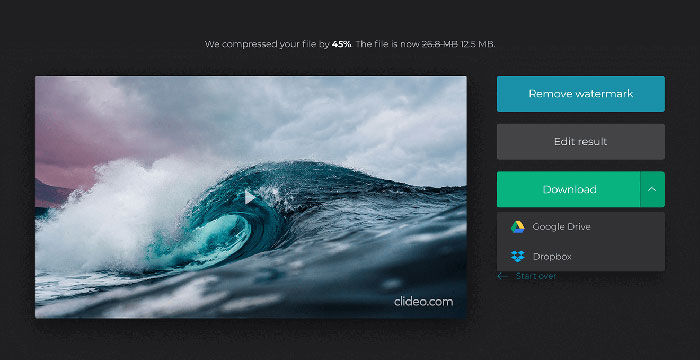
Step 4. Once the compression is over, you can see the initial file size and the compressed one. Now, you can preview the result to make sure it looks good. If you’re satisfied with it, you can click on the Download button to save it to your device or cloud storage.
Část 3. Nejčastější dotazy týkající se komprese souborů OGV
.OGV číslo volby
Soubor OGV je video soubor uložený ve formátu open source Ogg kontejneru Xiph.Org. Obsahuje video streamy, které mohou používat jeden nebo více různých kodeků, například Theora, Dirac nebo Daala. Soubory OGV lze přehrávat pomocí různých přehrávačů médií.
Jak funguje komprese OGV?
Pokud jde o kompresi souborů OGV, je to komprese mezi snímky, která vede ke zmenšení velikosti souboru odstraněním podobností, ke kterým dochází mezi videozáznamy.
Jak zkomprimuji formát MP4 do formátu OGV?
Výše uvedený nástroj - Free Video Compressor můžete použít ke kompresi souborů MP4 na OGV. Nebo si můžete vybrat aplikaci pro převádění videa, která vám to usnadní.
Závěr
Výše uvedené online metody vám mohou pomoci efektivně komprimovat zmenšení videa OGV. Který jste raději použili? Své doporučení můžete sdílet v komentářích níže!
-
 Od 50 MB do 5 MB - Jak komprimovat soubor MP4 během několika sekund
 Video ve formátu MP4 je pro nahrávání příliš velké? Chcete zmenšit velikost videa? Zde jsou 3 účinné způsoby, jak bez omezení omezit velikost souboru MP4 na menší velikost.
-
 Výukový program - 7 způsobů, jak zdarma komprimovat videa bez ztráty kvality
 Přečtěte si a získejte 7 způsobů, jak zdarma komprimovat videa na počítači nebo telefonu. Velká videa můžete snadno zmenšit na malé velikosti pro e-mail, Twitter, Instagram, YouTube, WhatsApp a další.
-
 Jak komprimovat soubory MOV v systémech Windows, Mac, iPhone a Android
 Tento článek ukazuje, jak podrobně komprimovat videa QuickTime MOV v telefonu nebo počítači. Pokud je vaše video MOV příliš velké na odesílání, sdílení nebo ukládání, můžete zde získat 4 funkční řešení.
