


 Video Converter Ultimate
 Screen Recorder
 Oprava videa
 Bezpečné stažení
Komprimovat TS video soubory - Jak komprimovat TS soubory do menších velikostí
Pokud máte nějaké soubory video_ts z DVD, jsou tyto soubory velké a zabírají místo na pevném disku. Pokud potřebujete uložit soubory TS na NAS nebo do knihovny médií, je nutné TS videa komprimovat. Samozřejmě by měl být počáteční volbou online TS video kompresor. Většina online služeb má ale omezení velikosti videa. Můžete si prohlédnout bezplatný online TS kompresor a profesionální nástroj z článku.

Část 1: Jak zdarma komprimovat soubory TS online
Je možné komprimovat videosoubory TS online? Protože jsou soubory TS velké, je obtížné najít online kompresor TS bez omezení velikosti. Free Video Compressor je univerzální online kompresor TS, který podporuje velké soubory TS bez jakéhokoli omezení. Pouze zmenšuje velikost videa u TS souborů, ale zachovává původní kvalitu videa.
- 1. Komprimujte TS videa v rozlišení 4K v ohromující kvalitě.
- 2. Do komprimovaných video souborů TS nepřidávejte žádný vodoznak.
- 3. Dávkově komprimujte soubory TS třikrát rychlejší rychlostí než jiné nástroje.
- 4. Poskytujte funkce zabezpečení soukromí na ochranu vašich informací.
Krok 1: Přejděte do online kompresoru videa v libovolném webovém prohlížeči, kliknutím na tlačítko Add Files to Compress stáhnete instalační program. Poté na tlačítko klikněte znovu a bez omezení velikosti importujte soubor TS do online kompresoru videa.

Krok 2: Jakmile nahrajete soubory TS online, můžete upravit různé parametry, jako jsou Size, Format, Resolution a Bitrate, abyste dosáhli požadované velikosti videa. Poté můžete kliknout na tlačítko Compress a zdarma zkomprimovat své TS video.

Část 2: Jak komprimovat soubory TS bez ztráty kvality
Když potřebujete spojit různé filmové klipy z různých souborů TS, komprimovat soubory TS pro telefony s Androidem, nebo dokonce převést TS na MP4 či MKV, Video Converter Ultimate je multifunkční kompresor TS, který zmenší velikost videa pomocí pokročilých algoritmů. Umožňuje vám také odstranit nežádoucí části a sloučit video klipy do jednoho filmu.
Zdarma ke staženíPro Windows 7 nebo novějšíBezpečné stažení
Zdarma ke staženíPro MacOS 10.7 nebo novějšíBezpečné stažení
Krok 1: Stáhněte a nainstalujte Video Converter Ultimate do svého počítače a spusťte program. Klikněte na nabídku Converter a zvolte tlačítko Add Files pro import souborů TS.
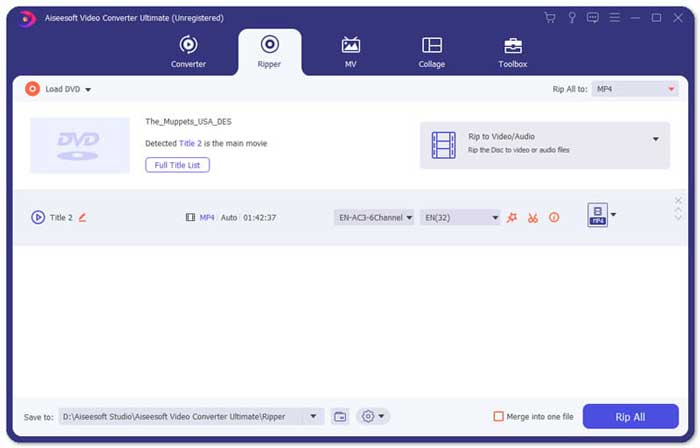
Krok 2: Jakmile importujete soubory TS, přejděte do nabídky Tool a klikněte na možnost Video Compressor. Jednoduše změňte velikost, název, formát, rozlišení a datový tok cílového souboru. Jakmile dosáhnete požadované velikosti videa, můžete kliknout na tlačítko Compress a zkomprimovat soubory TS.

Krok 3: Můžete také zvolit MKV nebo MP4 jako výstupní formát. Komprimuje to TS do MKV nebo MP4 s relativně malou velikostí. Kliknutím na ikonu Scissors vystřihnete požadované části TS. Pomocí možnosti Merge into one můžete také spojit různé klipy TS do jednoho.
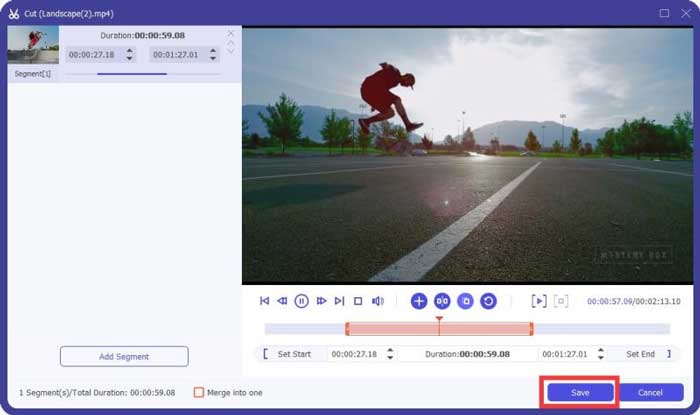
Krok 4: Jakmile jste s komprimovaným videem spokojeni, můžete vybrat cílovou složku pro komprimovaná TS videa. Poté klikněte na tlačítko Convert All a začněte komprimovat soubory TS z vašeho DVD bez ztráty původní kvality.

Část 3: Nejčastější dotazy týkající se komprese video souborů TS
1. Co je TS File Format?
TS, krátký Transport Stream, což je formát balíčku. Plný název TS je MPEG2-TS, což je standardní formát datového kontejneru pro přenos a ukládání zvuku, videa, programu atd. Používá se hlavně v systémech digitálního vysílání, jako jsou DVB, ATSC a IPTV.
2. Mám komprimovat TS na MP4 nebo MKV?
Ano. Pokud potřebujete zachovat původní kvalitu videa, můžete jednoduše komprimovat TS na MKV pomocí původního video kodeku. Pokud však chcete komprimovat TS pro telefon Android nebo iPhone, MP4 by měl být jednou z nejlepších možností.
3. Jak dlouho trvá komprese souborů .TS pomocí H.264?
Závisí to na velikosti souboru .TS. Pokud jde o H.264 s 15 MBPS kompresní bitrate, jehož komprimace trvá necelé 2 minuty. Vytvoří komprimovaný soubor 484 MB. Pokud potřebujete komprimovat TS z 9 GB DVD, může to trvat asi jednu hodinu.
Závěr
Tento článek sdílí 2 funkční způsoby, jak komprimovat vaše videosoubory TS. Free Video Compressor můžete použít ke kompresi velkých souborů TS bez omezení. Pokud potřebujete komprimovat soubory TS bez ztráty kvality, měl by být Video Converter Ultimate vždy tou nejlepší volbou.
-
 Jak převést TS na AVI / MKV / MOV / WMV online a zdarma na Win / Mac
 Chcete rychle převést soubory TS na AVI / MKV / MOV / WMV? Tento článek ukazuje online a offline převaděče videa s kompletním průvodcem. Možná zde získáte nejlepší bezplatný převodník TS.
-
 MTS VS M2TS - Rozdíl mezi MTS a M2TS
 Co je soubor MTS nebo M2TS? Jaký je rozdíl mezi M2TS a MTS? Jak mohu sledovat na videokameře nahraný soubor MTS nebo M2TS? Všechny odpovědi najdete v tomto příspěvku.
-
 10 bezplatných způsobů převodu souboru TS na MP3, AIFF, ALAC, FLAC a další
 Jak převést soubor TS na MP3 zdarma? V této příručce najdete 11 snadných způsobů, jak extrahovat zvuk ze souboru TS pomocí nástroje TS na audio freeware a nástroje pro online převod.
