


 Video Converter Ultimate
 Screen Recorder
 Oprava videa
 Bezpečné stažení
Upravujte MP3 pomocí nejlepších nástrojů na Windows, Mac, online a na mobilním telefonu
MP3 znamená MPEG-1 Audio Layer III a je to typ souboru, který uchovává hudbu v komprimovaném formátu. Tento typ souboru je mnohem menší než nekomprimované hudební soubory, což usnadňuje jejich ukládání a přenos. Jak vzniká stále více hudby, lidé hledají jednoduché způsoby, jak upravit soubory MP3, aby zněly lépe. Důvodem je, že MP3 může znít lépe než původní nekomprimovaná hudba. Problém je v tom, že editační software může být drahý a vyžadovat výkonný počítač. Naštěstí vám tato příručka ukáže, jak používat nejdoporučovanější editory MP3, abyste mohli upravovat svou hudbu na všech platformách, které používáte. Ať už jsou tedy vaše potřeby jakékoli, je nejlepší začít právě zde!

Část 1. Nejlepší výběr pro úpravy MP3 pomocí All-in-One MP3 Editoru
První software, který upravuje soubor MP3, je pečlivě vybraný FVC Video Converter Ultimate. Ano, je to multimediální konvertor, který není zaměřen pouze na videa, ale také na zvukové soubory. Umožní vám jednoduše upravit hlasitost až na dvojnásobek nebo ji stáhnout až na šepot. Můžete také zrychlovat nebo zpomalovat přehrávání, aniž byste se museli zabývat složitým technickým nastavením.
Navíc dokáže odstranit šum na pozadí, vystřihnout nechtěné části, rozdělit soubory do sekcí a dokonce upravit hlasové záznamy. Navíc nabízí snadno použitelné rozhraní, které, i když jste začátečník s úpravou zvuku, tento program zjednodušuje všechny tyto věci v několika krocích. Zamilujete si také pokročilé technologie, které nabízí, jako je hardwarová akcelerace, NVIDIA, Intel, AMD a editační nástroje s umělou inteligencí, které můžete použít.
Klíčové funkce:
• Převod zvuku, který převádí až 120x rychleji.
• Podpora více než 1000 různých formátů.
• Bezproblémově rozdělujte, stříhejte a slučujte zvukové soubory.
• Upravujte délku MP3 bez jakýchkoli omezení.
• Komprimujte zvukové soubory na požadovanou velikost.
• Upravte kodér, vzorkovací frekvenci, kanál a bitovou rychlost souboru MP3.
Zdarma ke staženíPro Windows 7 nebo novějšíBezpečné stažení
Zdarma ke staženíPro MacOS 10.7 nebo novějšíBezpečné stažení
Jak upravovat zvukové soubory v FVC
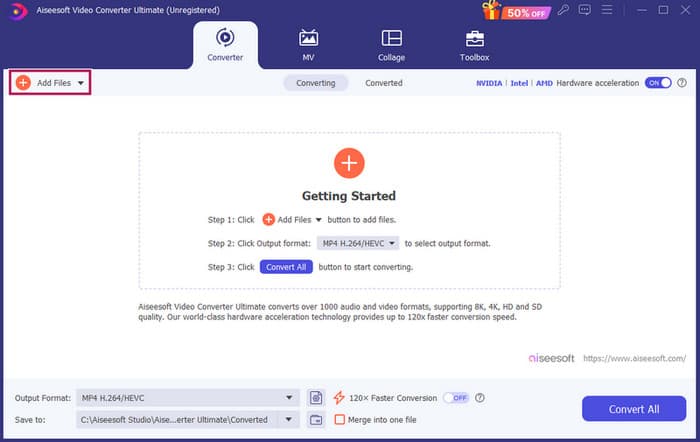
Krok 1. Po spuštění softwaru můžete přidat soubory MP3 kliknutím na tlačítko Přidat soubory (Add Files). Případně můžete soubory přetáhnout z jejich umístění a pustit je do editačního softwaru.
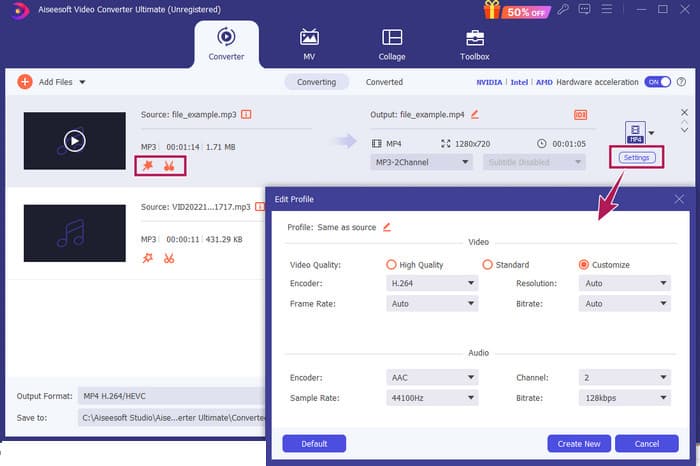
Krok 2. Jakmile jsou soubory načteny, můžete se k nastavení hlasitosti a zpoždění dostat kliknutím na tlačítko hvězdičky (Star) na miniatuře. Tlačítko nůžek (Scissors) slouží k přístupu ke slučovači, rozdělovači a ořezávači. A samozřejmě tlačítko Nastavení (Settings) pro přístup k úpravě profilu.
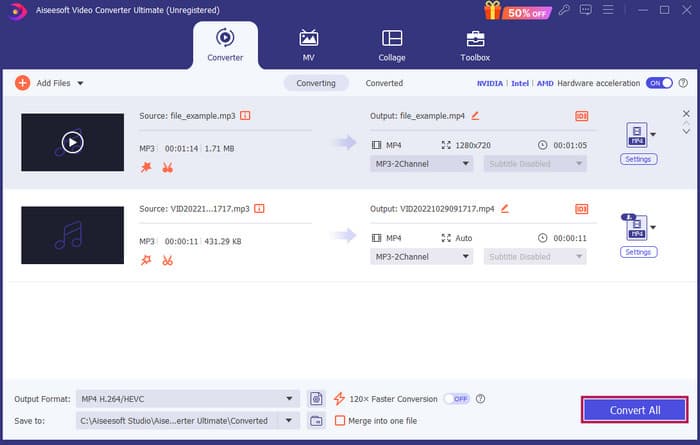
Krok 3. Po úpravě souborů je třeba kliknout na tlačítko Convert All. A takto se upravuje MP3 ve Windows 10 pomocí FVC.
Verdikt: FVC Video Converter Ultimate může být vaším hlavním řešením nejen pro vylepšení či úpravu MP3, ale také skvělým nástrojem pro konverzi. Líbí se nám, jak je úprava zvuku jednoduchá a rychlá. Přestože většina nástrojů v nástrojové sadě je určena pro video soubory, najdete zde i výkonné zvukové editory. Proto je naším osobním ručně vybraným tipem pro efektivní a snadnou úpravu souborů, která je ideální pro začátečníky.
Část 2. Úpravy MP3 pomocí Adobe Audition v systému Windows
Adobe Audition je jednou z nejznámějších voleb pro profesionální úpravu zvuku, kterou používají hudebníci, podcasteři i zvukoví inženýři. Je známý jako program, který je výkonný, ale zároveň snadno použitelný. Kromě toho nabízí funkce, jako je nahrávání a úprava více zvukových stop najednou, přidávání speciálních efektů, které můžete slyšet okamžitě při jejich vytváření, a dokonce i knihovnu zvuků, které můžete použít ve svých projektech. Můžete jej také vnímat jako dobře navržený nástupnický program ke staršímu Cool Edit Pro. Dále můžete upravovat soubory MP3 a přizpůsobit si rozložení podle svých potřeb a pracovat až se 40 samostatnými zvukovými stopami současně. K dispozici je také mixážní pult s editačními nástroji a dokonce nástroj pro přidání hudebních nástrojů do projektu.
Klíčové funkce:
• Upravte celou řadu zvukových souborů jediným kliknutím.
• Přidejte skvělé filtry a efekty, aby váš zvuk byl úžasný.
• Kombinujte různé zvukové stopy a vytvořte vybroušený zvuk.
• Opravte a vylepšete své vokály pomocí výkonných nástrojů.
Jak upravovat zvukové soubory v Adobe Audition
Krok 1. Otevřete program a importujte soubory MP3 přes nabídku Soubor – Otevřít (File–Open).
Krok 2. K úpravám můžete použít editor Waveform pro detailní práci s jednou stopou. Pro více zvukových stop využijte Multitrack Editor.
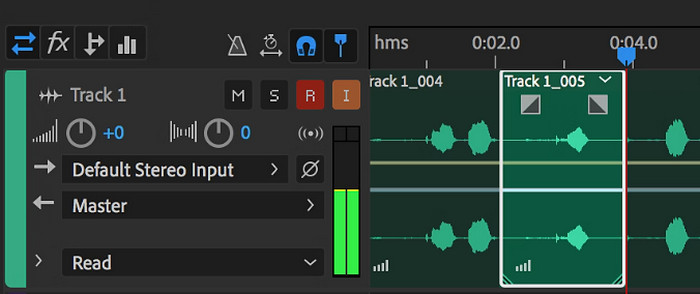
Krok 3. Jakmile dokončíte úpravy, můžete prozkoumat další nástroje programu, například efekty. Jakmile uděláte vše potřebné, můžete zvukový projekt uložit. Takto se upravuje MP3 ve Windows pomocí Adobe Audition.
Verdikt: Adobe Audition je bezpochyby vynikající a přitom klasický zvukový editor. Není divu, že se k němu mnoho střihačů stále vrací. Pro začátečníky, kteří nechtějí složité ovládání, však Adobe Audition nemusí být nejlepší volbou.
Část 3. Úpravy MP3 pomocí iTunes na Macu
iTunes je jako váš hudební manažer, který udržuje všechny vaše oblíbené skladby v počítači uspořádané. Představte si to jako digitální krabičku, kde můžete snadno třídit svou hudební sbírku podle interpreta, alba nebo dokonce žánru. Umožňuje také opravit jakékoli chybějící informace, jako jsou názvy skladeb nebo jména interpretů, takže vždy najdete to, co hledáte. Pomocí tohoto editoru lomítka přehrávače médií můžete vytvářet vlastní zvukové stopy nebo seznamy skladeb pro různé nálady nebo činnosti, jako je cvičební mix nebo seznam skladeb k relaxaci.
Nejlepší část? iTunes je super uživatelsky přívětivý. I když nejste technicky zdatní, můžete snadno a rychle přidávat skladby do své knihovny, úhledně je organizovat a přehrávat je bez problémů. I když nemůže dělat efektní úpravy jako jiné programy, je to skvělá volba pro základní úkoly, jako je ořezávání nechtěného ticha od začátku nebo konce vašich souborů MP3. Prozkoumáme, jak upravit MP3 na Mac a Windows v několika jednoduchých krocích!
Klíčové funkce:
• Spravuje a vytváří digitální knihovnu zvukových souborů.
• Kromě MP3 podporuje také různé audio formáty, včetně WAV, AIFF, Apple Lossless a AAC.
• Umožňuje editaci informací o souborech MP3, jako je interpret, album, žánr a rok vydání.
Jak upravovat zvukové soubory v iTunes
Krok 1. Spusťte program a načtěte soubor MP3. Najděte sekci File (Soubor) a zvolte možnost Add File to Library (Přidat soubor do knihovny) nebo podobnou volbu. Poté zvolte MP3, který chcete oříznout, ze svého zařízení.
Krok 2. Nyní znovu přejděte do nabídky File (Soubor) a zvolte Library (Knihovna). Ujistěte se, že je daný MP3 v seznamu. Klikněte na něj pravým tlačítkem a zvolte Get Info.
Krok 3. Nyní můžete nastavit body ořezu. Přejděte do okna Get Info, vyhledejte záložku Options (Možnosti) a najděte Start a Stop time (čas začátku a konce). Nastavte počáteční a koncový bod části, kterou chcete ponechat. Po dokončení uložte změny kliknutím na tlačítko OK.
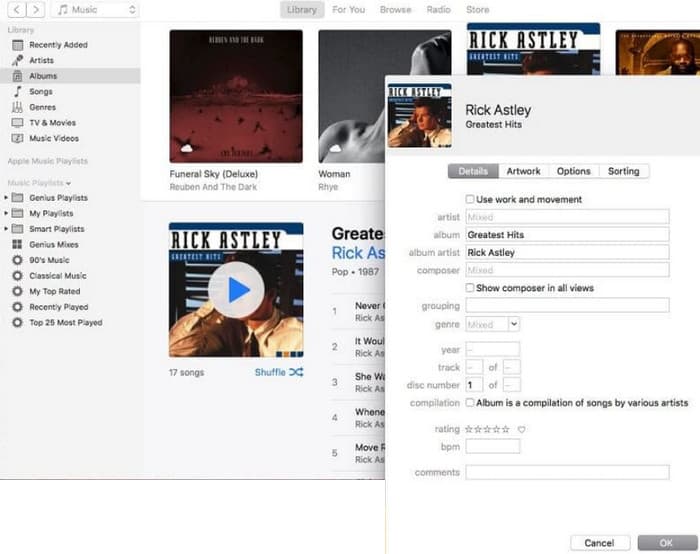
Verdikt: iTunes dokáže podle potřeby zajistit základní úpravy a vylepšení souborů MP3. Jelikož se však nejedná o specializovaný zvukový editor, který by MP3 upravil do hloubky, můžete být zklamáni nedostatkem funkcí.
Část 4. Upravte MP3 pomocí online editoru MP3
Clideo je slibný ořezávač a editor MP3 pro ty, kteří chtějí k ořezávání svých MP3 souborů použít online audio editor. Jde o webový nástroj, který funguje na jakémkoli zařízení, takže nemusíte nic instalovat. Clideo vám umožní vyříznout konkrétní části zvuku nastavením přesného času začátku a konce nebo jednoduše tažením značek na obrazovce.
Kromě toho podporuje různé typy souborů, takže můžete upravovat téměř jakýkoli hudební soubor, který máte. Kromě toho vám Clideo umožňuje přidat efekty, jako je zatmívání a zatmívání pro hladší přechod zvuku na začátku a na konci klipu. Celkově je Clideo uživatelsky příjemný a všestranný nástroj, díky kterému je úprava vašich zvukových souborů hračkou.
Klíčové funkce:
• Snadno vystřihněte nechtěné části vašich zvukových souborů.
• Přidejte efekty zatmívání a zatmívání.
• Podporuje různé zvukové formáty.
Jak upravovat zvukové soubory v Clideo
Krok 1. Jakmile přejdete na oficiální stránku Clideo, přejděte do jeho nástroje pro ořezávání zvuku (audio cutter).
Krok 2. Pro nahrání souborů MP3 klikněte na tlačítko Choose File. Jakmile je import souboru úspěšný, můžete začít s úpravami.
Krok 3. Nastavte táhlo (dragger) na požadovaný rozsah a poté klikněte na Export, abyste uložili změny.
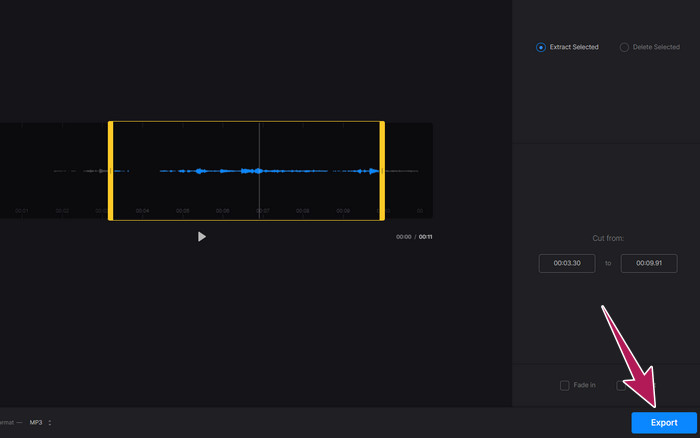
Verdikt: Clideo je online nástroj, který nabízí několik funkcí pro úpravu souborů MP3 i dalších typů souborů, včetně videí. Mějte však na paměti, že online nástroje jako Clideo mohou poskytovat nejistou úroveň zabezpečení, protože jsou zranitelnější než offline nástroje.
Část 5. Upravte MP3 pomocí mobilní aplikace na iPhone/Android
Posledním editorem MP3, který doporučuji, je aplikace pro Android a iOS. Jmenuje se WavePad a má spoustu funkcí, proto může na první pohled působit složitě. S touto aplikací můžete stříhat a ořezávat klipy, měnit výšku hlasu a dokonce odstraňovat šum v pozadí. Kromě toho umí upravovat MP3 na iPhonu i Androidu s celou řadou zvukových efektů a hudby, které můžete ke svým nahrávkám přidávat zdarma. Má vestavěný ekvalizér, který vám pomůže doladit zvuk přesně podle vašich představ. Kromě MP3 WavePad podporuje také většinu běžných typů zvukových souborů.
Klíčové funkce:
• Vyjmout, zkopírovat, vložit a přidat efekty ke zvukům.
• Podpora různých zvukových formátů jako MP3, WAV a AIFF.
• Má různá nastavení kvality zvuku.
Jak upravovat zvukové soubory ve WavePad
Krok 1. Spusťte aplikaci, klepněte na tři čárky a zvolte File – Import from the Audio záložky. Tím umožníte nahrát soubor MP3, který potřebujete upravit.
Krok 2. K editačním nástrojům se dostanete přejetím prstem doprava po liště nástrojů v horní části obrazovky.
Krok 3. Jakmile to uděláte, můžete klepnout na tlačítko REC a nahrát část, kterou chcete ze souboru ponechat. Poté ji uložte a exportujte do svého zařízení.
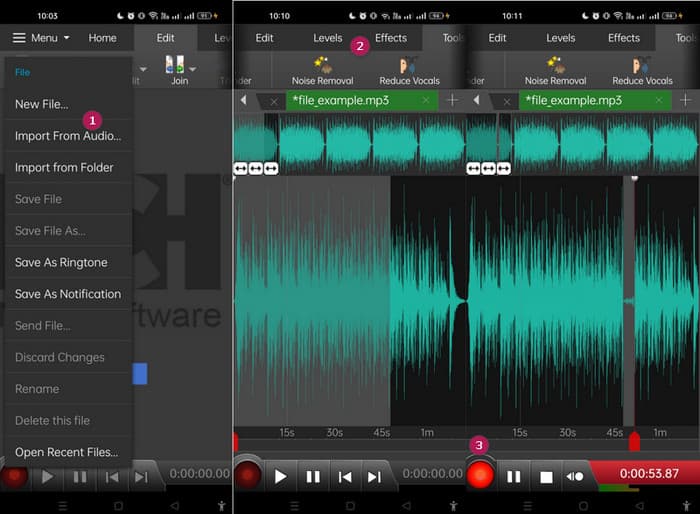
Verdikt: Bezplatná verze WavePad nabízí většinu funkcí, ale existuje i placená varianta za $3 měsíčně, která navíc odstraňuje reklamy a odemyká vše – například všechny zvukové efekty a možnost ukládat soubory v různých formátech. To vám umožní upravovat MP3 pokročilejším způsobem na Androidu nebo iPhonu.
Část 6. Často kladené otázky o úpravách MP3
Mohu zkrátit skladbu v Apple Music?
Ne. Bohužel nemůžete přímo ořezávat skladby v samotné Apple Music.
Má Microsoft zvukový editor?
Existuje mnoho dostupných zvukových editorů, jako je Audacity pro úpravu MP3, které si můžete stáhnout z obchodu Microsoft Store.
Jak oříznu soubor MP3 v programu Windows Media Player?
Bohužel samotný Windows Media Player nemá vestavěné editační funkce pro ořezávání souborů MP3.
Závěr
Alespoň nyní znáte ty nejlepší způsoby, jak upravit MP3 jako nikdy předtím. S nejlepšími audio editory, které výše doporučujeme, jistě dosáhnete požadované kvality zvuku! Tyto nástroje nabízejí ucelená řešení pro různé platformy a zajišťují flexibilitu a pohodlí bez ohledu na vaše zařízení či operační systém. Ať už dáváte přednost desktopové aplikaci, online nástroji nebo mobilní aplikaci, můžete snadno dosáhnout úprav v profesionální kvalitě. Od základního ořezávání a spojování až po pokročilé efekty a vylepšení – ten správný editor dokáže vaše soubory MP3 efektivně proměnit. Prozkoumejte možnosti a začněte své zvukové stopy ladit k dokonalosti ještě dnes.
-
 Top 10 FLV přehrávačů pro Windows, Mac, iOS a Android v roce 2024
 Přehrávač FLV vám pomůže snadno přistupovat k vašim souborům FLV ve vašem zařízení Windows, Mac, Android nebo iOS. Podívejte se na nejlepší přehrávače souborů FLV, které si můžete stáhnout právě teď.
-
 8 nejlepších přehrávačů MOV pro přehrávání souborů QuickTime MOV v původní kvalitě
 Prostě se dozvíte více o 8 nejlepších přehrávačích MOV dostupných pro Windows i Mac. Můžete vybrat požadovaný a vhodný soubor pro přehrávání souborů MOV v původní kvalitě.
-
 Získejte svůj nejlepší přehrávač MP4 pro přehrávání souborů MP4 s vysokou vizuální kvalitou
 Přečtěte si a získejte svůj nejlepší přehrávač MP4 z doporučení 10 nejnovějšího softwaru přehrávače videa MP4. Můžete přehrávat video soubory MP4 ve Windows a Mac bez problémů.
