


 Video Converter Ultimate
 Screen Recorder
 Oprava videa
 Bezpečné stažení
Jak komprimovat soubory PDF pro e-mail 3 efektivní způsoby, jak si vybrat
Opravdu, posílání velkých souborů e‑mailem může být problém. Může vám to způsobit potíže, nebo se zpráva vůbec nedoručí. Navíc mnoho poskytovatelů e‑mailu omezuje přílohy na určitou velikost souboru, což složitější PDF velmi snadno překročí. To platí zvlášť pro PDF s velkým množstvím obrázků nebo velmi rozsáhlé dokumenty. V takové situaci většina lidí sáhne po službách pro sdílení souborů, jako jsou Dropbox nebo Google Drive. Přitom téměř zapomínají na šikovný trik – kompresi souborů. Mnoho bezplatných online nástrojů to umí, a některé jsou poměrně populární. Ale jak efektivně komprimovat PDF pro e‑mail? To se právě chystáte naučit, když budete pokračovat ve čtení celého textu níže.

Část 1. Jaká je nejlepší velikost PDF pro e-mail
Zde je fakt: neexistuje žádné magické číslo pro ideální velikost PDF pro e-maily. Na co si dát pozor, je limit příloh vaší e-mailové platformy. Oblíbené služby omezují velikost příloh kolem 20 MB, což může být překvapivě snadné, zejména u souborů PDF, které obsahují spoustu obrázků nebo jsou to velmi dlouhé dokumenty. Pokud je tedy váš PDF větší než uvedený limit 20 MB, váš e-mail pravděpodobně nebude odeslán a zobrazí se vám chybová zpráva. To znamená, že místo usilování o konkrétní velikost nebo nejlepší velikost PDF pro e-mail je nejlepší hrát na jistotu a udržovat jej pod 20 MB. Tímto způsobem si můžete být jisti, že se úspěšně připojí a odešle.
Část 2. Jedním kliknutím zkomprimujte soubory PDF pro e-mail
Zde je skvělý a rychlý způsob, jak komprimovat soubory pro e‑mail. Připravte se vyzkoušet tento bezplatný nástroj s názvem FVC Free PDF Compressor, který dokáže výrazně zmenšit vaše objemné PDF soubory, aniž by je poškodil. Vzhledem k tomu, že většina e‑mailových služeb umožňuje přílohy zhruba do 20 MB, PDF s obrázky nebo velkým množstvím textu může tuto hranici snadno dosáhnout. Tento kompresor dokáže vaše PDF výrazně zmenšit, dokonce i pod 100 kilobajtů! Nemusíte se obávat, jak se mu daří PDF pro e‑mail tak dramaticky zmenšit, protože přitom zachovává kvalitu souborů. Ve skutečnosti si pravděpodobně ani nevšimnete rozdílu mezi originálem a zmenšenou verzí.
Tento úžasný nástroj se navíc velmi snadno používá a může jej používat kdokoli s jakoukoli úrovní odborných znalostí. Jediné, co musíte udělat, je přetáhnout soubor PDF do programu a ten jej automaticky zmenší. Poté můžete jediným kliknutím uložit menší PDF do svého počítače. Tímto způsobem můžete rychle zkomprimovat PDF na velikost e-mailu online na velikost, která je ideální pro odeslání e-mailem nebo odeslání všeho bez vodoznaků na konečném dokumentu. Chcete-li lépe porozumět jeho procesu, podívejte se na podrobné pokyny níže.
Krok 1. V jeho hlavním rozhraní klikněte na kartu Add PDF File a vyberte PDF soubor, který potřebujete zkomprimovat.
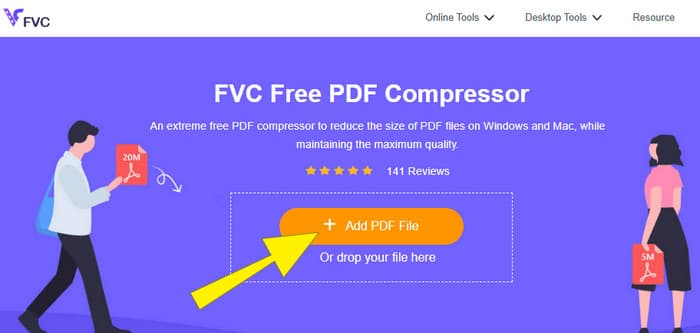
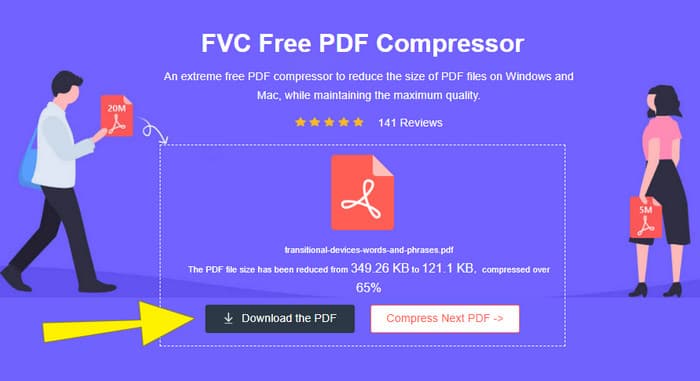
Krok 2. Zatímco se PDF soubor nahrává, nástroj zároveň provádí jeho kompresi.
Krok 3. Po dokončení klikněte na tlačítko Download the PDF.
Část 3. Komprimace souborů PDF pro e-mail s funkcemi úprav
Pokud dáváte přednost nástroji, který má i editační funkce, pak je pro tento úkol vhodný Adobe Acrobat. Adobe Acrobat je program určený k vytváření, úpravám a správě PDF souborů. Je to jako výkonná sada nástrojů speciálně navržená pro práci s PDF. Jednou z jeho užitečných funkcí je komprese PDF, kterou můžete použít, když máte objemné PDF, jež se kvůli velikosti nevejde do e‑mailu. Adobe Acrobat, který je k dispozici v online i desktopové verzi, vám pomůže komprimovat velké PDF soubory pro e‑mail, aniž by příliš snížil jejich kvalitu. Dělá to několika způsoby, například zmenšením velikosti obrázků v PDF nebo odstraněním zbytečných fontů. Vzhledem k tomu, jaký Adobe a jeho balíky jsou, však nepřekvapí, že má poměrně strmou křivku učení. Proto zde uvádíme kroky, které vám celý proces usnadní.
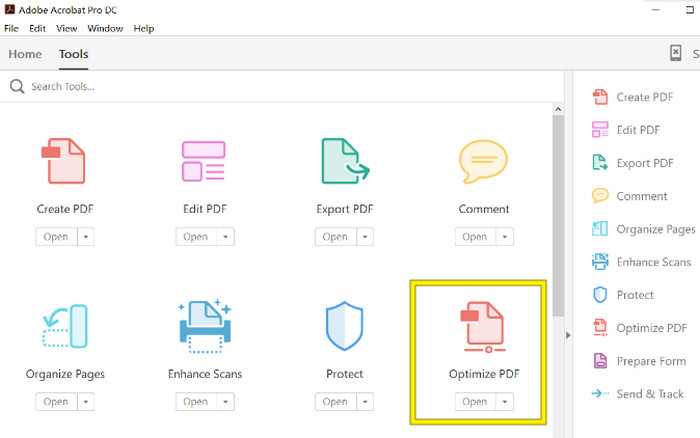
Krok 1. Spusťte Acrobat a otevřete PDF soubor, se kterým potřebujete pracovat. Provedete to tak, že přejdete na Nástroje–Optimalizovat PDF–Otevřít.
Krok 2. Jakmile PDF soubor otevřete, klikněte v nově zobrazené navigaci na možnost Reduce File Size. Poté nastavte nebo použijte nabízené editační možnosti, abyste dosáhli požadované komprese a optimalizace.
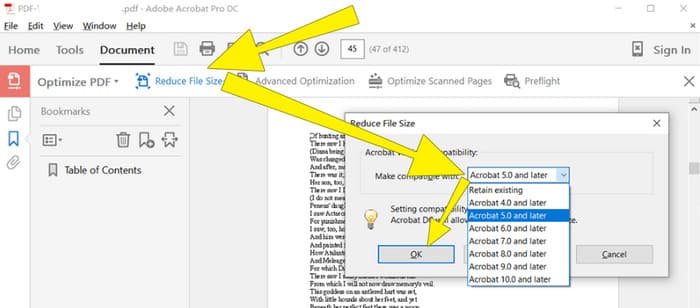
Krok 3. Poté zkomprimovaný PDF soubor uložte.
Část 4. Komprimujte soubory PDF pro e-mail pomocí převodu
Chcete se naučit nový trik, jak komprimovat PDF k odeslání e‑mailem? Pojďme soubor převést na JPG. Tento trik s konverzí lze skvěle provést pomocí PowerPointu. PowerPoint je program, který pravděpodobně používáte k vytváření prezentací. Představte si prezentaci se snímky, které obsahují text, obrázky a případně i videa. PowerPoint vám umožňuje tyto prezentace vytvářet pomocí jednotlivých snímků, mezi nimiž při prezentaci klikáte. Je to oblíbený nástroj učitelů, studentů, obchodníků a všech, kteří chtějí vizuálně sdílet informace.
Nyní může být vložení PDF do vaší prezentace v PowerPointu užitečné, ale nemusí to být nejintuitivnější proces. Ale jakmile to uděláte, vytvoření souboru JPG bude hračka. Ale nebojte se! Můžeme vás jím provést krok za krokem, který musíte dodržet, aby bylo vaše PDF vloženo okamžitě.
Krok 1. Spusťte PowerPoint ve svém počítači a vyberte správný snímek, na který můžete otevřít PDF soubor.
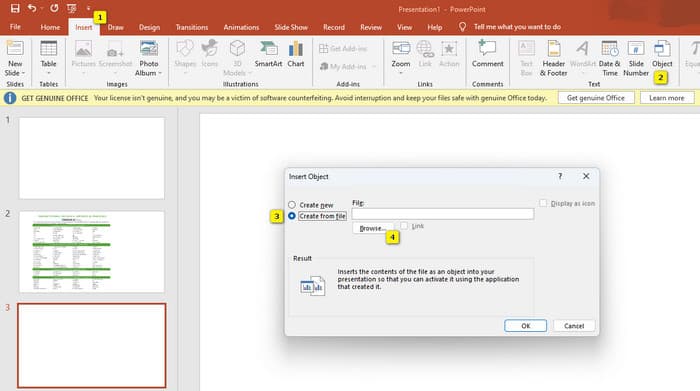
Krok 2. Nyní přejděte na kartu nabídky Insert a v části Text vyhledejte možnost Object. Klikněte na tuto možnost a objeví se nové okno. V tomto okně přepněte na možnost Create from File, která se nachází na levé straně rozhraní. Poté klikněte na tlačítko Browse, čímž umožníte import PDF souboru na snímek.
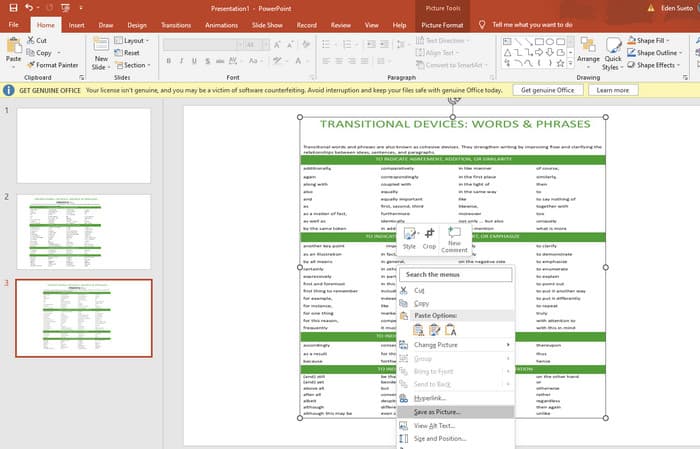
Krok 3. Jakmile je PDF soubor nahraný, můžete jej převést na JPG. Chcete‑li to provést, klikněte na PDF na snímku pravým tlačítkem, vyberte Save As Picture a uložte jej jako JPEG.
Část 5. Nejčastější dotazy o PDF a kompresi
Jakou velikost můžete poslat e-mailem jako přílohu PDF?
To závisí na vašem poskytovateli e-mailu, ale většina omezuje přílohy na přibližně 20 MB.
Jaký je nejlepší bezplatný kompresor PDF?
K dispozici jsou bezplatné PDF kompresory, ale ten nejlepší vždy závisí na preferencích uživatelů. Doposud je FVC Free PDF Compressor nejdoporučovanějším bezplatným online nástrojem.
Jak komprimovat soubory PDF pro e-mail?
Ve skutečnosti zipování funguje pro soubory PDF, protože se již jedná o komprimované soubory.
Závěr
Tento článek pojednává o tom, jak nejlépe komprimovat PDF soubory pro e‑mail. Nyní už můžete zajistit plynulejší a pohodlnější odesílání svých PDF e‑mailem, pokud je správně zmenšíte tak, aby splňovaly omezení velikosti souboru.
-
 3 nejlepší řešení, jak snadno odstranit vodoznak z videí
 Chcete odstranit otravný vodoznak z videa? Na tomto blogu se můžete naučit různé nápady na odstranění vodoznaku z videa.
-
 4 nejlepší způsoby, jak rychle přidat vodoznak do jakéhokoli videa
 Pokud si přečtete tento článek, naučíme se, jak přidat vodoznak do všech videí v systémech Windows, Mac, Online, iOS a Android.
-
 3 nejjednodušší způsoby, jak přidat vodoznak do GIF online a offline
 Přidání vodoznaku do GIF může být stejně snadné jako 1-2-3, pokud správně použijete správný nástroj. Nástroje na trhu jsou příliš široké, ale my vám představíme tři nástroje, na které se můžete spolehnout.
