


 Video Converter Ultimate
 Screen Recorder
 Oprava videa
 Bezpečné stažení
3 nejlepší záznamníky hovorů na Facebooku - Jak nahrávat videohovory na Facebooku
Jak nahrávat videohovory na Facebooku, abyste si uchovali cenné chvíle mezi vámi a vašimi přáteli a rodinou? Poté, co Facebook přidal funkci videohovorů, stále více uživatelů dává přednost kontaktu přes hovory na Facebooku před běžnými telefonními hovory. Ale jako doplňková komunikační funkce sociální sítě nemá na rozdíl od telefonních hovorů vestavěnou funkci nahrávání. Ani samostatná aplikace Facebook Messenger nemá integrovaný rekordér. V tomto případě se můžete v tomto článku seznámit se 3 snadno použitelnými rekordéry hovorů na Facebooku pro počítače, zařízení iOS a telefony s Androidem včetně podrobných návodů.

Část 1: Nejlepší online záznamník hovorů na Facebooku pro Windows / Mac
Bez stahování jakéhokoli softwaru třetích stran můžete k online nahrávání videohovorů na Facebooku zdarma použít FVC Free Screen Recorder. Jde o uživatelsky přívětivý rekordér hovorů na Facebooku s přehledným rozhraním a více funkcemi, které potřebujete.
- 1. Nahrávejte Facebook hovory a videa online zdarma pomocí jednoduchých kroků.
- 2. Bezztrátové nahrávání zvukových záznamů a videí, aby byla zachována vysoce kvalitní videa.
- 3. Žádný vodoznak, který chrání vaše vlastnictví.
- 4. Záznamy se automaticky uloží do knihovny médií a můžete se rozhodnout, zda je chcete volně mazat, stahovat a sdílet na SNS.
Krok 1: Otevřete ve svém prohlížeči webovou stránku FVC Free Screen Recorder. Klikněte na tlačítko Start Recording pro instalaci spouštěče během několika sekund a poté znovu klikněte na tlačítko Start Recording pro spuštění rekordéru.

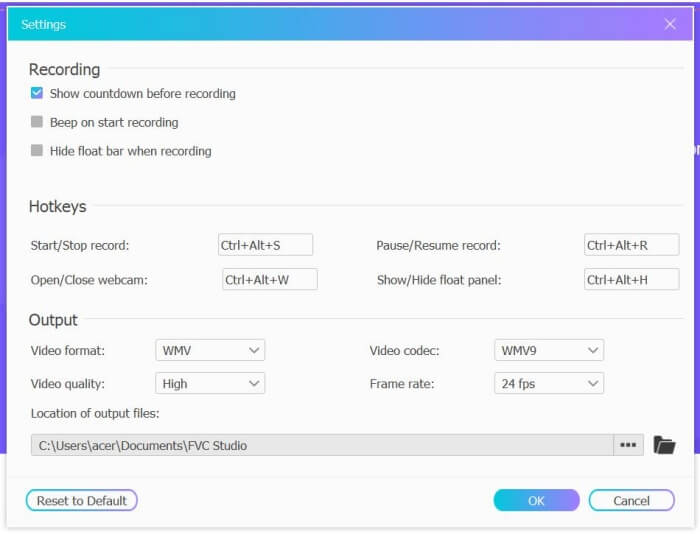
Krok 2: Klikněte na nabídku Recording Area a zvolte celou obrazovku nebo libovolně vyberte oblast. Potom zapněte zvuk Microphone a Speaker. Pro úpravu nastavení videa můžete kliknout na ikonu Setting. Můžete zvolit formát MP4, vysokou kvalitu a 24 snímků za sekundu, abyste zachovali vysokou kvalitu záznamu. Poté klikněte na tlačítko REC a začněte nahrávat hovory na Facebooku.
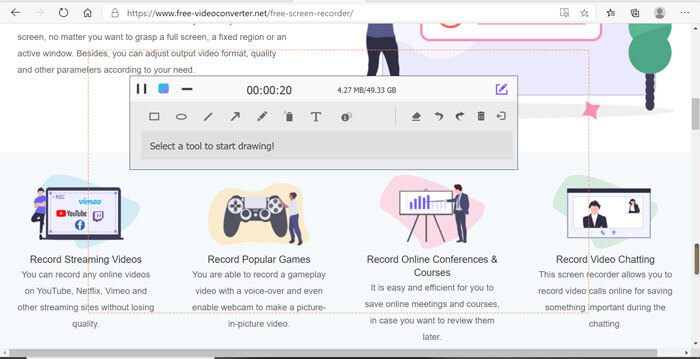
Krok 3: Objeví se plovoucí panel nástrojů s několika editačními funkcemi. Podle potřeby můžete přidávat tvary, text a čáry. Poté klikněte na ikonu Stop a uložte nahrávku do cloudu. Pravým tlačítkem myši můžete zvolit stažení do svého počítače.
Používání tohoto bezplatného online videorekordéru Facebook je nejlepším způsobem, jak uživatelé počítačů nahrávat videohovory Facebook online. Pokud předem upravíte nastavení nahrávání, můžete ukládat hovory z Facebooku ve formátu MP4 s malou velikostí a vysokou kvalitou. Pokud jste zvyklí na volání z Facebooku na mobil, pokračujte ve čtení tohoto článku.
Část 2: Jak nahrávat Facebook volání pro iOS pomocí výchozího záznamníku
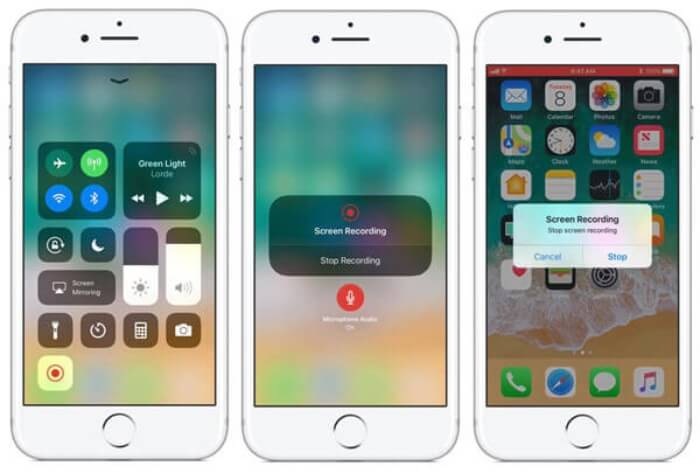
Aktualizovaná verze iOS 11 nebo vyšší má na vašem iPhonu a iPadu nový výchozí záznamník, který je nejlepší volbou pro zachycení videohovorů na Facebooku bez stahování aplikací. Zde se dozvíte, jak přidat záznamník hovorů na Facebook ke zkratkám v řídicím centru a jak jej používat.
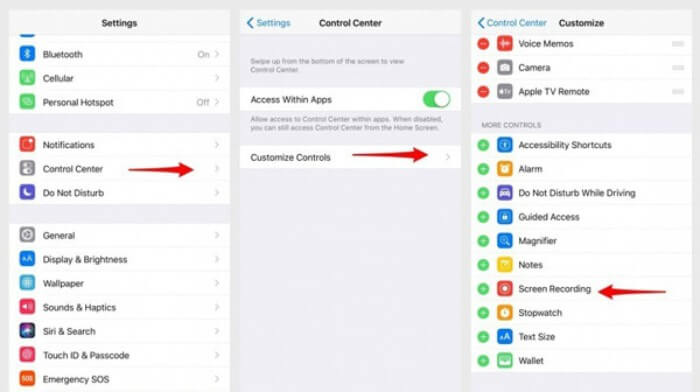
Krok 1: Klepněte na aplikaci Settings na iPhonu/iPadu a posuňte se dolů k volbě Control Center. Poté klepněte na kartu Customize Controls a najděte funkci Screen Recording. Klepnutím na ikonu Plus přidejte tuto funkci do Ovládacího centra.
Krok 2: Potažením z horní části obrazovky telefonu dolů otevřete Ovládací centrum a dole najdete aplikaci pro nahrávání. Klepnutím na ikonu Screen Recording spusťte nahrávání a můžete si zvolit, zda chcete zachytit video, nebo pouze zvukovou stopu. Pokud chcete nahrávání ukončit, klepněte nahoře na červený Status Bar a v vyskakovacím okně klepněte na možnost Stop.
Část 3: Snadný záznamník Facebook Messenger pro Android
Některé telefony s Androidem nemají vestavěné rekordéry a pro Android je příliš mnoho videorekordérů pro videohovory na Facebooku. Podrobný postup v následující části vám umožní naučit se jeden z nejlepších rekordérů pro mobilní telefony Android.
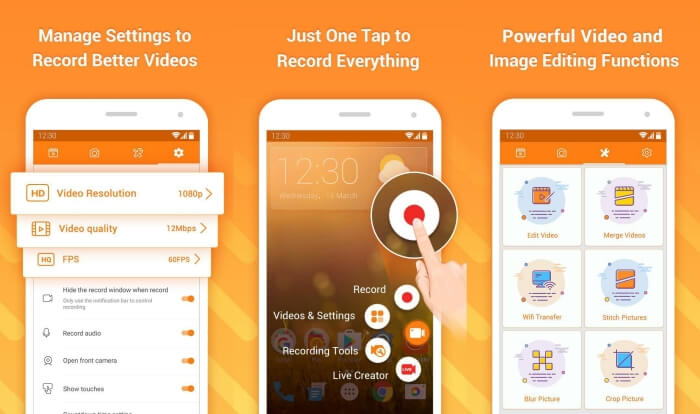
DU Recorder je snadno použitelný rekordér hovorů na Facebooku pro Android a je známý plynulým nahráváním. Bez rootu ho může každý použít k nahrávání hovorů přes Facebook Messenger jedním klepnutím.
Krok 1: Spusťte rekordér, kde najdete čtyři nabídky: nahrávky, snímky obrazovky, editační nástroje a nastavení. Nejprve klepněte na nabídku Settings a upravte parametry videa. Pro zachování vysoké kvality můžete zvolit rozlišení 1080p a snímkovou frekvenci 30 fps.
Krok 2: Rekordér nezavírejte a pouze spusťte Facebook Messenger. Poté uvidíte ikonu rekordéru. Klepněte na tuto ikonu a zvolte ikonu Recording pro zahájení záznamu obrazovky a zvuku. Opětovným klepnutím nahrávání zastavíte. Poté můžete klepnout na ikonu Editing a nahrávku oříznout a přidat k ní hudbu.
Mohlo by se vám také líbit:
Recenze Action Screen Recorder
Část 4: Nejčastější dotazy k aplikaci Facebook Call Recorder
1. Dáváte Facebooku výchozí záznamník pro nahrávání videohovorů na PC?
Ne, není. Musíte se tedy spolehnout na další profesionální záznamníky hovorů na Facebooku. Pokud si nechcete stahovat další software, který zabírá úložný prostor ve vašem počítači, je vaší nejlepší volbou FVC Free Screen Recorder.
2. Jak zahájit chat s přítelem v aplikaci Facebook Messager?
Nejprve otevřete na svém mobilním telefonu Facebook Messenger a poté vyberte chatovací schránku přítele, kterému chcete uskutečnit hovor na Facebooku. Nyní můžete vidět ikonu Video, takže na ni můžete kliknutím zahájit videohovor.
3. Jaký formát bych měl zvolit při ukládání nahrávek při používání rekordérů Facebook Messenger?
Ať už používáte záznamník hovorů na Facebooku v počítači nebo mobilním telefonu, nejlepším formátem pro ukládání videohovorů na Facebooku je MP4. Může ušetřit více úložného prostoru a je kompatibilní se všemi zařízeními.
Závěr
Výše uvedený článek představil 3 rekordéry videohovorů na Facebooku. Pro iPhone, iPad a některé telefony s Androidem můžete snadno použít vestavěný rekordér ve svém telefonu. V ostatních případech si můžete vybrat libovolný rekordér, včetně DU Recorderu na Google Play. Pro počítač je nejlepší volbou k zachycení hovorů na Facebooku FVC Free Screen Recorder. Pokud jste při používání rekordérů hovorů na Facebooku narazili na jiné problémy, zanechte prosím svůj komentář níže.
-
 Recenze Snagit 2021 - klady, zápory a nejlepší alternativa
 Jaká je nejlepší alternativa k Snagitu? Existuje nástroj pro snímání obrazovky, jako je Snagit? Tento příspěvek zkontroluje Snagit a bude sdílet nejlepší alternativu k Snagit pro snímání obrazovky.
-
 6 nejlepších rekordérů WAV, které by vám neměly chybět na ploše a online
 Nejlepší software pro nahrávání WAV, který sdílíme v tomto článku, má řadu užitečných funkcí, které vám pomohou zachytit zvuk a hlas jako profesionálové.
-
 Nejlepší 4 bezplatné rekordéry zvuku AIFF, které produkují vysoce kvalitní zvuk
 Tento článek pojednává o AIFF a některých nejoblíbenějších nástrojích, které můžete použít k vytvoření vysoce kvalitního formátu AIFF.
