


 Video Converter Ultimate
 Screen Recorder
 Oprava videa
Nejlepší převaděč MPG na GIF pro převod MPG na GIF [bezplatná a prémiová verze]
Nejlepší způsob, jak vyjádřit své pocity svým blízkým, je vytvořit smysluplnou zprávu. Chcete však vědět, co je mnohem lepší vyjádřit jiným způsobem? Můžete použít GIF. Také známé jako Graphics Interchange Format, to jsou obrázky, které odešlete, ale jsou upgradovány. Tyto pohyblivé obrázky jsou vytvořeny tak, aby jednoduše přímo nebo nepřímo vyjadřovaly vaše pocity vůči někomu. Věděli jste, že většina aplikací pro zasílání zpráv podporuje GIF i náš vestavěný messenger? Ale v některých starých verzích telefonu tento formát neposkytuje. Ačkoli je GIF zábavný, ne vždy vám poskytne emoce, které chcete vyjádřit.
Takže jste tady, abyste zjistili, jaký je nejlepší způsob, jak změnit formát svého souboru MPG na GIF. Není snad vzrušující vytvořit si vlastní GIF? Místo hledání, co byste měli použít, proč rovnou nezkusit vytvořit vlastní GIF a přidat mu svůj osobitý nádech. Nejlepší způsob, jak zjistit, jak na to, je přečíst si tento článek, protože poskytuje dostatek informací, postupů a nástrojů pro tuto práci. Takže bez dalšího chození kolem horké kaše přejděme k důležitým detailům tohoto článku. Pokračujte ve čtení, abyste se dozvěděli více o tomto seznamu převodníků.

Část 1. 4 Nejlepší nástroj pro převod MPG do formátu GIF pro PC nebo Mac
1. FVC Video Converter Ultimate
Pokud chcete sdílet humornou zprávu, aniž byste museli vypisovat příliš mnoho detailů, tento nástroj vám pomůže. Tento nástroj vám umožní převést mpg na animovaný gif a byl vyvinut společností FVC. FVC Video Converter Ultimate umožňuje uživateli převést jakýkoli typ formátu do přehratelného formátu, který chcete používat. Možná si říkáte, proč si vybrat právě tento nástroj. Je na něm něco zvláštního? Ano, tento nástroj je multifunkční. Může být vaším nejdůvěryhodnějším ripperem, tvůrcem MV, koláží a mnoha dalšími. To znamená, že tento nástroj dokáže víc než většina ostatních. Další úžasnou funkcí je jeho ultrarychlý převod, který vám pomůže převést video během chvilky. Abyste věděli, jak tento nástroj používat, pečlivě postupujte podle těchto kroků, abyste dosáhli úspěšného převodu ve vámi požadované kvalitě.
Krok 1. Nainstalujte nástroj do svého PC nebo Macu. Po instalaci postupujte podle pokynů a klikněte na Dokončit, abyste nástroj spustili.
Zdarma ke staženíPro Windows 7 nebo novějšíBezpečné stažení
Zdarma ke staženíPro MacOS 10.7 nebo novějšíBezpečné stažení
Krok 2. Po dokončení celého instalačního procesu se vám na obrazovce zobrazí takovéto mini rozhraní.
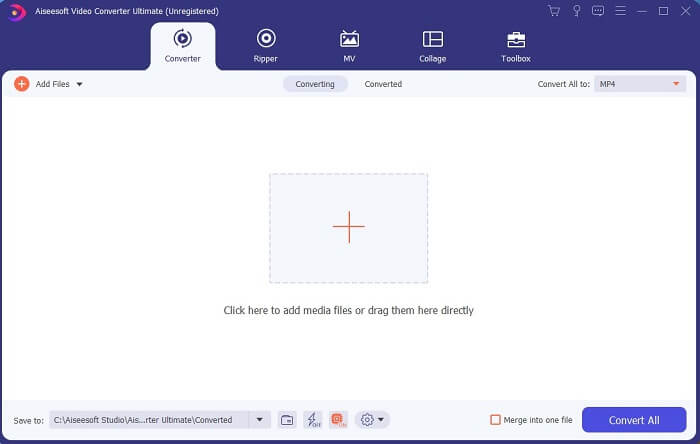
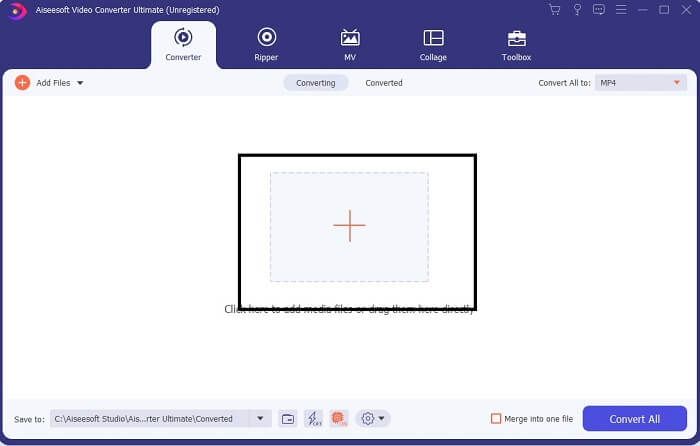
Krok 3. Klikněte na znak plus pro přidání souboru a klikněte na Otevřít pro zahájení převodu, nebo jednoduše přetáhněte videosoubor do nástroje. Na délce videa vůbec nezáleží.
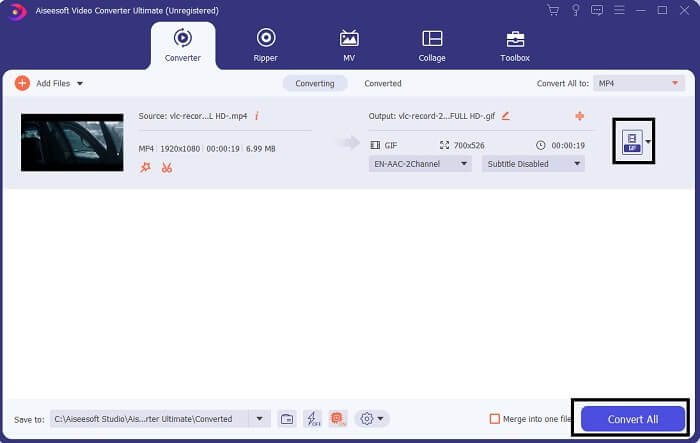
Krok 4. Klikněte na tlačítko rozbalovací nabídky v pravém horním rohu rozhraní, sjeďte dolů a klikněte na formát GIF. Vyberte požadované rozlišení, může být Velké, Střední nebo Malé. Pokud je všechno připraveno, klikněte na Convert All (Převést vše) a spusťte převod.
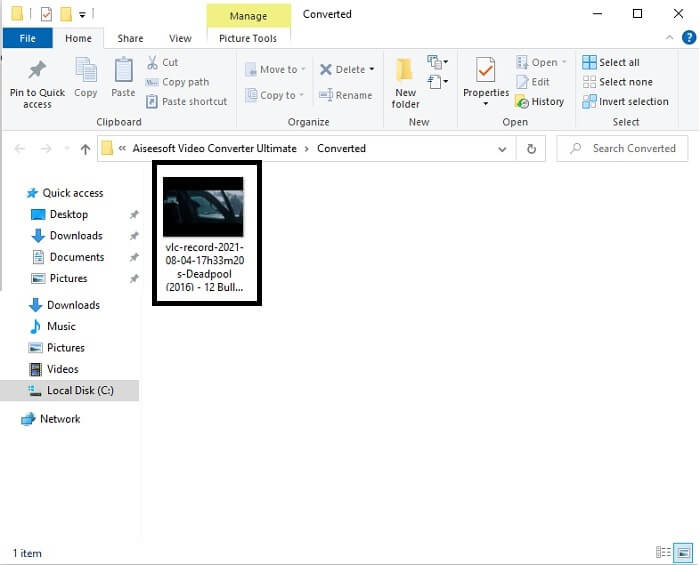
Krok 5. Po dokončení převodu se vám otevře správce souborů, který zobrazí váš finální výstup, a vy si nyní můžete svůj GIF užít. Stejným postupem můžete také převést soubor .gif na .mpg, jen změňte výstupní formát.
2. Free FVC Online Video Converter
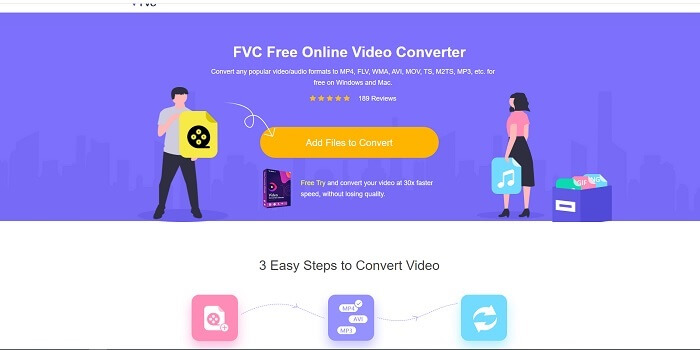
Možná si říkáte, co když nemáte peníze, mohu stále zažít stejnou konverzi jako ta první? Odpověď je velké tlusté ANO. FVC vždy poskytuje nejlepší zážitek svým zákazníkům, kteří nemají peníze, a také těm, kteří si chtějí svůj nástroj vyzkoušet. Ačkoli tento nástroj provádí pouze jednoduchou konverzi, neočekávejte příliš mnoho, protože prémiová verze může poskytnout. A nemůže rychleji převádět více video a audio formátů.
Proces převodu, který tento nástroj nabízí, je mnohem lepší než u jiných prémiových i bezplatných převodníků. FVC Free Online Video Converter je tu, aby vám zachránil den. Jak napovídá jeho název, jde o bezplatný online nástroj, který vám umožní převádět na maximální úrovni. Na rozdíl od jiných převodníků tento nástroj neobsahuje reklamy ani malware, nevyžaduje registraci, přihlášení ani zadávání osobních údajů před použitím. Pokud hledáte jednoduchý převodník, pak je to pro vás ten pravý nástroj. Postupujte podle těchto kroků, abyste zjistili, jak tento nástroj funguje jako převodník.
Krok 1. Přejděte na oficiální webové stránky kliknutím na tento odkaz.
Krok 2. Webová stránka by měla vypadat takto. Poté klikněte na Add Files to Convert (Přidat soubory k převodu), abyste tento online nástroj spustili.
Stáhněte si desktopovou verzi a převádějte soubory hromadně.
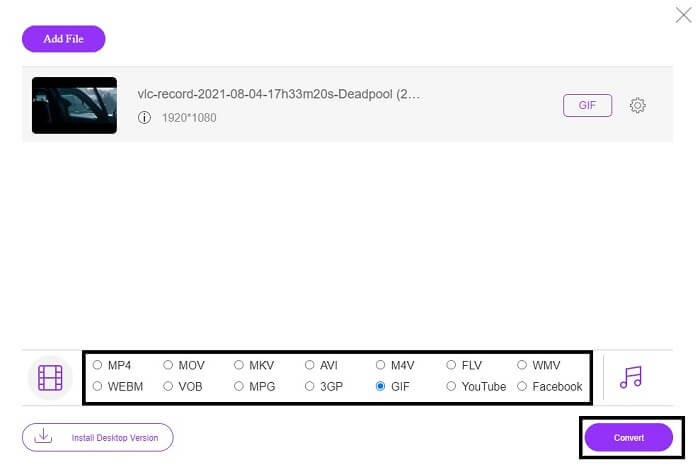
Krok 3. Vyberte video, které chcete převést. Po výběru videa zvolte jako výstupní formát soubor GIF. Pro doplnění informací – můžete zvolit také jiné video a audio formáty, můžete si je později prohlédnout, pokud chcete.
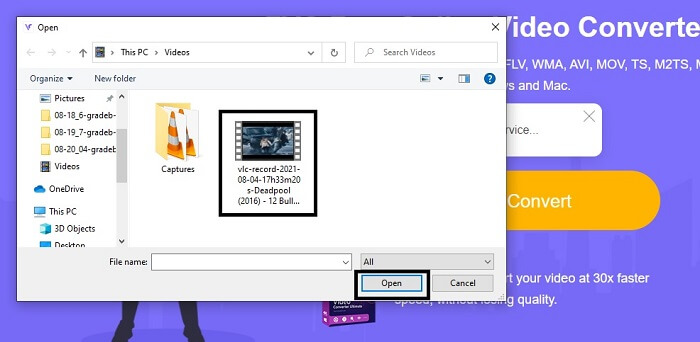
Krok 4. Vyberte, kam chcete uložit finální výstup. Až bude vše připraveno, klikněte na Convert (Převést) pro zahájení převodu. Dokončení převodu zabere jen pár sekund.
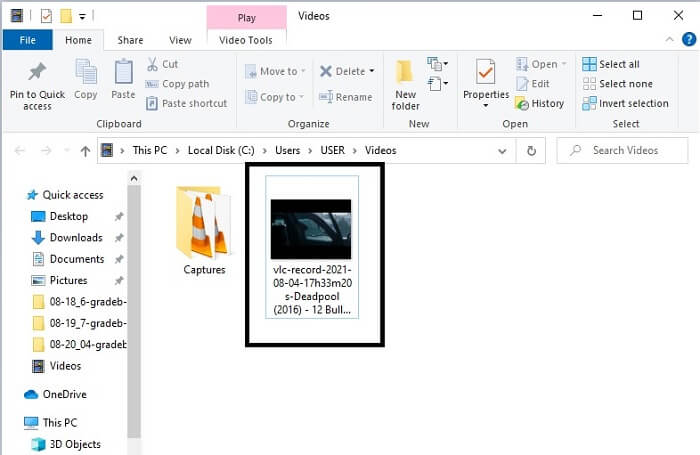
Krok 5. Abyste si ověřili úspěšný převod, vyhledejte převedený soubor GIF ve svém správci souborů nebo průzkumníku. Klikněte na něj a užijte si ho.
3. Přehrávač médií VLC
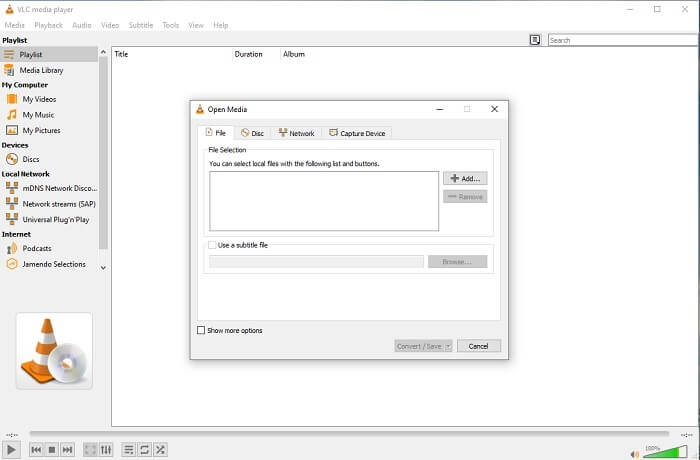
Tento nástroj je známý jako jeden z nejvýkonnějších multimediálních přehrávačů. Ale věděli jste, že přehrávač VLC dokáže také převádět MPG na GIF? Nabízené výstupní formáty jsou ale omezené jen na několik známých formátů. Přestože je VLC považován za jeden z nejlepších přehrávačů médií, jeho funkce převodu není pro vás tou nejlepší volbou. Pokud tedy chcete lepší převodník, měli byste si vybrat výše uvedený online nástroj raději než VLC. Pokud ale chcete video přehrávat, pak je pro vás VLC Media Player tou správnou volbou, protože druhý nástroj přehrávač videa neposkytuje – jeho hlavním účelem je převod.
4. Zamzar
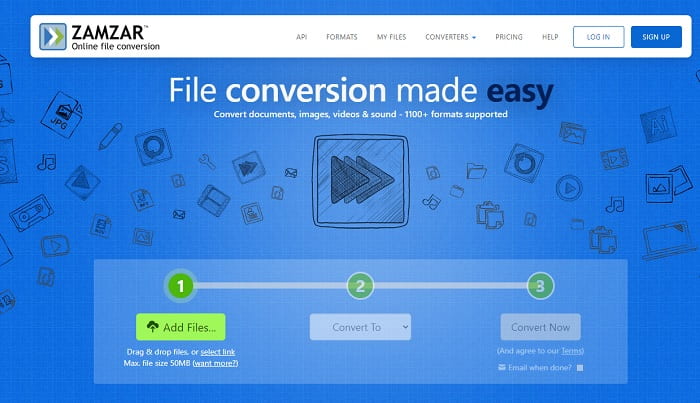
Dalším online nástrojem, který poskytuje skvělou konverzi, je Zamzar. Stejně jako jakýkoli jiný online převodník sdílejí stejné rozhraní a také poskytuje přesné pokyny, jak jej převést. Proces převodu a stahování je ale jiný. Přestože je bezplatná verze, můžete převést maximálně 50 MB souboru. Protože po převedení videa musíte přejít do fáze jeho stahování. Těm, kteří opustí svou konverzi a čekají na přehrání produktu, to přináší spoustu starostí.
Část 2. Srovnávací tabulka
| Funkce nástroje | FVC Video Converter Ultimate | Online převaděč FVC zdarma | VLC Media player | Zamzar |
| Konvertor |  | | | |
| Nástroj pro úpravy | |  | | |
| Výkonný převodník | | | | |
| Nutná registrace | | | | |
| Platformy | Desktopová aplikace | Webová aplikace | Desktopová aplikace | Webová aplikace |
| Cenové rozpětí | $25,00 1 měsíc/1 PC $55.20 Jednorázový nákup na 1 PC $119,00 Životnost 5 PC | Jedná se o bezplatný online nástroj | Jedná se o bezplatný online nástroj | Zdarma online nástroj Poskytuje však také měsíční prémii. Základní: $9 Pro: $16 Pro podnikání: $25 |
MPG vs. GIF
MPG, vytvořený Moving Picture Experts Group (MPEG), je běžný digitální video formát pro ukládání informací o videu, zvuku a metadatech. Je to docela užitečné při vytváření filmů pro sdílení na internetu. Tyto soubory v MPG obvykle obsahují MPEG-1 nebo MPEG-2 video/audio kompresi.
GIF je běžný formát obrázků pro webovou grafiku. Kromě ukládání malých obrázků a obrázků, které obsahují text, může GIF také obsahovat a zobrazovat základní animace na webových stránkách. Je to bezztrátový formát a komprese GIF nesnižuje čistotu obrazu.
Část 3. Časté dotazy o MPG až GIF
Existuje způsob, jak používat Photoshop a převádět video na GIF?
Ano, MPG můžete převést na GIF i pomocí Photoshopu. A nejen soubory MPG; můžete zvolit i jiné formáty a také je převést na GIF. Další speciální funkcí je, že GIF můžete navíc vylepšit. Klikněte zde a zjistěte, jak převést MP4 na GIF.
Jaký je nejlepší nástroj pro záznam obrazovky pro nahrávání GIF?
Nejlepším nástrojem pro záznam obrazovky, který k tomu můžete použít, je FVC Screen Recorder. Tento nástroj není nejlepší jen pro nahrávání videí. Má také vlastní integrovaný záznamník zvuku a rekordér her pro kvalitnější herní zážitek. Tento nástroj je však třeba nejprve zaplatit, než ho budete moci používat. Nemusíte být ale smutní, protože existuje i online nástroj, který nahrávání zvládne.
Proč byl GIF vytvořen?
GIF byl vytvořen, aby zobrazoval obraz a přitom šetřil úložný prostor. Tvůrcem formátu GIF je Steve Wilhite, americký počítačový vědec, s pomocí technologického gigantu CompuServe koncem roku 1987. Klikněte zde a zjistěte více informací o GIFech.
Závěr
Nakonec, když víte, jak na sobě vytvořit GIF, zkuste to a užijte si to. Pouhým použitím tohoto jednoduchého nástroje můžete něco změnit. Místo hledání na webu jste nyní certifikovaným tvůrcem GIF. Také nyní můžete vyjádřit své pocity svým vlastním způsobem svým osobním dotykem a odborností vyvinutou pouhým čtením tohoto článku. Doufám, že si můžete užít život lepšího GIF, který vytvoříte, a sdílet svůj nejlepší GIF s celým světem.
-
 [Průvodce] Jak převést videa M4V na animované GIFy ve Windows/Mac
 Pokud chcete vytvářet animované soubory GIF z vašich oblíbených videí M4V, můžete se dozvědět o 2 snadných a efektivních způsobech převodu videí M4V na GIF s přizpůsobeným nastavením.
-
 WebM to GIF - 3 bezplatné převaděče WebM na GIF pro vytváření vlastních GIFů
 Je WebM GIF? Jak z videa udělat GIF? Existuje nějaký bezplatný převodník WebM na GIF? Tento příspěvek sdílí 3 bezplatné způsoby, které vám pomohou převést WebM na GIF.
-
 Jak převést videa MKV na animované GIF bez Photoshopu/FFmpeg
 Po stažení a sledování filmů MKV na počítači možná budete chtít sdílet úžasné okamžiky s přáteli nebo na internetu jako GIF. V tomto článku se můžete dozvědět o 2 nejjednodušších způsobech převodu MKV na GIF.

