


 Video Converter Ultimate
 Screen Recorder
 Oprava videa
 Bezpečné stažení
Jak převést své video soubory FLV do formátu 3GP zdarma
Tento článek vám ukáže nejlepší způsoby, jak převést FLV na 3GP. Podle průzkumů existuje na trhu spousta video formátů. Vývojáři je vytvořili pro různé účely. FLV například, zkratka pro Flash Video, se používá k ukládání obrazového obsahu pro přehrávání v Adobe Flash Playeru přes internet.
3GP, na druhé straně, je multimediální formát vytvořený Partnerským projektem třetí generace za účelem úspory šířky pásma a využití dat na mobilních zařízeních. Jinými slovy, měli byste raději převést FLV na 3GP a sledovat videa na sluchátku.

Část 1: Nejlepší způsob převodu FLV na 3GP na ploše
FVC Free FLV Converter je výkonný video konvertor. Jak už název napovídá, umožní vám převést FLV na 3GP, aniž byste museli utratit jedinou korunu. Kromě toho nabízí řadu užitečných funkcí, jako je úprava videa a audia. Ještě důležitější je, že uživatelsky přívětivé rozhraní vám umožní rychle najít vše, co potřebujete.
Klíčové vlastnosti nejlepšího bezplatného převaděče FLV
- 1. Převádějte videa FLV do všech multimediálních formátů, například 3GP.
- 2. Dávkové zpracování více video souborů současně.
- 3. Transcode FLV soubory pro přehrávání na mobilních zařízeních.
Zdarma ke staženíPro Windows 7 nebo novějšíBezpečné stažení
Zdarma ke staženíPro macOS 10.7 nebo novějšíBezpečné stažení
Jak převést FLV na 3GP zdarma
Po instalaci spusťte nejlepší bezplatný FLV konvertor na svém zařízení. Je kompatibilní s Windows 10/8/7 i Mac OS X. Kliknutím na tlačítko Add File(s) otevřete dialog pro výběr souborů. Vyberte FLV soubory, které chcete převést, a klikněte na Open. Poté se videa zobrazí v knihovně.

Krok 2: Nastavte výstupní formát
Klikněte na rozbalovací nabídku Profile format dole a zobrazí se okno s profily. Do pole Search Profile zadejte 3GP a stiskněte klávesu Enter na klávesnici. Poté zvolte výstupní formát. Pokud chcete videa přehrávat na mobilním zařízení, vyberte výrobce a přímo zvolte správný model.

Krok 3: Převod FLV na 3GP
Nastavte konkrétní složku pro uložení výstupu kliknutím na tlačítko Open Folder dole. Nakonec klikněte na tlačítko Convert a spusťte převod FLV na 3GP. Za pár minut najdete 3GP soubory na svém pevném disku.

Část 2: Jak převést FLV na 3GP online
Webové aplikace pro převod videa jsou další oblíbenou cestou, jak převádět FLV na 3GP zdarma. Většina z nich má však různá omezení, jako je limit velikosti souboru, vodoznak, bezpečnostní rizika a další. Naštěstí vám FVC Free Online Video Converter pomůže tyto problémy vyřešit. Je zcela zdarma a bez jakýchkoli omezení. Výstupní kvalita je skvělá.
Krok 1: Navštivte https://www.free-videoconverter.net/free-online-video-converter/ v prohlížeči a klikněte na tlačítko Add Files to Convert, abyste stáhli spouštěč. Nezabere téměř žádné místo v paměti vašeho počítače.
Stáhněte si desktopovou verzi a převádějte soubory hromadně.
Krok 2: Klikněte na nabídku Add File a nahrajte FLV soubory, které chcete převést. Tato webová aplikace vám umožní dávkově převádět více videí najednou.
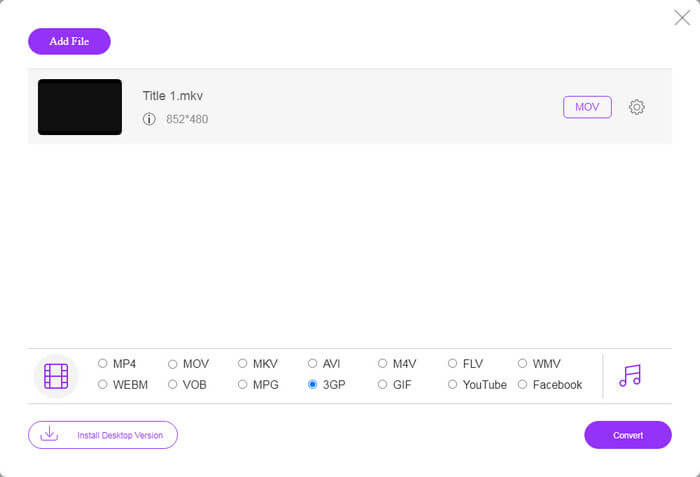
Krok 3: Přejděte dolů a v sekci profilu zvolte 3GP. Kliknutím na tlačítko Convert spusťte online převod FLV na 3GP. Pokud máte rychlé připojení k internetu, převod se dokončí během několika sekund. Poté si stáhněte 3GP soubory na svůj pevný disk.
Nenechte si ujít:
Část 3: Jak převést FLV na 3GP pomocí VLC
Freeware je někdy stejně výkonný jako profesionální software. Například VLC je populární přehrávač médií s otevřeným zdrojovým kódem. Je schopen převést FLV na 3GP na Windows, Mac a Linux zdarma. Samozřejmě, že náklady jsou zřejmé, například obtížné použít. Proto sdílíme níže uvedené kroky:
Krok 1: Spusťte bezplatný převodník FLV na 3GP na svém počítači. Nejprve ho musíte nainstalovat. Na oficiálních stránkách najdete bezpečný instalační program.
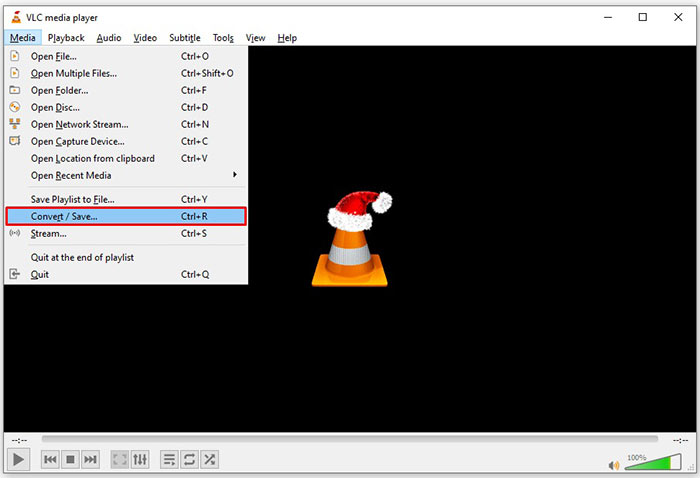
Krok 2: Přejděte do nabídky Media na horní liště a zvolte Convert/Save. Poté se zobrazí dialogové okno Otevřít média.
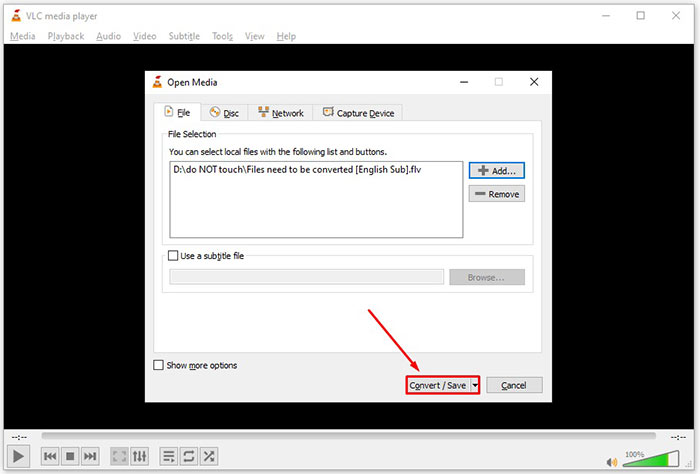
Krok 3: Klikněte na tlačítko Add, vyhledejte FLV soubor, který potřebujete převést, vyberte jej a klikněte na Open. Stiskněte tlačítko Convert/Save, abyste přešli do dalšího okna.
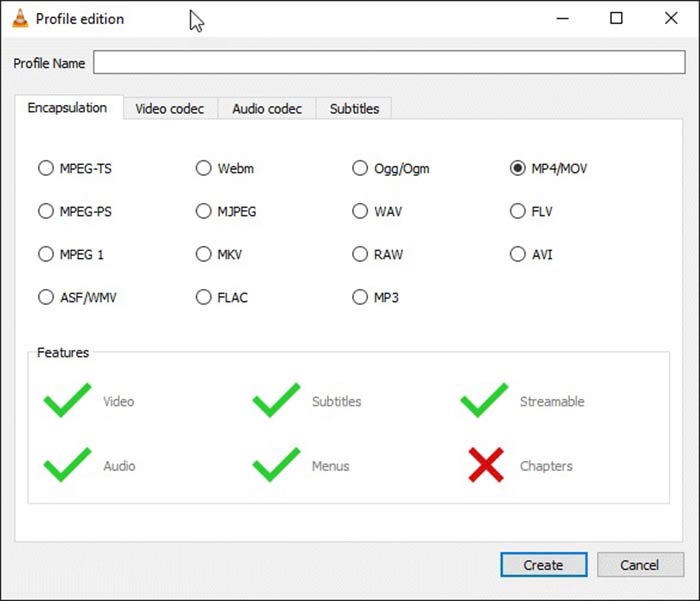
Krok 4: Rozbalte seznam vedle Profile a zvolte 3GP nebo příbuzný video formát. Pokud chcete změnit video kodek či jiné parametry, klikněte na tlačítko Profile Edit vedle rozbalovacího seznamu a přidejte 3GP.
Krok 5: Klikněte na tlačítko Browse a v sekci Destination zvolte konkrétní složku pro uložení výstupního 3GP souboru.
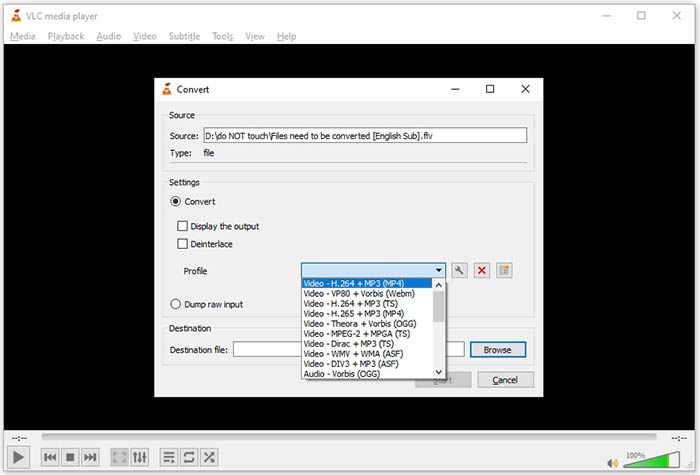
Krok 6: Jakmile kliknete na tlačítko Start, VLC začne převádět FLV na 3GP.
Dokončení převodu trvá chvilku, protože VLC provádí práci nahráváním původního videa. To znamená, že proces stráví tak dlouho, jak dlouho trvá vaše video FLV.
FLV vs. 3GP
Adobe Flash Player používal FLV k poskytování videoobsahu, jako jsou filmy a televizní pořady. V současné době Adobe již přehrávač nevyvíjí a doporučuje uživatelům, aby jej z bezpečnostních důvodů odinstalovali. Formát FLV však můžete stále používat v mnoha programech jiných než Adobe/Macromedia.
Projekt partnerství 3. generace (3GPP) vytvořil formát 3GP/3GPP jako formát multimediálního kontejneru. Ve skutečnosti je založen na formátu mediálního souboru ISO. Často jej používáme k ukládání video/audio streamů, které jsou přenášeny mezi 3G mobilními telefony a online.
Část 4: Časté dotazy týkající se převodu FLV na 3GP
Poškození převodu FLV na 3GP kvalitu videa?
Obecně řečeno, převod videa ztratí kvalitu. Výkonný program pro převádění videa je však schopen tento problém vyřešit a optimalizovat kvalitu videa pomocí pokročilé technologie.
Jak dlouho trvá převést video FLV?
Je určováno několika faktory, jako je délka videa, software pro převod videa, který používáte, výkon vašeho hardwaru a další. Pokud používáte webový video převodník, je vaše připojení k internetu zásadním prvkem.
Proč FLV nehraje na mém iPhone?
iPhone podporuje MOV, součást MP4, ASF a AVI. Proto nemůžete otevřít FLV na iPhone přímo. Existují však způsoby, jak sledovat FLV na mobilních zařízeních. Pokud je váš soubor FLV hostován internetovými službami, jako je Disk Google, je k dispozici integrovaný přehrávač médií. Navíc můžete použít jiný přehrávač médií, například VLC.
Závěr
Tato příručka vám řekla tři bezplatné způsoby převodu video souborů FLV do formátu 3GP v počítači nebo online. Pokud se chystáte sledovat videa FLV na mobilních zařízeních, měli byste je převést do formátu 3GP nebo jiných formátů vhodných pro mobilní zařízení pomocí převaděče FLV Free FVC. Je to nejen snadné, ale také schopné chránit kvalitu vašeho videa. Více otázek? Zanechte prosím zprávu níže.
-
 Jak převést své video soubory FLV na MP4 bez placení penny
 Tato příručka sdílí čtyři bezplatné metody pro převod vašich video souborů FLV do formátu MP4 v systémech Windows 10/8/7 / XP a Mac OS X, takže si videa můžete vychutnat na jakýchkoli zařízeních.
-
 Jak převést svá videa FLV na zvukové soubory MP3 na ploše a online
 Jak převést soubor FLV na soubor MP3? Vše, co musíte udělat, je pečlivě přečíst tento článek, najít svou oblíbenou metodu a podle našeho podrobného průvodce získat to, co chcete.
-
 Nejlepší 3 způsoby, jak převést FLV na MOV
 Jak převést FLV na MOV? Jak převedu FLV na MOV na Macu? Existuje nějaký bezplatný způsob, jak převést FLV na MOV online? Tento příspěvek sdílí 3 převodníky FLV na MOV pro změnu souborů FLV na MOV.

