


 Video Converter Ultimate
 Screen Recorder
 Oprava videa
 Bezpečné stažení
3 bezplatné způsoby převodu FLV na MPG
MPG, standardizovaný skupinou Moving Picture Experts Group, je běžný videoformát, který obsahuje video ve formátu MPEG-1 nebo MPEG-2 a také audio stopy. Je podporován na všech počítačových platformách, včetně Windows a macOS. Víte, jak převést FLV na MPG?

Na trhu je k dispozici mnoho video konvertorů, které vám mohou pomoci snadno převést FLV na MPG. V tomto článku vám představíme 3 skvělé nástroje, pomocí nichž můžete své soubory FLV změnit na MPG zdarma.
Část 1. Jak zdarma převést FLV na MPG
Bezplatný konvertor bude vždy vaší první volbou, když chcete převést FLV na MPEG. V této první části vám chceme představit snadno použitelný Free FLV Converter, který provede konverzi videa z FLV do MPG. Ve velké míře podporuje všechny běžně používané video a audio formáty, včetně FLV, MPG, MKV, MP4, MOV, WMV, WAV, AAC, MP3, M4A, FLAC a dalších. Umožňuje vám převádět FLV na MPG bez ztráty kvality.

- Převeďte jakýkoli soubor FLV na MPG, MP4, MOV, AVI, MKV, MP3, AAC a další.
- Nabídněte různá témata pro úpravy a přizpůsobení souboru FLV.
- Pokročilé vícejádrové procesory a GPU akcelerace pro převod FLV na MPG vysokou rychlostí.
- Podpora iPhone 12/11 / XS / XR / X / 8/7, iPad Pro, Samsung Galaxy S21, HUAWEI, SONY, LG atd.
- Převeďte jeden nebo více souborů FLV bez ztráty kvality obrazu nebo zvuku.
Zdarma ke staženíPro Windows 7 nebo novějšíBezpečné stažení
Zdarma ke staženíPro macOS 10.7 nebo novějšíBezpečné stažení
Krok 1. Tento FLV konvertor vám umožňuje převádět FLV na MPG jak na PC s Windows 10/8/7, tak na Macu. Podle svého systému si můžete vybrat správnou verzi a poté ji zdarma nainstalovat do počítače.
Krok 2. Otevřete tento FLV na MPG konvertor a poté klikněte na Add Files pro načtení svých FLV souborů.

Krok 3. Vyberte MPEG jako cílový formát z rozbalovacího seznamu Output format. Kliknutím na ikonu Settings vedle výstupního formátu můžete upravit další nastavení profilu. V tomto kroku můžete také zvolit vhodnou výstupní složku pro převedený MPG soubor.
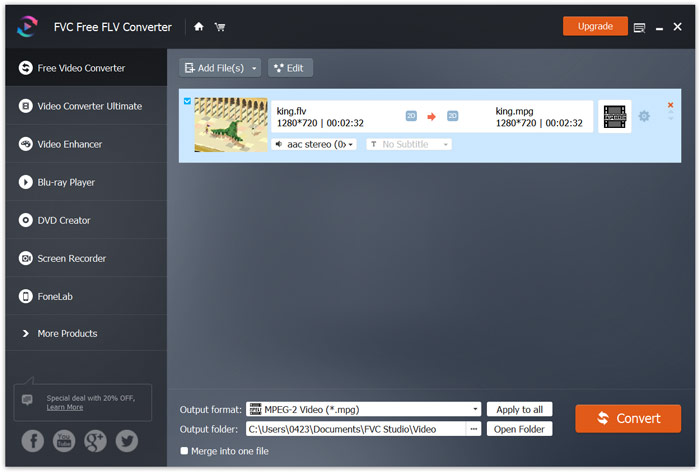
Krok 4. Jak již bylo zmíněno výše, tento bezplatný FLV na MPG konvertor je vybaven řadou editačních funkcí. Před samotnou konverzí je tedy můžete použít k úpravě videa. Poté klikněte na tlačítko Convert a spusťte tento bezplatný převod FLV na MPG.
Část 2. Jak změnit FLV na MPG online
Když na Googlu hledáte, jak převést FLV na MPG, mezi prvními 20 výsledky vyhledávání uvidíte mnoho online konvertorů. Zde vám důrazně doporučujeme oblíbený Free Online Video Converter. Je kompatibilní s mnoha populárními video a audio formáty. Nevyžaduje přihlášení ani nemá omezení velikosti souboru. Můžete přímo přejít na tuto online stránku FLV na MPG konvertoru a začít s konverzí.
Krok 1. Otevřete prohlížeč, jako je IE, Chrome, Firefox nebo Safari, a přejděte na tuto stránku Online FLV to MPG converter.
Stáhněte si desktopovou verzi a převádějte soubory hromadně.
Krok 2. Klikněte na Add Files to Convert a poté na tlačítko Download pro rychlou instalaci spouštěče (launcheru) pro konverzi FLV na MPEG. Po připravení spouštěče můžete v otevřeném okně vyhledat a načíst svůj FLV soubor.

Krok 3. Nyní budete přesměrováni do okna konvertoru. Zobrazí se zde některé populární video formáty, jako MP4, MPG, MOV, AVI, FLV, MKV, WMV a další. Jako cílový formát nastavte MPG.
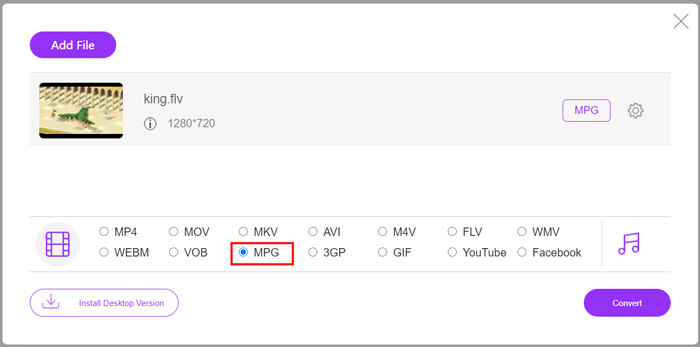
Krok 4. Pro další nastavení videa a audia můžete kliknout na ikonu Settings vedle výstupního formátu. Poté kliknutím na tlačítko Convert spusťte konverzi videa z FLV na MPG.
Část 3. Jak zdarma převést FLV na MPG pomocí Aconvert
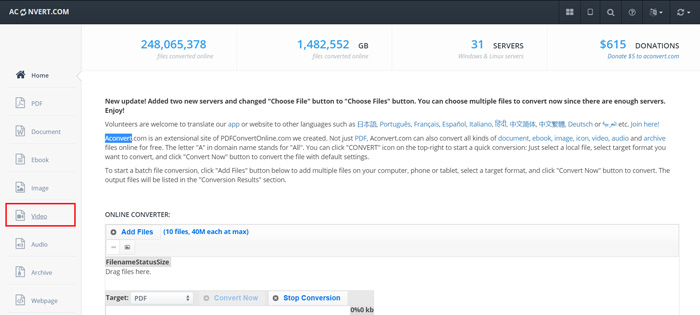
Aconvert je další populární online konvertor videa, audia, dokumentů, obrázků a PDF. Jako univerzální převodník souborů vám umožňuje online zdarma převádět vaše FLV soubory na MPG. Následující návod ukazuje, jak jej používat.
Krok 1. Vyhledejte a přejděte na oficiální stránky Aconvert. Jakmile tam budete, klikněte vlevo na Video. Poté budete přesměrováni na stránku Convert video online.
Krok 2. Klikněte na tlačítko Select File pro vyhledání a nahrání svého FLV souboru. Poté jako výstupní formát zvolte MPG. Pro více možností klikněte na Options a vyberte Change size, bitrate nebo frame rate.
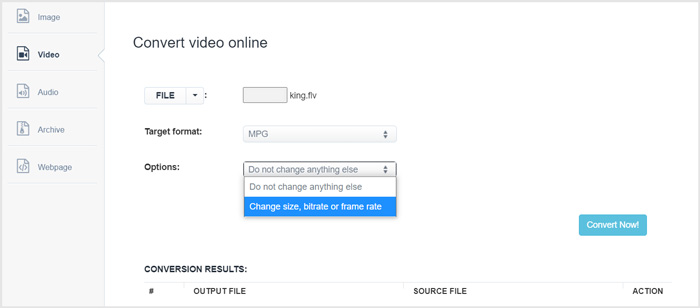
Krok 3. Klikněte na tlačítko Convert Now, abyste spustili online konverzi FLV na MPG. Tento online FLV na MPG konvertor začne váš soubor nahrávat a převádět. Ve srovnání s výše uvedeným online video konvertorem to zabere více času k dokončení celého procesu, proto buďte trpěliví.
FLV vs. MPG
Adobe Flash Player používal FLV k poskytování videoobsahu, jako jsou filmy a televizní pořady. V současné době Adobe již přehrávač nevyvíjí a doporučuje uživatelům, aby jej z bezpečnostních důvodů odinstalovali. Formát FLV však můžete stále používat v mnoha programech jiných než Adobe/Macromedia.
MPG, vytvořený Moving Picture Experts Group (MPEG), je běžný digitální video formát pro ukládání informací o videu, zvuku a metadatech. Je to docela užitečné při vytváření filmů pro sdílení na internetu. Tyto soubory v MPG obvykle obsahují MPEG-1 nebo MPEG-2 video/audio kompresi.
Část 4. Časté dotazy týkající se převodu FLV na MPG
Otázka 1. Jaké jsou nevýhody FLV?
Za prvé, vytváření obsahu Flash je časově náročné a nákladné. Soubory FLV nelze rozpoznat pomocí vyhledávačů. Nebudou tedy přidáni k optimalizaci webu. V takovém případě potřebujete delší dobu čekání na přístup na webovou stránku s bleskem.
Otázka 2. Mohu přehrávat soubory FLV v programu Windows Media Player?
Ano. Windows Media Player může otevírat soubory FLV. Chcete-li však přehrávat soubory FLV, musíte si stáhnout a nainstalovat kodek CCCP nebo jiné nezbytné kodeky.
Otázka 3. Jaký je nejlepší hráč FLV?
VLC Media Player může být pro vás nejlepším přehrávačem pro přehrávání FLV souborů jak na počítači s Windows, tak na Macu. Samozřejmě existuje mnoho dalších video přehrávačů nabízených na internetu, které vám pomohou soubory FLV zobrazit. Více FLV přehrávačů najdete zde.
Závěr
V tomto článku jsme se hlavně věnovali tomu, jak převést FLV na MPG. Doporučili jsme vám 3 bezplatné video konvertory, pomocí nichž můžete převádět své FLV soubory. Pokud máte lepší způsob převodu FLV, podělte se o něj prosím v komentáři s ostatními čtenáři.
-
 MP4 na MPEG: Nejlepší 4 způsoby převodu MP4 na MPEG (zdarma)
 Tento příspěvek je podrobným průvodcem pro převod MP4 na MPEG. Můžete použít horní 4 bezplatné převaděče videa pro změnu MP4 na MPEG-1 nebo MPEG-2, jak si přejete.
-
 Jak komprimovat soubory MPEG-4 online - žádné stahování, žádný vodoznak
 Nemáte dostatek úložného prostoru pro uložení všech vašich souborů MPEG-4? Zde je několik řešení, která vám mohou pomoci zmenšit vaše video soubory.
-
 Nejlepší 4 bezplatné způsoby převodu videí FLV na MP4 na počítači a online
 Tato příručka sdílí čtyři bezplatné metody pro převod vašich video souborů FLV do formátu MP4 v systémech Windows 10/8/7 / XP a Mac OS X, takže si videa můžete vychutnat na jakýchkoli zařízeních.

