


 Video Converter Ultimate
 Screen Recorder
 Oprava videa
 Bezpečné stažení
3 bezplatné způsoby převodu FLV na WAV
Chcete z stažených videí extrahovat zvuk, ale nevíte jak? Hledáte snadný způsob, jak převést soubory FLV na WAV nebo MP3?
V některých případech potřebujete pouze zvukovou stopu nebo hudbu na pozadí jednoho videa. Musíte tedy převést video na zvuk. Tento příspěvek bude hovořit hlavně o tom, jak převést FLV na WAV.

Zde jsou pro vás doporučeny 3 skvělé převodníky FLV na WAV, pomocí kterých převedete svoje soubory FLV. Můžete si vybrat preferovanou metodu pro převod FLV na zvuk WAV.
Část 1. Převod FLV na WAV online
Když na internetu hledáte způsob převodu FLV na WAV, uvidíte, že mnoho výsledků tvoří bezplatné online převodníky. Abyste nemuseli váhat, který z nich použít, upřímně vám zde představujeme populární Free Online Video Converter. Je speciálně navržen k převodu FLV na jakýkoli běžně používaný video či audio formát, jako MP4, MOV, AVI, MP3, AAC, M4A a WAV.
Ve srovnání s jinými online převaděči FLV na WAV podporuje více vstupních a výstupních formátů a nabízí rychlejší rychlost převodu. Navíc nevyžaduje žádnou registraci ani přihlášení. Umožňuje vám převést libovolný soubor FLV bez omezení velikosti souboru.
Krok 1: V prohlížeči přejděte na tuto stránku bezplatného online převodníku FLV na WAV. Je kompatibilní s většinou webových prohlížečů, včetně Safari, IE, Chrome, Firefox a Yahoo.
Krok 2: Klikněte na Add Files to Convert a poté na tlačítko Download pro instalaci spouštěče pro převod FLV. Po instalaci se zobrazí vyskakovací okno, ve kterém můžete načíst svůj soubor FLV.

Krok 3: Po přechodu do hlavního okna převodníku uvidíte vypsané některé populární video formáty, jako MP4, MOV, AVI, FLV, MKV, VOB, MPG, WMV a další. V tomto kroku musíte kliknout na ikonu Audio, aby se zobrazily audio formáty. Jako výstupní formát zvolte WAV.
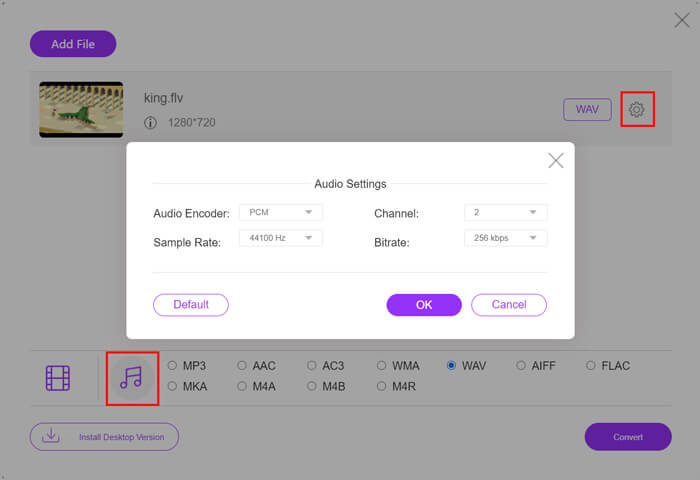
Krok 4: Před převodem FLV na WAV můžete kliknout na ikonu Settings vedle výstupního formátu a upravit další nastavení zvuku. Zde můžete měnit audio kodek, kanály, vzorkovací frekvenci a datový tok. Poté klikněte na tlačítko Convert pro převod souboru FLV na zvuk WAV.
Chcete‑li převést FLV na zvukové formáty jako MP3, WMA, WAV atd., měli byste kliknout na kartu zvuku a zaškrtnout ji.
Část 2. Bezplatný převod FLV na WAV
Kromě online převodníků FLV existují také některé bezplatné video konvertory, které vám pomohou snadno převést FLV na WAV. K tomu můžete využít Free FLV Converter.

Zdarma převaděč FLV na WAV
155321+ stažení- Převeďte FLV na WAV, AAC, MP3, M4A, MP4, MOV, AVI a další.
- Podpora všech často používaných video a audio formátů.
- Podpora nejnovějších vícejádrových procesorů a GPU akcelerací.
- Převeďte jeden nebo více souborů FLV bez ztráty kvality.
Free DownloadPro Windows 7 nebo novějšíBezpečné stahování
Free DownloadPro MacOS 10.7 nebo novějšíBezpečné stahování
Nese všechny převáděcí funkce, které potřebujete. Následující průvodce vám ukáže, jak s ním proměnit FLV na WAV.
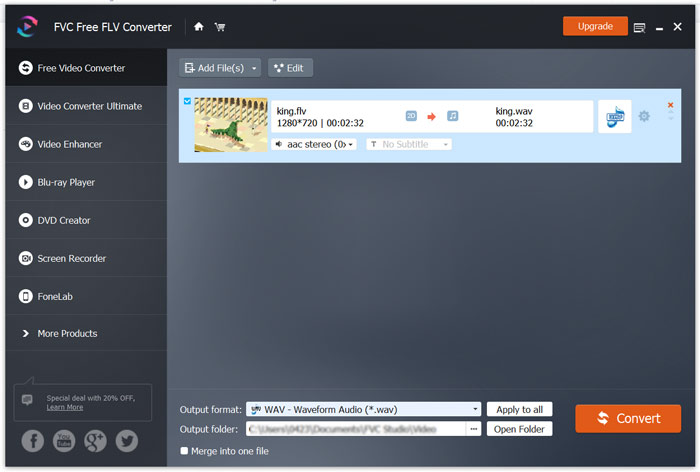
Krok 1: Zdarma si stáhněte, nainstalujte a spusťte tento bezplatný převodník FLV na WAV v počítači. Kliknutím na Add Files importujte svůj (své) soubor(y) FLV.

Krok 2: Klikněte na Output format a jako cílový formát vyberte WAV. Poté zvolte vhodnou cílovou složku.
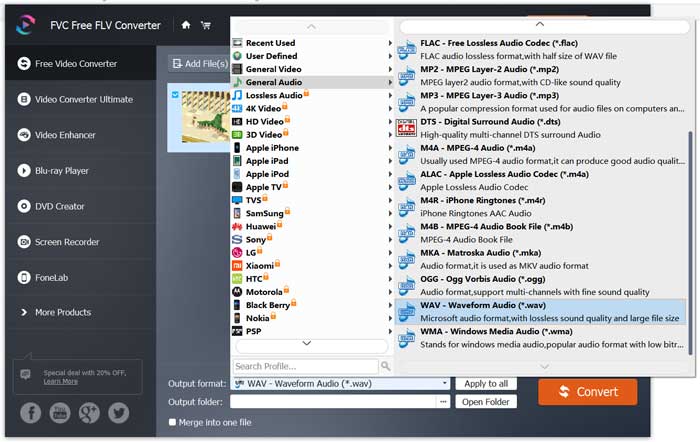
Krok 3: Klikněte na tlačítko Convert a spusťte převod FLV na WAV.
Část 3. Převod FLV na WAV pomocí VLC
Pokud máte v počítači nainstalovaný VLC Media Player, můžete se při převodu FLV na WAV spolehnout také na VLC. Měli byste vědět, že VLC je populární multimediální přehrávač, který zároveň nabízí i základní funkce pro převod a úpravu.
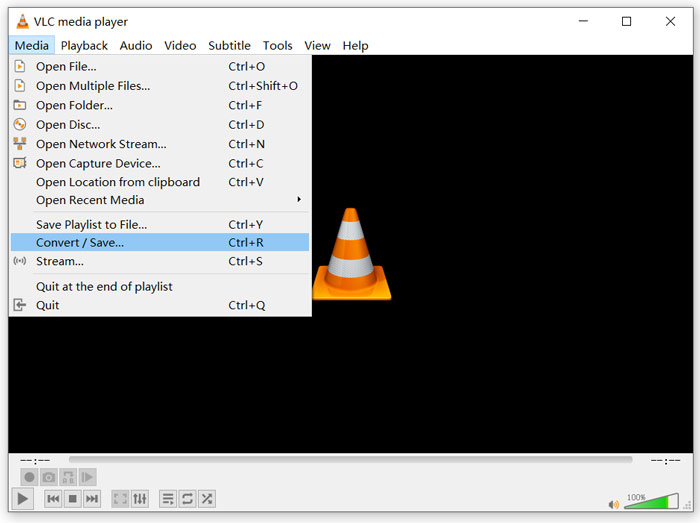
Krok 1: Otevřete v počítači VLC Media Player. Můžete si jej zdarma nainstalovat ze stránek VideoLAN. Klikněte na Media a poté z rozbalovací nabídky zvolte možnost Convert/Save.
Krok 2: Nyní se dostanete do okna Open Media. Kliknutím na tlačítko Add přidejte soubor FLV, který chcete převést. Poté klikněte na tlačítko Convert/Save, čímž vyvoláte okno Convert.
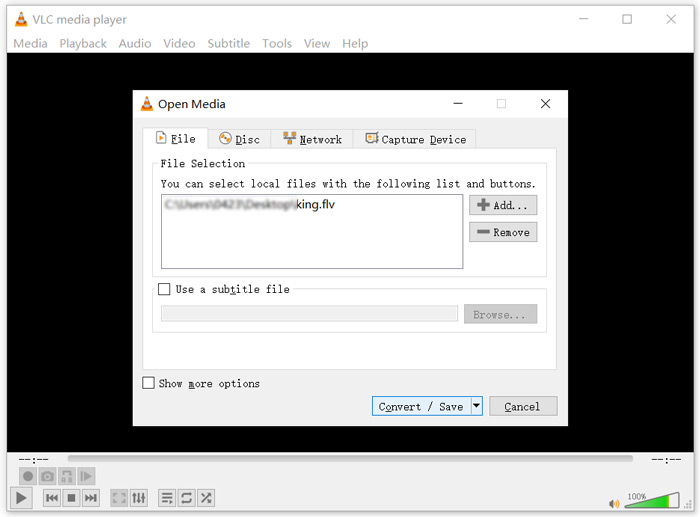
Krok 3: Zaškrtněte možnost Display the output na kartě Convert. Potom z rozbalovacího seznamu Profile zvolte vhodný výstupní formát. Klikněte na tlačítko Browse a vyberte vhodnou cílovou složku. V tomto kroku můžete také přejmenovat výstupní soubor.
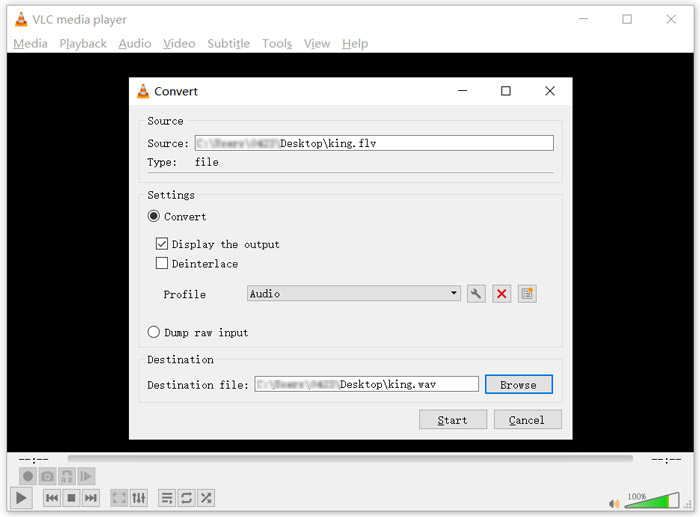
Krok 4: Kliknutím na tlačítko Start spusťte převod souboru FLV na WAV. Poté VLC automaticky přehraje převedený soubor WAV. Během převodu uvidíte hlášení Converting file. Nezavírejte VLC Media Player úplně, dokud převod neskončí.
Část 4. Časté dotazy týkající se převodu FLV na WAV
FLV vs WAV, Jaký je rozdíl mezi FLV a WAV?
FLV, Flash Video File, je formát videa kompatibilní s technologií Flash, který vyvinula společnost Adobe Systems. Obsahuje krátkou hlavičku a prokládané pakety videa, zvuku a metadat. FLV byl původně navržen pro vkládání video streamů do aplikací Adobe. Soubor FLV obvykle obsahuje video stopu 640×360 a zvukovou stopu s 44,1 kHz, 2 kanály, AAC.
Soubor s příponou WAV je formát Waveform Audio File Format a je to kontejner, který uchovává data v segmentech. Původně byl vyvinut společnostmi Microsoft a IBM a ukládá nekomprimovaný bezztrátový zvuk, což vede k velmi velkým souborům. Formát používá kontejnery pro uložení zvukových dat, počtu stop, vzorkovací frekvence a datového toku.
Jak převést FLV na WAV žádný software?
Pokud chcete převést FLV na WAV bez jakéhokoli softwaru pro převod, můžete změnit příponu souboru z .flv na .wav.
Jak stáhnout FLV do WAV?
Na trhu je nabízeno velké množství videorekordérů, které vám pomohou uložit video jako zvukové soubory na místním počítači.
Závěr
Po přečtení tohoto příspěvku se naučíte 3 způsoby, jak zdarma extrahovat zvuk WAV ze souborů FLV. Kdykoli potřebujete převést FLV na WAV, můžete si k tomu vybrat preferovaný převodník FLV.
-
 5 nejlepších bezplatných přehrávačů WAV pro Android, iOS a počítač
 Jak přehrávat soubory WAV na telefonu Android? Jaký hráč může hrát WAV? Tento příspěvek sdílí 5 nejlepších bezplatných přehrávačů WAV pro Android, iPhone, Mac a PC.
-
 10 nejlepších přehrávačů videa FLV pro Windows 10/8/7, Mac, iOS a Android musíte vyzkoušet
 Přehrávač FLV vám pomůže snadno přistupovat k vašim souborům FLV ve vašem zařízení Windows, Mac, Android nebo iOS. Podívejte se na nejlepší přehrávače souborů FLV, které si můžete stáhnout právě teď.
-
 Jak převést WAV na MP3 pomocí nejlepších 5 bezplatných převaděčů
 Tato stránka obsahuje dlouhý seznam bezplatných převaděčů WAV na MP3 (iTunes, Audacity, VLC, Windows Media Player a Free Audio Converter), které umožňují v počítači změnit formát WAV na MP3.
