


 Video Converter Ultimate
 Screen Recorder
 Oprava videa
 Bezpečné stažení
3 bezplatné způsoby převodu FLV pro hraní na Xbox
FLV je široce používán na zpravodajských a video‑sdílecích webech. Když si stahujete online videa z YouTube, Hulu nebo Facebooku, velmi často získáte soubory FLV. Formát FLV podporuje mnoho přehrávačů, zařízení, platforem i prohlížečů. Na Xboxu jej však přehrát nelze.
Xbox není jen herní konzole, ale také vám umožňuje přehrávat videa a hudbu z USB flash disku nebo externího disku. Xbox je kompatibilní s mnoha populárními multimediálními soubory. Jak však bylo uvedeno výše, FLV na Xboxu přímo nepřehrajete. Když chcete FLV soubory na Xboxu sledovat, musíte je převést z FLV do formátu podporovaného Xboxem.

Tento článek představuje 3 bezplatné způsoby, jak převést FLV do Xbox. Když chcete přehrávat FLV soubory na konzoli Xbox One, Xbox 360, nové Xbox Series X nebo Xbox Series S, můžete se na ně spolehnout a převést FLV do souboru podporovaného Xboxem.
Část 1. Jak zdarma převést FLV na Xbox Online
Mnoho převaděčů videa vám pomůže převést FLV do formátu podporovaného pro Xbox, jako je AVI nebo MP4. Pokud máte co do činění s malými videoklipy FLV, měli byste nejprve vyzkoušet bezplatný online převodník FLV na Xbox.
Free Online Video Converter je snadno použitelný video konvertor, který vám umožní převést FLV do MP4, AVI, WMV, MOV nebo jiného formátu podporovaného konzolí Xbox. Oproti jiným online konvertorům nevyžaduje žádnou registraci ani přihlášení. Navíc pro převod FLV souboru neexistuje žádné omezení jeho velikosti. Následující návod vám ukáže, jak jej používat.
Krok 1. Tento online převodník FLV do Xbox je kompatibilní s jakýmkoli webovým prohlížečem, jako je Chrome, Safari, IE a Firefox. Otevřete svůj prohlížeč a přejděte na stránku Online FLV to Xbox converter.
Krok 2. Po příchodu na stránku klikněte na Add Files to Convert a poté na tlačítko Download, abyste nainstalovali spouštěč pro převod FLV. Jakmile je spouštěč připraven, zobrazí se vyskakovací okno, ve kterém můžete přidat svůj FLV soubor.

Krok 3. U nahraného FLV souboru uvidíte vypsané některé populární video formáty včetně MP4, AVI, MOV, FLV, WMV, MKV a dalších. Můžete zvolit formát podporovaný Xboxem, například MP4 nebo AVI.
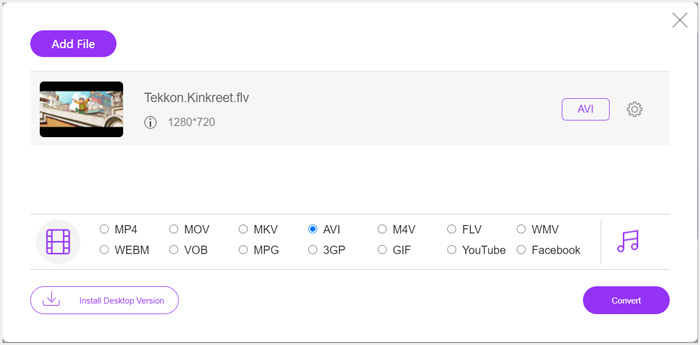
Krok 4. Pokud chcete více přizpůsobit výstupní nastavení videa a audia, klikněte na ikonu Settings vedle zvoleného výstupního formátu. Poté můžete kliknout na tlačítko Convert a spustit převod FLV do Xbox. Výstupní video se automaticky uloží do vašeho počítače ihned po dokončení převodu.
Část 2. Jak převést FLV na Xbox Online pomocí FreeConvert
FreeConvert je další populární video a audio konvertor, který vám může pomoci převést FLV do Xboxem podporovaného formátu MP4, AVI nebo WMV. Nabízí speciální FLV to Xbox Video Converter, pomocí kterého můžete své FLV soubory přímo převést pro Xbox.
Krok 1. Otevřete prohlížeč a přejděte na tuto stránku FLV to Xbox Video Converter.
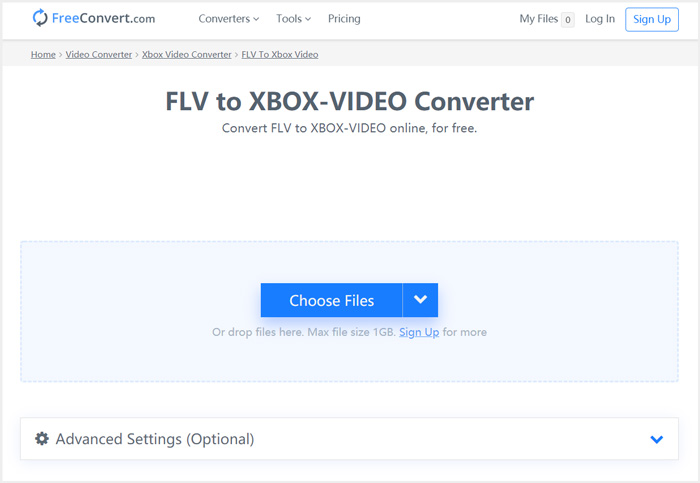
Krok 2. Klikněte na tlačítko Choose Files, vyhledejte a nahrajte svůj FLV soubor. Soubor můžete přidat také přes URL, Google Drive a Dropbox.
Krok 3. Kliknutím na Add More Files můžete nahrát další FLV soubory, které chcete převést. Cílový formát bude ve výchozím nastavení nastaven na XBOX. Pak stačí kliknout na tlačítko Convert to Xbox Video a spustit převod FLV do Xbox.
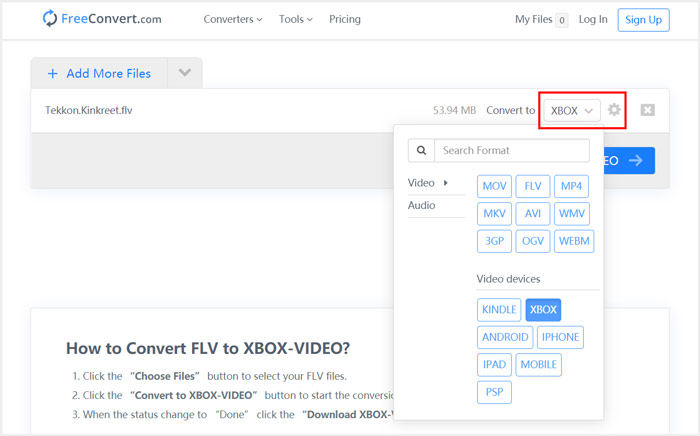
Podobným postupem můžete po převedení souborů do formátů kompatibilních s Xboxem přehrávat na Xboxu jakoukoli hudbu.
Tento FLV to Xbox Video Converter začne nahrávat a převádět vaše video. Po dokončení převodu můžete kliknout na tlačítko Download a uložit jej do svého Macu nebo počítače s Windows. Případně jej můžete uložit na Google Drive nebo Dropbox. Během používání tohoto bezplatného převodníku FLV do Xbox se vám budou zobrazovat reklamy.
Část 3. Lepší způsob, jak zdarma Převést FLV na Xbox pro Mac a Windows PC
Kromě online převodníků FLV se můžete při převodu a přehrávání FLV souborů na herní konzoli Xbox spolehnout i na další bezplatné video konvertory. Zde vám představujeme výkonný nástroj Free FLV Converter. Je speciálně navržen pro různé převody FLV.

- Převeďte libovolný formát FLV na formát podporovaný Xboxem, jako jsou MP4, AVI, WMV, MOV a další.
- Nabídněte řadu témat k úpravám a přizpůsobení souboru FLV.
- Pokročilé vícejádrové procesory a akcelerace GPU pro převod FLV na Xbox vysokou rychlostí.
- Převeďte jeden nebo více souborů FLV na Xbox bez ztráty kvality obrazu nebo zvuku.
Zdarma ke staženíPro Windows 7 nebo novějšíBezpečné stažení
Zdarma ke staženíPro macOS 10.7 nebo novějšíBezpečné stažení
Krok 1. Nejprve na něj můžete dvakrát kliknout v instalačním souboru a bezplatně jej nainstalovat do počítače. Otevřete jej a klikněte na Add Files pro import FLV souboru (souborů).

Krok 2. Z rozbalovacího seznamu Output format vyberte jako cílový formát MP4 nebo AVI. Pro další nastavení klikněte na ikonu Settings vedle výstupního formátu a vstupte do okna Profile Settings.
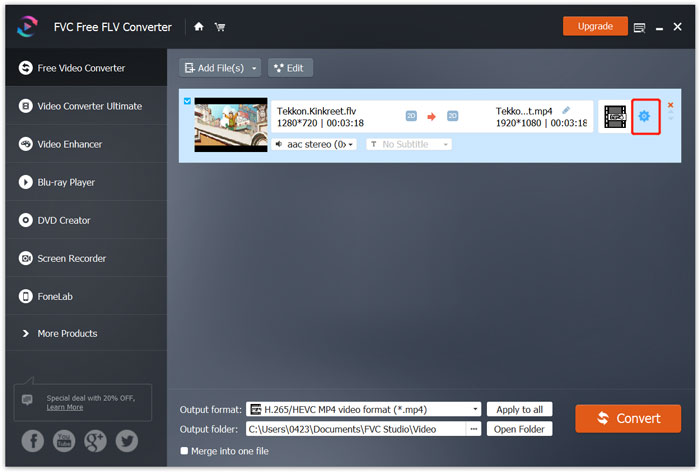
V nabídce Output format je také uvedena speciální kategorie Xbox, díky níž můžete FLV přímo převádět do souboru podporovaného Xbox One nebo Xbox 360. Pro tuto funkci je ale třeba upgradovat na placenou verzi.
Krok 3. Klikněte na tlačítko Convert a spusťte převod videa z FLV do MP4 nebo jiného video formátu podporovaného Xboxem.
Část 4. Časté dotazy k hraní FLV na Xbox
Otázka 1. Jaké formáty může Xbox One podporovat?
Jako jedna z nejpopulárnějších herních konzolí je XBox kompatibilní s mnoha často používanými video a audio formáty včetně MP4, AVI, M4V, MOV, WMV, MKV, H.264 AVCHD, WAV, WMA, 3GP video, 3GP audio, AAC , MP3 a další.
Otázka 2. Jak přehrávat videa na Xbox?
Pokud máte ve svém zařízení Xbox One nebo Xbox 360 aplikaci Filmy a televize, můžete při odesílání videa na Xbox nebo připojení externí jednotky ke Xboxu snadno sledovat videa.
Otázka 3. Jaký hráč může přehrávat soubory FLV?
Pokud chcete přehrávat soubory FLV na počítači Mac, Windows PC nebo na přenosném zařízení iOS / Android, VLC Media Player je vždy dobrá volba. Nabízí desktopové a mobilní aplikace pro přehrávání souborů FLV na počítači nebo telefonu.
Závěr
Nelze přehrávat soubory FLV na herní konzoli Xbox? Chcete-li to provést, měli byste nejprve převést soubor FLV na soubor podporovaný Xboxem. V tomto příspěvku najdete 3 bezplatné metody pro převod a přehrávání FLV na Xboxu.
-
 Nejlepší 10 přehrávače FLV pro Windows, Mac, iOS a Android v roce 2021
 Přehrávač FLV vám pomůže snadno přistupovat k vašim souborům FLV ve vašem zařízení Windows, Mac, Android nebo iOS. Podívejte se na nejlepší přehrávače souborů FLV, které si můžete stáhnout právě teď.
-
 Výukový program pro kompresi GIF a zmenšení jeho velikosti souboru s vysokou kvalitou
 Tady jsou 2 snadné způsoby, jak komprimovat GIF na počítači nebo mobilním telefonu. Můžete použít FVC Free Online Video Compressor a Photoshop ke zmenšení velikosti souboru GIF v různých aspektech.
-
 Nejlepší 4 bezplatné způsoby převodu videí FLV na MP4 na počítači a online
 Tato příručka sdílí čtyři bezplatné metody pro převod vašich video souborů FLV do formátu MP4 v systémech Windows 10/8/7 / XP a Mac OS X, takže si videa můžete vychutnat na jakýchkoli zařízeních.
