


 Video Converter Ultimate
 Screen Recorder
 Oprava videa
5 rychlých a jednoduchých způsobů, jak zdarma převést MKV na FLV [online a offline]
Nemůžete sdílet své soubory MKV přes internet, protože jsou příliš velké? Proč je raději nepřevést místo jejich silného komprimování, abyste se vyhnuli ztrátě kvality? Tento problém vyřešíte, pokud si před odesláním přečtete podrobnosti níže. Nemusíte trávit hodinu čtením tohoto článku, takže bez dalšího zdržování se podívejme na šest převodníků, které můžete použít k tomu, abyste převedli MKV na FLV.

Část 1. Top of the Line Nejlepší konvertor MKV na FLV ke stažení
FVC Video Converter Ultimate vám může pomoci změnit MKV na FLV snadno a efektivně, aniž byste se u toho zapotili. Tento fenomenální převodník se výrazně liší od ostatních převodníků v tomto seznamu i od těch, které už používáte nebo nepoužíváte. Je to špičkový kódovač a dekodovač, který si můžete stáhnout do PC nebo Macu, a funguje bezchybně offline, i když nemáte výkonnou stolní sestavu.

FVC Video Converter Ultimate
4 987 355+ stažení- Převeďte MKV do FLV, AVI, MP4, MOV nebo do více než 200 formátů dostupných na Windows a Mac.
- Udělejte svůj formát MKV kompatibilní se všemi stolními počítači a zařízeními.
- Může provádět dávkovou konverzi pro vaše formáty MKV nebo jiné formáty.
- Bezchybný převodník, který může používat kdokoli.
- Podporuje výstup ve vysokém rozlišení a dokonce až 4k kvalitu videa.
Zdarma ke staženíPro Windows 7 nebo novějšíBezpečné stažení
Zdarma ke staženíPro MacOS 10.7 nebo novějšíBezpečné stažení
Kroky, jak převést MKV na FLV pomocí FVC Video Converter Ultimate
Krok 1. Stáhněte aplikaci na svůj disk a poté postupujte podle instalačního procesu.
Zdarma ke staženíPro Windows 7 nebo novějšíBezpečné stažení
Zdarma ke staženíPro MacOS 10.7 nebo novějšíBezpečné stažení
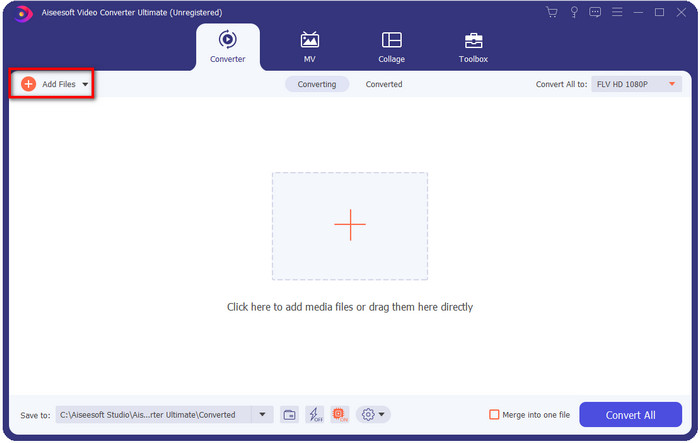
Krok 2. Po instalaci otevřete aplikaci a přidejte soubory MKV; můžete soubory na rozhraní přetáhnout metodou drag & drop, nebo kliknout na tlačítko Add Files.
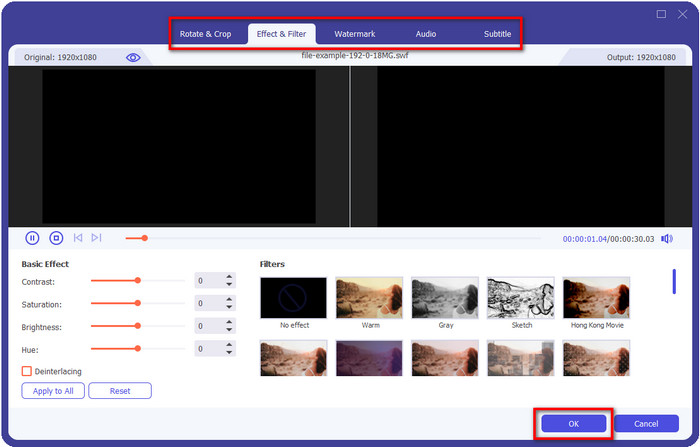
Pokud chcete své soubory MKV před převodem upravit, můžete kliknout na tlačítko s hůlkou a dodat výsledku trochu magie, například přidat efekty, oříznout obraz, přidat titulky a další. Pro uložení magie, kterou jste do videa přidali, klikněte na OK.
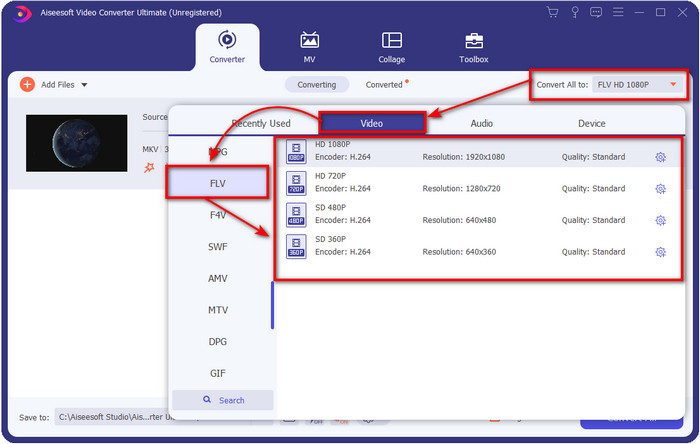
Krok 3. Klikněte na rozbalovací tlačítko a v seznamu formátů zvolte FLV.
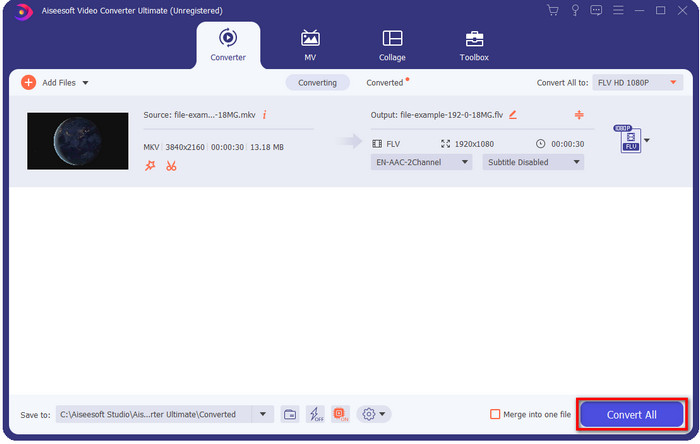
Krok 4. Klikněte na tlačítko Convert All, aby se spustila změna formátu MKV na FLV zdarma. Po dokončení se zobrazí složka s novým souborem FLV.
Část 2. 4 Nejlepší webový převodník MKV na FLV
1. FVC Free Video Converter Online
FVC Free Video Converter Online nabízí jednoduchý, ale působivý bezplatný online převodník MKV na FLV, který je dostupný ve všech prohlížečích. Podporuje také středně velkou škálu formátů, do kterých můžete soubory nahrávat a převádět. Ačkoli tento nástroj závisí na připojení k internetu, nahrávání a převod souboru je zde snazší a rychlejší. Chcete vědět, jak ho používat? Pak postupujte podle níže uvedených kroků.
Klady
- Je k dispozici pro použití kýmkoli s internetem.
- Uživatelsky přívětivé a snadno srozumitelné rozhraní.
- Bez omezení velikosti souboru.
- Pokročilá nastavení pro video a zvuk.
Nevýhody
- Středně velký formát.
Krok 1. Pro otevření online převodníku klikněte na tento odkaz.
Krok 2. Stiskněte tlačítko Add Files to Convert, vyberte soubor ve složce svého počítače a klikněte na Open.
Stáhněte si desktopovou verzi a převádějte soubory hromadně.
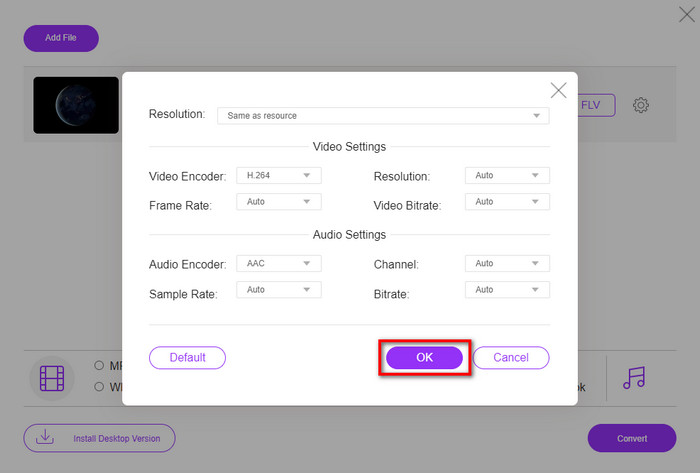
Přestože zde nemůžete video upravovat, můžete změnit nastavení videa a audia kliknutím na tlačítko s ozubeným kolečkem.
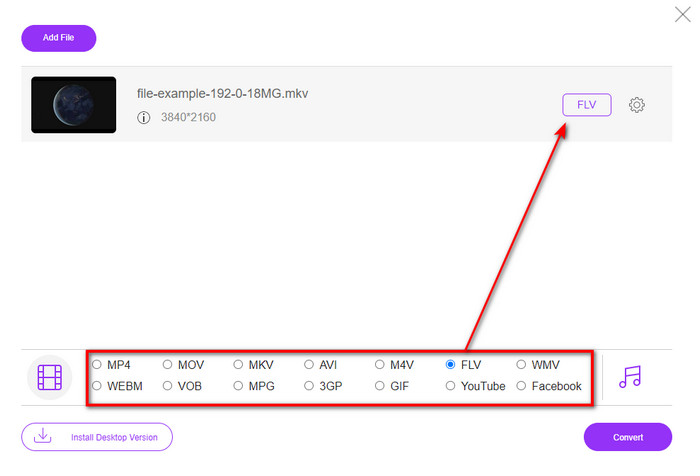
Krok 3. V seznamu formátů vyberte FLV.
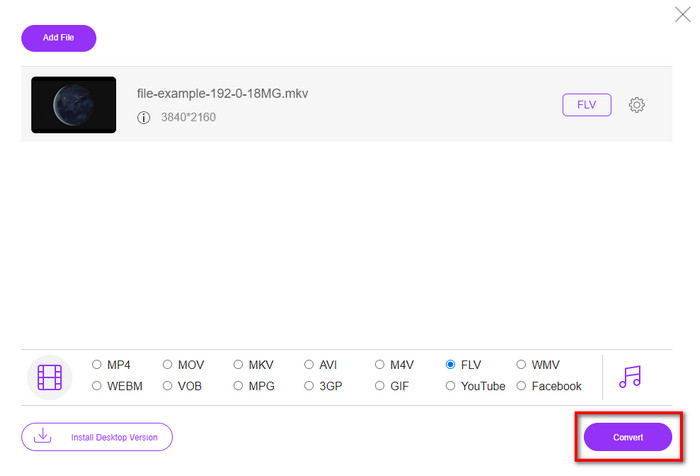
Krok 4. Klikněte na Convert, aby se spustil proces převodu.
2. Mkonvertor
Jedním z nejbezpečnějších online převodníků MKV na FLV, které můžete použít, je Mconverter. Kromě převodu video a audio formátů zde můžete převádět také své obrázky, archivy, dokumenty a mnoho dalších typů médií. I když je tento převodník zdarma, existuje limit velikosti pro každý soubor, který můžete vložit.
Klady
- Převádějte online videa, zvuk, dokumenty a další.
- Podporuje více konverzí.
- Snadné použití.
Nevýhody
- Velikost souboru nesmí přesáhnout 200 MB.
- Některé reklamy při převodu souboru.
Krok 1. Otevřete Mconverter ve svém prohlížeči, přetáhněte soubor .mkv a pusťte jej do určeného pole.
Krok 2. Klikněte na formát FLV a proces se automaticky spustí.
Krok 3. Po dokončení se soubor automaticky stáhne do vašeho úložiště.
3. Freeconvert.com
Freeconvert.com vám pomůže převést MKV na FLV online zdarma. Tento webový převodník má přehledné a snadno pochopitelné rozhraní, které může použít kdokoli. Tento online převodník ale podporuje jen menší škálu formátů, ze kterých si můžete vybírat, a na webovém rozhraní je hodně reklam.
Krok 1. Ve vyhledávači najděte Freeconvert.com.
Krok 2. Klikněte na Choose File, nahrajte soubor .mkv ze složky svého počítače, poté stiskněte rozbalovací tlačítko a vyberte formát FLV.
Krok 3. Klikněte na Convert FLV pro zahájení převodu a pro stažení klikněte na Download FLV.
Klady
- Bezplatný online převodník, který můžete použít.
- Zabezpečený a jednoduchý webový konvertor.
- Podporuje 1GB soubor pro převod.
Nevýhody
- Podporuje malý formát.
- Proces převodu a stahování vám zabere hodně času.
4. Movavi Online Video Converter
Movavi Online Video Converter je jedním z doporučovaných převodníků, které byste měli použít pro online převod MKV na FLV. Jde o bezplatnou webovou verzi programu Movavi Video Converter, který používá mnoho uživatelů na celém webu díky efektivitě tohoto nástroje a jeho profesionálnímu vzhledu.
Krok 1. Otevřete svůj oblíbený prohlížeč a vyhledejte webové stránky Movavi.
Krok 2. Klikněte na +Add Your Media, abyste přidali soubor, který chcete převést. Stiskněte rozbalovací tlačítko a vyberte Video; najděte formát FLV a klikněte na něj.
Krok 3. Stiskněte Convert, aby se spustil proces převodu.
Klady
- Žádné reklamní webové rozhraní.
- Jednoduchý převodník, který může použít každý.
- Podporuje střední formát.
Nevýhody
- Proces převodu formátu trvá déle.
- Závislé na internetu jako ostatní webové konvertory.
Část 3. Srovnávací tabulka
| Funkce | FVC Video Converter Ultimate | FVC Video Converter zdarma online | Mkonvertor | Freeconvert.com | Movavi Online Video Converter |
| Možnosti převodu formátu |  | | | | |
| Závislý na internetu |  | | | | |
| Dávková konverze | | | | | |
| Pokročilé funkce úprav | | | | | |
| Dostupné platformy | Nástroj pro stolní počítače | Webový nástroj | Webový nástroj | Webový nástroj | Webový nástroj |
MKV vs. FLV
Formát multimediálního kontejneru Matroska, vydaný v roce 2002, je formát s otevřeným zdrojovým kódem, který může obsahovat řadu stop videa, zvuku, obrázků a titulků. Můžete jej tedy použít ke snadnému ukládání krátkých videoklipů, televizních pořadů a filmů. To je docela populární pro anime fan-subbing.
Adobe Flash Player používal FLV k poskytování videoobsahu, jako jsou filmy a televizní pořady. V současné době Adobe již přehrávač nevyvíjí a doporučuje uživatelům, aby jej z bezpečnostních důvodů odinstalovali. Formát FLV však můžete stále používat v mnoha programech jiných než Adobe/Macromedia.
Část 4. Nejčastější dotazy o převodu MKV na FLV
Proč jsou soubory MKV příliš velké?
Existují dva hlavní důvody, proč jsou soubory MKV příliš velké. Prvním je, že tento formát dokáže do jednoho souboru uložit neomezené množství obsahu a prvků videa, audia a metadat. Druhým je, že pokud je vaše video dlouhé, můžete očekávat, že se velikost souboru výrazně zvětší. Soubor MKV však můžete zkomprimovat pomocí tohoto kompresoru MKV, který můžete použít. Ale pokud chcete jednodušší řešení, měli byste zvážit převod souborů MKV do MP4, AVI, MOV, FLV atd.
Je MKV lepší než AVI?
Formáty MKV a AVI jsou si téměř podobné v tom, že mohou obsahovat video ve vysokém rozlišení a mít velkou velikost souboru. Tyto kontejnery však mají odlišný účel a strukturu, díky čemuž jsou jedinečné. Například formát AVI je nekomprimovaný formát, který může uchovávat syrový video obsah a je ideální pro přehrávání. Je také základem pro vývoj souboru MKV. I když soubory MKV podporují kompresi, jejich obsah a prvků je mnohem více, než kolik unese AVI. Pokud tedy chcete zachovat vysokou kvalitu svých videí, zvolte formát MKV. Pokud ale potřebujete kompatibilitu, pak je lepší AVI. Chcete-li zjistit, jak převést MKV na AVI, klikněte na tento odkaz.
Zvládá ruční brzda převod MKV na FLV?
Ruční brzda tuto práci zvládne, ale tento převodník nepodporuje programy pro macOS a Windows, které nejsou 10 výše.
Závěr
Na závěr už nyní víte, jak převést MKV na FLV online i offline. Tyto nástroje výše nebyly vybrány náhodně, ale zvolili jsme je podle preferencí uživatelů. Při našem hledání a zkoumání jsme zjistili, že těchto šest nástrojů podává jako převodníky nejlepší výkony. Ale FVC Video Converter Ultimate dokázal ještě víc, než jsme od převodníku očekávali. Chcete poznat další schopnosti tohoto fenomenálního převodníku? Tak na co čekáte? Musíte si ho hned stáhnout.
-
 MKV na MOV - Jak převést MKV na MOV
 Jak převést MKV na MOV na Macu? Může iMovie číst MKV? Co znamená formát MOV? Tento příspěvek popisuje 2 jednoduché způsoby, jak vám pomoci převést MKV na MOV s bezplatnými online a profesionálními převaděči videa.
-
 Jak převést videa MKV na animované GIF bez Photoshopu/FFmpeg
 Po stažení a sledování filmů MKV na počítači možná budete chtít sdílet úžasné okamžiky s přáteli nebo na internetu jako GIF. V tomto článku se můžete dozvědět o 2 nejjednodušších způsobech převodu MKV na GIF.
-
 Tipy a triky, jak převést soubory MKV do MP3 [2025]
 Máte problém s výběrem správného převodníku pro MKV na MP3? Poté pokračujte ve čtení tohoto příspěvku, protože jsme představili různá řešení jednoho problému.

