


 Video Converter Ultimate
 Screen Recorder
 Oprava videa
Offline a online nástroje pro převod TRP na FLV, o kterých byste měli vědět
TRP je formát souboru pro ukládání nahraných televizních pořadů. Protože jen málo přehrávačů si poradí s tímto typem souboru v jeho původní podobě, možná bude nutné převést soubor do jiného formátu, než si ho budete moci přehrát. Abyste mohli převést soubory TRP na soubory FLV, potřebujete k tomu vhodný softwarový nástroj. Naštěstí je to mnohem snazší díky našemu softwaru nebo jeho online variantě, které vám během celého procesu převodu nezpůsobí žádné potíže. Postupujte podle kroků, které poskytneme, abyste úspěšně převedli svá videa TRP do formátu FLV.

Část 1. Offline metoda pro převod TRP na FLV
Formát souboru TRP je pro většinu uživatelů videa nezvyklý a tvůrci jej příliš často nepoužívají. Z tohoto důvodu ho většina softwaru ani online nástrojů nepodporuje. Proto stojí za zvážení Video Converter Ultimate vždy, když potřebujete převést video z jednoho formátu do druhého. Tento software dokáže váš soubor TRP převést na jakýkoli formát dle vašeho výběru jedním kliknutím.
Tento nástroj pro převod videa poskytuje pokročilé editační funkce a má grafické rozhraní, které se snadno používá, i když nemáte žádné technické znalosti nebo dovednosti. S pomocí této aplikace můžete převádět soubory a těžit ze superrychlé doby převodu a vysoce kvalitního výstupu. Zde vám nabízíme jednoduché kroky, které musíte dodržovat:
Krok 1: Stáhněte si soubor .exe kliknutím na tlačítko Free Download níže podle toho, jaký používáte operační systém. Po dokončení stahování jej otevřete a spusťte instalační proces. Počkejte na dokončení instalace a poté program spusťte.
Zdarma ke staženíPro Windows 7 nebo novějšíBezpečné stažení
Zdarma ke staženíPro MacOS 10.7 nebo novějšíBezpečné stažení
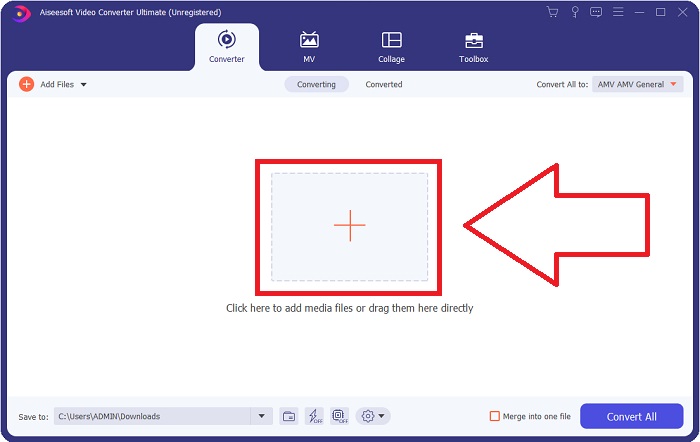
Krok 2. Jakmile se software spustí, zobrazí se rozhraní. V jeho středu klikněte na tlačítko + a začněte importovat videosoubor, který chcete převést, nebo soubor jednoduše přetáhněte metodou drag & drop.
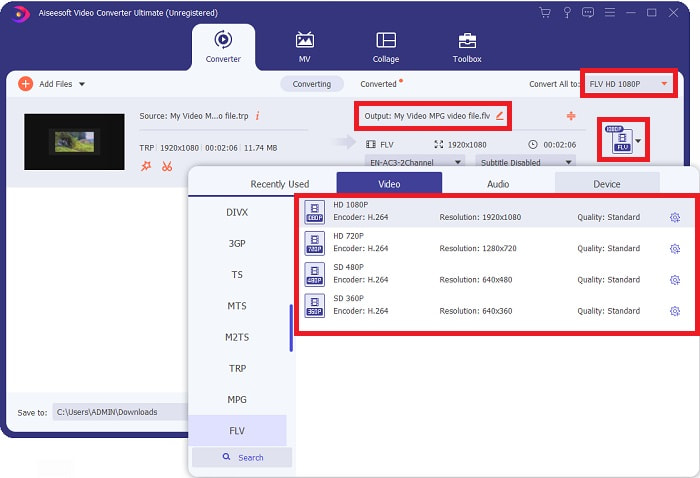
Krok 3: Na pravé straně souboru uvidíte aktuální formát svého videa. Chcete-li zvolit formát, do kterého se má video převést, klikněte na něj a zobrazí se všechny dostupné formáty. Najděte FLV nebo jej jednoduše napište do vyhledávacího pole. Vpravo jsou pro vás k dispozici také různé kvality videa.
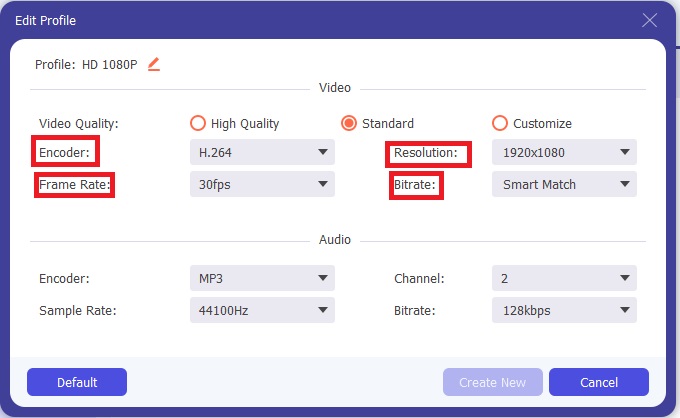
Krok 4: Pro dodatečné funkce, o kterých mluvíme, klikněte na ikonu ozubeného kola vpravo od vámi zvolené kvality videa a zobrazí se další rozhraní. Zde můžete upravit řadu nastavení videa i zvuku podle svých potřeb. Kliknutím na tlačítko Create New změny uložíte.
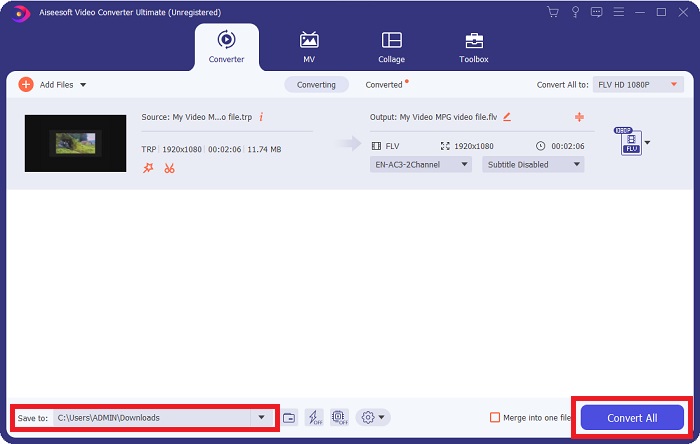
Krok 5: Jakmile dokončíte všechny úpravy, klikněte na tlačítko Convert All v pravém dolním rohu rozhraní a spusťte proces převodu. Počkejte na jeho dokončení.
Část 2. Online metoda pro převod TRP na FLV
Převod videosouborů je možné řešit také pomocí webového nástroje, aniž byste museli instalovat plnou verzi softwaru. V tomto případě nabízíme i online variantu programu – FVC Free Video Converter Online. Poskytuje stejné doplňkové možnosti jako software, i když ne všechny funkce. Přesto splní svůj účel v přiměřeném čase. Chcete-li tento webový nástroj použít, postupujte podle následujících kroků:
Krok 1: Přejděte přímo na převodník kliknutím na tento odkaz. Odtud začněte stažením spouštěče, který potřebujete k importu souborů. Kliknutím na tlačítko Add Files to Convert uprostřed stránky zahájíte proces.
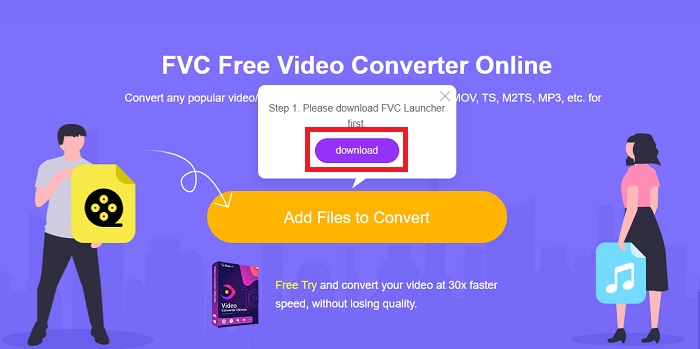
Krok 2: Znovu klikněte na uvedené tlačítko a nahrajte videosoubor, který chcete převést. Po importu souboru se zobrazí nové rozhraní se všemi dostupnými formáty, ze kterých si můžete vybrat. V tomto případě zvolte FLV.
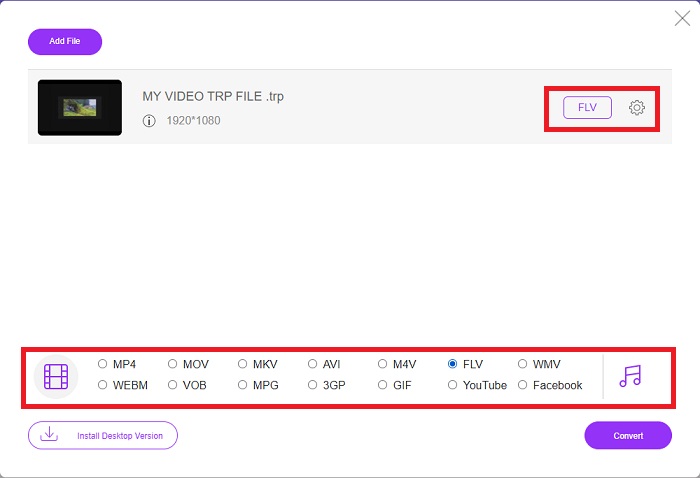
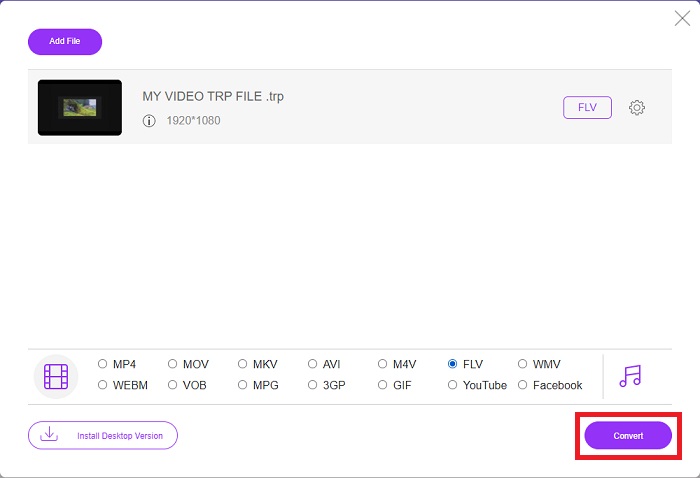
Krok 3: Pro další možnosti, podobně jako v samotném softwaru, klikněte vpravo na ikonu ozubeného kola. Zobrazí se nastavení videa a zvuku, kde můžete video dále upravit, například co do rozlišení, snímkové frekvence a mnoha dalších parametrů. Po dokončení klikněte na OK a uložte změny. Nakonec spusťte proces převodu kliknutím na tlačítko Convert v pravém dolním rohu.
Související:
Část 3. Rozšířené znalosti TRP a FLV
Chcete-li se o obou zmíněných formátech dozvědět více, poskytujeme vám stručné informace a také srovnání obou.
Soubory TRP jsou obvykle spojeny s VLC VideoLAN. Příponu souboru TRP lze shromažďovat s MPEG-2 Part 1 obsahující filmy s vysokým rozlišením. Soubory TRP mohou obsahovat a ukládat datové pakety zasílané jako digitální video a zvuk přes sítě digitálního vysílání videa, rádiové frekvence nebo lineární záznamová zařízení, jako jsou videorekordéry. Soubor TRP obsahuje více audio a video streamů a také kód pro opravu chyb. Uživatelé mohou do obsahu souboru zahrnout také metadata, jako je čas pořízení, ID kamery a zdroj.
Na druhou stranu soubor s příponou .flv znamená Flash Video. Přípona souboru FLV označuje video nebo zvukový soubor odeslaný přes internet pomocí Adobe Flash Player nebo Adobe Air. Flash Video je již dlouho primárním formátem videa pro téměř všechna vložená videa na internetu, včetně videí na YouTube, Hulu a různých dalších webech. Na druhou stranu poskytovatelé streamování a vývojáři softwaru opustili Flash ve prospěch HTML5 a dalších formátů od formálního ukončení Adobe.
| TRP | FLV | |
| Přípona souboru | .trp | .flv |
| Vývojář | Projektový tým VideoLAN | Adobe Systems Incorporated |
| Podpůrné programy | ◆ SMPlayer ◆ VLC Media Player ◆ Apple QuickTime Player | ◆ RealPlayer ◆ Apple QuickTime Player ◆ Mplayer ◆ VLC Media Player |
Část 4. Nejčastější dotazy o převodu TRP na FLV
Jak otevřít formát videa TRP pomocí VLC?
Jakmile je VLC Media Player nainstalován na vašem počítači, vyhledejte video soubor TRP na pevném disku a vyberte jej pravým tlačítkem myši. Z rozbalovací nabídky „Otevřít pomocí“ vyberte „VLC media player“. Systém otevře video soubor, který se bude přehrávat z tohoto programu, jakmile je spuštěn.
Jak převedu soubor FLV do Windows Media Player?
Nejprve musíte vybrat soubor FLV, který chcete převést. Jako formát, do kterého chcete převést soubor FLV, můžete zvolit WMV. Chcete-li převést soubor FLV, vyberte z rozbalovací nabídky možnost Převést.
Mohu hrát TRP kdekoli?
Převod TRP na široce známé formáty MP4, AVI, MOV, MKV, FLV, WMV a další je doporučenou možností, pokud chcete přehrávat soubory TRP kdekoli a na jakémkoli zařízení nebo přehrávači médií.
Závěr
Celkově vzato je Video Converter Ultimate a jeho protějšek online nástroj tím, koho hledáte, abyste provedli celý proces převodu a zároveň poskytli všechny potřebné funkce, které potřebujete. Nezpůsobuje žádné nepříjemnosti a navíc je k dispozici kdykoli během dne, pokud máte software nainstalovaný na ploše. Nikdy nebudete vědět, kdy budete potřebovat převodník, jako je tento, proto pro vaše pohodlí doporučujeme používat tento software.
-
 Nejjednodušší průvodce, jak převést TRP do AVI na Windows a Mac
 Možná neznáte formát videa TRP a zajímá vás, jak převedete TRP do AVI? Přečtěte si dále tento článek, abyste se dozvěděli podrobnosti, které se tohoto problému týkají.
-
 3 řešení pro převod MTS na FLV zdarma a online
 Chcete převést MTS na FLV? Zde jsou 3 bezplatné převaděče MTS na FLV, které můžete zkusit převést MTS na FLV v systémech Mac OS X a Windows 10/8/7.
-
 Nejlepší způsoby, jak převést VOB na FLV [zdarma a online v ceně]
 Chcete převést soubor VOB na soubor FLV? Úlohu můžete snadno dokončit pomocí převaděče pro stolní počítače nebo online. Přečtěte si tuto příručku a naučte se, jak snadno a rychle převést VOB na FLV.
