


 Video Converter Ultimate
 Screen Recorder
 Oprava videa
Tipy a triky, jak převést soubory WebM do FLV pro Windows/Mac/Online
Máte potíže s přehráváním videí s příponou souboru WebM? Možná právě hledáte nejlepší řešení v podobě převodu souboru do formátu, který lze na vašem zařízení přehrát. Pokud ano, máte štěstí, protože tento článek probere dva z nejlepších převodníků WebM, které můžete používat online i offline. Pojďme se vrhnout na bezplatný převodník WebM na FLV, který můžete používat na stolním počítači, a naučme se krok za krokem převádět WebM.

Část 1. Špičkový převodník WebM na FLV pro Windows a Mac
Jako první na řadě je úžasný převodník WebM na FLV, který si můžete stáhnout do počítače, aby vyřešil váš problém. FVC Video Converter Ultimate je nejlepší volbou převodníku, s níž dosáhnete 100% úspěšnosti převodu. Je speciálně určen pro převod video a audio formátů na kompatibilní formáty – na výběr máte více než 200 formátů. Je ještě propracovanější tím, že nabízí jednoduchý převod s mimořádně vysokou rychlostí konverze bez zhoršení kvality. Tento převodník posouvá konverzi na novou úroveň – chcete to zažít? V tom případě se naučme, jak tento nástroj používat, podle podrobných kroků níže.
Postup, jak převést soubory WebM do formátu FLV pomocí FVC Video Converter Ultimate:
Krok 1. Klikněte na tlačítko pro stažení uvedené níže a postupujte podle pokynů k instalaci.
Zdarma ke staženíPro Windows 7 nebo novějšíBezpečné stažení
Zdarma ke staženíPro MacOS 10.7 nebo novějšíBezpečné stažení
Krok 2. Chcete‑li přidat své soubory WebM, klikněte na Add Files v levém horním rohu rozhraní. Poté ve složce zvolte soubor .webm a klikněte na Open.
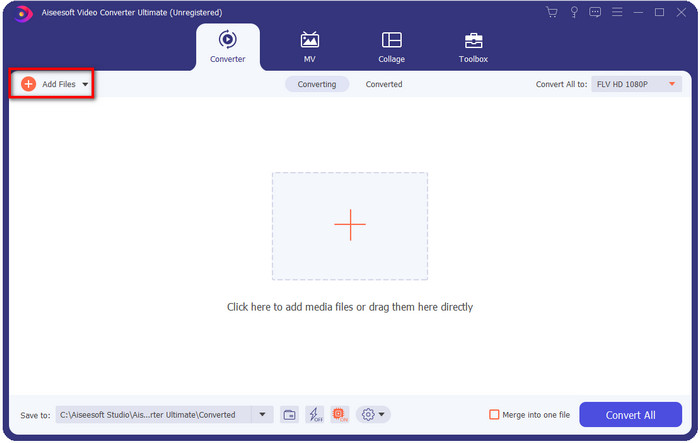
Pokud chcete k dávkové konverzi přidat více souborů WebM nebo jakékoli jiné soubory, můžete soubory přetáhnout na rozhraní.
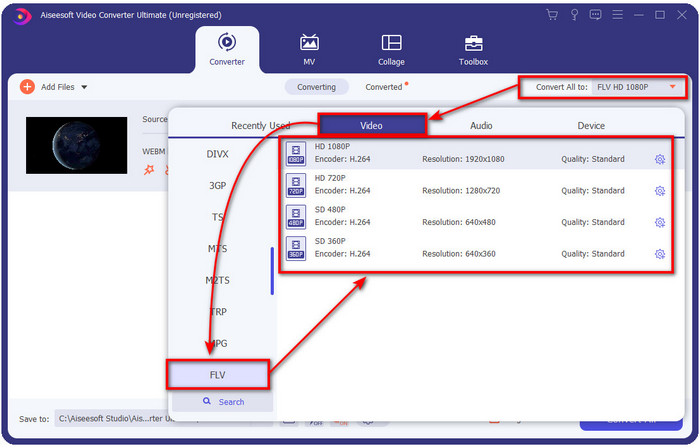
Krok 3. Klikněte na možnost Convert All to v pravém horním rohu rozhraní a zvolte formát FLV.
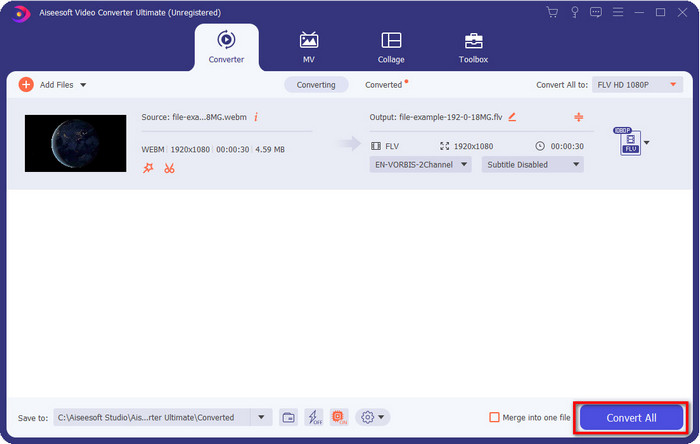
Krok 4. Klikněte na Convert All a spusťte převod WebM na FLV. Po dokončení procesu se na obrazovce zobrazí složka s nově převedeným souborem FLV.
Klady
- Podporuje nespočet profilů formátů, ze kterých si můžete vybrat.
- Podporuje hardwarovou akceleraci a rychlou konverzi pro rychlejší postupy konverze.
- Nabízí několik pokročilých funkcí úprav, jako je řezání, slučování, ořezávání, přidávání efektů a mnoho dalších.
- Převeďte soubory WebM v dávce.
- K dispozici ve všech operačních systémech, jako jsou Windows a Mac.
Nevýhody
- Stáhněte si ji na plochu.
- Placený převodník.
Část 2. Převod WebM na FLV zdarma online
FVC Free Video Converter Online vám nabízí výkonný online převodník WebM na FLV. Tento převodník je dostupný ve všech vámi zvolených vyhledávačích. Místo stahování převodníku do počítače – proč nevyužít tento webový nástroj jako alternativu? Kromě toho, že je zdarma, je také bez reklam a malwaru. Mnoho funkcí, které nabízí FVC Video Converter Ultimate, zde však chybí, zejména co se týče rozsahu podporovaných formátů. Chcete vědět, jak tento online převodník používat? Pak postupujte podle níže uvedených kroků.
Postup, jak online převést soubory WebM do formátu FLV pomocí FVC Free Video Converter Online:
Krok 1. Klikněte na tento odkaz FVC Free Video Converter Online a otevřete webovou stránku převodníku.
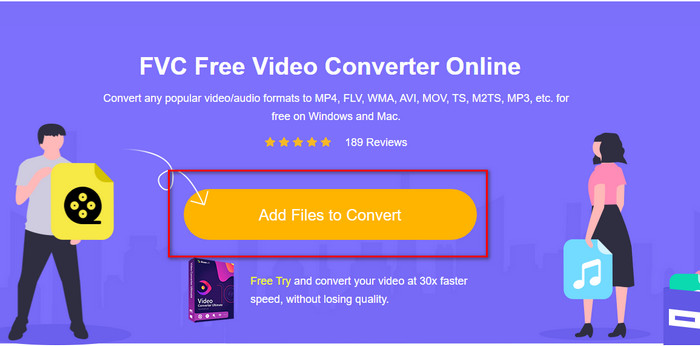
Krok 2. Na webové stránce převodníku klikněte na Add Files to Convert, čímž nainstalujete spouštěč webového nástroje. Klikněte na něj znovu, otevře se složka, vyhledejte soubor .webm a klikněte na Open.
Krok 3. Nastavte formát na FLV výběrem této možnosti v seznamu.
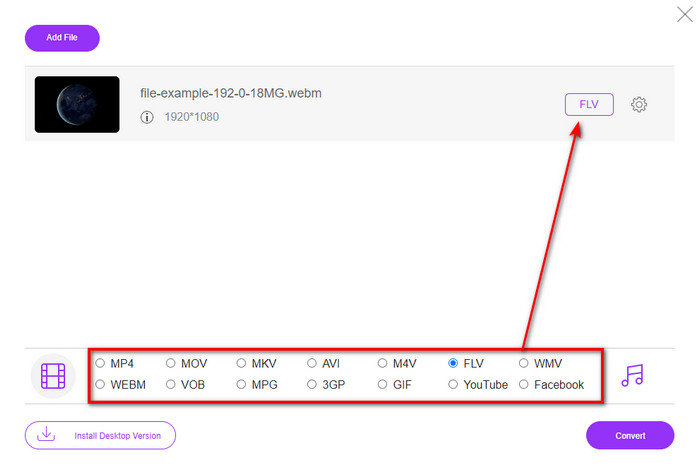
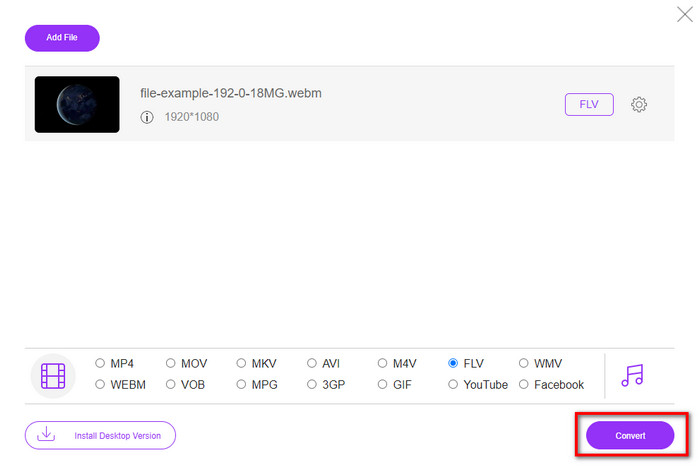
Krok 4. Pro převod souboru klikněte na Convert.
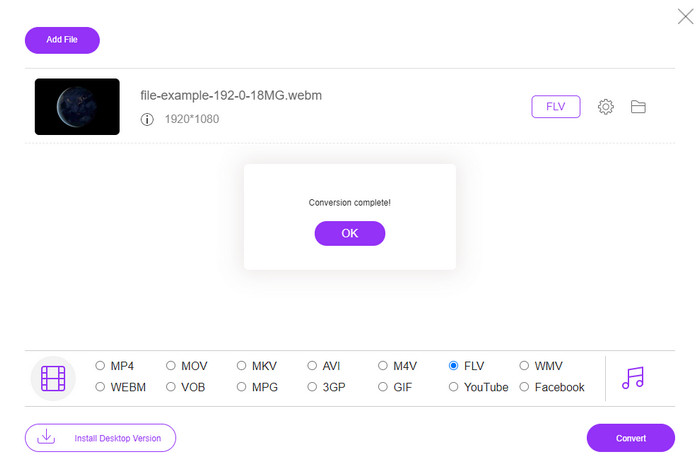
Krok 5. Po dokončení převodu se na obrazovce zobrazí složka.
Klady
- Dostupné a zdarma dostupné ve všech webových prohlížečích.
- Žádné nepříjemné reklamy a neobsahuje malware.
- Podporuje formát středního rozsahu.
Nevýhody
- Je nutné připojení k internetu.
- Speciální funkce nejsou v tomto převodníku k dispozici.
Část 3. WebM vs. FLV
WebM je hratelný ve většině prohlížečů, které jsou pod HTML5. Účelem tohoto formátu je být bezplatný a dostupný ve všech webových prohlížečích pro přehrávání videa a zvuku. Navíc se dokáže přizpůsobit jakýmkoliv situacím šířky pásma, které uživatelé mají. Přehrává hlavně videa a zvuk, aniž by to ovlivnilo kvalitu, i když uživatelé mají hroznou internetovou konektivitu. Další fantastickou vlastností tohoto formátu je použití samostatného kodeku pro video a audio streamy. Ačkoli tento formát může obsahovat video ve vysoké kvalitě, některé chytré telefony a přehrávače médií tento typ videa nepřehrávají. Existuje mnoho důvodů, proč nemůžete soubor přehrát, a jedním z nich je zastaralá verze vašeho operačního systému.
Na rozdíl od WebM je účelem FLV doručovat video obsah přes internet pomocí Adobe Flash Player nebo Adobe Air. Tento formát také může obsahovat nejen video obsah, ale také prvky, jako jsou metadata, krátké záhlaví, audio a video streamy. Ačkoli formát obsahuje zásuvné moduly, nebudete jej potřebovat k přehrání souboru v přehrávači médií nebo jeho uložení v telefonu. Stejně jako u WebM i tento formát používá samostatné kodeky pro kompresi videa a zvuku.
Aby byl váš soubor WebM kompatibilní, budete muset svůj WebM převést na FLV. I když můžete na svém zařízení ukládat soubory WebM, stále je to plýtvání úložištěm, pokud jej nemůžete používat. Převedení souboru WebM do formátu, který lze přehrát, vám navíc umožní zobrazit soubor na více zařízeních.
Část 4. Nejčastější dotazy o převodu WebM na FLV
Podporuje VLC formát WebM?
VLC je jedním z víceúčelových multimediálních přehrávačů, které si můžete stáhnout do Windows, Macu i do smartphonu. Podporuje různé formáty videa a zvuku, včetně souborů .webm. Pokud ale chcete své soubory WebM sledovat v lepším přehrávači, přečtěte si tento článek a zjistěte více o pěti nejlepších programech pro přehrávání souborů WebM.
Jak převést WebM na GIF?
Převod souborů WebM na animovaný GIF lze provést během minuty. Chcete vědět, jak převést WebM na GIF? Pokud ano, klikněte na tento odkaz a zjistěte víc.
Mohu komprimovat svůj soubor WebM?
Rozhodně ano, můžete svůj soubor WebM zmenšit, abyste jej mohli poslat e‑mailem nebo ušetřit místo na disku. Pokud zatím nemáte oblíbený software, máte štěstí – vybrali jsme pro vás 2 bezplatné kompresory WebM, které můžete použít.
Závěr
Nyní, když víme, jak převést soubory WebM do formátu FLV, je čas vybrat si převodník, který budete používat. I když vám oba zde uvedené převodníky WebM mohou zaručit úspěch, mají stále odlišné možnosti. Například pokud chcete převádět WebM online bez jakýchkoli omezení a bez reklam, měli byste zvolit FVC Free Video Converter Online. Pokud ale chcete dělat víc než jen převádět soubory, vaší volbou by měl být FVC Video Converter Ultimate. Stále pochybujete o schopnostech tohoto ultimátního převodníku? Pokud ano, měli byste si jej hned stáhnout do počítače a vyzkoušet plnou funkčnost převodníku.
-
 3 způsoby, jak převést WebM na MP3 bez ztráty kvality zvuku
 Máte problém, protože soubory WebM nelze použít k přehrávání uloženého zvuku? Pak si přečtěte tento článek, protože poskytujeme účinnou pomoc převodem WebM na MP3.
-
 3 Ohromující software používaný k převodu souboru WebM do formátu AVI
 Nemáte ponětí, jak převést WebM do AVI? Pak se pustíme do čtení tohoto článku. Protože specifikujeme všechny podrobnosti o WebM a třech převodnících, které můžete použít k převodu.
-
 Snadno srozumitelné metody, jak převést WEBM na MOV
 Je pro vás obtížné, že vaše videa WebM nelze přehrát v safari, a nechcete přecházet na prohlížeč, který tento formát podporuje? V tomto článku se dozvíte, jak snadno změnit WebM na MOV.
