


 Video Converter Ultimate
 Screen Recorder
 Oprava videa
 Bezpečné stažení
Získejte nejlepší postupy, jak převést NEF na JPG
Při pořizování fotografií chceme mít nezapomenutelné okamžiky našeho života zachycené v co nejlepší možné kvalitě. Proto si lidé pořizují špičkové fotoaparáty, které nabízejí skvělé výsledky. Nejlepší kvality ale můžete dosáhnout tím, že snímek uložíte v surovém (raw) formátu. To však může přinést řadu problémů. NEF znamená Nikon Electronic Format. Nikon, jeden z nejznámějších výrobců fotoaparátů, používá právě tento raw formát snímků. Někdy se stane, že soubory na počítači neotevřete. Je k tomu potřeba profesionální program, který bývá drahý a obtížně se používá. V takové situaci je nejlepší řešení převést soubory NEF na univerzální obrazový formát, jako je JPG. Flexibilita tohoto formátu vám umožní zobrazit fotografie téměř na jakémkoli zařízení. Zároveň navíc šetří místo v úložišti. Pokud chcete své soubory převést do souboru JPG, přečtěte si tuto příručku a seznamte se s nejlepšími převodníky NEF na JPG, které můžete použít.
Část 1. NEF vs. JPG
| Formát souboru | NEF | JPG / JPEG |
| Přípona názvu souboru | .nef | .jpg / .jpeg |
| Celé jméno | Elektronický formát Nikon | Společná skupina fotografických expertů |
| Vyvinul | Nikon | Společná skupina fotografických expertů |
| Popis | Soubory Nikon Raw Image jsou známé jako NEF soubory. Stejně jako ostatní obrazové soubory RAW i soubory NEF ukládají všechny informace zaznamenané fotoaparátem před zpracováním. Zahrnuje metadata, jako jsou modely fotoaparátu a objektivu. Fotografie NEF nabízejí neuvěřitelně vysokou kvalitu obrazu. | Společná skupina fotografických expertů vytvořila JPG formátu na konci roku 1980. Zahrnuje také ukládání obrázků na digitální fotoaparáty a další reprodukční nástroje. Soubory JPEG používají metodu ztrátové komprese pro až 24bitové barvy a větší úložiště obrázků. |
| Komprese | Ztrátový | Ztrátový |
| Přidružené programy / prohlížeče | Adobe Lightroom Prohlížeč grafiky IrfanView Adobe Photoshop ViewNX 2 Pics.io | IrfanView Prohlížeč grafiky Program fotografií Malování Adobe Photoshop Google Chrome Internet Explorer Microsoft Edge Mozilla Firefox |
Část 2. Jak převést NEF na JPG na webu
Jak převést NEF na JPG na Safeimageconverter
Pomocí nástroje Safeimageconverter můžete rychle převádět online obrázky z formátu JPF do formátu NEF. S tímto jednoduchým online nástrojem můžete snadno změnit formát souboru. Tento převodník obrázků je zdarma, funguje online a nevyžaduje instalaci, takže jej můžete používat tak často, jak chcete, bez jakýchkoli nákladů. Stačí nahrát původní soubor do tohoto nástroje a získáte převedený obrazový soubor ve formátu NEF. Nástroj je také velmi užitečný a šetří nám drahocenný čas. Můžeme rychle a snadno převádět z formátu JPG do formátu NEF. Soubory můžete převádět přímo v prohlížeči. Při převodu obrázků se však na obrazovce objevuje mnoho rušivých reklam. Také se občas stane, že online nástroj po dokončení převodu zobrazí chyby. Při používání tohoto online nástroje je navíc doporučeno připojení k internetu.
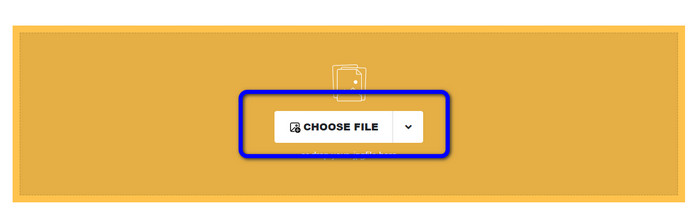
Krok 1. Přejděte na webové stránky Safeimageconverter. Poté klikněte na tlačítko Choose File a nahrajte soubor NEF, který chcete převést.
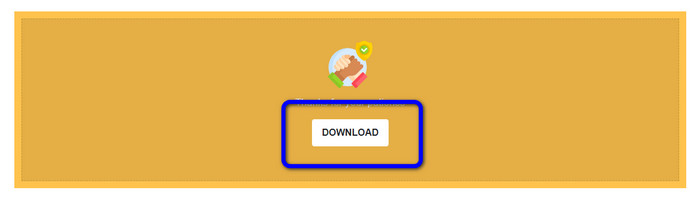
Krok 2. Po nahrání nástroj image converter automaticky převede obrazový soubor. Po dokončení převodu klikněte na tlačítko Download. Tímto způsobem si můžete uložit převedený obrázek do počítače.
Část 3. Praktická metoda převodu NEF na JPG na Mac a Windows
Pokud dáváte přednost Windows nebo Macu pro převod NEF na JPG, použijte Photoshop. Adobe Photoshop není dobrý jen na úpravu fotografií. Je také spolehlivý při převodu různých souborů, včetně NEF. Kromě toho můžete v Photoshopu dávkově převádět NEF na JPG. Má také rychlý proces převodu, což z něj dělá ideální nástroj pro všechny uživatele. Offline program navíc dokáže zachovat kvalitu vašich snímků. Díky tomu bude mít fotografie i po převodu stále uspokojivou kvalitu. Adobe Photoshop však není 100% zdarma. Abyste mohli program používat, musíte si zakoupit předplatné. Nabízí pouze 7denní zkušební verzi zdarma. Kromě toho je proces instalace poměrně složitý.
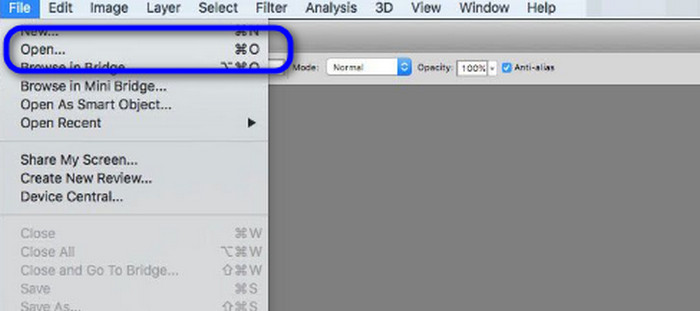
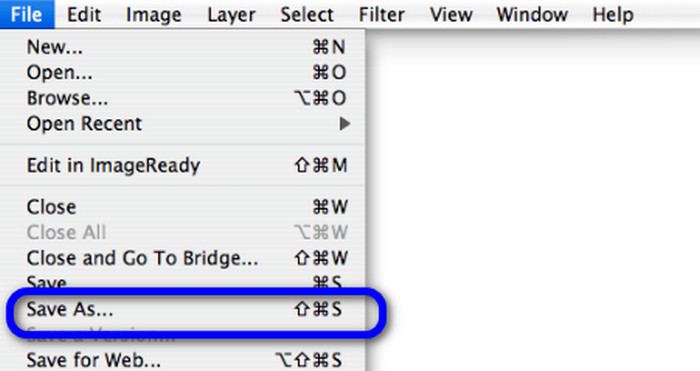
Krok 1. Stáhněte si Adobe Photoshop do počítače. Po instalaci program spusťte, abyste zobrazili rozhraní. Poté přejděte do nabídky File a vyberte Open pro vložení souboru s obrázkem NEF.
Krok 2. Jakmile vložíte obrázek NEF do rozhraní, znovu přejděte do nabídky File a zvolte možnost Save as.
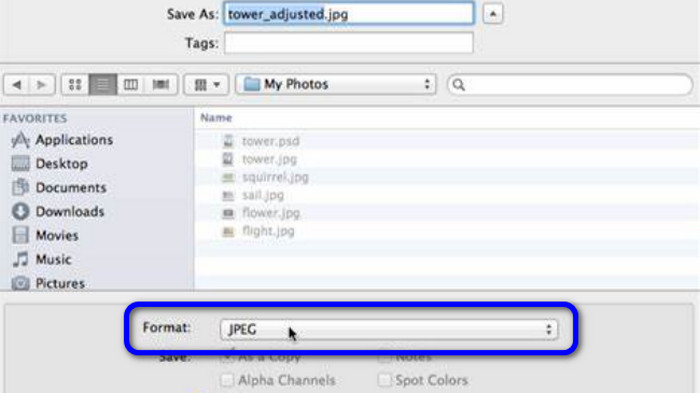
Krok 3. Poté v nabídce formátu vyberte JPG a klikněte na Save.
Část 4. Doporučený převodník obrázků
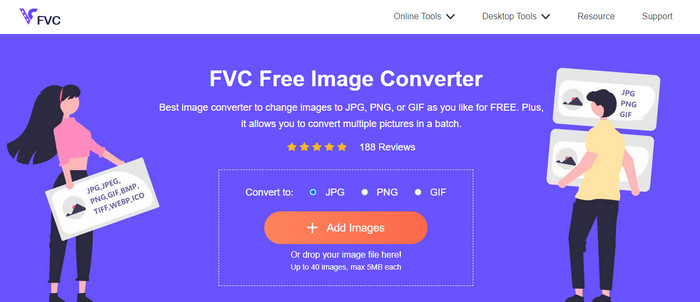
V této části, pokud hledáte další převodník obrázků pro online převod jiných obrazových formátů, je pro vás nejlepší řešení použít FVC Free Image Converter. Tento online převodník obrázků dokáže snadno převádět různé formáty. FVC Free Image Converter podporuje JPG, PNG, GIF, BMP, TIFF a další. K převodníku obrázků se navíc dostanete v různých prohlížečích, jako jsou Google, Explorer, Edge, Firefox a další. Kromě toho můžete proces převodu dokončit během několika sekund, což je pro všechny uživatele velmi pohodlné. Do tohoto online nástroje můžete také nahrát více obrázků najednou. Díky funkci hromadného převodu můžete nahrát až 40 snímků současně. Navíc při stahování převedených obrázků je můžete stáhnout jediným kliknutím.
Část 5. Nejčastější dotazy o převodu NEF na JPG
1. Je možné převést JPG na NEF?
Bohužel nelze převést soubor JPG do NEF. Je to proto, že NEF je skutečný snímek pořízený fotoaparátem Nikon. Formát NEF se používá vždy, když fotograf používá fotoaparát Nikon a nahrává digitální soubory.
2. Jak otevřít soubor NEF?
Soubor NEF můžete snadno otevřít, pokud máte v systému Windows správný kodek. Pokud však soubor NEF nemůžete otevřít, potřebujete pomoc programů ke stažení. Můžete použít Microsoft Camera Codec Pack, Adobe Photoshop, Irfan View, GIMP a další.
3. Proč byste měli převádět z NEF na JPG?
Je nezbytné převést NEF na JPG, protože některé programy a editory obrázků nepodporují soubory NEF. NEF má také velkou velikost souboru, která zabírá příliš mnoho místa v zařízení. Nejlepší volbou je tedy převést soubor NEF na JPG.
Závěr
Soubory NEF vám mohou nabídnout vysoce kvalitní snímky. Některé prohlížeče a programy však tento formát nepodporují, což je frustrující. Naštěstí tento článek poskytl skvělé řešení, jak převést NEF na JPG. Kromě toho vás seznámil s dalším online převodníkem obrázků, který můžete použít k převodu jiných obrazových formátů, a tím je FVC Free Image Converter. Tento online převodník můžete použít k převodu různých obrazových formátů.
-
 4 důvěryhodné přístupy k snadnému převodu JFIF na JPG
 Tento průvodce vám řekne vše o převodu JFIF na JPG online a offline. Pokud se chcete naučit nejúčinnější metody, okamžitě si přečtěte tento příspěvek!
-
 Jak převést GIF na JPG bez ztráty kvality
 Přečtěte si a získejte nejúčinnější metody profesionálního převodu GIF na JPG. Naučíte se převádět obrazové soubory s průvodcem dokonalých konvertorů obrázků
-
 Snadno srozumitelné postupy pro převod obrázků na vektor
 Zde jsou některé z pozoruhodných způsobů, jak vektorizovat obrázek. Kromě toho získáte dostatek znalostí o konvertoru obrázků, který můžete použít.
