


 Video Converter Ultimate
 Screen Recorder
 Oprava videa
 Bezpečné stažení
Jak rychle převést SVG na JPG [Super snadné způsoby]
SVG obrázek můžete chtít převést na JPG z několika důvodů. Jedním z nich je zjednodušení úprav. Pro práci se soubory SVG je potřeba editor vektorové grafiky. Naopak rastrové editory obrázků jsou mezi uživateli mnohem rozšířenější. Patří mezi ně například Microsoft Paint a Adobe Lightroom. Úprava SVG v Lightroomu může být možná, pokud jej nejprve převedete na JPG. Dalším důvodem pro převod SVG na JPG je sdílení online. Webové stránky a aplikace, které umožňují nahrávání obrázků, téměř vždy přijímají soubory JPG. Je však nepravděpodobné, že by přijímaly SVG. Například Instagram přijímá JPG, ale SVG ne. Tento článek vám představí praktické metody, jak změnit SVG na JPG. Také objevíte nejlepší převodníky obrázků, které můžete používat online i offline.

Část 1. Porovnání SVG a JPG
| Formát souboru | SVG | JPG |
| Přípona názvu souboru | .svg | .jng |
| Vyvinuto | World Wide Web konsorcium | Výbor JPEG |
| Vyvinuto | SVG je formát souboru vektorového obrázku pro 2D grafiku založený na XML. Podporovány jsou animace a interaktivita. V textových souborech XML jsou definovány obrázky SVG a jejich chování. Protože soubory SVG jsou pouze soubory XML, lze je upravovat pomocí libovolného textového editoru. | JPG se používají pro webové stránky a e-mail, protože mají zmenšenou velikost souborů. Jelikož je však JPG ztrátový, ovlivní to kvalitu obrazu po kompresi. Výsledný „ztrátový“ soubor znamená ztrátu kvality. Paměťové karty pro digitální fotoaparáty používají formát JPG. |
| Technické údaje | SVG je formát používaný k definování vektorové grafiky založené na XML pro web. Tento soubor neztratí kvalitu obrazu ani při přiblížení nebo změně velikosti. Všechny prvky a atributy souboru SVG lze animovat. | JPG je formát obrázkového souboru pro úpravu fotografií. Poskytuje techniku symetrické komprese, která je náročná na procesor. Je to také časově náročné při kompresi i dekompresi. JPEG je běžný standard Mezinárodní telekomunikační unie. Zahrnuje také Mezinárodní organizaci pro normalizaci. |
| Přidružené programy | Adobe Photoshop Adobe Preview Corel Paint Shop Pro Corel SVG Viewer | Prohlížeč Microsoft Windows Photo Gallery Adobe Photoshop Adobe Preview Corel Paint Shop Pro |
Část 2. Nejlepší způsob, jak převést SVG na JPG online
Nejlepší nástroj, který můžete použít, je FVC Free Image Converter. Umí bez problémů převádět SVG na JPG. Kromě toho je možné převádět několik souborů SVG na JPG najednou. Poskytuje přehledné uživatelské rozhraní a pokyny, což je ideální pro uživatele. Tento převodník obrázků podporuje hromadný převod. Navíc můžete jedním kliknutím stáhnout velké množství převedených souborů. Jedním z jeho kladů je, že neobsahuje otravné reklamy. Můžete se soustředit na převod souborů, aniž byste naráželi na reklamy. Kromě toho přijímá vstupní soubory v různých formátech, jako jsou PNG, BMP, TIFF, GIF atd. Instalace tohoto převodníku navíc není nutná. Ovládáte jej přímo ve svém prohlížeči. Po převodu navíc zůstane kvalita obrázku stejná jako u originálu. Tím máte jistotu, že váš obrázek bude stále vypadat skvěle. Vaše údaje jsou na tomto webu také v bezpečí. Po převodu a uložení obrázků se všechna vaše data automaticky smažou.
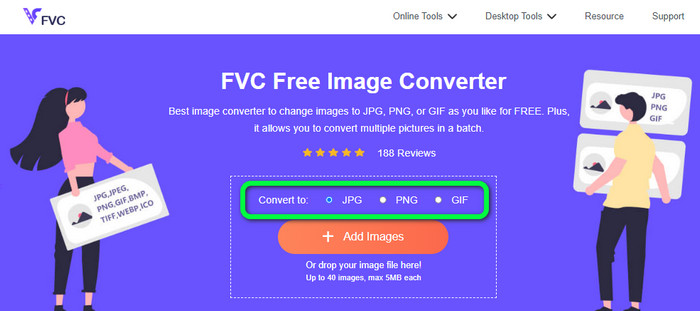
Krok 1: Přejděte na hlavní stránku FVC Free Image Converter. Než přidáte soubor SVG, zvolte požadovaný výstupní formát. V nabídce formátů klikněte na formát JPG.
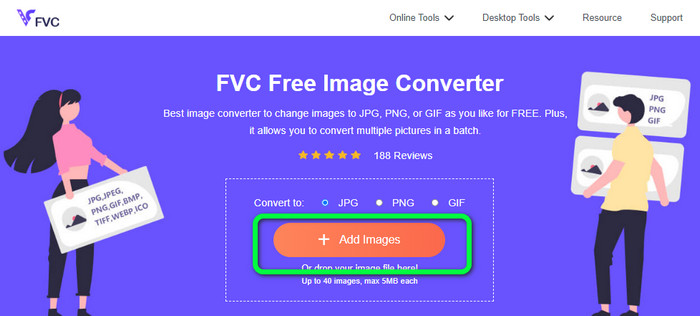
Krok 2: Klikněte na tlačítko Add Images uprostřed rozhraní. Poté se na obrazovce zobrazí okno se soubory. Vyberte obrázek SVG, který chcete převést, a otevřete jej. Soubor SVG můžete také přetáhnout přímo do příslušného pole. Pro hromadný převod klikněte znovu na tlačítko Add Images.
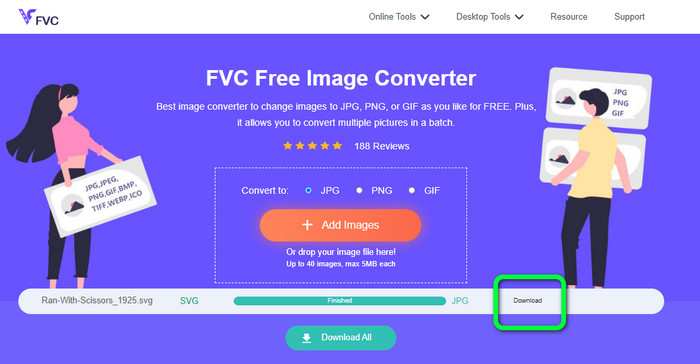
Krok 3: Během nahrávání souboru dojde k automatickému převodu obrázku. V posledním kroku klikněte na tlačítko Download na pravé straně rozhraní. Po dokončení ukládání otevřete převedený obrázek v počítači.
Část 3. Snadná metoda převodu SVG na JPG v systému Windows
V této části objevíte nejlepší metodu, jak převést SVG na JPG offline v systému Windows. Jednou z účinných metod je použití programu HitPaw Video Converter. Funkce Image Convert v HitPaw Video Converter usnadňuje hromadný převod obrázků. Můžete importovat fotografie a grafiku v různých formátech a převést je do požadovaného formátu. Je to skvělá volba pro hromadnou i jednotlivou změnu formátu obrázků. Podporuje také všechny běžně používané formáty fotografií. Patří mezi ně PNG, JPG, HEIC, RAW, BMP a další. Tento nástroj tedy můžete použít i k převodu BMP na JPG nebo PNG. Tento stažitelný program navíc nabízí i další funkce kromě samotného převodu. Pomocí tohoto softwaru můžete stahovat hudební a video soubory. Vaše videa lze také upravovat otáčením, ořezáváním a použitím filtrů. HitPaw Video Converter je však obtížně použitelný, zejména pro začátečníky. Má nepřehledné rozhraní, takže se s ním těžko pracuje. Také proces instalace zabere hodně času.
Krok 1: Nainstalujte HitPaw Video Converter do svého systému Windows. Po instalaci program spusťte.
Krok 2: Přejděte na panel Toolbox a vyberte nástroj Image Converter. Z adresáře v počítači vyberte soubor SVG, který chcete převést.
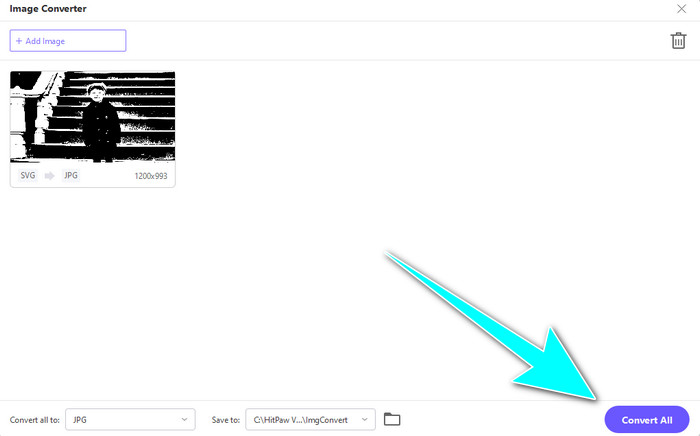
Krok 3: Klikněte na možnost Convert All to v levém dolním rohu rozhraní. Poté jako výstupní formát zvolte JPG.
Krok 4: Nakonec klikněte na tlačítko Convert All v pravém dolním rohu rozhraní. Vyčkejte na dokončení převodu. Poté už můžete svůj obrázek otevřít v souborovém formátu PNG.
Část 4. Jak převést SVG na JPG na Macu
Pokud chcete převést SVG na JPG v systému Mac, použijte BatchPhoto Pro. Podporuje různé obrazové formáty. Patří mezi ně JPG, PNG, ICO, SVG, EPS a dalších více než 170. Obrázky můžete dokonce ukládat jako PDF. Nabízí také hromadný převod. Díky tomu můžete převádět více souborů současně. Kromě převodu obrázků nabízí i další funkce. Můžete upravovat fotografie změnou velikosti, otáčením a úpravou barevných nastavení. Pokud však chcete program používat dlouhodobě, musíte si jej zakoupit. Bezplatná zkušební verze je časově omezená pouze na několik dní. Proces převodu je také složitý. Neprofesionálním uživatelům bude převod obrázků připadat komplikovaný.
Krok 1: Stáhněte a nainstalujte BatchPhoto Pro. Můžete si pořídit bezplatnou zkušební verzi. Po instalaci aplikaci spusťte.
Krok 2: V horní části rozhraní vyberte možnost Add Photos. Po kliknutí přidejte obrázky SVG, které chcete převést do formátu JPG. Můžete přidat více souborů najednou.
Krok 3: Přejděte na možnost Set Up v horní části rozhraní. V nabídce Output Format vyberte formát JPG.
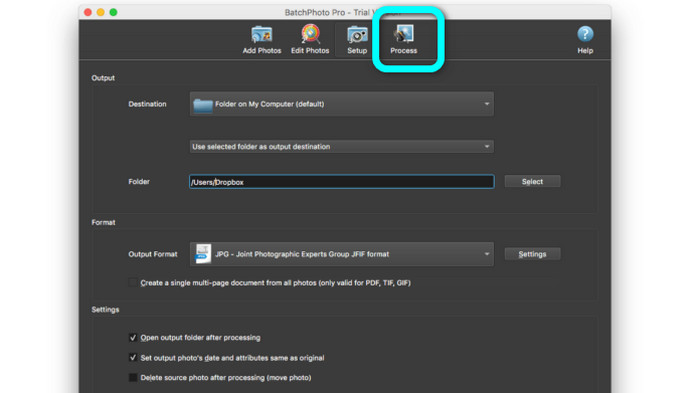
Krok 4: Kliknutím na možnost Process spusťte převod. Po dokončení přejděte do výstupní složky a zkontrolujte převedený obrázek.
Část 5. Časté dotazy o převodu SVG do JPG
1. Proč byste měli převádět SVG na JPG?
Ve srovnání s SVG je JPG vhodnější pro sociální média a další zařízení. Je to jeden z populárních obrazových formátů, které můžete v dnešní době používat. V SVG můžete tento soubor otevřít pouze ve webových prohlížečích. Převod SVG na JPG je tedy nezbytný pro větší kompatibilitu.
2. Jaké jsou výhody a nevýhody souborů SVG?
Soubor SVG můžete rozbalit nebo zmenšit na libovolnou velikost bez ztráty kvality. SVG se nestarají o typ zobrazení nebo velikost obrázku. To, jak vypadají, je konstantní. SVG také poskytují návrhářům a vývojářům velkou kontrolu nad tím, jak vypadají. Je to lepší než je upravovat v textovém editoru. Dokonce i další vizuální prvky, jako jsou stíny a barevné přechody, jsou nastavitelné. Pro detailní a vysoce kvalitní fotografii však existují lepší formáty než SVG. Uživatelé vytvářejí vektorovou grafiku pomocí bodů a cest spíše než pixelů. Kód je také nezbytný.
3. Jak otevřu soubor SVG?
Nejlepší způsob, jak otevřít soubor SVG, je použít prohlížeč. Na klávesnici stiskněte Ctrl+O. Poté vyberte soubor SVG, který chcete zobrazit, a klikněte na Open.
Závěr
A to je vše! Informace výše popisují způsoby, jak převést SVG na JPG ve Windows, na Macu i online. Stahování převodníku obrázků je však zdlouhavé. Pokud tedy chcete jednodušší způsob převodu obrázků, použijte FVC Free Image Converter. Tento online převodník obrázků vám umožní převádět obrázky přímo v prohlížeči.
-
 Užitečné metody, jak snadno převést TIFF na JPG/PNG
 Nenechte si ujít tyto skvělé způsoby, jak převést TIF na formáty JPG/PNG. Tento příspěvek poskytne potřebné informace, které potřebujete vědět. Zahrnuje jejich rozdíly.
-
 Efektivní převod JPEG na JPG [uvedeno pět metod]
 Přijďte a získejte ty nejpřímější návody na převod JPEG do obrazového formátu JPG. Klikněte na tento průvodce a začněte se učit své preferované metody
-
 5 nejlepších návodů, jak rychle převést PNG na JPG
 Pokud potřebujete převést soubor PNG do formátu JPG, můžete se naučit nejlepší způsoby zde. Dozvíte se také rozdíl mezi formáty souborů PNG a JPG
