


 Video Converter Ultimate
 Screen Recorder
 Oprava videa
 Bezpečné stažení
Efektivní způsoby, jak převést TIFF na JPG a PNG
TIFF je obrazový souborový formát běžný mezi fotografy a grafickými designéry. Má vysokou kvalitu, flexibilitu a téměř univerzální kompatibilitu. Jeho velikost je však větší, což ztěžuje sdílení s ostatními nebo na webu. V takovém případě je jedním z nejlepších řešení převést tento soubor do jiných formátů. Formáty souborů JPG a PNG mají menší velikost než TIFF. Proto je lepší převádět TIFF na JPG a PNG. Tento článek vám nabídne nejlepší metody, jak převést TIFF na JPG/PNG. Také se dozvíte všechny informace, které o těchto obrazových formátech potřebujete. A tak, bez dalšího otálení, pojďme si tento příspěvek přečíst a najít řešení, které hledáte.

Část 1. TIFF vs. JPG vs. PNG
| Formát souboru | TIF/TIFF | JPG | PNG |
| Přípona názvu souboru | .tif / .tiff | .jpg | .png |
| Vyvinuto | Aldus (získaný společností Adobe) | Společná skupina fotografických expertů | PNG Development Group |
| Popis | V roce 1992 byl formát souboru obrázku tagu (TIFF) bylo vyvinuto. Vývojáři mohou tento flexibilní typ souboru rozšířit tak, aby vyhovoval mnoha potřebám. Soubory TIF a TIFF jsou oba formáty obrazových souborů používané k ukládání obrázků. Mezi těmito formáty však existují určité rozdíly. Soubory obrázků TIFF jsou schopny uložit více než jeden obrázek do souboru. Na druhou stranu soubory TIF mohou uložit pouze jeden obrázek. Soubory TIFF také mohou ukládat metadata týkající se obrázku, ale soubory TIF nikoli. | JPG a JPEG jsou stejné přípony, které odkazují na stejný formát digitálního obrazu. Mezi formáty JPEG a JPG nejsou žádné rozdíly. Jediný rozdíl je v počtu použitých znaků. Soubory JPG se ukládají s příponou .jpg a soubory JPEG se ukládají s příponou .jpeg. JPEG je zkratka pro Joint Photographics Experts Group. | Zkratka PNG znamená Portable Network Graphic. Můžete ukládat vysoce kvalitní fotografie a sdílet je ve formátu PNG. PNG zvládnou ohromujících 16 milionů barev. Podporuje také průhledné a poloprůhledné pozadí. Soubor obrázku PNG je otevřený formát, což znamená, že soubor PNG můžete uložit a otevřít z libovolného softwaru pro úpravu obrázků. |
Část 2. Vynikající metody pro převod TIF/TIFF na JPG/PNG online
FVC Free Image Converter je špičkový převodník, který můžete použít k online převodu TIFF na JPG/PNG. Postup převodu je také přímočarý. Obrázky lze převést ve třech jednoduchých krocích. Je k dispozici i dávkový převod. Najednou můžete převádět více fotografií. To znamená, že obrázky převedete za kratší dobu. Nástroj je snadno pochopitelný a nabízí intuitivní rozhraní s přehledným nastavením. Kromě toho FVC Free Image Converter podporuje různé vstupní formáty. Podporuje různé formáty, včetně JPG, PNG, BMP, TIFF, WEBP a GIF. Dále je tento převodník zcela zdarma. Také chrání soukromí uživatelů. Po převedení a uložení fotografií vaše data okamžitě smaže. Skutečnost, že tuto online aplikaci můžete používat ve všech typech prohlížečů, zvyšuje její dostupnost. Chcete‑li tento převodník TIFF na JPG používat, postupujte podle níže uvedených jednoduchých pokynů.
Převést TIF/TIFF na JPG
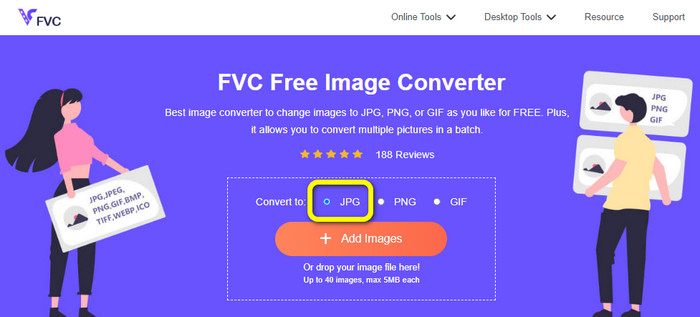
Krok 1: Navštivte webovou stránku FVC Free Image Converter ve svém prohlížeči. Poté z možnosti Convert to vyberte formát souboru JPG.
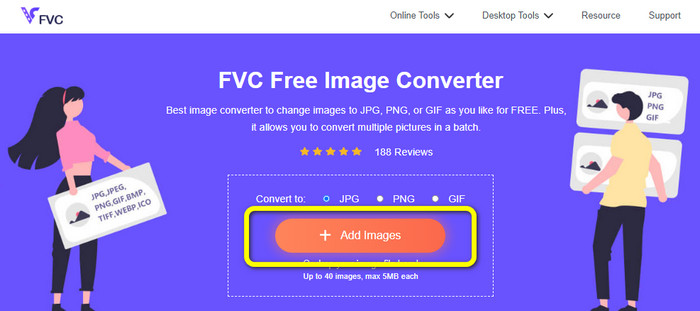
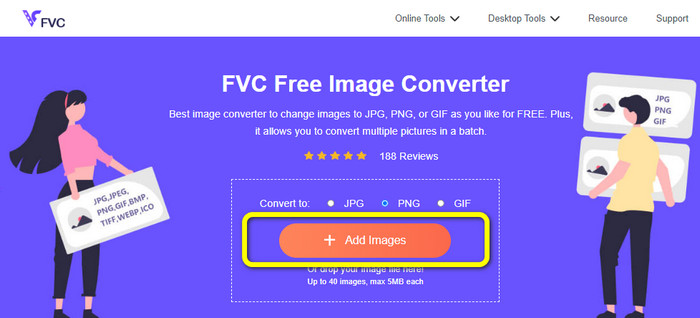
Krok 2: Dalším krokem je kliknout na tlačítko Add Images. Po kliknutí se na obrazovce počítače zobrazí okno se soubory. Vyberte obrazový soubor a klikněte na Open.
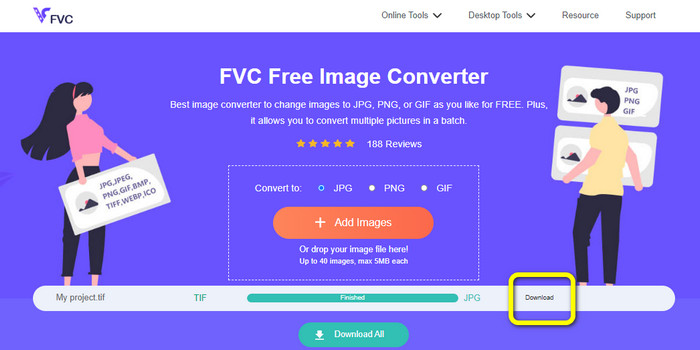
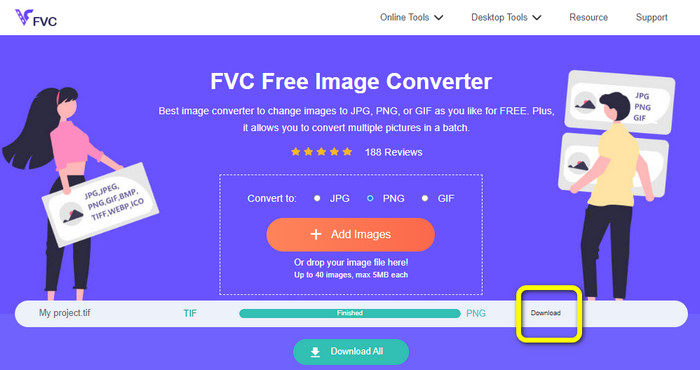
Krok 3: Po nahrání převodník obrázků váš snímek automaticky převede. Kliknutím na tlačítko Download převedený obrázek uložíte a stáhnete do počítače.
Převést TIFF/TIF na PNG
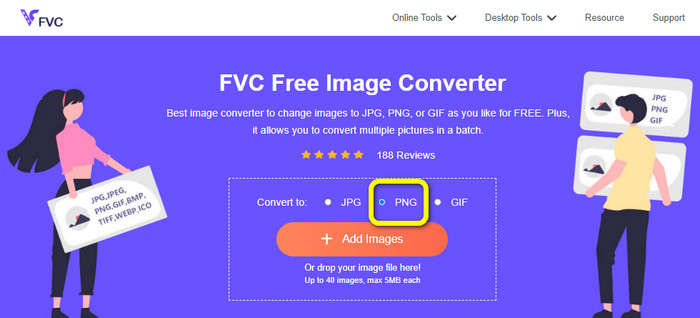
Krok 1: Na webové stránce vyberte z nabídky formátů souborový formát PNG.
Krok 2: Klikněte na tlačítko Add Images. Když se na obrazovce zobrazí okno se soubory, vyberte soubor PNG, který chcete převést. Poté ho otevřete.
Krok 3: Po dokončení převodu klikněte na tlačítko Download. Počkejte na dokončení ukládání a otevřete si obrázek ve své složce. Kliknutím sem se dozvíte, jak převést BMP na JPG nebo PNG.
Část 3. Nejlepší způsoby, jak převést TIF/TIFF na JPG/PNG offline
Video Converter Ultimate je jedním z nejlepších offline způsobů, jak převést soubor TIF na JPG a PNG. Tento program si můžete stáhnout jak na operační systém Mac, tak na Windows. Tento offline převodník obrázků vám umožní převést soubor TIF na JPG a PNG. Podporuje také další formáty, jako WEBP, BMP, GIF, TIFF, JPG, PNG a další. Převodník nabízí uživatelsky přívětivé rozhraní, takže je ideální pro profesionály i začátečníky. Kromě toho, pokud chcete převádět více souborů najednou, můžete to udělat. Jednou z jeho pozoruhodných funkcí je možnost dávkového převodu. Díky tomu je velmi pohodlný pro všechny uživatele, kteří chtějí převádět obrazové soubory. Navíc při převodu obrázků můžete dělat ještě více věcí. V nabídce nastavení můžete obrázky přibližovat a oddalovat. Můžete také změnit kvalitu obrázku podle svých preferencí. Tímto způsobem dosáhnete požadovaného výsledku. Podle níže uvedeného základního postupu převedete TIF na formát JPG a PNG.
Převést TIFF na JPG
Krok 1: Stáhněte si do počítače program Video Converter Ultimate. Poté aplikaci po instalaci spusťte. Podívejte se na tlačítko Download níže a klikněte na něj, abyste se k převodníku snadno dostali.
Zdarma ke staženíPro Windows 7 nebo novějšíBezpečné stažení
Zdarma ke staženíPro MacOS 10.7 nebo novějšíBezpečné stažení
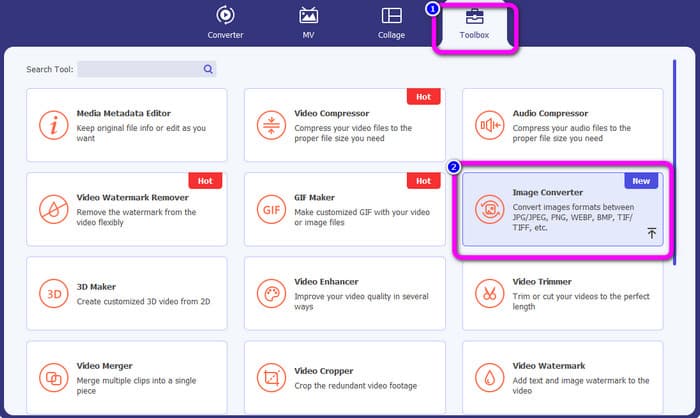
Krok 2: Klikněte na panel Toolbox v horní části rozhraní. Vyberte funkci Image Converter.
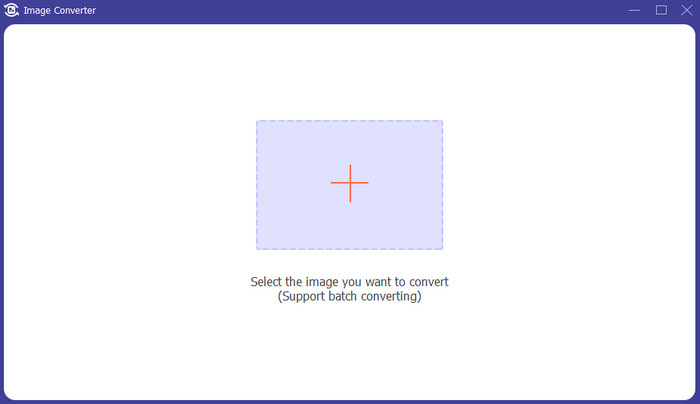
Krok 3: Poté klikněte na tlačítko se symbolem Plus uprostřed rozhraní. Vyberte obrazový soubor TIFF ze své složky se soubory a otevřete jej.
Krok 4: Pokud chcete přidat další obrázky, klikněte na tlačítko Add Source file. Poté přejděte k možnosti Convert All to a vyberte formát souboru JPG.
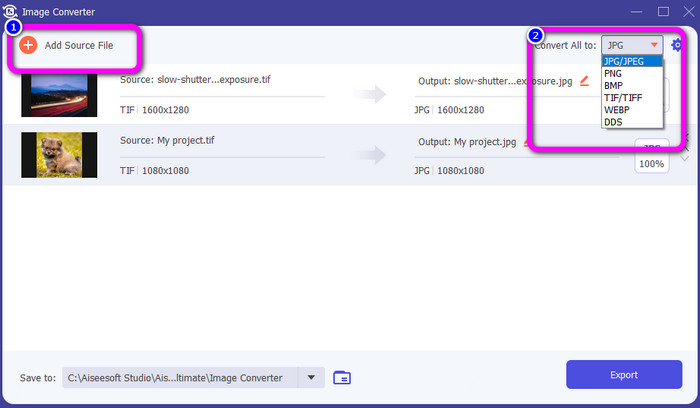
Krok 5: Nakonec klikněte na tlačítko Export poté, co jako výstupní formát zvolíte JPG. Po dokončení převodu můžete převedený obrázek otevřít ve své složce se soubory.
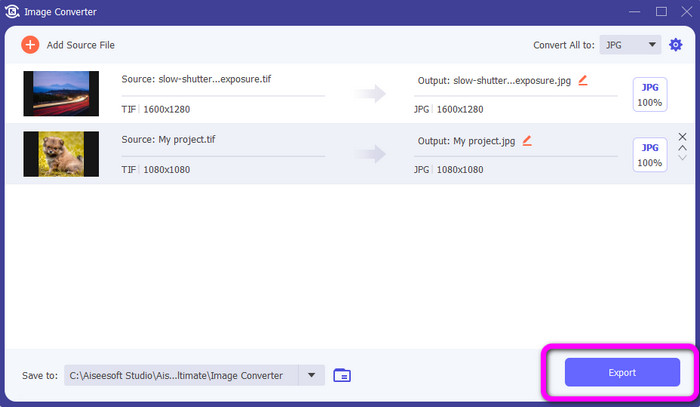
Převést TIFF na PNG
Krok 1: Můžete postupovat podle stejného postupu jako výše. Přejděte na panel Toolbox a vyberte funkci Image Converter.
Krok 2: Kliknutím na ikonu Plus vložte TIFF, který chcete převést.
Krok 3: Po přidání svých obrázků TIFF přejděte k možnosti Convert All to. Jako výstupní formát vyberte souborový formát PNG.
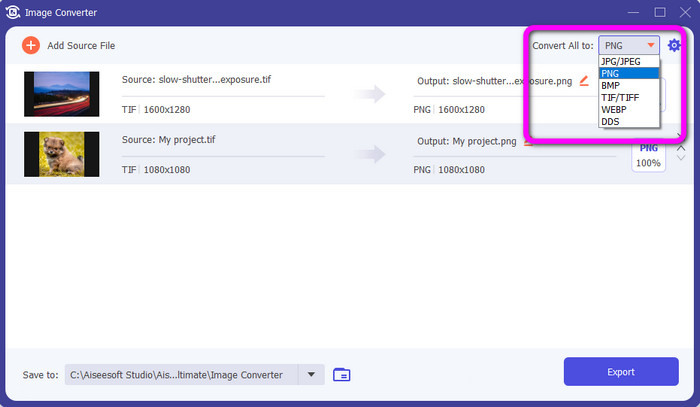
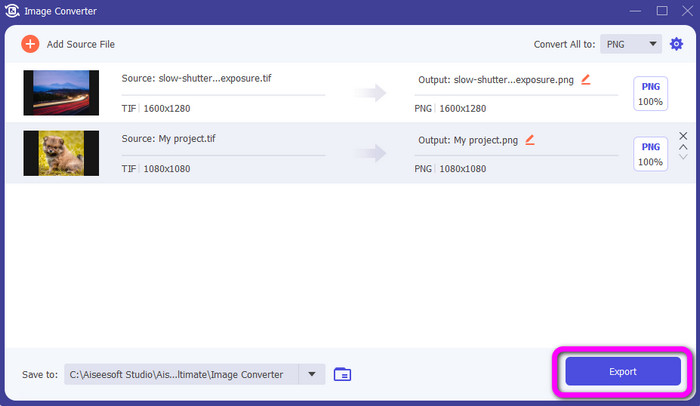
Krok 4: V posledním kroku klikněte na tlačítko Export v levém dolním rohu rozhraní. Tento software také můžete použít ke konverzi JPG na PNG.
Část 4. Časté dotazy o převodu TIF/TIFF na JPG/PNG
1. Jak převést TIFF na PNG na Macu?
Jedním z účinných způsobů, jak převést TIFF na PNG na Macu, je použít FVC Free Image Converter. Otevřete v Macu Safari a přejděte na tento online převodník obrázků. Na hlavní stránce vyberte v nabídce formátů možnost PNG. Kliknutím na tlačítko Add Images přidejte soubor TIFF, který chcete převést. Během nahrávání se soubor automaticky převede. Poté klikněte na tlačítko download a uložte převedený obrázek do svého Macu.
2. Jaké jsou výhody převodu TIF do PNG?
Pokud chcete soubor zmenšit, je nutné změnit soubor TIF na jiné formáty. Převod TIF na soubor PNG je nejlepší, protože PNG má menší velikost souboru. Poskytne vám spravovatelnou velikost souboru pro webové prohlížeče a zařízení.
3. Který soubor je snazší odeslat, JPG nebo TIFF?
Formát souboru JPG má menší velikost souboru. Usnadňuje odeslání obrázku online nebo e-mailem. TIFF má větší velikost souboru, takže odesílání obrázku je pomalé.
Závěr
Nyní už víte, že obrazový soubor TIFF má větší velikost. Pokud tedy chcete obrázek odeslat online rychleji, je lepší jej převést do jiných formátů s menší velikostí souboru. Proto vám tento článek poskytl nejlepší řešení, jak převést TIFF na JPG a PNG. Pokud chcete jednodušší způsob převodu obrazových souborů, použijte FVC Free Image Converter. Nabízí přehledné rozhraní s jednoduchými postupy převodu obrázků.
-
 Efektivní převod JPEG na JPG [uvedeno pět metod]
 Přijďte a získejte ty nejpřímější návody na převod JPEG do obrazového formátu JPG. Klikněte na tento průvodce a začněte se učit své preferované metody
-
 5 nejlepších návodů, jak rychle převést PNG na JPG
 Pokud potřebujete převést soubor PNG do formátu JPG, můžete se naučit nejlepší způsoby zde. Dozvíte se také rozdíl mezi formáty souborů PNG a JPG
-
 Úplné podrobnosti o rozdílech JPEG vs. JPG vs. PNG
 Tento příspěvek vám poskytne dostatek informací o rozdílech mezi JPEG vs. JPG vs. PNG. Kromě toho se naučíte převádět obrázky do těchto souborů
