


 Video Converter Ultimate
 Screen Recorder
 Oprava videa
 Bezpečné stažení
3 způsoby, jak snadno komprimovat fotografie pro e-mail [Průvodce]
E-mail je skvělá platforma pro odesílání zpráv s přílohami fotografií a dalšími potřebnými soubory. Někteří uživatelé se však setkávají s potížemi při odesílání fotografií s velkými soubory, protože to vede k pomalému nahrávání, neúspěšnému doručení nebo překročení limitů velikosti příloh stanovených poskytovateli e-mailu. Chcete-li se těmto problémům vyhnout, je zásadní změnit velikost fotografií před jejich odesláním.
S tímto vás v tomto článku provedeme 3 metodami, jak komprimovat fotografie pro e‑mail, abyste zajistili, že vaše foto‑přílohy bude snadné odesílat i přijímat, aniž by utrpěla jejich kvalita.

Část 1. Výhody komprese fotografií pro e-mail
Komprese fotografií má obecně mnoho výhod, včetně použití e-mailu. Při změně velikosti fotografií pro e-mail se můžete těšit z následujících věcí:
• Protože komprese obrázků v praxi znamená změnu velikosti fotografie na menší rozměr, můžete v e‑mailu snadno posílat více fotografií jako přílohy než v případě nekomprimovaných snímků.
• Poskytovatelé e‑mailu často omezují velikost příloh, které můžete odeslat. Komprimováním fotografií pro e‑mail se můžete držet v rámci těchto limitů a zajistit, aby byl váš e‑mail doručen bez problémů. To je užitečné při odesílání e‑mailů více příjemcům nebo pokud kromě fotografií přikládáte i jiné typy souborů.
• Když jsou fotografie komprimované, znamená to jen, že zabírají méně místa, což vám umožní lépe využívat přidělený prostor pro e‑mailové schránky.
• Velké e‑mailové přílohy mohou být někdy označeny e‑mailovými servery, což vede k chybám při doručení nebo k zařazení zpráv do spamu. Komprimování fotografií pro e‑mail pomáhá těmto problémům předcházet a zajišťuje, že vaše přílohy dorazí zamýšleným příjemcům bez potíží.
• V některých situacích si uživatelé prohlížejí e‑maily na mobilních telefonech. Odeslané komprimované fotografie se na mobilních zařízeních stahují a zobrazují snáze než nekomprimované.
Část 2. Komprimujte fotografie pro e-mail převodem obrazového formátu
Pokud chcete komprimovat fotografie pro e-mail, první metodou, kterou můžete vyzkoušet, je použití nástroje pro převod obrázků. Díky tomu převede váš obrázek do formátu, který si přejete, ve kterém proces převodu také optimalizuje vaši fotografii na požadovanou a lépe zvládnutelnou velikost.
FVC Free Image Converter je bezplatný konverzní nástroj, který uživatelům umožňuje převádět jejich fotografie do různých obrazových formátů, jako jsou JPG, PNG a GIF. Pokud tedy v e‑mailu odesíláte obrázek ve formátu, který uchovává více dat a tím zvětšuje velikost souboru, můžete této pomůcky bezpochyby využít. Navíc je ideální, když chcete poslat více velkých souborů, protože umí hromadně převést až 40 obrázků najednou. Zde je návod, jak tento nástroj použít ke kompresi fotografií pro e‑mail:
Krok 1. Nejprve ve svém prohlížeči vyhledejte FVC Free Image Converter, abyste získali přístup k tomuto online nástroji.
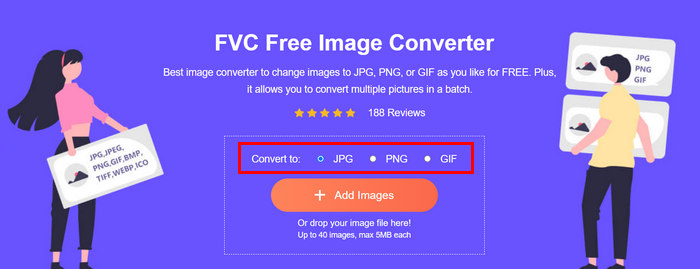
Krok 2. Dále zvolte výstupní formát souboru, který preferujete, v možnosti Convert to. Poté klikněte na tlačítko Add Images a naimportujte snímky, které chcete převést.
Krok 3. Po dokončení klikněte na tlačítko Download All.
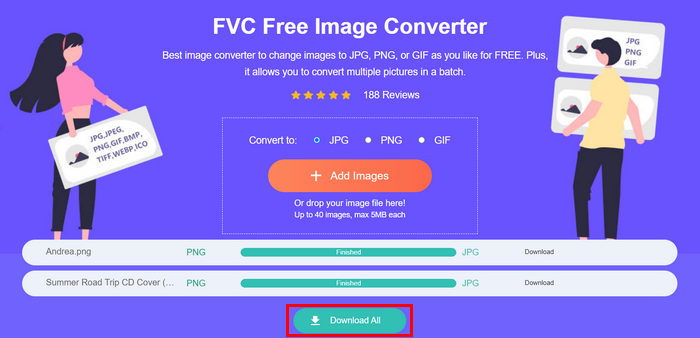 S nástrojem FVC Free Image Converter je zaručeno, že vaše převedené fotografie jsou nyní komprimovány a mají zmenšenou velikost, což je ideální pro použití v e-mailu.
 Část 3. Zmenšení fotografií pro e-mail pomocí online nástroje pro kompresi
FVC Free Image Compressor je bezplatný online kompresní nástroj, který zjednodušuje proces komprimování fotografií pro e‑mail. Stačí nahrát nebo importovat obrazové soubory a nástroj je automaticky zkomprimuje. Pokud se obáváte ztráty kvality, tento nástroj využívá nejlepší optimalizační a pokročilé kompresní algoritmy. Tím zajistí, že se kvalita vašich obrázků při kompresi pro e‑mail zachová.
Také, pokud musíte dávkově komprimovat obrázek, tento nástroj vám umožní současně komprimovat 40 obrázků najednou. A konečně, podporuje různé populární obrazové formáty jako JPEG, PNG, SVG a animované GIFy.
Krok 1. V prohlížeči otevřete jejich oficiální webové stránky.
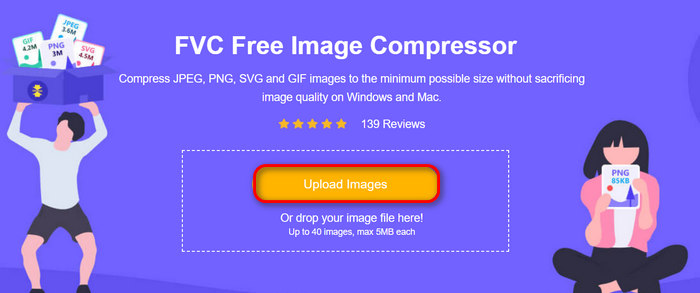
Krok 2. Poté klikněte na Upload Images a naimportujte snímky, které chcete komprimovat pro web. Vezměte prosím na vědomí, že tento nástroj vaše fotografie automaticky zkomprimuje, jakmile je vyberete a kliknete na Otevřít.
Krok 3. Po kompresi obrázků si je můžete prohlédnout tak, že zkontrolujete jejich novou velikost po zmenšení. Nakonec klikněte na Download All, abyste si obrázky uložili.
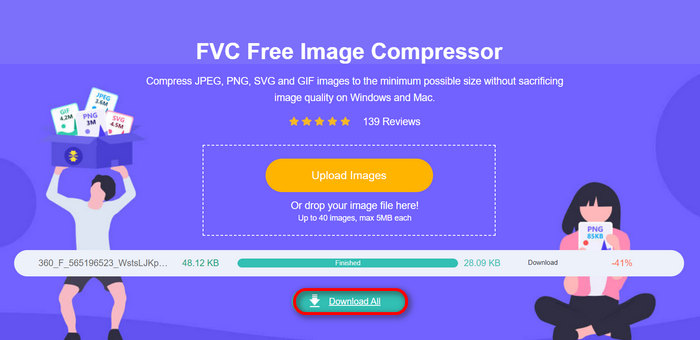
Tato metoda vám může skutečně pomoci komprimovat fotografie pro e-mail bez nutnosti složitých kroků a poplatků za předplatné. Navíc jeho uživatelsky přívětivé a intuitivní rozhraní z něj dělá ideální nástroj pro všechny úrovně uživatelů. Pokud tedy chcete optimalizovat své fotografie pro použití v e-mailu, vyzkoušejte tuto metodu nyní.
Část 4. Změna velikosti fotografií pro e-mail na zadanou velikost
Pokud chcete změnit velikost fotografií pro e-mail na zadanou velikost, můžete vyzkoušet nástroj IMGonline. Tento nástroj pro kompresi obrázků vám umožňuje změnit velikost obrázku na velikost podle vašeho výběru. Jak na to:
Krok 1. Na jejich webových stránkách klikněte na tlačítko Choose File a přidejte fotografii, kterou chcete komprimovat.

Krok 2. Dále nastavte parametry komprese souboru JPEG. Zadejte požadovanou velikost v KB nebo MB, podle vaší volby.

Krok 3. V nabídce Size Reducing in Megapixel zvolte, jak moc chcete svou fotografii zkomprimovat, nebo jak chcete kompresi své fotografie omezit.
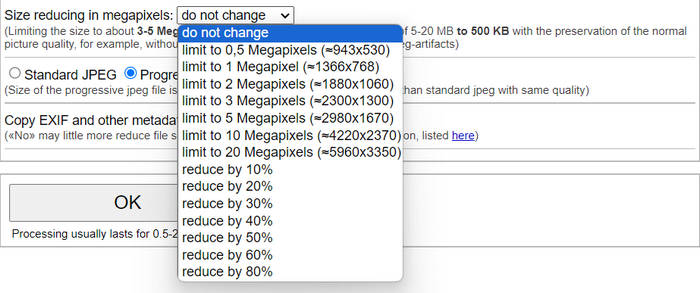
Krok 4. Poté si vyberte mezi možnostmi Standard JPG nebo Progressive JPG.

Krok 5. Po dokončení jednoduše klikněte na tlačítko OK.
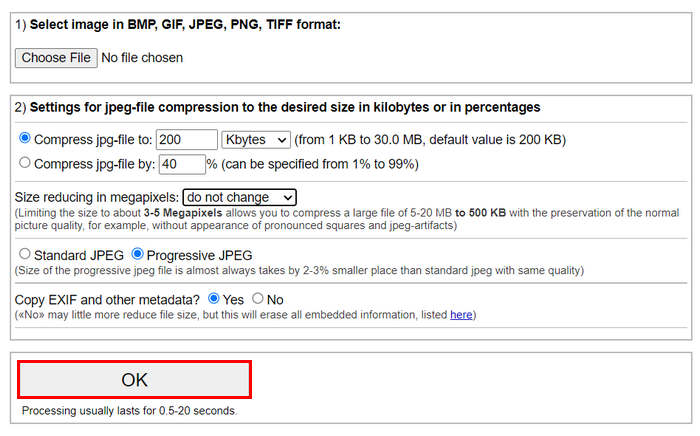
V souvislosti s výběrem mezi standardním JPG a progresivním JPG mějte na paměti, že velikost progresivního jpeg souboru je vždy o 2-3% menší než u standardního jpegu se stejnou kvalitou.
Část 5. Nejčastější dotazy o kompresi fotografií pro e-mail
Jakou velikost mám změnit velikost fotek pro e-mail?
Pokud jde o ideální velikost pro odesílání fotografií e-mailem, není zde žádné omezení, přesto se obecně doporučuje změnit velikost fotografií na maximálně 1024 x 768 pixelů. Udržení velikosti obrázku pod 1 MB také pomáhá vyhnout se problémům s limity příloh a usnadňuje příjemcům stahování a prohlížení obrázků.
Jak komprimovat obrázky pro Gmail?
Komprimování obrázků pro Gmail lze provést různými způsoby. Jedním z nejjednodušších je použití online kompresních nástrojů, jako je bezplatný nástroj FVC image compressor tool. K jeho použití stačí nahrát obrazové soubory a nástroj je automaticky zkomprimuje.
Jaký typ obrázku je nejlepší pro e-maily?
Nejlepšími typy obrázků pro e‑maily jsou JPEG a PNG. JPEG je široce používaný díky dobrému poměru komprese a vyváženosti mezi velikostí souboru a kvalitou, což z něj dělá ideální volbu pro fotografie a snímky s mnoha barvami. PNG se upřednostňuje u obrázků, které vyžadují průhlednost, nebo u obrázků s textem, logy či grafikou s ostrými hranami, protože u těchto prvků zachovává vyšší kvalitu, ačkoli soubory mohou být ve srovnání s JPEG větší.
Závěr
Je opravdu důležité vědět, jak komprimovat fotografie pro e‑mail, abyste se vyhnuli pomalému nahrávání, nedoručeným zprávám a omezením velikosti příloh. Dodržením postupů, které byly v tomto článku podrobně popsány, zajistíte, že vaše foto‑přílohy budou dobře zvládnutelné a rychlé na odeslání i příjem.
na co čekáš? Začněte optimalizovat své e-mailové přílohy ještě dnes těmito 3 snadnými způsoby.
-
 Příliš komprimovaná fotografie: Zde je návod, jak je snadno opravit
 Zajímá vás, co dělat, když je váš obrázek příliš komprimovaný? Přečtěte si tento článek a zjistěte, proč k tomuto problému s obrázkem dochází, a naučte se 2 způsoby, jak je opravit.
-
 Změnit velikost obrázku na 100 kB: 3 nejlepší způsoby efektivní komprese
 Hledáte nástroj, který vám pomůže změnit velikost obrázku na 100 kB? Přečtěte si tento článek a naučte se 3 způsoby, jak můžete obrázky zmenšit na požadovanou velikost souboru.
-
 Jak komprimovat obrázky ve Wordu [Windows a Mac]
 Zajímá vás, jak můžete využít svůj Word pro kompresi obrázků? Tato příručka vás naučí, jak komprimovat obrázky ve Wordu pro bezproblémovou kompresi.
