


 Video Converter Ultimate
 Screen Recorder
 Oprava videa
 Bezpečné stažení
Jak převést AIFC na MP3 pomocí nejlepších audio převodníků
AIFC, zkratka pro Audio Interchange File Format, je zvukový formát původně vyvinutý společností Apple Inc. Jedná se o standard pro ukládání zvukových dat a soubory AIFF můžete běžně najít na systémech Mac. AIFC je rozšířením AIFF, kde jsou komprimované varianty označeny příponou souboru .aifc.
Výzva u souborů AIFC spočívá v jejich omezené kompatibilitě s různými zařízeními a multimediálními přehrávači. Navíc při úpravách souborů AIFC mohou problémy s kompatibilitou způsobovat zásadní potíže, pokud editor tento formát nepodporuje. Proto jsme shromáždili několik účinných metod, které vám pomohou převést soubory AIFC na široce podporovaný formát MP3. Převod vašich souborů AIFC do MP3 zajistí lepší kompatibilitu napříč zařízeními a plynulejší možnosti úprav. Pojďme se podívat na tyto metody převodu a překonat překážky s kompatibilitou vašich zvukových souborů.

Část 1. 5 způsobů, jak převést AIFC na MP3
1. Video Converter Ultimate
Video Converter Ultimate je spolehlivý a profesionální převodník AIFC do MP3, navržený pro bezproblémový převod formátu AIFC do MP3 a mnoha dalších formátů. Tento software vám umožní snadno a bezpečně převádět video a audio soubory, zlepšit zážitek z offline zábavy a zároveň zajistit optimální kompatibilitu. Využijte jeho působivé možnosti a stáhněte si software ještě dnes na bezplatné vyzkoušení.
Stáhnout zdarmaPro Windows 7 nebo novějšíBezpečné stažení
Free DownloadPro macOS 10.7 nebo novějšíBezpečné stažení
Chcete-li převést soubory AIFC na MP3 pomocí Video Converter Ultimate, postupujte podle těchto jednoduchých kroků:
Krok 1. Importujte soubory AIFC
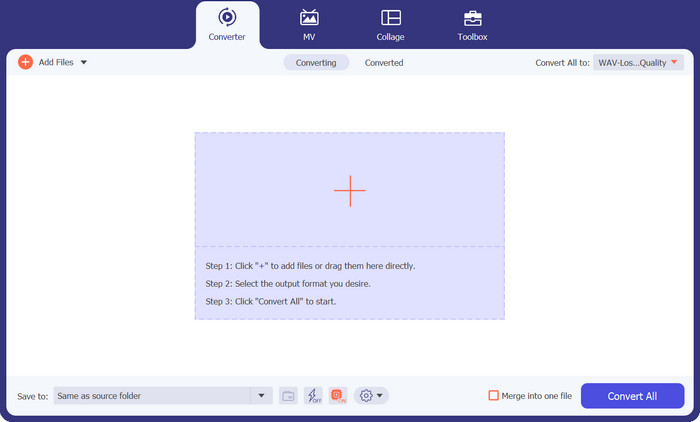
Po instalaci programu Video Converter Ultimate na počítač se systémem Windows nebo Mac jej spusťte. Klikněte na tlačítko Add Files na horní liště a importujte soubory AIFC, které chcete převést.
Krok 2. Zvolte MP3 jako výstupní formát
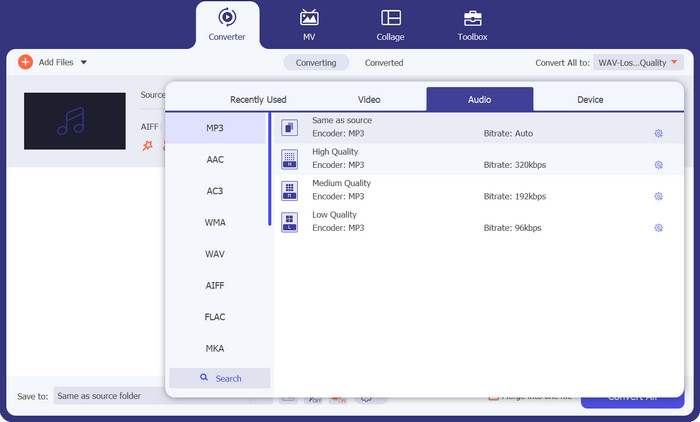
Vyhledejte zvukový soubor AIFC v knihovně a klikněte na rozbalovací nabídku Convert All to umístěnou na pravé straně. Zvolte kartu Audio a jako požadovaný výstupní formát vyberte MP3. Poté klikněte na rozbalovací tlačítko dole a vyberte složku, do které se mají ukládat převedené soubory MP3.
Krok 3. Převeďte AIFC na MP3
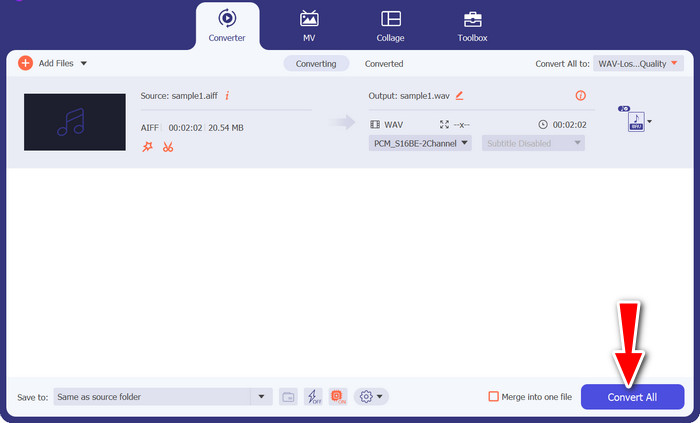
Jakmile nastavíte výstupní parametry, vyberte v knihovně všechny soubory AIFC, které chcete převést. Klikněte na tlačítko Convert All umístěné v pravém dolním rohu a spusťte proces převodu, který vaše soubory AIFC převede do formátu MP3. Po dokončení převodu můžete soubory MP3 snadno přenášet a přehrávat na jakémkoli kompatibilním zařízení.
2. iTunes
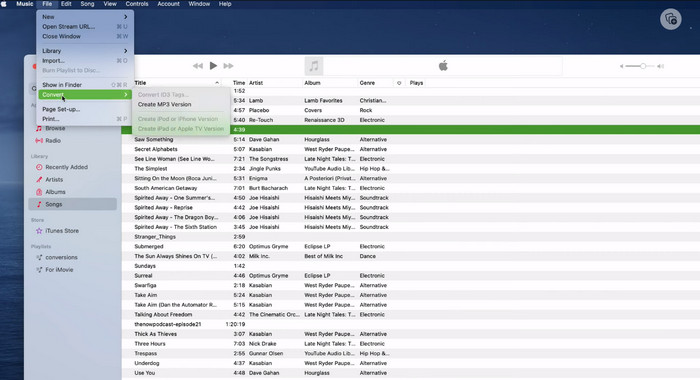
iTunes je všestranná platforma pro přehrávání, správu a stahování hudby a videí v systémech Mac OS X a Windows. Navíc se může pochlubit vestavěnou schopností převádět zvukové soubory AIFC. Níže naleznete obsáhlé podrobné průvodce efektivním převodem AIFC na MP3 na Macu pomocí iTunes.
Krok 1. Otevřete na počítači iTunes. Na Macu otevřete iTunes tak, že v horní liště obrazovky zvolíte iTunes > Preferences.
Krok 2. V okně předvoleb iTunes přejděte na General a poté dole klikněte na Import Settings. V dialogovém okně Import Settings klikněte na rozbalovací nabídku vedle Import Using a zvolte MP3 Encoder. Kliknutím na OK volbu potvrďte. Pokud používáte Mac, podržte klávesu Option, klikněte na File > Convert > Convert to MP3 a vyberte složku obsahující skladby AIFC, které chcete převést.
Krok 3. Po dokončení procesu budou skladby převedeny do formátu MP3 a zobrazí se ve vaší knihovně iTunes, připravené k přehrávání nebo přenosu do vašich zařízení. Poté byste již měli umět převádět AIFC do MP3 na Macu.
3. Free MP3 Converter Online
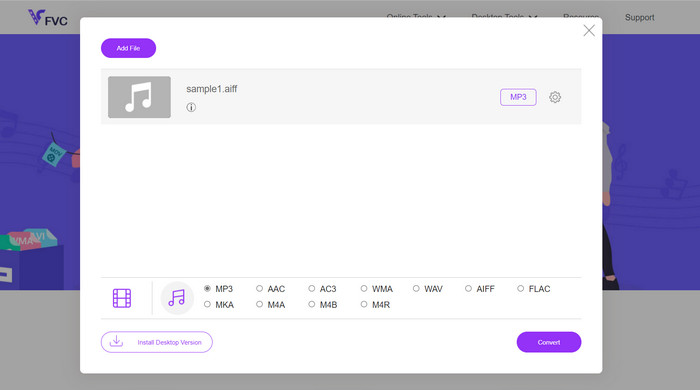
Nejjednodušším a nejpohodlnějším řešením je použití důvěryhodného online převodníku AIFC do MP3; mým osobním favoritem je Free MP3 Converter Online. Tato webová služba nevyžaduje žádné přihlášení ani e‑mailovou adresu, takže uživatelé mohou soubory přidat k přímému převodu naprosto bez komplikací. Jednou z pozoruhodných funkcí, které stojí za zmínku, je její široká podpora různých formátů.
Krok 1. Začněte návštěvou oficiální stránky programu. Klikněte na tlačítko Add Files to Convert a vyberte požadovaný soubor AIFC z pevného disku vašeho počítače.
Krok 2. Jakmile je soubor přidán, otevřete nabídku formátů a jako požadovaný výstupní formát vyberte MP3.
Krok 3. Nakonec klikněte na tlačítko Convert a spusťte proces převodu. Během několika sekund bude soubor úspěšně převeden do formátu MP3 a uložen přímo do vašeho počítače pro snadný přístup.
4. Zamzar
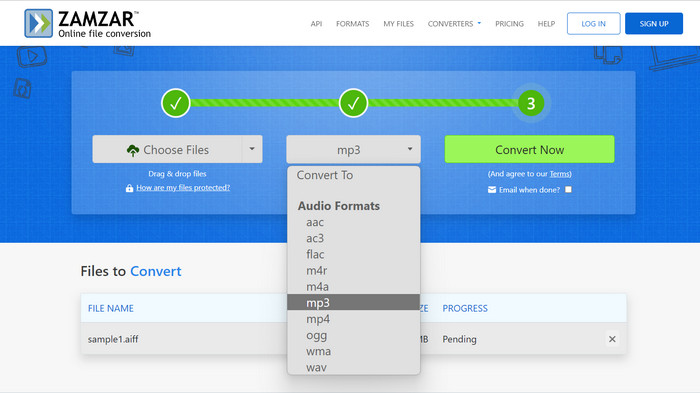
Volba webových aplikací pro převod zvuku představuje lákavou alternativu pro převod AIFC na MP3. Bez nutnosti instalace tyto aplikace efektivně zvládají úlohu převodu zvuku. Pro ilustraci procesu použijeme jako příklad Zamzar.
Krok 1. V internetovém prohlížeči otevřete stránku pro převod AIFC do MP3. Nahrajte soubory AIFC z pevného disku počítače, pomocí adresy URL nebo přímo z vašeho cloudového úložiště.
Krok 2. Pro úpravu výstupního formátu klikněte na rozbalovací nabídku formátu a jako požadovaný formát vyberte MP3.
Krok 3. Po nastavení parametrů klikněte na tlačítko Convert Now a spusťte proces převodu. Počkejte na dokončení převodu a poté si stáhněte převedené soubory MP3 do počítače k okamžitému použití.
5. Convertio
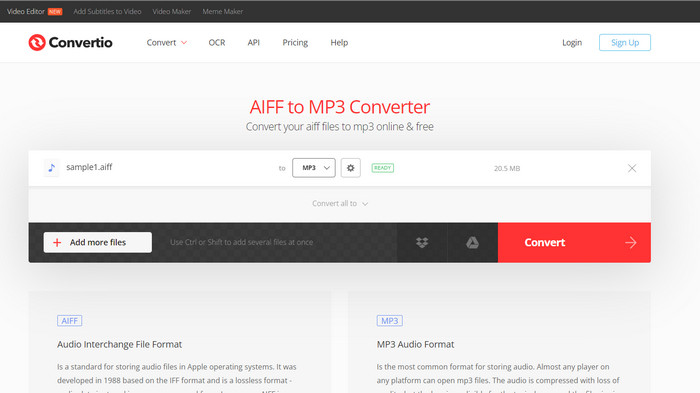
Převod se neomezuje pouze na převod AIFC na MP3. Ve skutečnosti nabízí širokou škálu možností pro převod souborů AIFC do různých dalších populárních formátů, včetně WAV, WMA, AAC, AC3, FLAC, OGG, RA a dalších. S Convertio můžete snadno transformovat své soubory AIFC do preferovaného zvukového formátu, což z něj činí všestranný a cenný nástroj pro převod zvuku.
Krok 1. Navštivte web Convertio (https://convertio.co/aifc-mp3/) ve svém internetovém prohlížeči.
Krok 2. Klikněte na tlačítko Choose Files a nahrajte své soubory AIFC z počítače. Případně můžete soubory na web jednoduše přetáhnout metodou drag & drop.
Krok 3. Po nahrání souborů AIFC klikněte na rozbalovací nabídku výstupního formátu. Z dostupných zvukových formátů vyberte MP3.
Krok 4. Klikněte na tlačítko Convert a spusťte proces převodu AIFC do MP3. Počkejte na dokončení převodu.
Další čtení:
Recenze nejlepších programů pro převod AIF na WAV [2023]
FLAC vs. MP3: Který zvukový formát je skutečně nejlepší?
Část 2. Nejčastější dotazy o konverzi AIFC na MP3
Převádí QuickTime AIFC na MP3?
Zatímco QuickTime umí číst soubory AIFC, nemá schopnost převádět AIFC na MP3.
Je AIFC lepší než AIFF?
AIFC je oblíbená varianta AIFF, která využívá kompresi, což vede k menší velikosti souborů ve srovnání s AIFF. Tato komprese však také vede k nižší kvalitě zvuku než původní formát AIFF.
Co je lepší, MP3 nebo AIFC?
AIFC je ztrátový formát a jeho kvalita je dána zvoleným datovým tokem. Úprava datového toku může mít vliv na to, zda AIFC překonává nebo zaostává za MP3 v kvalitě zvuku. Navzdory tomu se MP3 těší rozsáhlé kompatibilitě zařízení. Lepší volba mezi MP3 a AIFC závisí na vašich konkrétních požadavcích a preferencích.
Mohu na svém mobilním zařízení převést soubory AIFC na MP3?
Ano, některé mobilní aplikace nebo online převodníky nabízejí pro pohodlí převod AIFC na MP3 přímo na vašem mobilním zařízení.
Jak mohu zajistit nejlepší kvalitu zvuku během procesu převodu?
Chcete-li dosáhnout nejlepší kvality zvuku, použijte při převodu vyšší datový tok. Mějte však na paměti, že větší velikost souborů bude výsledkem vyšší bitové rychlosti.
Závěr
Převod AIFC do MP3 nabízí flexibilitu a širší kompatibilitu se zařízeními, takže je oblíbenou volbou pro převod audia. Přestože AIFC může při vyšších datových tocích poskytovat lepší kvalitu, MP3 zůstává praktickou a široce přijímanou možností pro každodenní použití.
-
 Nejlepší 4 způsoby, jak převést AIFF na MP3 na Mac a PC
 Máte potíže, protože soubory AIFF jsou příliš velké na uložení? Takže musíte pokračovat ve čtení, protože vysvětlujeme, jak to opravit převodem AIFF do formátu MP3.
-
 Přehrávač MP3 ke stažení – 10 nejlepších bezplatných hudebních přehrávačů MP3 z roku 2023
 klobouk je nejlepší hudební přehrávač MP3? Jak vložím hudbu do MP3 přehrávače? Jak stáhnout hudební přehrávač MP3? Tento příspěvek vám poskytuje podrobný přehled 10 nejlepších bezplatných přehrávačů MP3 pro Windows PC a Mac.
-
 5 MP3 řezaček pro snadné řezání jakéhokoli zvuku [2023 Aktualizováno]
 Potřebujete MP3 řezačku pro oříznutí zvuku? V takovém případě si přečtěte tento článek, protože poskytujeme nástroje, na které se můžete spolehnout a které umožňují snadné řezání zvuku.
