


 Video Converter Ultimate
 Screen Recorder
 Oprava videa
 Bezpečné stažení
M4A vs. MP3 Hloubkový přehled a srovnání dvou audio formátů
Vzhledem k šíření digitální hudby je nyní výběr vhodného zvukového formátu důležitější než kdy dříve. Zatímco M4A a MP3 jsou široce používány, existují mezi nimi důležité rozdíly. Zatímco MP3 je de facto standardem pro hudební soubory, M4A se často používá pro vynikající kvalitu zvuku.
V porovnání M4A vs. MP3 se podíváme na jemnější rozdíly mezi formáty souborů M4A a MP3, abyste se mohli informovaně rozhodnout. Také předložíme komplexní analýzu rozdílů a podobností mezi těmito dvěma typy souborů, pokud jde o kvalitu zvuku, kompatibilitu, velikost souboru a další. Ať už jste milovník hudby nebo profesionální muzikant, rozhodně čtěte dál, abyste zjistili, který formát je pro vás ideální.

Část 1. M4A vs. MP3
Zde je jednoduchá tabulka srovnávající tyto formáty v různých důležitých aspektech pro informované rozhodnutí. Podívejte se na tabulku níže.
| M4A | MP3 | |
| Kvalita zvuku | Vysoký | Dobrý |
| Velikost souboru | Velký | Malý |
| Kompatibilita | Omezený | Široce kompatibilní |
| Metadata | Podporováno | Omezený |
| Ochrana DRM | Ano | Ne |
| Populární použití | Hudba, audioknihy, podcasty | Hudba, podcasty, vyzváněcí tóny |
Část 2. Úvod do M4A a MP3
Dost bitvy MP3 vs. M4A. Pojďme se na chvíli zastavit a dozvědět se více o těchto formátech prostřednictvím krátkého představení každého z nich.
Úvod do M4A
Vlastní digitální audio formát společnosti Apple je MPEG-4 Audio (nebo zkráceně M4A). Je to skvělý zvukový formát pro hudbu, audioknihy a podcasty, protože dokáže pojmout mnoho datových toků a vzorkovacích frekvencí. Soubory M4A lze otevřít v iTunes, QuickTime a dalších přehrávačích médií, takže jsou ideální pro zařízení Apple.
Úvod do MP3
MP3, což je zkratka pro 'MPEG-1 Audio Layer 3', je digitální zvukový formát, který se stal standardem pro komprimovaný zvuk díky jeho rozšířenému přijetí a kompresi s nízkou bitovou rychlostí. Soubory MP3 jsou skvělé pro hudbu, podcasty a vyzváněcí tóny, protože jsou ve srovnání s jinými zvukovými formáty kompaktní. Lze je přehrávat na mnoha různých zařízeních a stahovat rychle a snadno z internetu. Na druhou stranu soubory MP3 mají často horší kvalitu zvuku než alternativní formáty, jako je M4A.
Část 3. Je M4A lepší než MP3?
M4A a MP3 mají různé silné a slabé stránky. M4A je známý pro svou vynikající kvalitu zvuku a je preferován hudebními nadšenci a profesionály. MP3 má na druhou stranu menší velikost souboru a je široce kompatibilní s různými zařízeními a přehrávači médií.
Výběr mezi M4A a MP3 závisí na tom, co je pro vás důležitější: vysoká kvalita zvuku nebo menší velikost souboru a kompatibilita.
Část 4. Rozdíl mezi MP3 a M4A
Populární digitální hudební formáty MP3 a M4A mají odlišné vlastnosti. Následuje podrobné vysvětlení rozdílů mezi MP3 a M4A:
Kvalita zvuku: M4A je známý svou vyšší kvalitou zvuku ve srovnání s MP3. M4A používá lepší kompresní algoritmus a podporuje širší rozsah datových toků (bitrate) a vzorkovacích frekvencí. M4A také podporuje bezeztrátovou kompresi, která zachovává původní kvalitu zvuku, zatímco MP3 používá ztrátovou kompresi, jež snižuje velikost souboru, ale zároveň i kvalitu zvuku.
Velikost souboru: Soubory MP3 jsou menší než soubory M4A. Je to proto, že MP3 používá efektivnější kompresní algoritmus, který zmenšuje velikost souboru, aniž by významně ovlivnil kvalitu zvuku. M4A naopak používá méně efektivní kompresní algoritmus, což vede k větším souborům, ale s lepší kvalitou zvuku.
Kompatibilita: MP3 je široce uznáván jako průmyslový standard pro digitální audio a je kompatibilní s širokou škálou zařízení a přehrávačů, včetně chytrých telefonů, tabletů a počítačů. M4A je naproti tomu méně rozšířený a používá se především na zařízeních a v softwaru společnosti Apple, jako jsou iTunes a QuickTime.
Metadata: M4A podporuje širší rozsah metadat než MP3. To znamená, že soubory M4A mohou uchovávat více informací o zvuku, jako je obal alba, texty písní a informace o skladbách.
Ochrana DRM: M4A podporuje ochranu Digital Rights Management (DRM), která držitelům autorských práv umožňuje kontrolovat používání a šíření jejich audio souborů. MP3 naopak ochranu DRM nepodporuje.
Část 5. Jak převést M4A na MP3 nebo MP3 na M4A
Více než porovnávání a prohlížení těchto dvou zvukových formátů je také důležité naučit se převádět z M4A na MP3 nebo naopak. Zde jsou některé z programů, které můžete použít:
Ať už jste online nebo offline, Video Converter Ultimate je skvělý nástroj, který můžete použít ke konverzi mezi M4A a MP3. Tento program nabízí mnoho funkcí, které můžete využít. Nástroj umožňuje převádět více souborů dávkově, což znamená, že můžete zpracovat celou kolekci hudebních souborů. Zajímavé je, že vám poskytuje přístup k výstupním nastavením vašich audio souborů. Podívejte se na postup níže a zjistěte, jak tento nástroj funguje.
Krok 1. Spusťte stahování kliknutím na jedno z tlačítek Free Download a poté postupujte podle pokynů na obrazovce. Dalším krokem je spuštění aplikace a seznámení se s jejím jednoduchým rozhraním.
Stáhnout zdarmaPro Windows 7 nebo novějšíBezpečné stažení
Stáhnout zdarmaPro MacOS 10.7 nebo novějšíBezpečné stažení
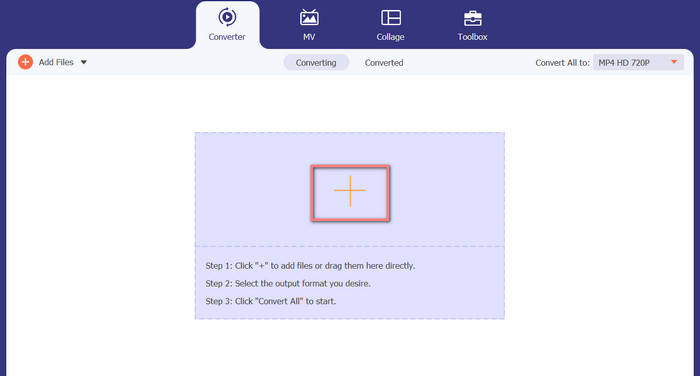
Krok 2. Klikněte na tlačítko add na hlavní obrazovce a poté vyhledejte zvukový soubor, který chcete převést. Krátce po nahrání se na rozhraní zobrazí náhled nahraného souboru. Můžete převádět více souborů M4A najednou na MP3 tak, že nahrajete celou složku.
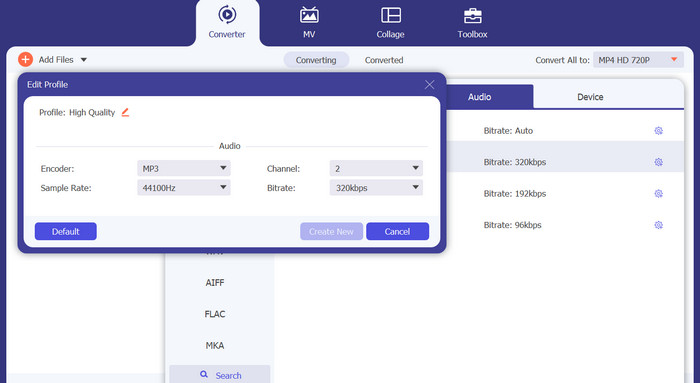
Krok 3. Chcete-li změnit výstupní formát nástroje, přejděte do nabídky Profile na kartu Audio (nachází se v pravém horním rohu nástroje). Můžete změnit soubor M4A na soubor MP3 a naopak.
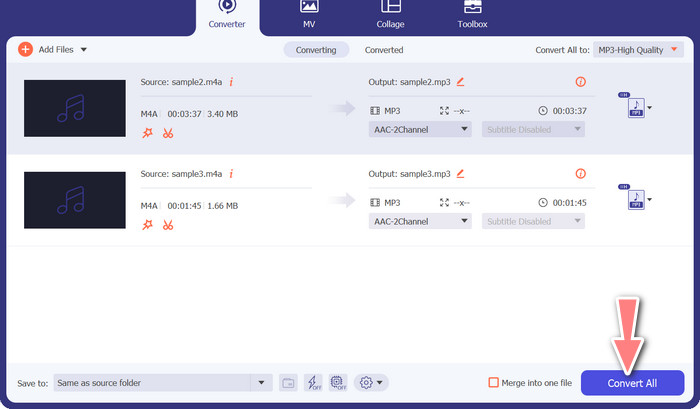
Krok 4. Vyberte požadované umístění úplně dole na obrazovce. Pro zahájení převodu klikněte na Convert All.
Free Video Converter online (online)
Nemáte prostor instalovat další program? Dobrou zprávou je, že použití webového převodníku může zcela odstranit potřebu stahovat software. Webový nástroj Free Video Converter Online umožňuje převod přímo v prohlížeči. Podporuje také širokou škálu hudebních a video formátů. Kromě toho tento webový nástroj podporuje dávkové převody. Uživatel může také upravit nastavení výsledného audio souboru. Zjistěte, jak online převést MP3 na M4A.
Krok 1. Nejprve spusťte svůj oblíbený webový prohlížeč a přejděte na web Free Video Converter Online.
Krok 2. Klikněte na možnost Add Files to Convert, poté vyhledejte soubor M4A, který chcete převést, a vyberte jej.
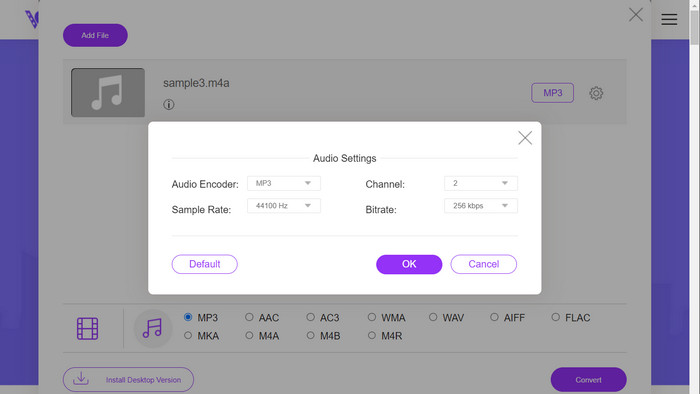
Krok 3. Zvolte MP3 jako výstupní typ souboru v nabídce formátu Audio. Je také možné upravit datový tok (bitrate), tedy výstupní kvalitu souboru MP3.
Krok 4. Chcete-li spustit proces převodu, klikněte na tlačítko Convert. Takto probíhá převod M4A na MP3 na webu.
Další čtení:
Pokyny, jak převést M4A na WAV [PC a Mac]
Nejlepší nástroje, které můžete použít k dávkovému převodu souborů MP3 na M4R
Část 6. Časté dotazy o M4A a MP3
Co je to MP3 vs. M4A z hlediska metadat?
M4A podporuje širší rozsah metadat než MP3, což znamená, že soubory M4A mohou ukládat více informací o zvuku.
Mohu upravovat soubory MP3 nebo M4A?
Soubory MP3 a M4A můžete upravovat pomocí různých programů pro úpravu zvuku.
Který z nich je lepší pro podcasty, MP3 nebo M4A?
MP3 je lepší pro podcasty kvůli menší velikosti souboru a širší kompatibilitě.
Závěr
Pochopení srovnání MP3 vs. M4A vám může pomoci vybrat nejlepší formát digitálního audia. Ať už hudbu streamujete, nebo ji produkujete, výběr správného formátu je zásadní pro zajištění co nejlepší kvality zvuku a kompatibility.
-
 MP3 VS MP4: Jaký je rozdíl mezi MP3 a MP4?
 MP3 nebo MP4, co je lepší? Jaký je rozdíl mezi MP3 a MP4? Tento článek bude porovnávat MP3 s MP4 ze všech aspektů, které můžete zobrazit.
-
 M4A Player - Top 5 M4A Player pro Android a počítač
 Jak přehrávat soubory M4A na telefonu Android? Jaký hráč může hrát M4A? Tento příspěvek sdílí 5 nejlepších bezplatných hráčů M4A pro Android, Mac a PC.
-
 4 nejlepší způsoby, jak opravit a upravit metadata MP3 ve Windows a Mac
 Chcete poznat tajemství snadné úpravy metadat MP3? Tento blog vás naučí různé techniky s různými nástroji, ke kterým máte snadný přístup.
