


 Video Converter Ultimate
 Screen Recorder
 Oprava videa
Jak převést 3GP na WMV profesionálním způsobem [online a offline]
3GP je populární mobilní formát, který přenáší data přes mobilní telefony, aniž by spotřeboval příliš šířky pásma, a zároveň šetří místo. Tento formát je také standardizovaný pro nahrávání videí na mobilních telefonech třetí generace, ale bez obav, video můžete přehrát i na telefonech druhé a čtvrté generace. Přestože je na telefonech vynikající, je omezen v podstatě jen na smartphony. Není tedy překvapením, že soubor .3gp nemusí být na stolním počítači ideální. Přesto se můžete naučit převést 3GP do formátu, který má na počítačích mnohem širší podporu, například WMV. Chcete se odborně naučit, jak převést 3GP do WMV? V tom případě se na to pojďme podívat a neztrácejme čas.

Část 1. Co je 3GP
Jde o formát založený na ISO, který ukládá mediální toky jako H.263 nebo H.264 pro video a AMR nebo AAC pro zvuk, ideální pro ztrátovou kompresi. Tento formát 3. generace je navíc vhodný pro ukládání dat na přenosné disky v našich telefonech, dokonce i na IOS. I když je 3GP stále k dispozici, míra účinnosti tohoto formátu začala klesat, a proto se na scénu připojil 3GPP a stal se jeho lepší verzí.
Část 2. Co je WMV
Jedná se o proprietární multimediální formát vyvinutý systémem Windows pro streamování videa online. Na rozdíl od jakéhokoli jiného formátu, jako je 3GP, WMV používá vícenásobný kodér, aby byl soubor ještě více komprimovaný. Díky možnosti použití mnoha kodérů je efektivnější sdílení videí v tomto formátu dostupnější. Existuje však nevýhoda používání mnoha kodérů, zejména při úpravách a přehrávání, protože ne všechny přehrávače médií a editory podporují širokou škálu kodeků. Přestože formát používá kompresor, kvalita média se nezmění ani nesníží.
Část 3. Profesionální způsob, jak převést 3GP na WMV pomocí Video Converter Ultimate
Chcete získat profesionální převodník 3GP do WMV ke stažení zdarma pro svou platformu? FVC Video Converter Ultimate nabízí špičkový převodní proces bez velké námahy. Tento převodník vás posune na zcela jinou úroveň převodu, jakou vám jiné online ani offline převodníky neposkytnou. Kromě toho tento špičkový nástroj podporuje více než 200 multimediálních formátů, ze kterých si můžete vybrat, na rozdíl od většiny ostatních nástrojů.
Dokud máte tento konvertor, vždy očekávejte profesionální výstup na vašem převedeném formátu médií. Chcete použít profesionální konvertor k převodu souborů 3GP? V takovém případě můžete pomocí následujících kroků úspěšně převést pomocí dokonalého nástroje.
Postup, jak převést soubor 3GP do WMV pomocí FVC Video Converter Ultimate
Krok 1. Níže jsou uvedena tlačítka pro stažení; vyberte to, které odpovídá platformě, kterou používáte. Například pokud jste uživatel Windows, klikněte na tlačítko pro stažení pro Windows. Jste‑li uživatel Macu, klikněte na to druhé. Po dokončení stahování nainstalujte převodník a poté jej spusťte kliknutím na Start Now. Důležité je, že po spuštění byste se měli nejprve seznámit s rozhraním, než přejdete k dalším krokům.
Zdarma ke staženíPro Windows 7 nebo novějšíBezpečné stažení
Zdarma ke staženíPro MacOS 10.7 nebo novějšíBezpečné stažení
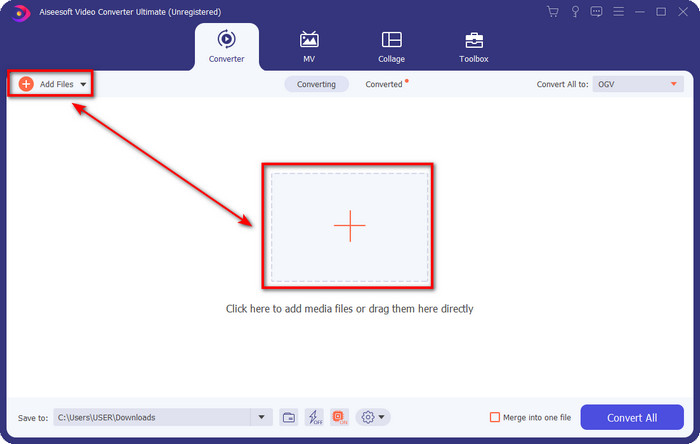
Krok 2. V levé horní části rozhraní uvidíte možnost Add Files; klikněte na ni a zobrazí se okno se složkami. Vyhledejte soubor .3gp na disku počítače a nahrajte jej stisknutím Open.
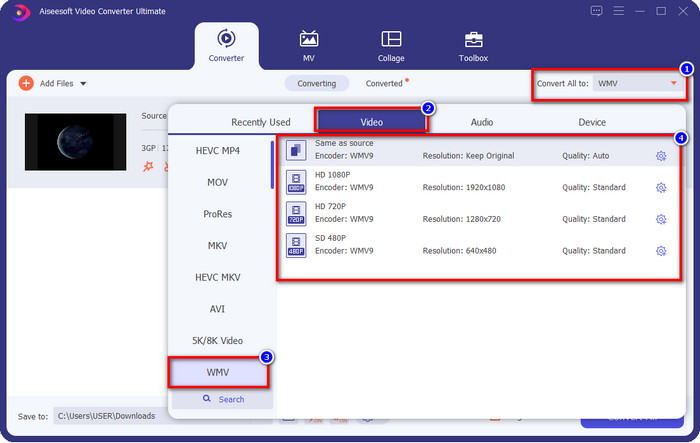
Krok 3. Klikněte na Convert All to, vyberte formát WMV, který chcete, nebo přímo WMV jako finální výstup.
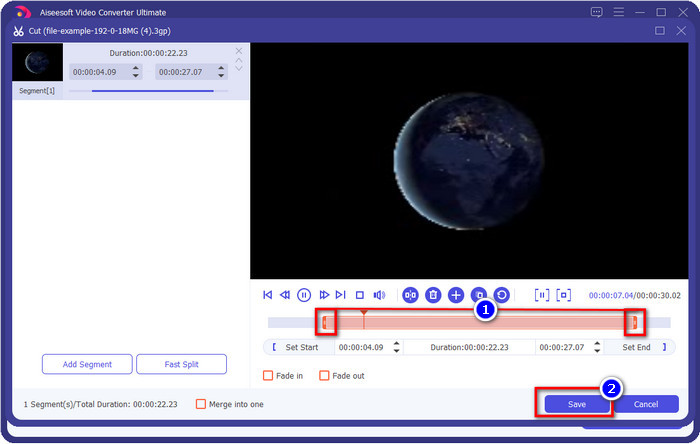
Volitelné. Než převedeme soubor 3GP do WMV, pojďme si stručně představit další funkce tohoto nástroje. Potřebujete stříhat? Žádný problém. Klikněte na tlačítko scissor, přetáhněte slide bar na obou stranách podle potřeby a stiskněte Save, abyste uplatnili provedené střihy.
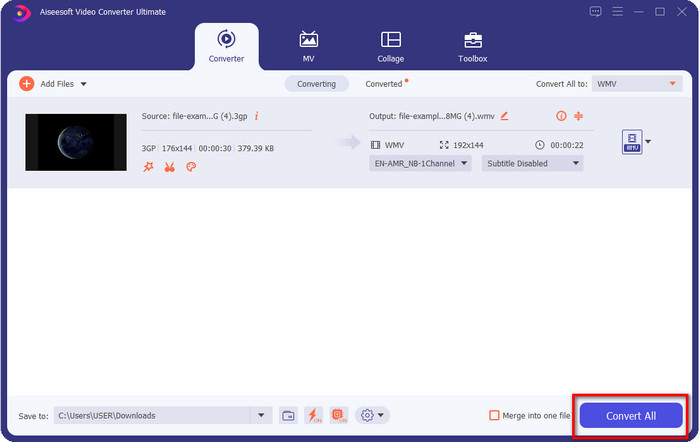
Krok 4. Spusťte proces převodu kliknutím na tlačítko Convert All. Převod skončí během krátké doby a voilà, soubor WMV se uloží na váš disk v počítači.
Část 4. Online způsob, jak převést MXF na WMV pomocí Free Video Converter Online
Dalším produktem FVC, tentokrát v online podobě, je FVC Free Video Converter Online. Tento profesionální online převodník nabízí oproti jiným webovým převodníkům přehledné a čisté rozhraní. Dále není třeba převodník před použitím stahovat do zařízení – stačí otevřít prohlížeč a spustit převodník. Ačkoli je webový převodník skvělý, mnoho pokročilých funkcí, které poskytuje desktopová verze, zde nenajdete. Pokud ale chcete převádět 3GP do WMV online, je to vhodná volba; zkopírujte si níže uvedené kroky a podle nich nástroj použijte.
Postup, jak zdarma převést 3GP do WMV online pomocí FVC Free Video Converter Online
Krok 1. Kliknutím na tento odkaz otevřete online převodník.
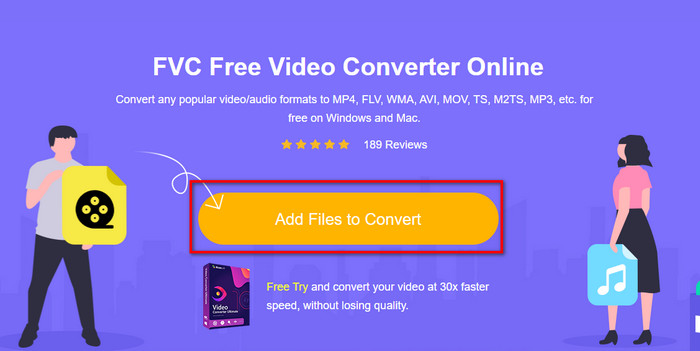
Krok 2. Po kliknutí stiskněte Add Files to Convert, abyste spustili převodník. Pokud tento převodník používáte poprvé, musíte si nainstalovat spouštěč kliknutím na Add Files to Convert, ale není tak velký jako špičkový desktopový nástroj. Vyhledejte soubor 3gp, který chcete převést, a klikněte na Open.
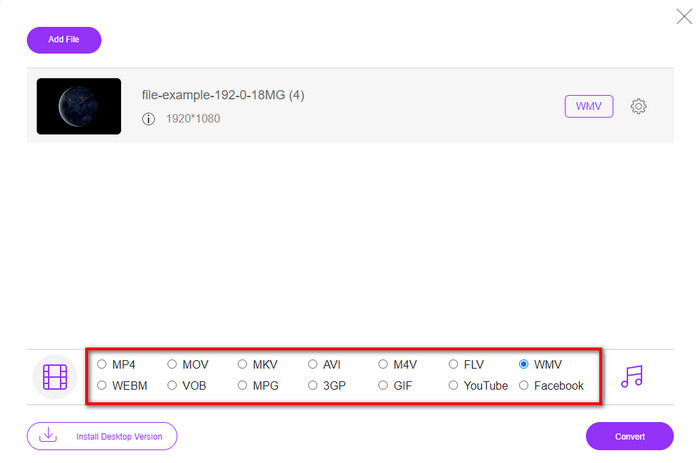
Krok 3. Po nahrání souboru 3GP je čas vybrat některý z níže uvedených formátů nebo kliknout na WMV.
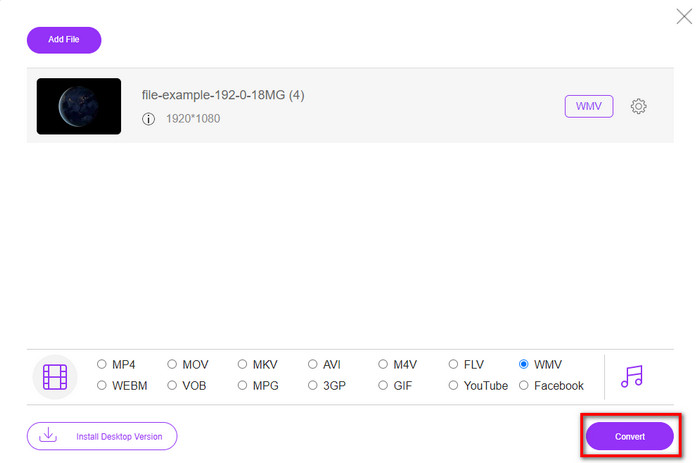
Krok 4. Už jste zvolili formát? Pokud ano, klikněte na Convert, čímž spustíte proces převodu souboru.
Část 5. Nejčastější dotazy o převodu 3GP na WMV
Je to skvělý nápad používat online převodník 3GP na WMV?
Pokud nechcete do svého zařízení stahovat konvertor, je ideální použít online konvertor. Pamatujte však, že ne všechny online nebo offline převodníky lze bezpečně používat. Většinu času mají viry, pokud je nainstalujete nebo neděláte úkol efektivně. Pokud však chcete mít jistotu při převodu, doporučujeme používat produkty převodníku FVC, protože tento neobsahuje malware 101% a zaručuje úspěch vašeho procesu převodu.
Je možné sloučit více 3GP videí?
Ano, s pomocí slučovacích nástrojů FVC můžete spojit více videí ve formátu 3GP. Pokud tedy nyní chcete vědět, jak sloučit několik svých 3GP videí, měli byste si přečíst tento článek a naučit se, jak na to.
Mají 3GP videa dobrou kvalitu?
3GP má dobrou kvalitu, ale nedokáže uložit kvalitu vysokého rozlišení, takže očekávejte, že kvalita videa 3GP je nízká.
Závěr
Na závěr lze říci, že převodníky uvedené v tomto článku byly pečlivě vybrány podle určitého standardu profesionálního výstupu. Kromě toho jsme tyto nástroje sami použili, abychom vám mohli předložit a uvést pouze ověřená fakta o jejich vlastnostech. Pokud si navíc nechcete stahovat převodník na stolní počítač, abyste ušetřili místo, a přesto chcete dosáhnout profesionálního výsledku, důrazně doporučujeme použít FVC Free Video Converter Online. Jestliže však chcete svůj 3GP překódovat ještě profesionálnějším způsobem, vřele doporučujeme FVC Video Converter Ultimate. Pořád nejste spokojeni s naším popisem? V tom případě byste to měli vyzkoušet sami, abyste na vlastní kůži zažili špičkový převod, který tento nástroj nabízí, a naučili se, jak převést 3GP do WMV.
-
 Top 4 nejúčinnější způsoby, jak převést 3GP do formátu AVI [2025]
 Mohu převést své soubory 3GP do AVI? No, můžete to snadno převést, pokud vyzkoušíte tyto dostupné nástroje, protože jsme shromáždili všechna možná řešení vašeho problému s převodem 3GP na AVI.
-
 Nejlepší převaděč 3GP na FLV pro použití při převodu 3GP na FLV [2025]
 Zkoušeli jste někdy převést 3GP na FLV, ale nevíte, jaký převodník použijete? Přečtěte si tento článek, kde se dozvíte všechny podrobnosti o převodu 3GP na FLV.
-
 2 nejlepší možné způsoby převodu nepodporovaného 3GP do DivX [2025]
 Mnoho uživatelů se ptá, jak převést 3GP na DivX. Nyní k tomu nabízíme článek, který vám pomůže s bezproblémovým převodem vašeho souboru .3gp.
