


 Video Converter Ultimate
 Screen Recorder
 Oprava videa
Nejnovější a nejjednodušší pokyny Jak převést AMV do AVI [2021]
Chcete upravovat své video v nejlepším videoeditoru, který máte, ale nemůžete ho nahrát, protože editor nepodporuje formát vašeho AMV videa. Nebo například, když chcete převést AMV na AVI – jaká je šance, že najdete ten nejlepší nástroj, který váš problém vyřeší? Toto zcela nové téma si zaslouží pozornost: přečtěte si různé informace, které rozšíří vaše znalosti o tom, jak převést AMV na AVI, a o jejich podrobnostech, srovnání a vzájemných rozdílech.
Část 1. Jak převést AMV do AVI na Windows a Mac
Video Converter Ultimate je nejlepší konvertor, jaký internet může nabídnout, ať už pro převod nebo úpravu videa. S tímto softwarem můžete udělat spoustu věcí, které vaše video posunou na úplně jinou úroveň. Jednou z hlavních funkcí, které software nabízí, je široká škála podporovaných videoformátů, takže se nemusíte obávat neznámých formátů, které potřebujete převést. Jde o profesionální nástroj, který dokáže převádět videa ve vynikající kvalitě. Proto převod AMV na AVI pro něj nebude žádný problém. Pojďme se tedy pustit do všech postupů, které tento software při převodu AMV na AVI nabízí.
Krok 1. Nejprve je potřeba stáhnout software kliknutím na tlačítko Free Download níže. Můžete si vybrat, zda stáhnete verzi pro Windows nebo pro Mac. Po dokončení stahování program nainstalujte do počítače a poté jej můžete začít používat kliknutím na Start Now.
Zdarma ke staženíPro Windows 7 nebo novějšíBezpečné stažení
Zdarma ke staženíPro MacOS 10.7 nebo novějšíBezpečné stažení
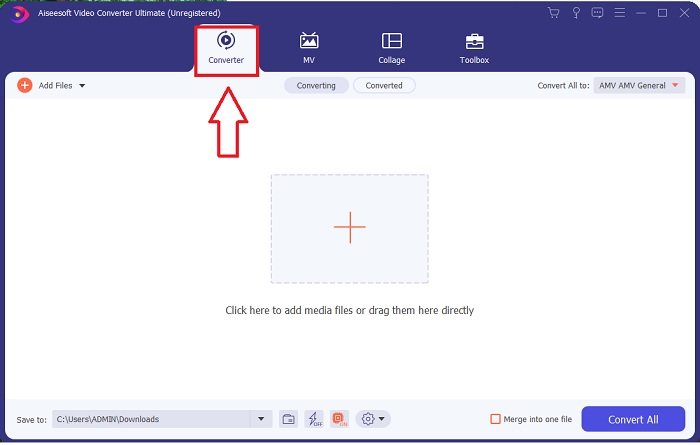
Krok 2. Otevřete stažený software. Po spuštění se objeví okno a zobrazí se rozhraní Converter.
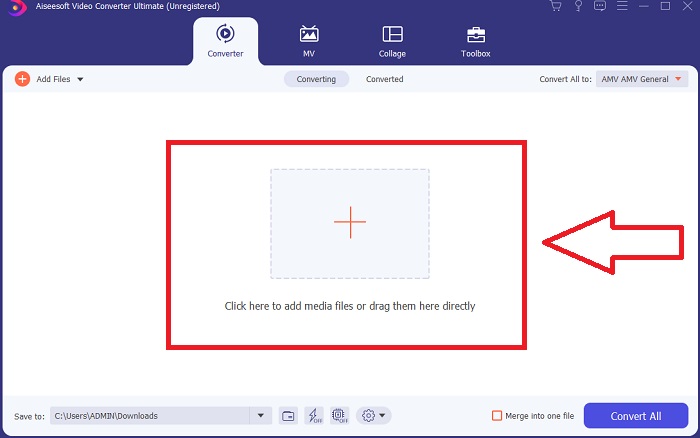
Krok 3. Pokračujte v převodu importováním souborů do konvertoru. Klikněte na ikonu + nebo přetáhněte video, které chcete převést.
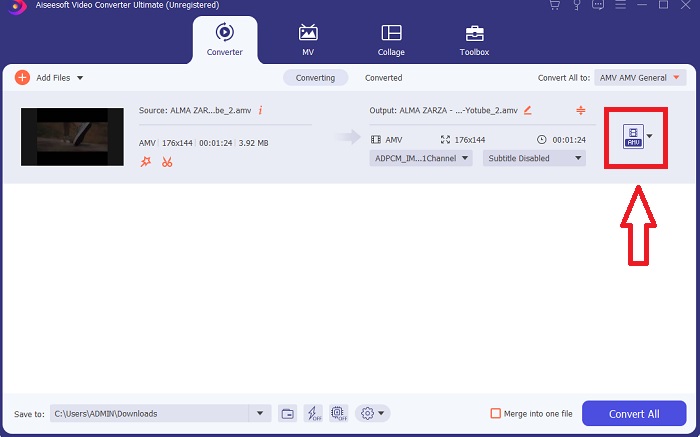
Krok 4. Klikněte na výběr videoformátů v pravém rohu. Najděte a zvolte formát AVI. Po výběru formátu si můžete zvolit různou kvalitu videa, kterou formát AVI nabízí. Pokud vám však žádná z nabízených možností nevyhovuje, můžete kvalitu videa upravit podle sebe. Kliknutím na ikonu ozubeného kolečka můžete změnit rozlišení, snímkovou frekvenci a dokonce i nastavení kvality zvuku. Pro uložení změn klikněte na Create New.
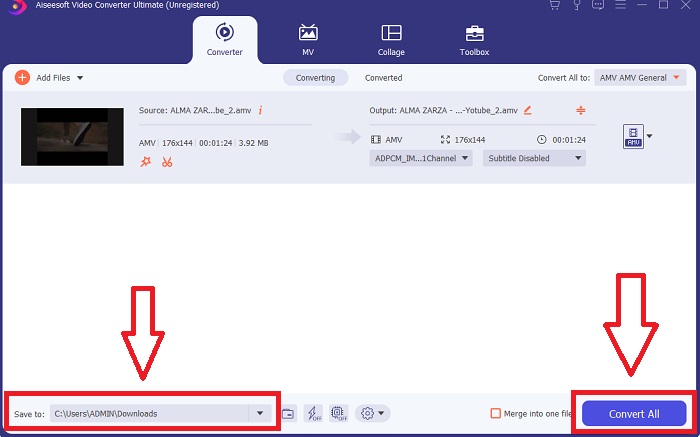
Krok 5. Jakmile jste videa upravili a jsou připravena k převodu, nejprve změňte cílovou složku pro převedené video a poté klikněte na Convert All, abyste ho uložili do svého počítače.
Část 2. Jak převést AMV do AVI online
Co když ale nemáte čas stahovat nějaké aplikace nebo software, abyste mohli převádět AMV na AVI? V takovém případě vám může pomoci tento online nástroj – představujeme ConvertFiles. Tento online nástroj vám umožní zdarma převádět mnoho podporovaných formátů přímo online, pouze potřebujete stabilní připojení k internetu. Navíc je jeho používání velmi snadné díky uživatelsky přívětivému rozhraní, které je k převodnímu procesu velmi přímočaré a nevyužívá žádné aplikace třetích stran. Zde jsou kroky, které potřebujete znát, abyste mohli tento online nástroj použít k převodu:
Krok 1. Vyhledejte ConvertFiles v libovolném vyhledávači. Klikněte na online nástroj a zobrazí se rozhraní webového nástroje.
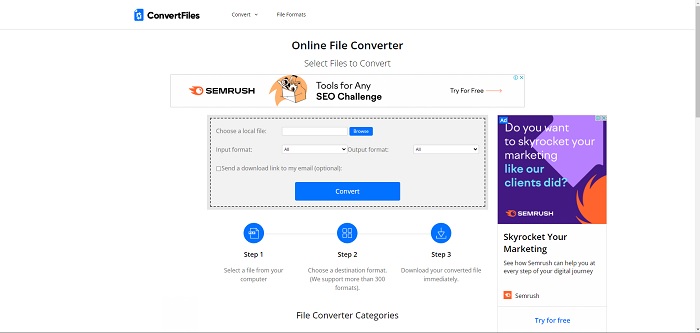
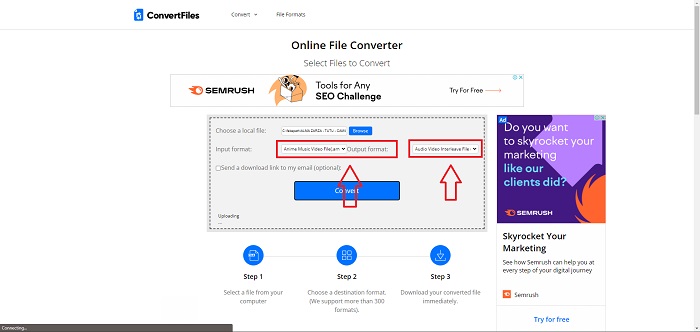
Krok 2. Nahrajte soubor kliknutím na Browse. Díky tomu můžete ve svém počítači vyhledat video a nahrát ho do webového nástroje. Zvolte vstupní formát – to je formát video souboru, který chcete převést. Dále zvolte výstupní formát – formát videa, do kterého se původní soubor převede.
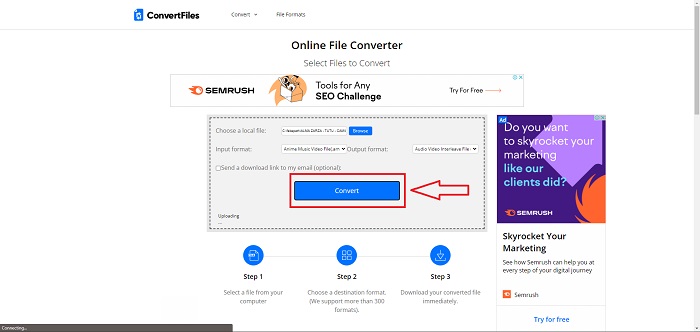
Krok 3. Pro převod a export souboru klikněte na Convert a počkejte, než se soubor nějakou dobu zpracuje. Čím větší je velikost souboru, tím déle bude zpracování trvat. Poté klikněte na odkaz, který se objeví, aby se soubor stáhl.
Část 3. Fakta, která chcete vědět o AMV a AVI
Video soubory ve formátu AMV (Actions Media Video) lze přehrávat pouze na přehrávačích MP4 a S1 MP3 s možností videa. Jedná se o formát video kontejneru nebo obalu vytvořený společností Microsoft, který ukládá video data zakódovaná v různých kodecích a lze jej přehrávat v různých přehrávačích videa. Ve srovnání s jinými formáty videa, jako jsou MPEG a MOV, však soubor AVI používá méně komprese, a proto spotřebuje více místa. Soubory AVI nemusí být při vytváření komprimovány. Protože soubory již nejsou komprimovány, jsou mnohem větší a zabírají hodně místa — asi 2–3 GB za minutu videa. Bez ohledu na to, kolikrát otevřete nebo uložíte bezztrátový soubor, kvalita se nesníží. Pro přehrávání navíc nejsou potřeba žádné kodeky.
Část 4. Nejčastější dotazy o převodu AMV do AVI
Jsou AMV a AVI stejné?
Upravený kontejner AVI slouží jako transportní vrstva pro data. Všechna známá AMV videa používají zvuk s frekvencí 22 050 vzorků za sekundu a variantu kodeku IMA ADPCM, přičemž prvních 8 bajtů každého rámce obsahuje počátek (16 bitů), index (16 bitů) a počet kódovaných 16bitových vzorků (32 bitů).
Můžete převést AVI na MP4 bez ztráty kvality?
Pomocí přehrávače VLC Media Player můžete převádět soubory AVI na soubory MP4. Nabídku Media ve VLC otevřete z horní lišty a klikněte na Convert/Save. V okně Open Media klikněte na Add a vyberte videa, která chcete převést. Úplně dole pak klikněte na tlačítko Convert/Save.
Je AVI lepší než MP4?
Co se týče YouTube, formáty AVI i MP4 jsou přijatelné, ale MP4 si vede mnohem lépe, protože jej lze komprimovat bez ztráty kvality videa nebo zvuku. Soubory AVI se sice snáze upravují, ale kvalita tím trpí, protože pro zmenšení velikosti je nutná komprese. Můžete si přečíst článek AVI vs. MP4, kde najdete podrobnější informace.
Závěr
Jak vyplývá z celé této stati, AMV není příliš běžný video soubor, který by podporovaly jiné převodníky, ať už online, nebo offline. Existuje však Video Converter Ultimate, který si můžete kdykoli zdarma stáhnout. Nyní můžete převádět AMV do různých typů video formátů. Také můžete upravit a změnit kvalitu videa výstupního souboru tak, aby odpovídala každému účelu, který pro výsledné video máte – ať už jde o zábavu, podnikání nebo školní práci. Toto jsou ty nejlepší možnosti, které byste měli zvážit při převodu tohoto méně známého formátu.
-
 3 snadné metody pro převod FLV na AVI na ploše a online
 Zde jsou tři metody, které vám pomohou efektivně převádět vaše video soubory FLV do formátu AVI ve Windows a Mac, abyste je mohli sledovat ve vysoké kvalitě.
-
 Jaký je nejlepší způsob, jak převést GIF na AVI [Open-source & Premium]
 Chcete převést svůj GIF do formátu AVI bez ztráty kvality videa? Pokračujte ve čtení a zjistěte, jak převést soubor GIF do AVI.
-
 4 efektivní způsoby převodu MOV do AVI na PC a Mac [2021]
 Chcete vědět, jaký je nejlepší převodník MOV do AVI na webu? A proč FVC Ultimate Video Converter může být ten pravý pro vás.
