


 Video Converter Ultimate
 Screen Recorder
 Oprava videa
 Bezpečné stažení
Převeďte DIVX na 3GP s nejúčinnějšími postupy
Nemůžete na svém zařízení přehrát video ve formátu DIVX, protože není podporováno? Většina lidí má stejný problém. Ale máte štěstí, protože si povíme o nejúčinnější a nejjednodušší metodě, jak převést DIVX na 3GP. Nepropásněte tuto příležitost a zjistěte více o převodu různých souborů pomocí spolehlivých a prověřených aplikací, které vám představíme.

Část 1: Nejlepší software pro převod DIVX na 3GP
Chcete převést DIVX na 3GP na zařízeních, jako jsou počítače se systémem Windows a Mac? Pak je váš problém vyřešen. K převodu souboru DIVX můžete použít Video Converter Ultimate. Už z názvu nástroje je patrné, že jde o špičkovou aplikaci, ve které můžete převádět více než 1000 videoformátů, včetně DIVX, 3GP, MP4, MOV, MTS, WEBM a dalších. Můžete také převádět dva nebo více souborů současně, protože tento nástroj nabízí dávkový převod. Kromě toho má Video Converter Ultimate rychlé zpracování převodu, což je skvělé, pokud plánujete převést velké množství souborů.
Kromě toho můžete stále používat tuto offline aplikaci, pokud máte zájem o úpravu souboru DIVX před jeho převodem. Za předpokladu, že chcete opravit barvu svého videa, můžete přejít na panel Toolbox a vybrat nástroj Color Correction pro úpravu jasu, kontrastu a sytosti videa. Kromě toho předpokládejme, že chcete synchronizovat zvuk ve svém video souboru DIVX před jeho převodem. V takovém případě to můžete udělat, protože nabízí funkci Audio Sync, takže synchronizace zvuku s videem je pro vás snadná.
Funkce:
◆ Převod formátů video souborů, včetně MP4, M4V, FLV, AVI atd.
◆ Může vytvářet hudební videa s různými tématy.
◆ Toolbox obsahuje nástroj pro vylepšení videa, odstraňovač vodoznaku, kompresor a další.
◆ Schopnost vytvořit koláž.
Klady
- Podporuje různé formáty souborů, jako jsou MP4, AVI, FLV, MOV, MTS, DIVX, 3GP atd.
- Má přátelské uživatelské rozhraní, které je vhodné pro začátečníky.
- Má 30x rychlejší proces převodu
- Přístupné na Windows i Mac.
- Dokáže převést více videí najednou.
Nevýhody
- Kupte si Video Converter Ultimate a užijte si více jedinečných funkcí.
Chcete-li snadno převést DIVX na 3GP, musíte postupovat podle těchto jednoduchých pokynů níže.
Krok 1: Nejprve si stáhněte Video Converter Ultimate do zařízení, například do počítače se systémem Windows nebo Mac. Poté jej nainstalujte a otevřete aplikaci.
Zdarma ke staženíPro Windows 7 nebo novějšíBezpečné stažení
Zdarma ke staženíPro MacOS 10.7 nebo novějšíBezpečné stažení
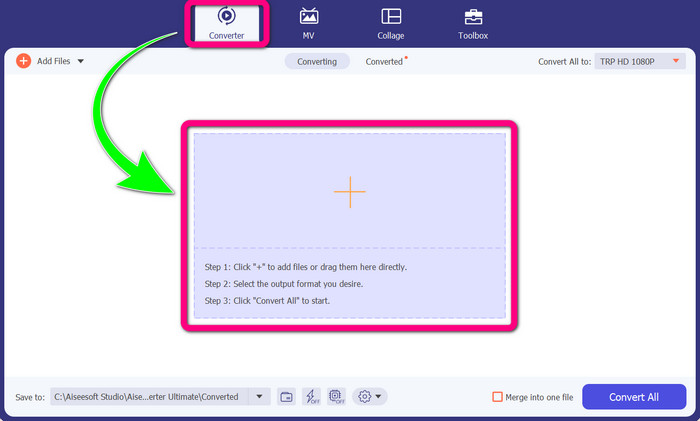
Krok 2: Jakmile máte Video Converter Ultimate ve svém zařízení otevřený, zvolte panel Converter. Poté klikněte na ikonu + a přidejte svůj video soubor DIVX.
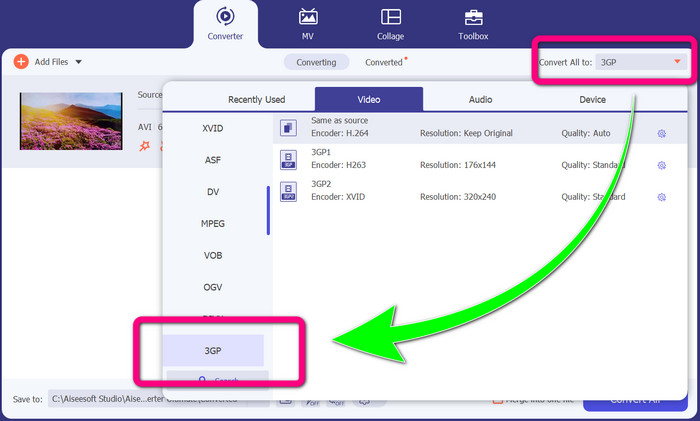
Krok 3: Po přidání video souboru klikněte na možnost Convert all to, vyhledejte formát 3GP a zvolte jej.
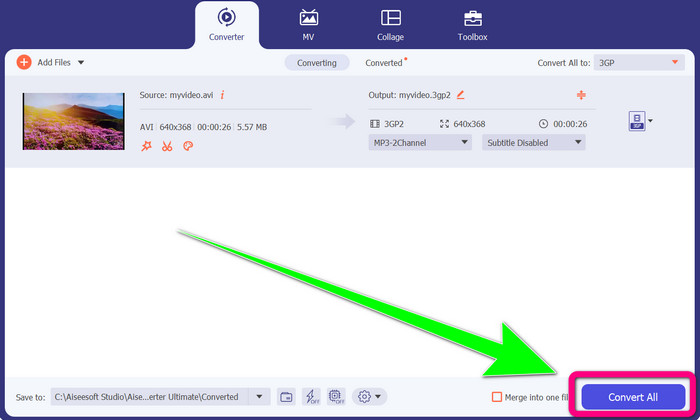
Krok 4: Až budete mít vybraný formát 3GP, klikněte na tlačítko Convert All. Počkejte na dokončení převodu a uložte výsledné video do svého zařízení.
Část 2: Vynikající online převodníky pro převod DIVX na 3GP
Použití FVC Free Video Converter online
Jedním z nejlepších online nástrojů pro převod DIVX na 3GP je FVC Free Video Converter Online. Tento nástroj vám pomůže převést různé formáty souborů během několika kliknutí. Podporuje téměř všechna hlavní video a audio média do MP4, MOV, MKV, FLV, VOB, MP3, AAC a dalších. FVC Free Video Converter Online je jednoduchý a snadno ovladatelný. Aplikaci zvládnou používat i začátečníci. A pokud jste uživatel Windows nebo Mac, můžete se na tento nástroj spolehnout, protože je dostupný jak pro Windows, tak pro Mac. Postupujte podle níže uvedených jednoduchých kroků a převedete DIVX na 3GP.
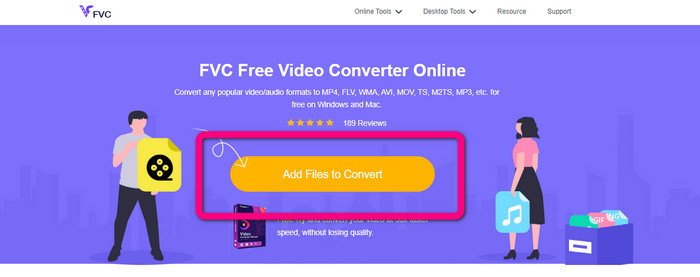
Krok 1: Navštivte FVC Free Video Converter Online. Poté vyberte tlačítko Add Files to Convert a naimportujte soubor DIVX, který chcete převést.
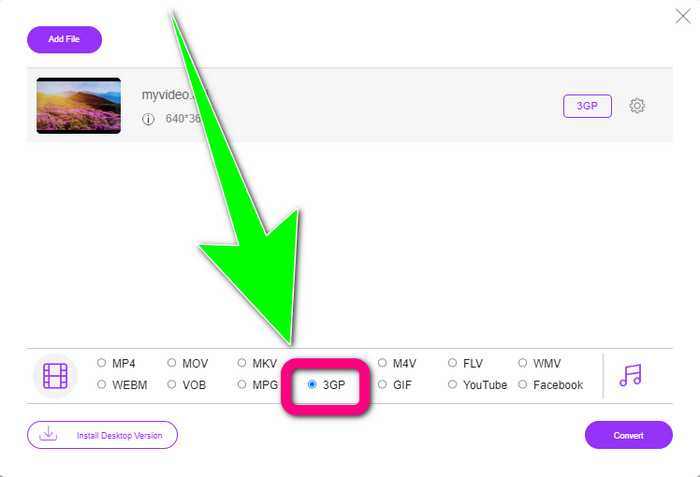
Krok 2: Po přidání souboru DIVX klikněte dole v nabídce formátů na 3GP.
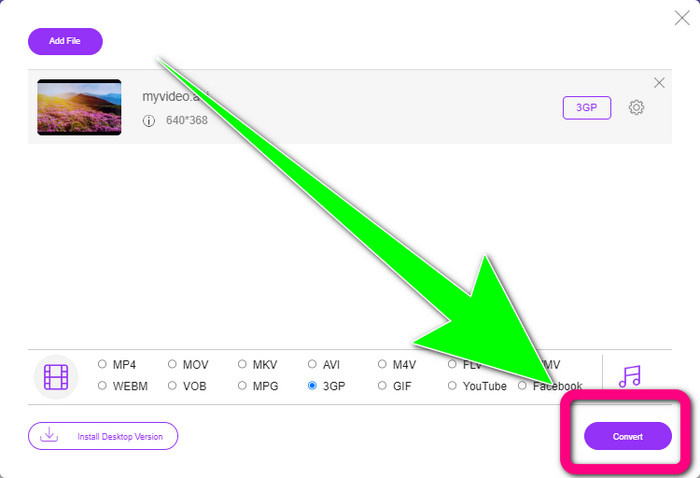
Krok 3: Pokračujte kliknutím na tlačítko Convert. Počkejte na dokončení převodu a uložte převedené video.
Pomocí Convertio
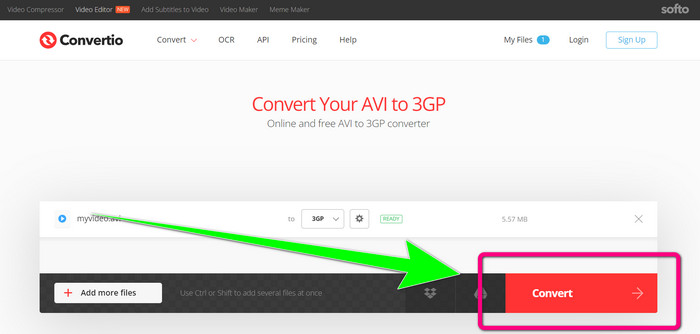
Pokud chcete převést DIVX na 3GP online, jedním z nástrojů, které můžete využít, je Convertio. Podporuje mnoho formátů, jako 3GP, DIVX, XVID, AVID, MP4, M4V, ASF, HEVC a další. Kromě převodu video souborů můžete převádět i obrázky, audio, dokumenty, archivy a další typy souborů. Convertio je rovněž jednoduchý nástroj, protože převod probíhá v několika krocích, takže si s převodem souboru DIVX na 3GP nebudete dělat starosti. Stejně jako u jiných online nástrojů však software nebudete moci používat bez připojení k internetu. Také se může stát, že tento online nástroj nebude vždy fungovat úplně spolehlivě. Bezplatná verze Convertio má omezení – můžete převádět pouze soubory s maximální velikostí 100 MB. Abyste zvýšili maximální velikost souboru a získali lepší výkon, musíte si software zakoupit. Postupujte podle následujících kroků a převedete soubor DIVX do formátu 3GP.
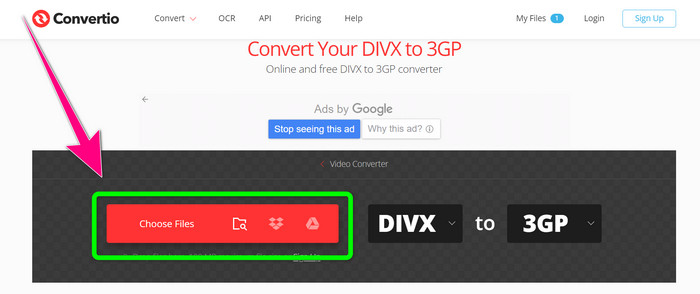
Krok 1: Přejděte na web Convertio. Klikněte na tlačítko Choose Files a přidejte své video ve formátu DIVX.
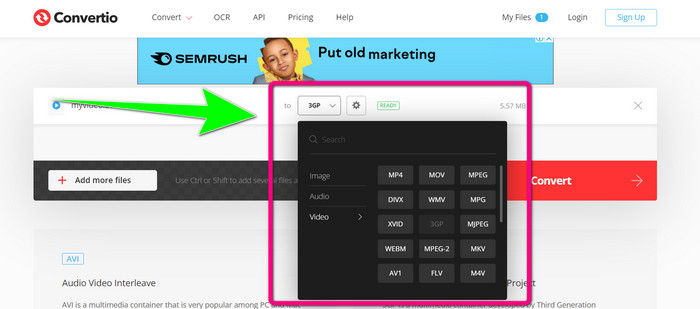
Krok 2: Po přidání videa přejděte do nabídky formátů a vyberte formát 3GP.
Krok 3: Jakmile máte zvolený formát 3GP, klikněte na tlačítko Convert, počkejte na dokončení převodu a uložte svůj video soubor 3GP.
Část 3: Přehled formátů souborů DIVX a 3GP
DIVX
DIVX je software pro kompresi videa, který dokáže zmenšit video soubory až na jednu dvanáctinu původní velikosti s minimální ztrátou kvality. Tento video formát je běžný u velkých filmových společností, jako jsou Disney, DreamWorks SKG, Universal a Paramount.
3GP
3GP je multimediální kontejner. Byl vyvinut organizací Third Generation Partnership Project v roce 1998 pro telefony založené na GSM (Global System for Mobile Communications). Kontejner 3GP vyžaduje málo úložného prostoru, datového provozu i šířky pásma, což je ideální pro mobilní telefony.
Další čtení
Snadný převod MTV do MKV pomocí těchto špičkových převodníků
Jak převést TRP na MKV bez ztráty kvality
Část 4: Nejčastější dotazy o převodu DIVX na 3GP
Co je převodník DIVX?
Jde o vynikající nástroj, který dokáže převádět různé typy souborů do mnoha dalších formátů. Patří mezi ně AVI, MP4, MPEG, MOV, FLV a další. Jakmile máte převod hotový, můžete své video přehrát v libovolném jiném přehrávači, který daný formát podporuje. FVC Free Video Converter Online je jeden z nejlepších převodníků, které můžete použít.
Je formát souboru DIVX stejný jako formát AVI?
Formát souboru DIVX je založen na kontejneru AVI, ale může obsahovat skvělé funkce, jako jsou kapitoly a titulky. Na zařízeních s certifikací DIVX lze navíc přehrávat formáty souborů AVI i DIVX.
Mohu převést soubor DIVX na 3GP bez ztráty kvality?
Ano, samozřejmě můžete. Pomocí Video Converter Ultimate můžete převést soubor DIVX na 3GP, aniž byste se museli obávat změny kvality. Tento skvělý převodník dokáže konvertovat různé soubory bez ztráty kvality vašeho videa.
Závěr
Jak vidíte, existují různé účinné metody, jak převést DIVX na 3GP s využitím offline i online nástrojů. Některé online nástroje však mohou být někdy nepraktické, zejména pokud máte slabé internetové připojení, a proto můžete využít aplikaci ke stažení. Pokud hledáte špičkový offline nástroj, můžete vyzkoušet Video Converter Ultimate.
-
 4 z nejlepších převaděčů MKV na 3GP pro Windows a Mac
 Pokud hledáte převodníky MKV na 3GP, které se snadno používají, máte štěstí! Našli jsme nejlepší a bezplatné převodníky MKV na 3GP, které musíte vyzkoušet.
-
 5 nejlepších konečných konvertorů MOV na 3GP, které si nesmíte nechat ujít
 Pokud hledáte nejlepší online a offline převodníky MOV na 3GP, pak jste na správné cestě. Přečtěte si tento článek o převodu MOV na soubor 3GP.
-
 3 způsoby, jak převést MPG na 3GP na Windows a Mac [zdarma]
 Pokud hledáte způsoby, jak převést MPG na 3GP, přečtěte si tento článek a zjistěte nejlepší způsoby, jak převést MPG na 3GP v systémech Windows a Mac.
