


 Video Converter Ultimate
 Screen Recorder
 Oprava videa
Pochopte, jaké jsou převodníky, které lze snadno použít pro převod DivX do AVI
DivX a AVI si vzájemně nekonkurují, i když jsou oba spojovány s video soubory – přesto se v mnoha ohledech liší. DivX se používá ke komprimaci kontejneru dlouhých videí a k co největšímu zmenšení jejich velikosti, aniž by došlo ke ztrátě kvality samotného videa. AVI je naopak příkladem video kontejneru, který můžete použít k uložení videa ve vysokém rozlišení, ale s větší velikostí souboru. Teď tedy máme krátké shrnutí obou formátů. Pojďme se do nich ponořit hlouběji, abychom jim lépe porozuměli, a zjistit, jak převést DivX na AVI zdarma, když budete pokračovat ve čtení tohoto článku.
Část 1. DivX vs AVI
Jak již bylo řečeno, DivX a AVI nejsou ve skutečnosti samy o sobě konkurenty, protože je lze použít v jednom nebo druhém souboru. DivX je navíc souborový kompresor vyvinutý samotnou DivX, Inc. Tento kompresor je proprietární a říká se, že jde o další generaci videopůjčovny DVD. Ale nyní byl DivX vypnut kvůli neúspěšnému pokusu o výměnu DVD. Nyní však stále můžete přistupovat k nástroji a sledovat jej v některých starších přehrávačích médií, které podporují typ komprese, kterou DivX poskytuje.
AVI je formát multimediálního souboru určený k uchování video a audio stop s různými kodeky. Tento formát vyvinula společnost Microsoft, aby sloužil k přehrávání jakýchkoli video či audio streamů. Na konci roku 1992 bylo AVI vytvořeno s cílem přinést pokročilé a „futuristické“ video a audio určené původně jen pro operační systémy Windows. V dnešní době však můžete AVI používat i na Macu, Linuxu a dokonce i v mobilních telefonech. Přesto však jedna věc zůstává u formátu AVI slabinou – komprese a s ní související velikost souboru.
DivX
◆ Kompresory používané ke zmenšení velikosti souboru kontejneru, aniž by to ovlivnilo jeho kvalitu.
◆ Je to proprietární kompresor společnosti DivX Inc.
◆ Říkalo se, že je to lepší verze DVD, ale na svůj pokus to selhalo.
◆ Většina dnešních nových přehrávačů médií nepodporuje DivX.
AVI
◆ Je známý jako jeden z revolučních video a audio kontejnerů v této moderní době.
◆ Tento formát je podporován na většině platforem a softwaru.
◆ Nemá podporu přesné komprese, protože je bezztrátový.
A nyní, když známe rozdíl mezi těmito dvěma, je nyní ten správný čas poznat převodník DivX do AVI online a offline, který můžete použít ke sledování souboru DivX.
Část 2. 4 nejlepších konvertorů a zjistěte, jak převést DivX do AVI
Top 1. FVC Video Converter Ultimate
Pokud je pro vás problém převod DivX, pak by pro vás FVC Video Converter Ultimate mohl být tím pravým řešením. Na rozdíl od jiných převodníků byl tento software v průběhu let neustále vylepšován a stal se jedním z průlomových nástrojů. Kromě toho, že patří k nejlepším, nabízí i nejrychlejší proces převodu, protože využívá hardwarovou akceleraci a rychlou konverzi. Díky svým integrovaným funkcím se snadno zařadil mezi špičku. Ačkoli je placený, za jeho používání nemusíte utrácet mnoho. Pokud se tedy chcete naučit, jak převést DivX na AVI v systému Mac nebo na PC, postupujte podle níže uvedených kroků, které si společně vyzkoušíme.
Krok 1. Nejdříve, než tento nástroj vůbec můžete použít, musíte si jej stáhnout do počítače. Poté jej nainstalujte, proveďte základní nastavení a klikněte na Start Now, abyste pokračovali.
Zdarma ke staženíPro Windows 7 nebo novějšíBezpečné stažení
Zdarma ke staženíPro MacOS 10.7 nebo novějšíBezpečné stažení
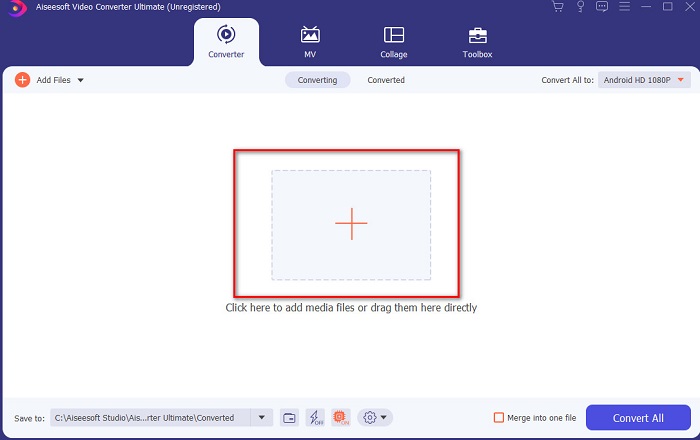
Krok 2. Spusťte nástroj a zobrazí se vám podobné rozhraní. Uprostřed klikněte na tlačítko +, vyhledejte soubor DivX, který chcete vložit, a klikněte na Open.
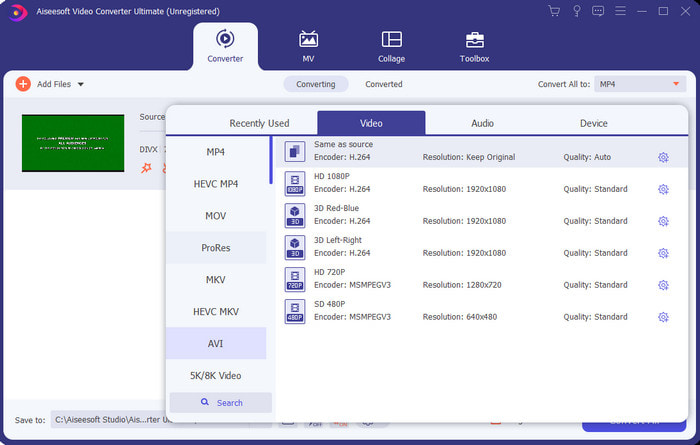
Krok 3. Chcete-li změnit DivX na AVI, klikněte na Convert All to, vyhledejte formát AVI a klikněte na něj.
Krok 4. Pro zahájení převodu klikněte na Convert All a počkejte na dokončení procesu.
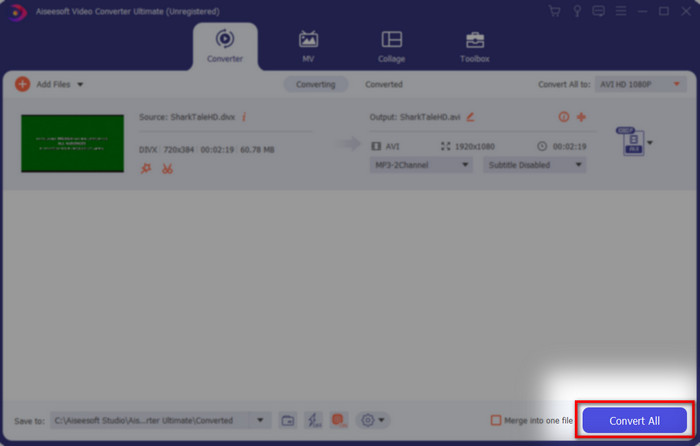
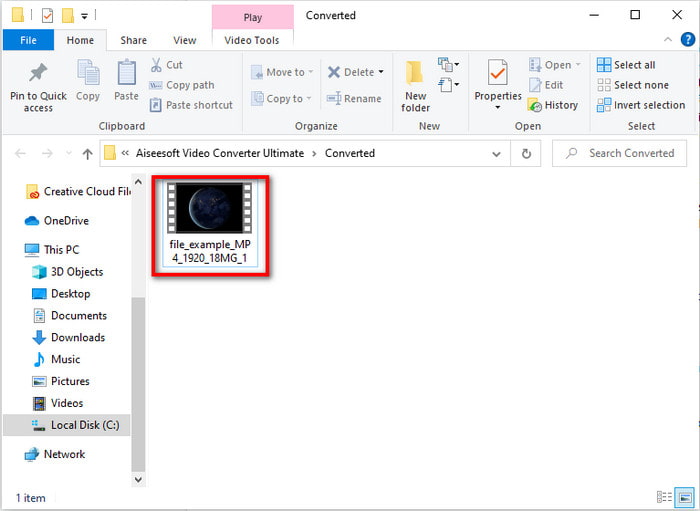
Krok 5. Počkejte, až bude proces převodu dokončen. Jakmile se tak stane, na obrazovce se zobrazí složka s převedeným souborem. Klikněte na něj, podívejte se na video a užijte si ho.
Top 2. Freemake Video Converter
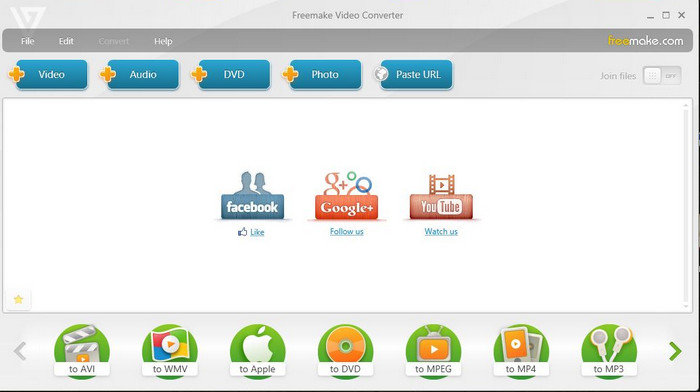
Dalším stažitelným softwarem, který můžete použít k převodu formátů, je Freemake Video Converter. Tento nástroj již pomohl mnoha uživatelům převést jakýkoli multimediální soubor do nového formátu. Je také široce považován za jeden z nejlepších programů, které si můžete stáhnout a spolehnout se na ně. Přestože je nástroj dobrý, stále mu chybí podpora některých formátů a proces převodu je velmi pomalý. Tento nástroj totiž nemá hardwarovou akceleraci, jako má FVC Video Converter Ultimate. Pokud tedy chcete převést DivX na AVI zdarma, může být právě tento software vaší první volbou.
Klady
- Zdarma ke stažení jakýkoli software.
- Vzhled je jednoduchý.
Nevýhody
- Nemá hardwarovou akceleraci.
- Některé formáty zde nejsou podporovány.
Top 3. FVC Free Video Converter
Co když chcete převést multimediální soubor do nového formátu, ale nechcete nic stahovat? Pak je tu pro vás FVC Free Video Converter. Na rozdíl od dvou výše zmíněných nástrojů je tento dostupný online a nemusíte ho instalovat. Přestože je software volně přístupný, některé formáty zde stále nejsou podporovány. Také máte jen omezený výběr cílových formátů. Proces převodu je ale výrazně rychlejší než u Freemake Video Converter. Pokud tedy chcete vědět, jak převést DivX na AVI online, postupujte podle následujících kroků.
Krok 1. Přejděte na hlavní stránku FVC Free Video Converter kliknutím na tento odkaz.
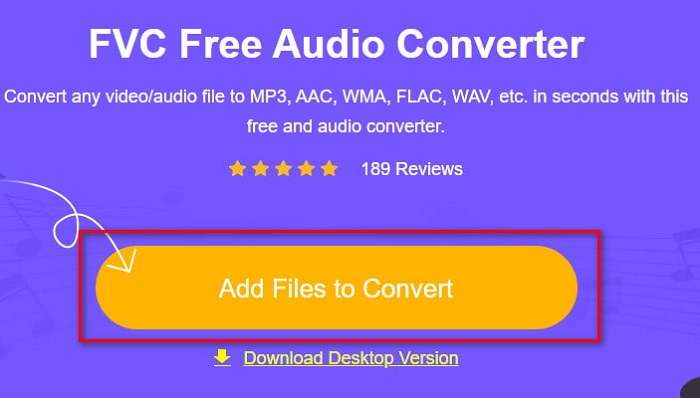
Krok 2. Stiskněte Add Files to Convert, abyste si při prvním použití stáhli spouštěč. Pokud už je spouštěč nainstalovaný, klikněte znovu na Add Files to Convert, vyhledejte soubor ve složce, klikněte na něj a poté na Open.
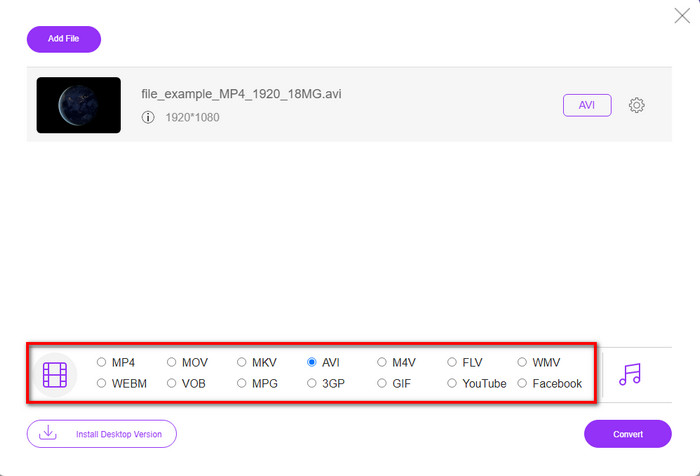
Krok 3. V nabídce dole vyberte formát AVI, nebo jakýkoli jiný formát, do kterého chcete soubor převést.
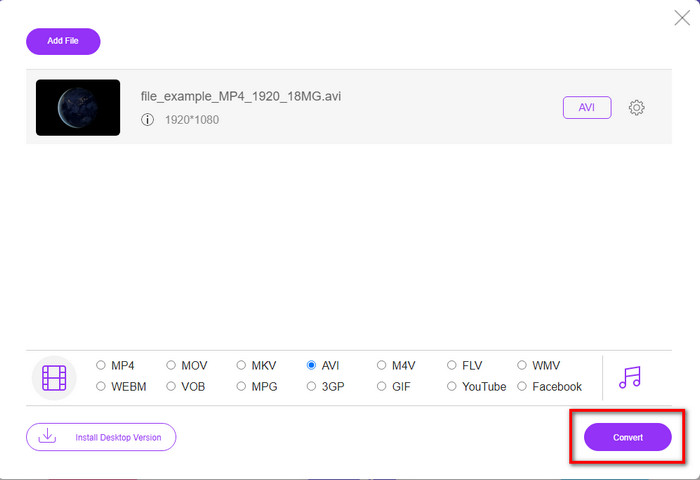
Krok 4. Jakmile dokončíte výběr formátu, je čas uložit soubor na disk kliknutím na Convert.
Krok 5. Pokud již převod proběhl, vyčkejte, až se na obrazovce objeví složka s výsledným souborem. Otevřete jej kliknutím a přehrajte si převedené video.
Top 4. Online-Convert.com
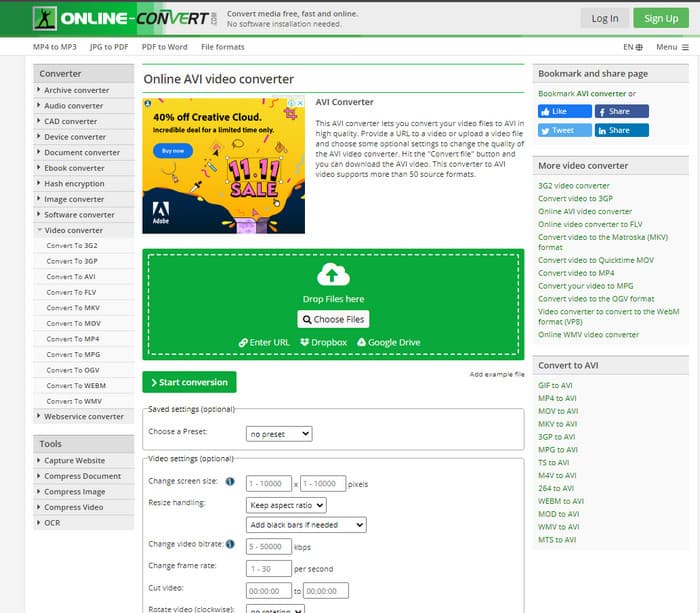
Dalším online nástrojem, který můžete použít k převodu jakéhokoli multimediálního souboru, je Online-Convert.com. Stejně jako některé jiné online převodníky podporuje jen omezené množství formátů. Má však vestavěné možnosti úprav videa, které můžete využít, ale jsou obtížněji ovladatelné, zvláště pokud s nimi nemáte zkušenost. Nahrávání a stahování souborů je navíc výrazně pomalejší než u FVC Free Video Converter.
Klady
- Zdarma k přístupu na webu.
- Rozhraní nástroje je skvělé a nemá téměř žádné reklamy.
- Proces převodu bude záviset na připojení k internetu.
Nevýhody
- Bez internetu není přístupný.
- Proces importu a exportu zabere ve srovnání s ostatními nástroji hodně času.
Část 3. Který z nich je nejlepší pro převod DivX do AVI?
| Funkce | FVC Video Converter Ultimate | Freemake Video Converter | FVC Free Video Converter | Online-Convert.com |
| Převod videa a zvuku |  | | | |
| Dávková konverze | |  | | |
| Hardwarová akcelerace | | | | |
| Nástroj založený na programu | Desktop Based Tool | Desktop Based Tool | Webový nástroj | Webový nástroj |
| Připojení k síti | Nevyžaduje se | Nevyžaduje se | Požadované | Požadované |
Část 4. Nejčastější dotazy týkající se převodníků DivX na AVI
Který je lepší? DivX a XviD?
DivX je dobře známý proprietární kodek pro video a audio kontejnerový soubor a také se specializuje na ripování souboru na disku při jeho kompresi bez ztráty kvality. Zatímco XviD je oddělovací verze DivX a je o něco mnohem lepší než DivX. Je také neproprietární, což znamená, že jej může kdokoli používat kdykoli nebo cokoli chcete.
Co jsou kodeky?
Kodek se používá ke kompresi souboru a mnohem rychlejší distribuci audio a video souborů v rámci menší velikosti souboru. Také se používá k dekomprimaci souboru, který je svázán s uvedeným kodekem, aby se otevřel komprimovaný soubor, který jste vytvořili, aniž by došlo ke zničení jeho důvěryhodnosti.
Chcete-li mít menší velikost souboru, je ideální komprimovat nebo převádět?
Pokud chcete zachovat kvalitu videa a zároveň jej zmenšit, je ideální použít kompresi pomocí tohoto odkazu. Pokud ale hledáte ještě jednodušší cestu, zvažte převod videí do MP4 – v tomto článku najdete podrobný návod, jak na to.
Závěr
Na závěr tohoto článku už je pro nás snazší pochopit, co je DivX a co je AVI. Také jsme vám představili 4 užitečné nástroje, pomocí kterých můžete přehrát svůj soubor DivX tím, že jej převedete do formátu AVI. Pokud tedy chcete zažít „100%“ úspěšných převodů, použijte FVC Video Converter Ultimate, abyste měli výsledek zaručený.
Zdarma ke staženíPro Windows 7 nebo novějšíBezpečné stažení
Zdarma ke staženíPro MacOS 10.7 nebo novějšíBezpečné stažení
-
 [Zdarma a online] 7 způsobů, jak převést MTS do AVI na počítači Mac/Windows
 Jak snadno převést MTS na AVI? V této příručce najdete 7 bezplatných a snadných způsobů převodu souborů MTS do formátu AVI ve Windows nebo Mac bez ztráty kvality.
-
 Výukový program pro převod souborů MP4 na AVI se 7 bezplatnými převaděči videa
 Chcete získat všechny bezplatné způsoby, jak převést AVI na MP4 video? Tento článek byste si neměli nechat ujít. Zde je 7 způsobů, jak zdarma převést soubory AVI na MP4 na Windows, Mac, iPhone, Android a online.
-
 3 snadné metody pro převod FLV na AVI na ploše a online
 Zde jsou tři metody, které vám pomohou efektivně převádět vaše video soubory FLV do formátu AVI ve Windows a Mac, abyste je mohli sledovat ve vysoké kvalitě.
