


 Video Converter Ultimate
 Screen Recorder
 Oprava videa
 Převeďte MOD do jakéhokoli formátu, jako je MP4, MOV, AVI, MP3 atd.
7 bezplatných převodníků MOD dostupných na vaší platformě pro snadné převádění formátu MOD
Potřebujete změnit svůj soubor MOD? Pokud ano, už se nemusíte strachovat ani složitě zkoušet různé převodníky. Nestresujte se, protože dnes pro vás máme řešení. Hned vám představíme nejlepší způsoby, jak převést MOD do MP4, MOV, MPEG2, na DVD nebo do jakéhokoli videoformátu, který chcete, včetně kroků, jež vám pomohou postup následovat.

Část 1. Top 7 bezplatných převodníků MOD pro převod souborů MOD online a offline
1. FVC Video Converter Ultimate – Nejlepší MOD Converter na Windows a Mac
Jako první v našem seznamu je nejčastěji volený převodník MOD dostupný napříč platformami, FVC Video Converter Ultimate. Tento převodník svým uživatelům nabízí ultra zrychlený převod a jako vždy je nezklame. I když je převod pomocí tohoto nástroje rychlý, kvalita se nemění, protože je při změně formátu chráněna.
Co je víc než jeho bleskový proces? Podporuje také obrovské formáty, které můžete importovat nebo exportovat, jako je MOD, MP4, MOV, MKV, FLV, WMV a mnoho dalších. Díky podporovanému formátu si zákazníci tento nástroj oblíbili a mnozí z nich jej doporučují dalším uživatelům, kteří potřebují svůj formát převést. Pokud tedy potřebujete pomoc s převodem MOD na MP4 nebo jakýkoli jiný formát videa, který chcete, tento nástroj je vynikající pomocí podle níže uvedených kroků.
Krok 1. Chcete-li převodník stáhnout do počítače, klikněte na tlačítko pro stažení níže a vyberte platformu, kterou aktuálně používáte. Poté rychle projděte instalačním procesem a spusťte software. Pokud s převáděním teprve začínáte, nemusíte se bát, protože kroky uvedené zde vám zajistí, že soubor MOD převedete správně.
Zdarma ke staženíPro Windows 7 nebo novějšíBezpečné stažení
Zdarma ke staženíPro MacOS 10.7 nebo novějšíBezpečné stažení
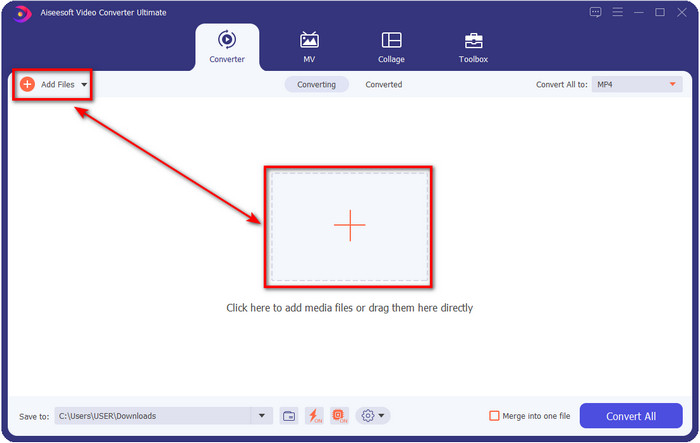
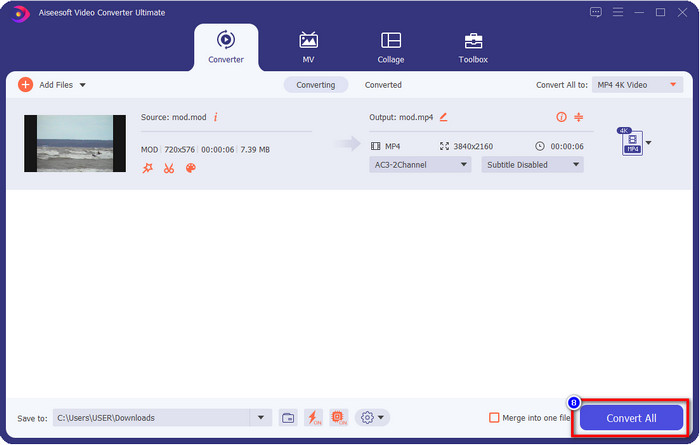
Krok 2. Nahrajte soubor MOD kliknutím na Add Files, nebo můžete stisknout velké tlačítko + uprostřed rozhraní. Poté se na obrazovce zobrazí okno s adresáři počítače; nyní vyhledejte a klikněte na soubor MOD a stiskněte Open, abyste pokračovali k dalšímu kroku.
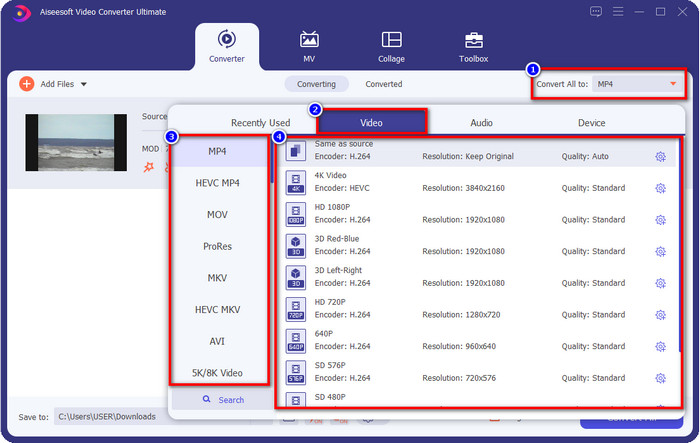
Krok 3. Chcete-li změnit formát na MP4, MOV, MKV nebo jakýkoli jiný potřebný formát, klikněte na Convert All to a vyberte.
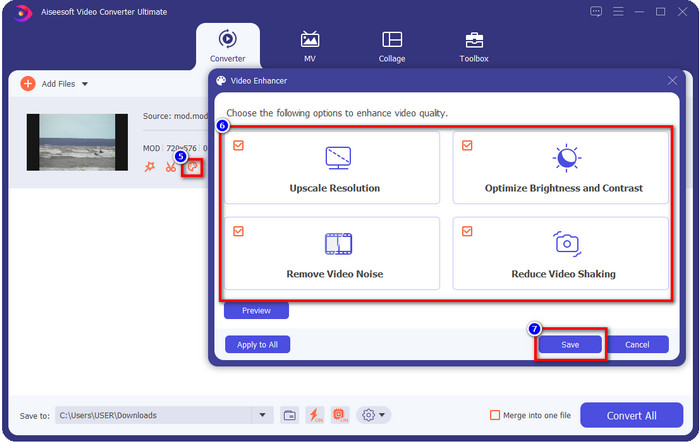
Volitelné. Jednou z fantastických funkcí, které tento nástroj nabízí, je vylepšovač videa. Pokud kliknete na paint tray (ikonku palety), zobrazí se nové minirozhraní; nyní můžete provést výrazné úpravy videa zaškrtnutím boxes (políček). Kliknutím na Save použijete změny, které jste na svém MOD videu provedli.
Krok 4. Po všech předchozích krocích je čas převést MOD kliknutím na Convert All. Tak snadno jako 1-2-3 se naučíte převést formát MOD do nového formátu.
Klady
- Převeďte MOD do MP4, MOV, MKV, FLV, AVI nebo do formátu 200+, který je k dispozici efektivně.
- Pokročilé funkce úprav zahrnují ořezávání, řezání, ořezávání a další.
- Ke stažení je bezpečný a bez malwaru.
- K dispozici ke stažení na všech desktopových platformách, jako jsou Windows a Mac.
Nevýhody
- Abyste mohli využívat všechny pokročilé funkce, budete si muset nástroj zakoupit.
2. iMovieSoft Free TOD Converter
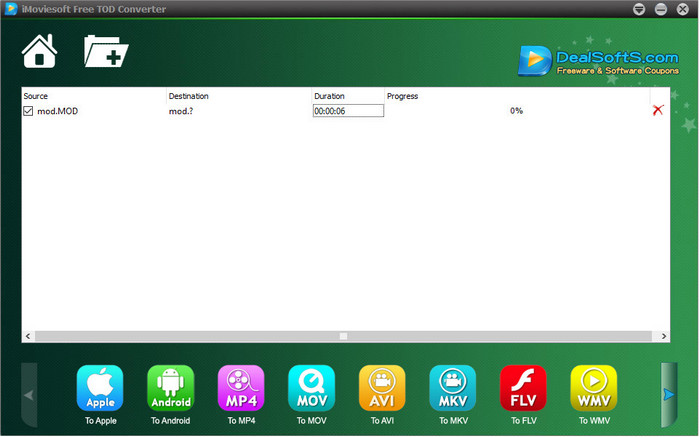
Další převodník, který si můžete stáhnout do počítače, je iMoiveSoft Free TOD Converter. S jeho pomocí můžete snadno převést formát MOD do dostupných formátů. Formátů, které tento nástroj podporuje, však není mnoho, ale ty nejznámější zde najdete. Kromě toho hlavní web nástroje nemá zabezpečené připojení; i když se zobrazí varování, přesto jsme jej do našeho systému stáhli, abychom mohli poskytnout postup, jak převést soubory MOD do MOV, MP4, AVI atd.
Krok 1. Stáhněte převodník do počítače a otevřete ho.
Krok 2. Klikněte na Folder (složku) a vyhledejte soubory MOD, které chcete vložit.
Krok 3. Klikněte na formát dole a stiskněte Convert.
Klady
- Je zdarma ke stažení na Windows a Mac.
- Snadné použití.
- K dispozici jsou základní editační funkce.
Nevýhody
- Hlavní web není bezpečný pro připojení.
- Má možnost formátu, kterou si můžete vybrat.
- Uživatelské rozhraní potřebuje vylepšení.
3. iOrgSoft Converter
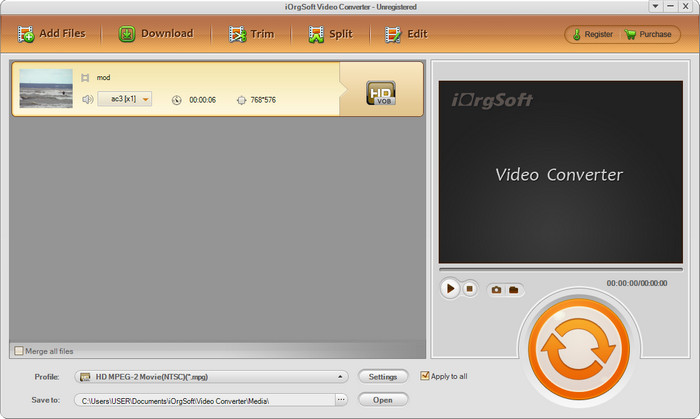
iOrgSoft Converter je volbou, pokud potřebujete snadno převést MOD do MPEG2. Hlavní web tohoto převodníku má stejně jako iMovieSoft nezabezpečené připojení. Video si zde můžete stáhnout také z externího odkazu. Přestože nástroj nabízí několik možností, uživatelské rozhraní není prioritou, takže nečekejte příliš vzhledný design. Také se může stát, že při samotném převodu dochází k pádům a chybám.
Krok 1. Najděte hlavní webovou stránku převodníku a stáhněte si ho odtud.
Krok 2. Otevřete převodník, klikněte na Add Files pro vložení souborů MOD, klikněte na lištu s formáty a zvolte formát, který chcete.
Krok 3. Stiskněte tlačítko convert pro spuštění převodu.
Klady
- Podporuje více formátů než iMovieSoft.
- Jednoduché použití a snadno pochopitelné.
- Stáhněte si ji na Windows a Mac.
Nevýhody
- Nezabezpečené připojení k hlavnímu webu.
- Uživatelské rozhraní je hrozné.
4. FFmpeg
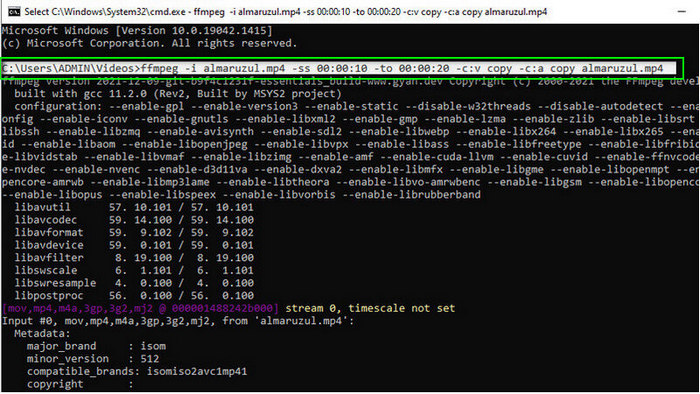
Pokud potřebujete bezplatný převodník MOD do MOV, pak vám pomůže FFmpeg. Na rozdíl od ostatních převodníků v tomto seznamu používá rozhraní založené na příkazové řádce (CLI), takže s nástrojem komunikujete pomocí textu. I když na to nejsme až tak zvyklí, někteří uživatelé jej stále používají jako svůj převodník. Pokud vás tento nástroj zaujal, postupujte podle kroků níže.
Krok 1. Stáhněte FFmpeg a spusťte exe soubor.
Krok 2. Otevřete CMD (příkazový řádek); nyní s nástrojem můžete komunikovat přes něj.
Krok 3. Pomocí příkazového řádku najděte umístění souboru. Poté zkopírujte a vložte tento text ffmpeg -i input.mod -vn -ar 44100 -ac 2 -b:a 192k output.mp4 pro převod do MP4. Formát můžete změnit také na MOV, MKV, AVI a další. Pro spuštění procesu stiskněte na klávesnici Enter.
Klady
- Unikátní video konvertor dostupný na většině platforem.
- Bezpečné použití.
- Je spolehlivý při převodu vašeho formátu.
Nevýhody
- Použití není příliš snadné.
- Není to nejlepší volba pro začátečníky nebo začátečníky pro převod formátu.
5. CloudConvert
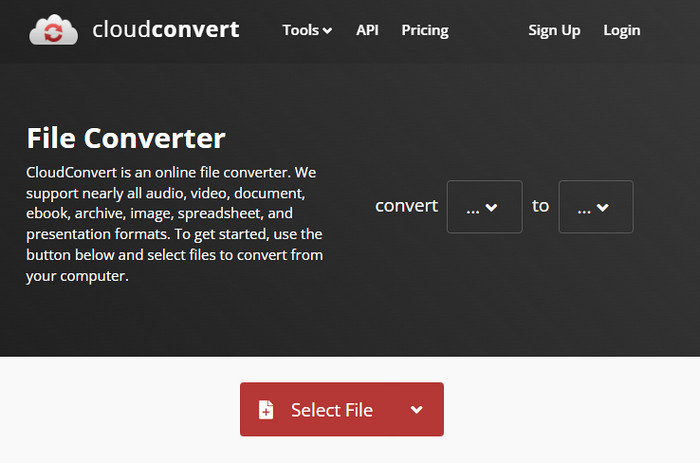
Nechcete si do počítače stahovat žádný převodník? V tom případě můžete formát MOD stále převést online pomocí CloudConvert. Tento online nástroj nabízí svým uživatelům jednoduchý, ale účinný proces převodu. Podporuje také převod jiných typů souborů, jako jsou PDF, archivy, e‑knihy a další, do nových formátů.
Krok 1. Vyhledejte CloudConvert ve svém oblíbeném prohlížeči.
Krok 2. Klikněte na Select File a nahrajte soubor MOD. Stiskněte drop-down (rozbalovací) tlačítko a zvolte požadovaný formát. Poté klikněte na Convert.
Krok 3. Po nahrání klikněte na Download a uložte nový formát souboru na svůj disk.
Klady
- Stahování nástroje není potřeba.
- Bezplatný online webový nástroj.
- Uživatelsky přívětivý.
Nevýhody
- Závisí na síti.
- Průběh procesu bude záviset na rychlosti vašeho internetu.
6. Převodník365
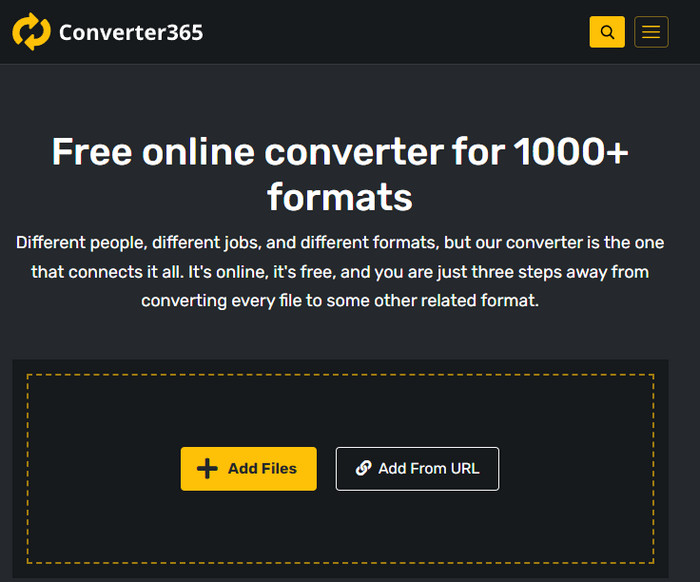
Další online bezplatný převodník MOD do MP4, který můžete použít, je Converter365. Patří mezi online nástroje, o nichž lze říci, že mají elegantní, moderní vzhled rozhraní. Díky tomu působí práce s tímto nástrojem profesionálně; měli jsme však potíže s převodem video souborů, protože docházelo k pádům. Pokud ale potřebujete svůj soubor MOD převést jednoduše, může vám pomoci.
Krok 1. Otevřete prohlížeč a vyhledejte Converter365.
Krok 2. Klikněte na Add Files, poté najděte soubor .mod. Jakmile soubor najdete, zvolte formát kliknutím na drop-down (rozbalovací) tlačítko.
Krok 3. Stiskněte Start Conversion a převod se spustí.
Klady
- Převodník je přístupný přes web.
- Poskytuje jednoduchou, ale efektivní konverzi.
- Uživatelské rozhraní vypadá profesionálně.
Nevýhody
- K použití je potřeba připojení k internetu.
- Při převodu formátu někdy dochází k chybám.
7. Zamzar
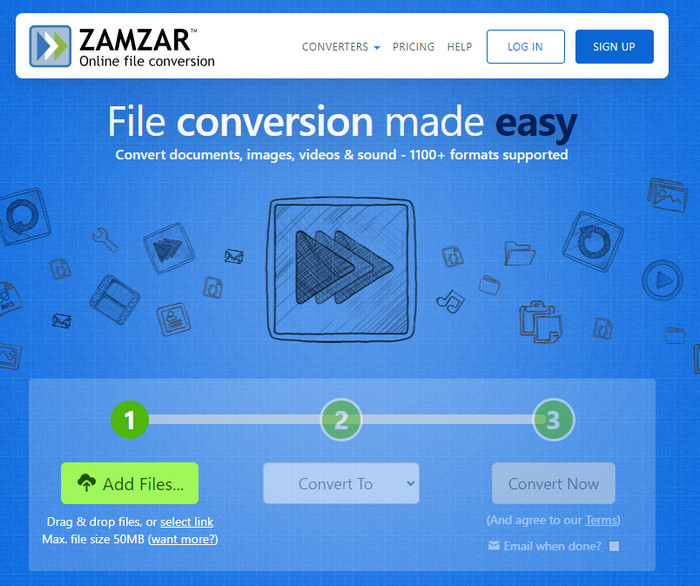
Pokud potřebujete jednoduchý a praktický online převodník MOD, pak vám pomůže Zamzar. Tento nástroj nabízí přímočarý postup převodu vašich .mod souborů. Kromě toho patří bezpochyby mezi nejbezpečnější převodníky dostupné na webu. Pokud tedy chcete tento nástroj vyzkoušet, můžete postupovat podle níže uvedených kroků.
Krok 1. Otevřete Zamzar tak, že jej vyhledáte ve svém oblíbeném prohlížeči.
Krok 2. Stiskněte Add File pro vložení souboru MOD, který potřebujete převést. Klikněte na Convert To a zvolte požadovaný formát.
Krok 3. Klikněte na Convert Now a vyčkejte na dokončení procesu. Poté klikněte na Download a uložte soubor na disk svého počítače.
Klady
- Jedna z nejlepších možností, pokud potřebujete převést formát.
- Poskytuje přímý proces převodu.
- Dostupné ve všech webových prohlížečích.
Nevýhody
- Závislý na internetu, žádný internet, nemůžete ho používat.
- Podporuje méně možností formátu.
Související:
Část 2. Nejčastější dotazy o MOD konvertorech
Co je MOD?
MOD je obousměrný formát, který lze použít jako zvuk pro standardní aplikace pro sledování digitální hudby. Obsahuje notové vzory, čísla nástrojů a ovladače zpráv s různými stopami pro ukázkové zvuky. Jak je zmíněno, je obousměrný; můžete jej také použít jako video formát pro digitální videokamery vyráběné společnostmi Panasonic a JVC. Ačkoli tento formát podporuje známé značky, je trochu zastaralý, pokud bychom jej chtěli srovnat s jiným video kontejnerem.
Podporují přehrávače médií rozšíření .mod?
Ne všechny přehrávače médií tento formát podporují, zvláště pokud váš přehrávač nemá uvnitř video kodek MPEG-2. Je to docela problém pro všechny; můžete si stáhnout rozšíření videa MPEG-2, pokud je potřebujete k přehrávání. Soubor ale můžete také převést do podporovaného formátu na své platformy, je to zatím nejjednodušší a nejbezpečnější způsob. Takže nyní, pokud potřebujete převést svůj MOD soubor, možná budete chtít místo toho použít FVC Video Converter Ultimate. Nemáte představu o nástroji? V tom případě si přečtěte podrobnosti výše.
Je MOD kompatibilní s DVD přehrávačem?
Není kompatibilní s DVD přehrávačem; můžete jej však vypálit na disk DVD, aby byl kompatibilní s přehrávačem DVD.
Závěr
Těchto sedm nástrojů je nejlepší volbou, pokud potřebujete převodník MOD, a to díky jejich výkonu a efektivitě. Všechny programy jsme pečlivě vyzkoušeli a zjistili jsme, že FVC Video Converter Ultimate poskytuje fenomenální výstup a funkce, které ostatní nástroje nedokážou překonat. Pokud tedy chcete zažít, jak dobrý tento nástroj je, můžete si jej nejprve stáhnout do počítače a používat ho podle potřeby.

FVC Video Converter Ultimate
2 999 368+ stažení- Převeďte MOD do jakéhokoli populárního formátu.
- Vylepšete kvalitu videa přirozeně
- Vytvářejte plynulé video koláže s vysoce kvalitním výstupem
- Upravujte videa jako profesionál, včetně oříznutí, otočení, přidání filtru atd.
Zdarma ke staženíPro Windows 7 nebo novějšíBezpečné stažení
Zdarma ke staženíPro MacOS 10.7 nebo novějšíBezpečné stažení
-
 2 Ultimate MPG převodníky pro převod MPG do WMV zdarma
 Chcete zdarma převést MPG do WMV? V tom případě máte štěstí, protože jsme zjistili, že existují dva nástroje, které můžete použít k převodu souborů MPG.
-
 Jak změnit iTunes M4V na MKV na Mac a Windows nejrychlejší způsob
 Pokud potřebujete převést M4V na MKV na Mac, musíte si přečíst tento článek. Protože poskytujeme fakta o převodnících, které vám pomohou s procesem převodu.
-
 Top 5 bezplatných převodníků MPEG na MKV dostupných na všech platformách
 Jaké jsou dostupné převodníky MPEG na MKV? Potřebujete se dozvědět více o konvertorech MPEG dostupných na vaší platformě? Pak je tento článek právě pro vás.
