


 Video Converter Ultimate
 Screen Recorder
 Oprava videa
 Bezpečné stažení
Úžasné způsoby, jak převést GIF do DivX během několika minut
V dnešní době se na internetu používají různé formáty souborů. Jedním z populárních formátů pro webovou grafiku je GIF, který je obvykle zábavné sledovat. Existují však situace, kdy formát GIF není na jiných zařízeních podporován. Někdy potřebujete formát, který podporuje více zařízení, například DivX. V takovém případě, pokud se chcete do tohoto tématu ponořit hlouběji, musíte si přečíst tento článek, abyste získali informace o tom, jak okamžitě převést GIF na DivX.

Část 1: Úvod do GIF a DivX
Graphics Interchange Format neboli GIF je oblíbený formát pro webovou grafiku. Může být animovaný a často se používá především k zobrazení základních animací na webových stránkách. GIFy také obsahují průhledné pixely, díky nimž mohou splývat s jinými barvami. Navíc, pokud si všimnete obrázků, které se neustále opakovaně pohybují, je pravděpodobné, že jde o obrázek ve formátu GIF. Soubor DivX je jiný formát souboru, který rozpoznávají různá elektronická zařízení pro spotřebitele, software pro přehrávání videa a přehrávače DVD. Tento soubor je také známý jako DivX-Encoded Movie File a je zařazen mezi video soubory. Podporují ho také další zařízení. Proto si přečtěte další důležité body níže, pokud chcete převést GIF na DivX.
Část 2: Program pro převod GIF a DivX bez ztráty kvality
Pokud hledáte dobrý a skvělý převodník, který umí převést GIF na DivX bez ztráty kvality, pak je nejlepší aplikací, kterou můžete použít, Video Converter Ultimate. Tato spolehlivá aplikace podporuje různé formáty souborů, jako jsou MKV, MOC, GIF, MTS, M2TS, MPEG, FLV, XVID, MTS, DivX, AVI a další. Kromě převodu má tato aplikace také mnoho různých funkcí a nástrojů, které můžete využít, jako je ovladač rychlosti videa, odstraňovač vodoznaku z videa, vylepšovač videa, tvůrce GIFů, nástroj pro tvorbu koláží, zpětné přehrávání videa, ořezávač videa, kompresor zvuku, kompresor videa a další. Navíc je tato aplikace zdarma a dostupná jak pro Windows, tak pro Mac. A konečně, Video Converter Ultimate se snadno používá a má jednoduché rozhraní, které je vhodné pro nové uživatele.
Klíčové funkce
Aplikace je nejen skvělá při převodu souborů, ale má také mnoho funkcí, které si můžete užít.
◆ Poskytuje mnoho možností pro vylepšení videa/audia.
◆ Přizpůsobte si video.
◆ Umožňuje upravit datový tok videa.
◆ Umožňuje upravit rozlišení a snímkovou frekvenci vašeho videa.
Klady
- Vhodné pro začátečníky.
- Má rychlý proces ukládání.
- Konverze je stabilní a bezpečná.
- Nebyl použit žádný vodoznak.
- K dispozici pro Windows i Mac.
- Snadné použití.
Nevýhody
- Kupte si software pro pokročilejší funkce.
Pokud chcete převést soubor GIF na DivX pomocí počítače Mac nebo Windows, postupujte podle následujících jednoduchých a jednoduchých kroků níže.
Krok 1: Stáhněte si Video Converter Ultimate do svého Macu nebo Windows. Po dokončení procesu aplikaci spusťte.
Zdarma ke staženíPro Windows 7 nebo novějšíBezpečné stažení
Zdarma ke staženíPro MacOS 10.7 nebo novějšíBezpečné stažení
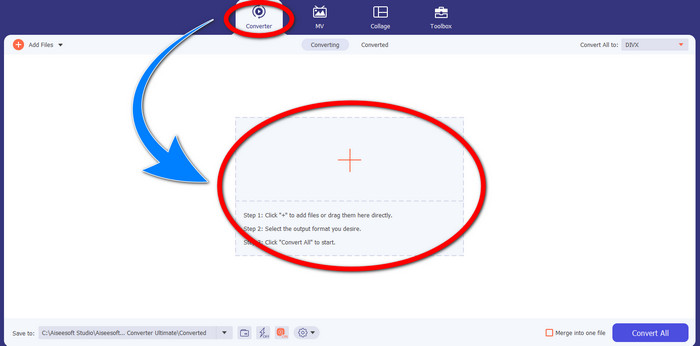
Krok 2: Po otevření Video Converter Ultimate klikněte na tlačítko Converter > Plus, abyste připojili soubor GIF, který chcete převést.
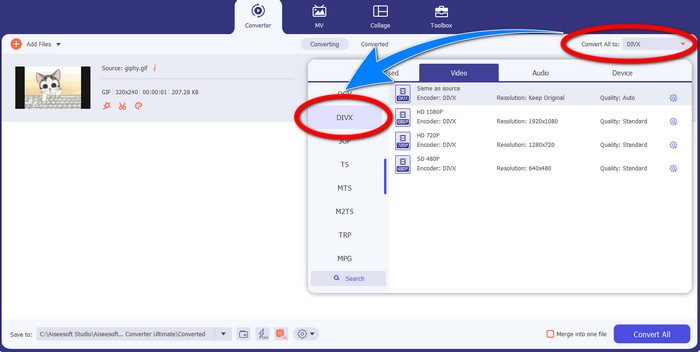
Krok 3: Jakmile už máte GIF přidaný, klikněte na tlačítko Convert All to a poté vyberte soubor DivX s požadovanou kvalitou, například 480p, 720p nebo 1080p.
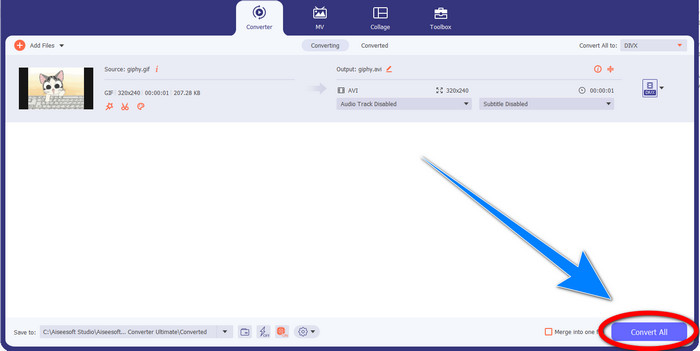
Krok 4: Po změně formátu souboru z GIF na DivX klikněte na tlačítko Convert All, abyste uložili svůj výsledný soubor.
Část 3: Online konvertor pro změnu GIF na DivX
Convertio je online nástroj, který můžete použít k převodu GIFů do formátu DivX. Tento software dokáže převádět konkrétní formát souboru do různých jiných formátů. Kromě toho má mnoho funkcí, zejména převodních, jako je audio převodník, převodník obrázků, převodník písem, převodník e‑knih, převodník prezentací a další. Navíc můžete tento software využívat zdarma a také si můžete zakoupit předplatné pro další výhody. Také se nemusíte obávat o své soubory, protože jsou v bezpečí a zabezpečené. Soubor, který převádíte, bude automaticky smazán po 24 hodinách. Bezplatná verze je však omezená. K dispozici máte jen několik funkcí a omezenou velikost souboru, který můžete uložit. Pokud vás zajímá, jak převést GIF na DivX, postupujte podle níže uvedených kroků.
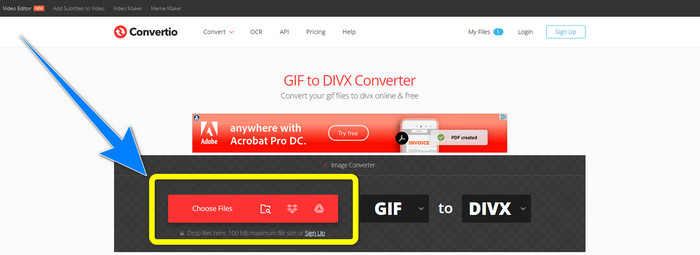
Krok 1: Přejděte na webové stránky Convertio. Poté klikněte na tlačítko Choose Files, abyste připojili soubor GIF, který chcete převést.
Krok 2: Po připojení souboru GIF můžete změnit formát na DivX výběrem z možností formátu.
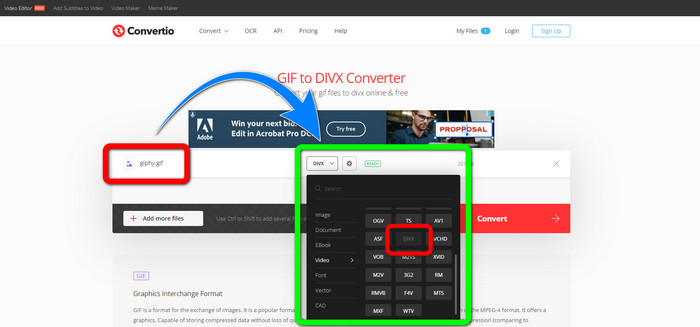
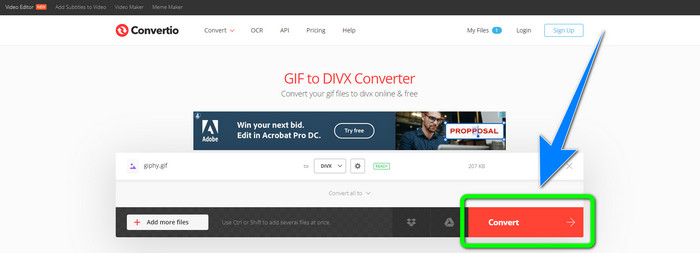
Krok 3: Jakmile máte v možnostech formátu zvolený DivX, klikněte na tlačítko Convert, abyste převedli GIF na DivX. Poté si už můžete uložit výsledný soubor do svého zařízení.
Související s:
[Offline/Online] Nejčastěji používané převodníky AVI na DivX, které byste měli znát
Jak zdarma převádět MKV na DivX online i offline
Část 4: Nejčastější dotazy o převodu GIF do DivX
Proč bych měl převádět konkrétní soubor do jiných formátů souborů?
Jedním z důvodů, proč musíte převést konkrétní soubor do jiného formátu souboru, je, že existují soubory, které zařízení nepodporuje, a stanou se nekompatibilními a nevhodnými. Tímto způsobem je nezbytná aplikace s konvertorem pro změnu formátu konkrétního souboru tak, aby se vešel na zařízení, které používáte.
Mohu převést svůj zvuk pomocí aplikace Convertio?
Ano, samozřejmě. Convertio je také spolehlivý nejen při převodu obrazových a video formátů. Tuto aplikaci lze také považovat za audio převodník.
Jaký je nejlepší a nejdůvěryhodnější video konvertor, který mohu použít pro svůj Mac?
Pokud hledáte skvělou a výjimečnou aplikaci s převodníkem souborů, pak byste měli použít Video Converter Ultimate. Je vhodný pro úpravu a převod vašich video souborů na Macu.
Existuje nějaká skvělá aplikace s konvertorem videa, kterou mohu použít pro svůj telefon?
Ano, tam je! Software s převodníkem videa není přístupný pouze pro počítače, ale existují také aplikace, které najdete v obchodě Play nebo prohlížečích pro převod souborů pomocí telefonu, jako je Android.
Existuje konvertor videa pro můj iOS?
Určitě ano. Existuje konvertor videa, který můžete použít pro svůj iOS. Dobrá věc, kterou uděláte, je podívat se do obchodu s aplikacemi. Vyhledejte konvertor videa, vyhledejte aplikace zobrazené ve výsledcích a vyzkoušejte je.
Závěr
Jak je uvedeno ve výše uvedených informacích, lze usoudit, že převod souboru do jiného formátu je důležitý. Některé formáty nejsou s vašimi zařízeními kompatibilní či vhodné, a proto je musíte převést do jiného formátu. Tento článek také poskytl dva vynikající a účinné způsoby, jak převést GIF na DivX ve Windows, na Macu i online. Pokud chcete převést více souborů, je nejlepším softwarem, který můžete použít, Video Converter Ultimate. Tuto aplikaci můžete používat velmi snadno a převádět soubory rychleji než v jiných aplikacích.
-
 Jak převést M4V na DivX zdarma na Mac [Nejlepší nástroje]
 Hledáte způsoby, jak zdarma převést M4V na DivX? Uvedli jsme pro vás nejlepší převodníky pro převod vašeho souboru M4V do DivX na Macu.
-
 Bezplatné převodníky WMV do DivX Nejlepší volba uživatele
 Zde jsou nejlepší bezplatné převodníky WMV na DivX, které uživatelé většinou používají. Tento článek poskytuje nejlepší způsoby, jak převést soubor WMV na DivX.
-
 Top 5 nejlepších bezplatných převaděčů MPEG do DivX pro Windows a Mac
 Snadno převeďte svůj soubor MPEG na soubor DivX pomocí nejlepších převodníků MPEG na DivX. Přečtěte si tento článek a dozvíte se o nich více podrobností.
