


 Video Converter Ultimate
 Screen Recorder
 Oprava videa
3 efektivní způsoby, jak změnit M4V na MKV na Mac/Windows/Linux bez ztráty kvality
Potřebuji přepnout videa M4V, která jsem si stáhl na iTunes. Máte nějakou představu, jak převést M4V na MKV na Mac a později jej použít na mé televizi?
Tento problém je rozšířený, zejména u videí M4V stažených z iTunes, protože tento formát spadá pod Apple Fair Play Policy a je chráněný. Proto nemůžete soubory .m4v okamžitě přehrát na jiných zařízeních bez jejich převodu. Tento článek vám poskytne fakta o převodnících, které můžete použít, abyste úspěšně převedli formát M4V. Bez dalšího zdržování se pojďme naučit efektivní způsob, jak změnit M4V na MKV na Macu nebo ve Windows.

Část 1. Převod iTunes M4V na MKV na Mac a Windows [Nejvybranější]
Na trhu je mnoho bezplatných převodníků M4V na MKV, které si můžete stáhnout, a jedním z nich je FVC Video Converter Ultimate. Tento špičkový nástroj však poskytuje účinnější převod než ostatní převodníky díky bleskové rychlosti převodu, neomezenému nahrávání souborů k převodu a intuitivnímu rozhraní. Jste ohromeni tímto ultimátním převodníkem? Nebo se chcete o převodníku dozvědět víc? V tom případě níže najdete klíčové funkce, které uvidíte, pokud si tento převodník pořídíte.

FVC Video Converter Ultimate
2 999 368+ stažení- Dokáže převést více iTunes M4V na MKV nebo do 200+ mediálních formátů, jako je MOV, AVI, MP4 atd.
- Díky ultrarychlé konverzi je váš proces okamžité konverze vašeho M4V
- K dispozici jsou pokročilé editační funkce, díky kterým bude vaše video ještě lepší.
- Nastavte úžasné funkce pro kompresi, změnu velikosti, GIF maker atd. v panelu nástrojů.
Zdarma ke staženíPro Windows 7 nebo novějšíBezpečné stažení
Zdarma ke staženíPro MacOS 10.7 nebo novějšíBezpečné stažení
Není to úžasné, jak mohou být všechny tyto funkce na jednom nástroji? Neztrácejme více času a určete, jak tento nástroj efektivně převede váš iTunes M4V na MKV podle následujících kroků.
Krok 1. Nejprve si stáhněte ultimátní převodník na svůj disk kliknutím na tlačítko pro stažení níže. Zvolte platformu, kterou aktuálně používáte, postupujte podle instalačního procesu a pro pokračování klikněte na Start Now. Nezapomeňte, že je dobré se s rozhraním nástroje blíže seznámit, abyste se vyhnuli potížím.
Zdarma ke staženíPro Windows 7 nebo novějšíBezpečné stažení
Zdarma ke staženíPro MacOS 10.7 nebo novějšíBezpečné stažení
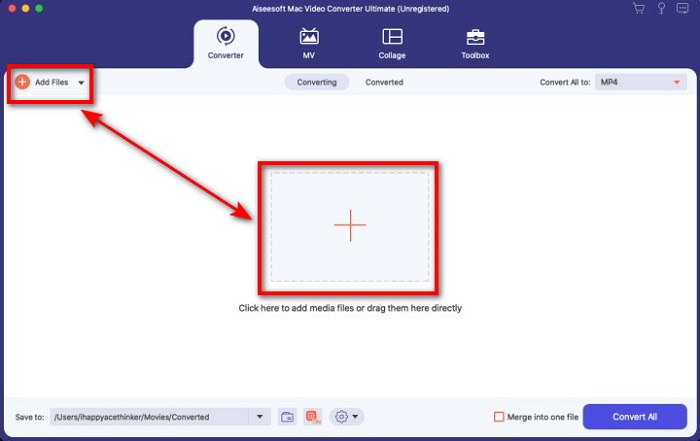
Krok 2. Nahrajte soubor M4V do rozhraní kliknutím na Add Files nebo tlačítko +. Poté se na obrazovce otevře složka počítače, vyhledejte soubor .m4v a stiskněte Open.
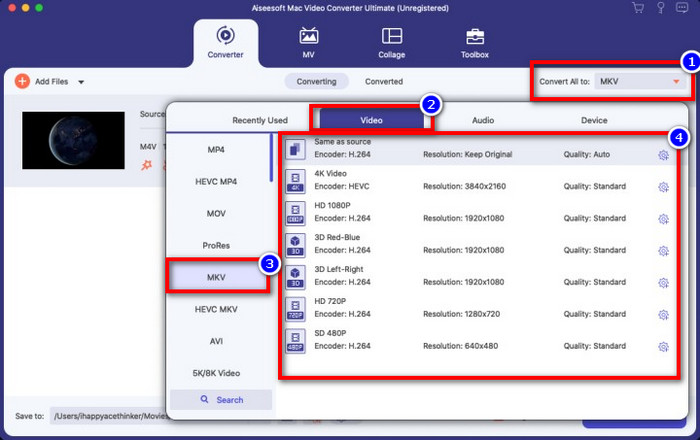
Krok 3. Vyberte formát MKV v nabídce Convert All to a klikněte na něj.
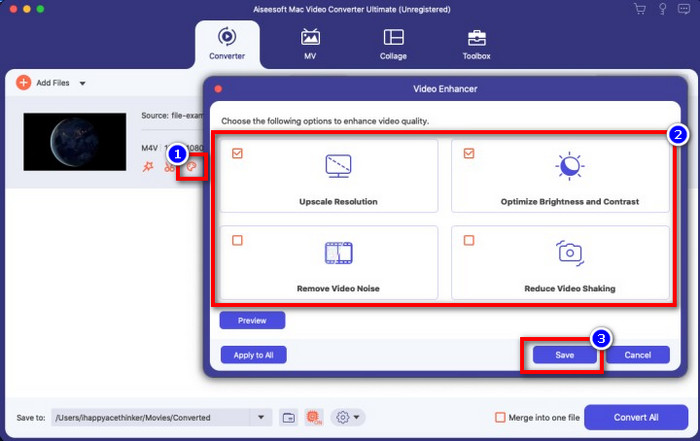
Volitelné. Účinnost tohoto nástroje je bezpochyby dosud skvělá. Věděli jste ale, že tento nástroj nabízí také vylepšení videa? Pokud kliknete na možnost enhance video, zobrazí se dialogové okno; zaškrtněte políčko u funkcí, které chcete u videa vylepšit, a pro jejich použití klikněte na Save.
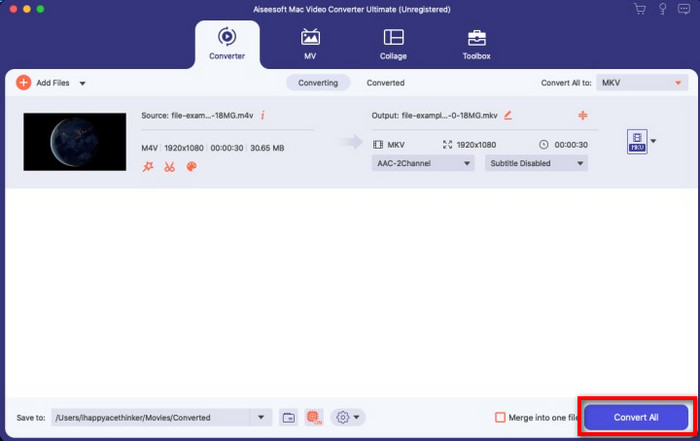
Krok 4. Kliknutím na tlačítko Convert All začne během krátké chvíle převod. A je to, přípona vašeho video souboru je nyní .mkv.
Část 2. Převod M4V na MKV Online
Nechcete platit za převod souborů M4V a raději chcete převést M4V na MKV online? Pokud ano, FVC Free Video Converter Online je online převodník, který zaručuje efektivní proces převodu i na webu. Převodník zvládne práci bez nutnosti jej kupovat nebo dokonce stahovat. Také zde nejsou žádné reklamy ani nutná registrace. I když je převodník zdarma, funkce, které nabízí, se zaměřují pouze na samotný převod. Na rozdíl od ultimátního nástroje nenabízí tak širokou a působivou škálu funkcí. Pokud však potřebujete převést soubory M4V online, použijte tento převodník a postupujte podle kroků níže.
Krok 1. Klikněte prosím na tento odkaz pro otevření FVC Free Video Converter Online.
Krok 2. Stiskněte možnost Add Files to Convert, abyste spustili a nahráli soubor M4V, který potřebujete převést.
Stáhněte si desktopovou verzi a převádějte soubory hromadně.
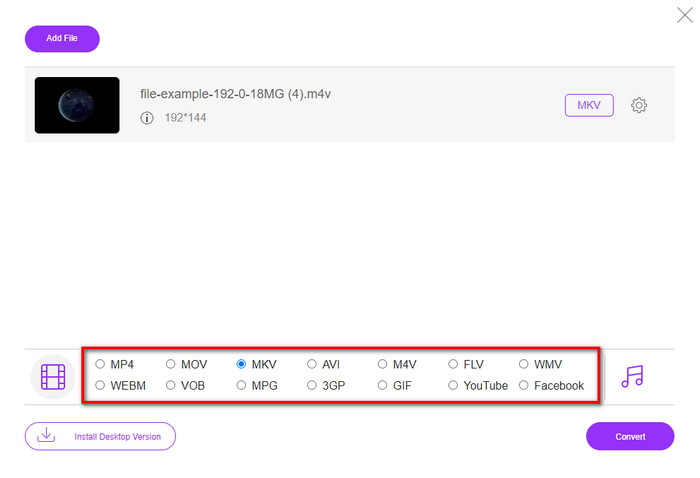
Krok 3. Vyberte formát MKV dole nebo jiný formát, který chcete získat.
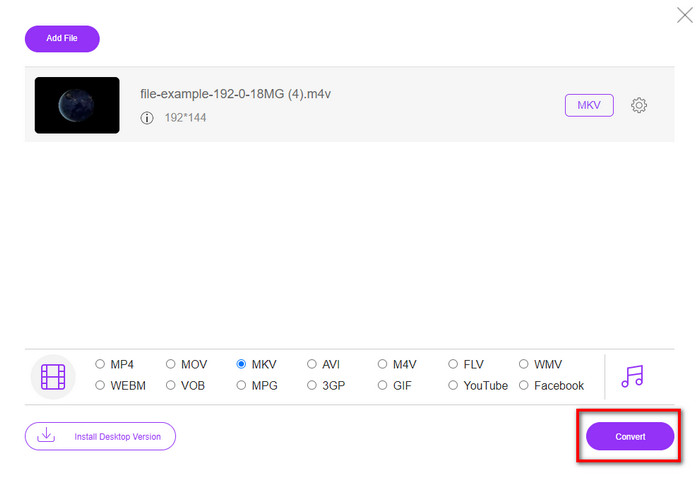
Krok 4. Klikněte na Convert, aby mohl proces začít.
Část 3. Převod M4V na MKV zdarma
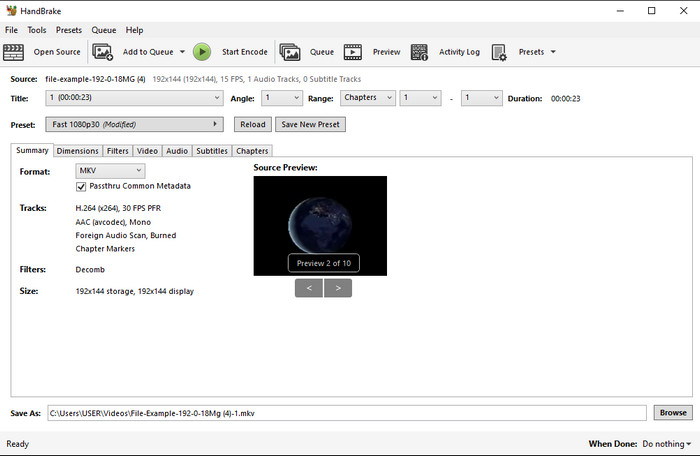
Handbrake poskytuje rychlý a efektivní proces převodu, podobně jako ostatní převodníky zde uvedené. Podporované formáty tohoto nástroje jsou však omezené, což znamená, že máte méně možností, do kterého formátu chcete soubor převést. Pokud ale chcete použít Handbrake k převodu M4V na MKV, postupujte podle níže uvedených kroků.
Krok 1. Stáhněte si Handbrake na svůj počítač. Nahrajte soubor .m4v tak, že jej přetáhnete do rozhraní. Můžete také kliknout na File, vyhledat soubor ve složce počítače a stisknout Open.
Krok 2. Klikněte na Format a zvolte MKV.
Krok 3. Klikněte na Start Encode, aby mohl proces převodu začít.
Část 4. Jaké jsou podobnosti a rozdíly mezi M4V a MKV
Než porovnáme M4V a MKV, pojďme zjistit podobnosti mezi těmito dvěma formáty. M4V a MKV jsou oba kontejnery pro mediální obsah a prvky. O těchto dvou formátech je také známo, že ukládají jednu z nejlepších videokvalit, jako jsou HD videa nebo 4k. A jsou také velké, aby obsahovaly prvky, jako jsou metadata. Kromě toho následující podrobnosti níže představují rozdíl mezi těmito dvěma formáty.
M4V je velmi podobný formátu MP4; tento formát je však chráněn proti kopírování DRM, což znamená, že jej nemůžete volně používat. Ale ne všechny soubory M4V mají ochranu Apple, protože některé ze souborů M4V ke stažení mají neoprávněnou licenci, takže se ujistěte, že jste si stáhli soubor .m4v na iTunes, abyste se vyhnuli škodlivému viru, který infikuje váš systém. Ačkoli má formát omezení, stále můžete tento formát používat na několika přehrávačích médií ke sledování videa, které si stáhnete z iTunes. Navíc, pokud potřebujete chráněný design na Macu, je tento formát nejlepší volbou.
Naopak MKV je specifické tím, že obsahuje více mediálního obsahu a prvků v jednom souboru. Tato funkce je k dispozici pouze na MKV, protože tento formát je zdarma k použití a je flexibilnější než M4V. Kromě toho existuje mnoho důvodů, proč změnit M4V na MKV na Mac nebo Windows, a jedním z nich je učinit video soubor neomezeným.
M4V vs. MKV
M4V je vyvinut společností Apple, která také používá MPEG 4. Soubory M4V se často používají k ukládání videí stažených z obchodu Apple iTunes, jako jsou hudební videa, televizní epizody atd. Některé soubory M4V mohou být chráněny proti kopírování, protože používá Apple FairPlay DRM ochrana autorských práv.
Formát multimediálního kontejneru Matroska, vydaný v roce 2002, je formát s otevřeným zdrojovým kódem, který může obsahovat řadu stop videa, zvuku, obrázků a titulků. Můžete jej tedy použít ke snadnému ukládání krátkých videoklipů, televizních pořadů a filmů. To je docela populární pro anime fan-subbing.
Část 5. Nejčastější dotazy o konverzi M4V na MKV
Co je lepší pro úpravy, M4V nebo MOV?
Oba zmíněné formáty patří mezi formáty Apple, takže si všimnete, že mezi M4V a MOV není výrazný rozdíl. MOV je však mnohem lepší pro střih, protože tento formát často obsahuje sekvenci video přehrávání, což je nejlepší volba pro profesionální úpravy. Možná si říkáte, že byste měli převést své M4V na MOV pro editační účely. Pokud ano, klikněte na tento odkaz a zjistěte více o převodu M4V na MOV s podrobným vysvětlením.
Jsou M4V a MP4 stejné?
M4V a MP4 jsou velmi identické ve smyslu struktury a kvality videa. Ale kvůli ochraně Apple Plays má M4V malý rozsah podpory a nemůžete jen přehrávat video nebo upravovat v rozšíření .m4v.
Jaké jsou přehrávače médií, které podporují M4V?
Mnoho multimediálních přehrávačů tento typ formátu nepodporuje kvůli ochraně DRM. Pokud tedy hledáte přehrávač MKV, strávíte tím hodně času a zkoušení, což je časově náročné. Když si ale přečtete tento článek, můžete si stáhnout nebo použít 5 nejlepších přehrávačů MKV dostupných na všech platformách.
Závěr
Tři nástroje uvedené v tomto článku vám při dodržení kroků jistě poskytnou efektivní převod, který chcete dosáhnout. Přestože mají převodníky mnoho společného, mají také mnoho rozdílů. Pokud jste si přečetli podrobnosti uvedené výše, dozvíte se o těchto třech nástrojích mnoho. Pokud chcete v jednom kroku dosáhnout vynikajícího převodu a zároveň zachovat efektivitu převodu, doporučujeme FVC Video Converter Ultimate. Zní to neuvěřitelně? Skutečně ano, proto si jej stáhněte do svého počítače a vyzkoušejte sami.
-
 Převaděč M4V na MP3 - 4 nejlepší metody pro extrakci MP3 ze souborů M4V
 Pokud chcete snadno extrahovat zvuk MP3 z videí M4V, můžete se dozvědět více o 4 nejlepších převaděčích M4V na MP3 a získat z článku požadované zvukové soubory.
-
 [Průvodce] Jak převést videa M4V na animované GIFy ve Windows/Mac
 Pokud chcete vytvářet animované soubory GIF z vašich oblíbených videí M4V, můžete se dozvědět o 2 snadných a efektivních způsobech převodu videí M4V na GIF s přizpůsobeným nastavením.
-
 3 Program Video Converter Slouží k převodu iTunes M4V do AVI na Macu
 Nevíte, jak převést MKV do formátu AVI? Jak budeme pokračovat ve čtení tohoto článku, budeme znát 3 nástroje, které vám mohou pomoci převést tento formát souboru.

