


 Video Converter Ultimate
 Screen Recorder
 Oprava videa
Nejlepší bezplatné převodníky MKV do WMV, které dokážou rychle převést vaše soubory
MKV (Matroska) je standardní kontejner s rozsáhlými audio a video soubory. Přestože jde o běžný formát souboru, je stále nutné jej převést na formát, který je široce podporovaným videoformátem, jako je WMV. Pokud tedy hledáte bezplatný převodník MKV na WMV, tento článek je určen právě vám.

Část 1. Proč potřebujete převést MKV do WMV
MKV (Matroska) uchovává velké množství audiovizuálních a multimediálních souborů, protože jde o bezplatný standardní kontejner. Přestože je to běžný formát souboru, není průmyslovým standardem. Proto některé přehrávače médií tento typ souboru nemusí podporovat. Naproti tomu WMV neboli Windows Media Video je formát souboru široce podporovaný mnoha přehrávači médií dostupnými na jakémkoli zařízení. Navíc jde o kodek, který komprimuje velikost souboru, díky čemuž je jedním z nejběžnějších a nejvhodnějších formátů v mnoha přehrávačích médií.
Část 2. Převod MKV na WMV pomocí Lightning-Speed Converter
Není pochyb o tom, že FVC Video Converter Ultimate je pro vás tím nejlepším nástrojem, pokud jde o převod souborů MKV na soubory WMV. Tento bezplatný a ultrarychlý převodník vám umožní převést MKV na WMV bez ztráty kvality. Tento konvertor má také působivé funkce, které vám umožňují upravovat, vylepšovat a dokonce slučovat více souborů do jednoho. Navíc vám umožňuje převádět různé formáty souborů, jako je MKV do WMV, MP4, M4V, AVI, MOV a další.

FVC Video Converter Ultimate
5 689 200+ stažení- Podporuje dávkovou konverzi pro konverzi více souborů současně.
- Má funkci, která vám umožní ultrarychle převádět soubory MKV.
- Podporuje 200+ včetně MKV, WMV, MP4, AVI, MPG, MOV, VOB a dalších.
- K dispozici na různých platformách, jako jsou Windows a Mac.
Zdarma ke staženíPro Windows 7 nebo novějšíBezpečné stažení
Zdarma ke staženíPro MacOS 10.7 nebo novějšíBezpečné stažení
Jak převádět soubory pomocí FVC Video Converter Ultimate
Krok 1. Chcete-li nainstalovat FVC Video Converter Ultimate, klikněte na tlačítko Download (Stáhnout) níže. Poté postupujte podle instalačního procesu a otevřete aplikaci.
Zdarma ke staženíPro Windows 7 nebo novějšíBezpečné stažení
Zdarma ke staženíPro MacOS 10.7 nebo novějšíBezpečné stažení
Krok 2. Po otevření aplikace klikněte na Add Files (Přidat soubory) nebo na tlačítko + a nahrajte soubory do fronty, abyste mohli zahájit proces převodu.
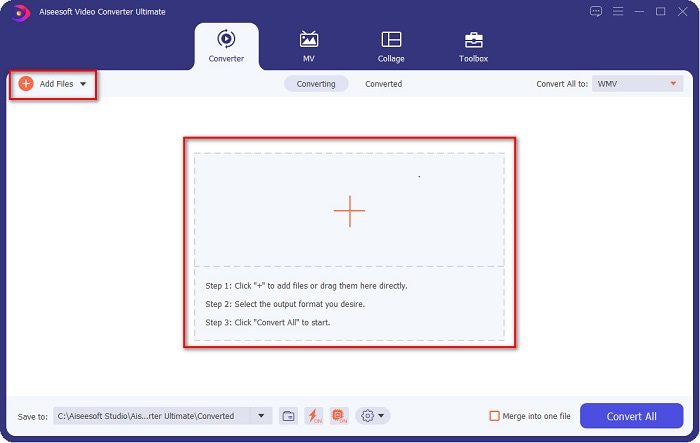
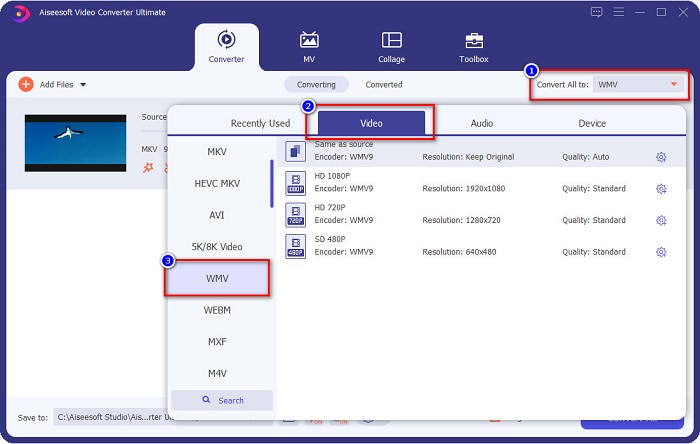
Krok 3. Dále klikněte na tlačítko Convert All to (Převést vše na), které se nachází v pravém horním rohu rozhraní programu. Zobrazí se seznam formátů souborů, poté vyberte soubor WMV.
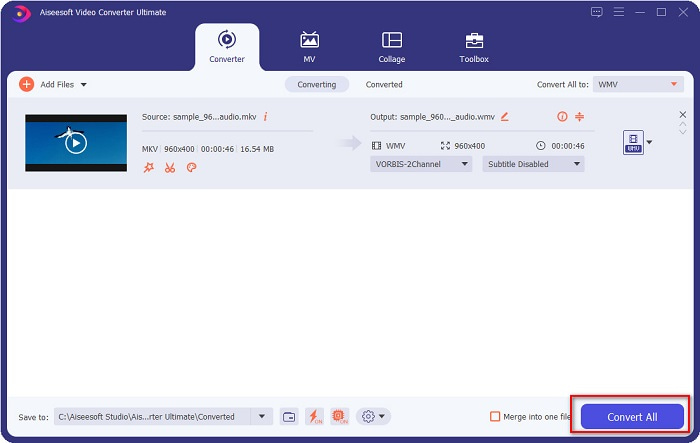
Krok 4. Po výběru požadovaného formátu souboru klikněte na tlačítko Convert All (Převést vše), aby se váš soubor MKV převedl do formátu WMV. Pak několik sekund vyčkejte a váš soubor WMV je připraven!
Pomocí těchto jednoduchých kroků při používání FVC Video Converter Ultimate můžete tento převodník MKV na WMV rychle převést.
Část 3. Převod MKV na WMV pomocí VLC Media Player Converter
Dalším způsobem, jak můžete převést soubor MKV na soubor WMV, je použití bezplatného převaděče. VLC Media Player není jen přehrávač videa; umí také převádět soubory jako MKV do WMV, WebM, MP4 atd. Jeho rozhraní je však trochu těžko pochopitelné. Tento převodník však používá mnoho uživatelů.
Rychlý průvodce, jak používat VLC Media Player Converter:
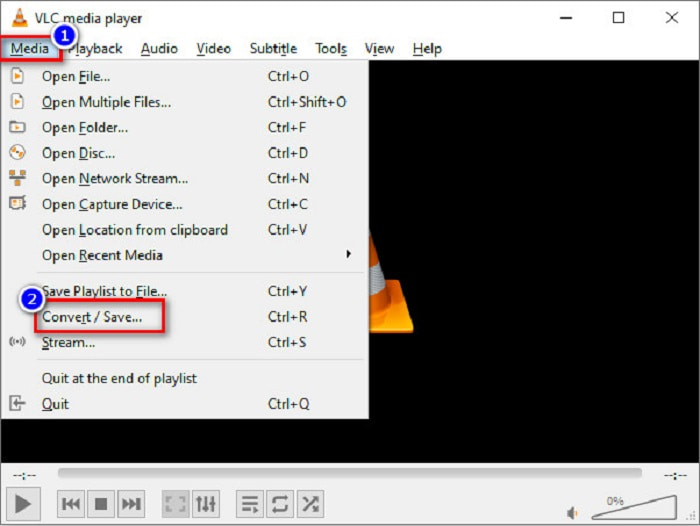
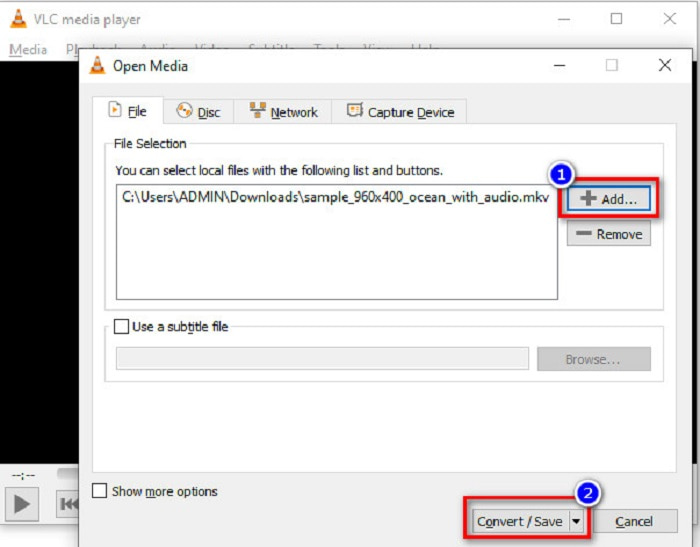
Krok 1. Otevřete VLC Media Player, nebo pokud jej ještě nemáte stažený v počítači, vyhledejte VLC Media Player a postupujte podle instalačního procesu. Poté v levém horním rohu obrazovky klikněte na nabídku Media a zvolte tlačítko Convert/Save (Převést/Uložit).
Krok 2. Po kliknutí na tlačítko Convert/Save (Převést/Uložit) se zobrazí nové rozhraní, kde uvidíte seznam místních souborů, které jste nahráli. Pro nahrání klikněte na tlačítko + Add (Přidat) a nahrajte svůj soubor MKV. Dole stiskněte tlačítko Convert/Save (Převést/Uložit), abyste postoupili k dalšímu kroku.
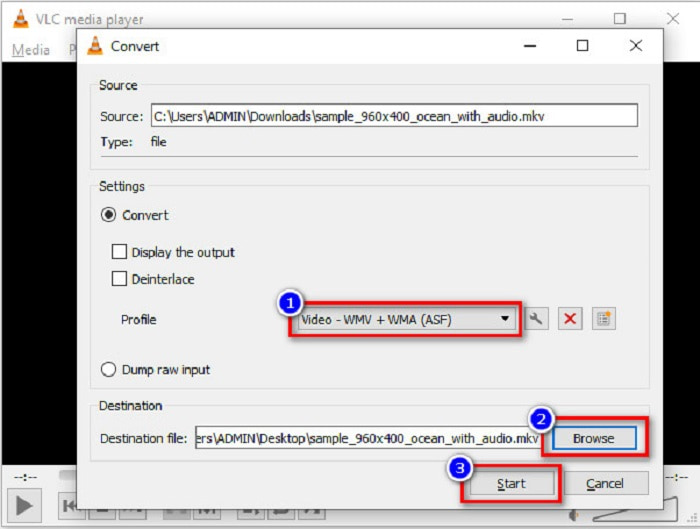
Krok 3. Nakonec vyberte soubor WMV jako cílový formát. Klikněte na tlačítko Browse (Procházet), abyste zvolili umístění souboru po dokončení převodu. A nakonec zaškrtněte tlačítko Start (Spustit), abyste začali převádět svůj soubor MKV do souboru WMV.
Část 4. Převod MKV do WMV pomocí bezplatného online převodníku
FVC Free Video Converter Online je bezplatný online převodník MKV na WMV, který vám umožní převádět mnoho audio a video formátů, včetně MKV na WMV, AVI, MPG, MOV, MP4, MP3 a další. Tento převodník má také funkci úpravy datového toku videa (bitrate), snímkové frekvence a dokonce i rozlišení vašeho souboru. Přestože jde o skvělý online převodník, můžete zaznamenat pomalejší převod kvůli připojení k internetu, protože je na něm závislý. I tak ale nabízí vynikající výkon a mnozí jej považují za jeden z nejlepších.
Zde jsou kroky, jak převést soubor MKV na WMV pomocí FVC Free Video Converter Online
Krok 1. Ve svém prohlížeči vyhledejte FVC Free Video Converter Online a přejděte na jejich webové stránky.
Krok 2. Po přechodu na jejich web klikněte na tlačítko Add Files to Convert (Přidat soubory k převodu) a spusťte jej. Zobrazí se soubory ve vašem počítači, kde vyberete svůj soubor MKV.
Stáhněte si desktopovou verzi a převádějte soubory hromadně.
Krok 3. Na druhém rozhraní programu dole uvidíte seznam formátů souborů. Zaškrtněte kolečko vedle souboru WMV.
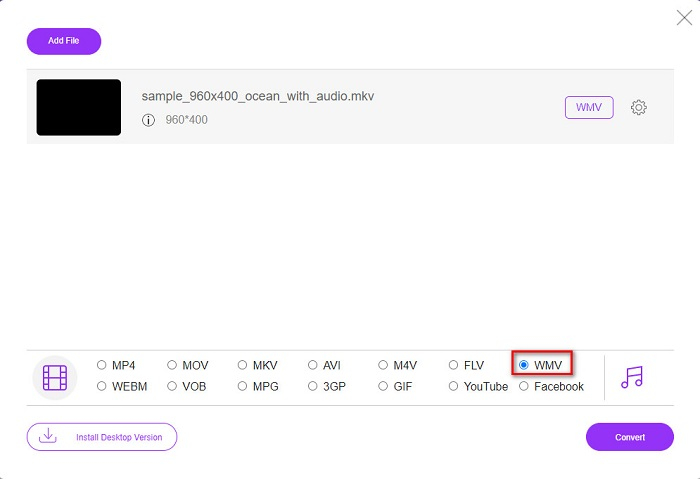
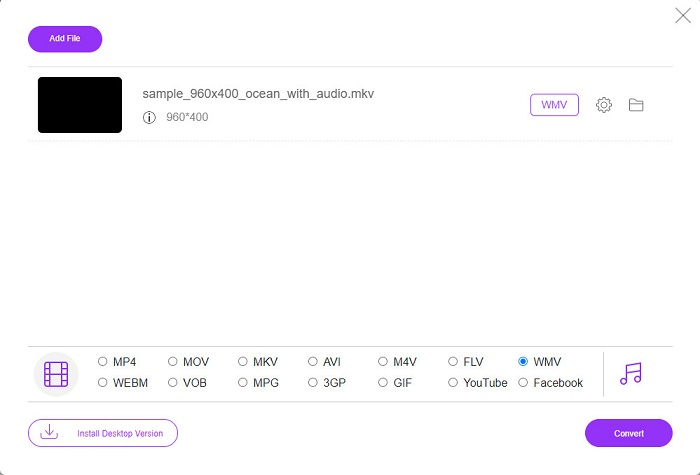
Krok 4. V posledním kroku klikněte na tlačítko Convert (Převést), které se nachází v pravém dolním rohu rozhraní programu. Poté se váš soubor MKV začne převádět.
MKV vs. WMV
Formát multimediálního kontejneru Matroska, vydaný v roce 2002, je formát s otevřeným zdrojovým kódem, který může obsahovat řadu stop videa, zvuku, obrázků a titulků. Můžete jej tedy použít ke snadnému ukládání krátkých videoklipů, televizních pořadů a filmů. To je docela populární pro anime fan-subbing.
WMV, produkovaný společností Microsoft, byl jedním z nejběžnějších video formátů v roce 2000. Lze jej vidět na webu a přehrávat v různých přehrávačích médií ve Windows. A je to také výchozí formát souboru videa programu Windows Media Player. V poslední době ji ale přebírají jiné formáty.
Část 5. Nejčastější dotazy o převodu MKV do WMV
Můžete změnit MKV na WMV bez ztráty kvality souboru?
Rozhodně. Pomocí FVC Video Converter Ultimate můžete převést soubor MKV na WMV bez ztráty kvality souboru.
Jaký je nejlepší formát souboru pro převod souboru MKV?
Jak bylo uvedeno výše, některé přehrávače médií tento formát souboru nepodporují. Proto jej musíte převést do formátu, který je široce podporován mnoha přehrávači médií. Jedním z nich je formát MP4. Chcete-li se o tomto tématu dozvědět více, přečtěte si článek [Online & Free] How Can I Convert MKV to MP4 on Windows/Mac.
Může Windows Media Player přehrávat soubory MKV?
Windows Media Player nepodporuje soubory ve formátu MKV. Když se proto pokusíte přehrát soubor MKV ve Windows Media Playeru, přehraje se pouze zvuk. Přečtěte si Best MKV Player, abyste si našli ten, který vám vyhovuje.
Závěr
Existuje mnoho způsobů, jak budete moci převést soubor MKV na WMV. Výše uvedené převodníky mají odlišné vlastnosti, které je od sebe odlišují.
Z uvedených nejlepších převodníků MKV na WMV doporučujeme používat FVC Video Converter Ultimate, protože tento převodník je efektivnější a snadno se používá. Kromě toho má jedinečné funkce, které vám mohou pomoci váš soubor vylepšit. Pořád si nejste jisti? Stáhněte si jej nyní a vyzkoušejte tento ultra rychlý převodník.
-
 MKV na MOV - Jak převést MKV na MOV
 Jak převést MKV na MOV na Macu? Může iMovie číst MKV? Co znamená formát MOV? Tento příspěvek popisuje 2 jednoduché způsoby, jak vám pomoci převést MKV na MOV s bezplatnými online a profesionálními převaděči videa.
-
 Jak převést videa MKV na animované GIF bez Photoshopu/FFmpeg
 Po stažení a sledování filmů MKV na počítači možná budete chtít sdílet úžasné okamžiky s přáteli nebo na internetu jako GIF. V tomto článku se můžete dozvědět o 2 nejjednodušších způsobech převodu MKV na GIF.
-
 Tipy a triky, jak převést soubory MKV do MP3 [2021]
 Máte problém s výběrem správného převodníku pro MKV na MP3? Poté pokračujte ve čtení tohoto příspěvku, protože jsme představili různá řešení jednoho problému.

