


 Video Converter Ultimate
 Screen Recorder
 Oprava videa
Nejjednodušší způsoby, jak převést MPG na MKV pomocí nejlepších převodníků [zdarma]
Bohužel soubory MPG neobsahují žádné stopy titulků; můžete však svůj soubor převést do formátu, který umí uchovávat více stop titulků v různých jazycích. A pokud hledáte způsob, jak svůj soubor MPG snadno převést na MKV, nabízíme jednoduché kroky, jak převést MPG na MKV online i offline – přečtěte si tento článek až do konce.

Část 1. Proč převést MPG na MKV
Formát souboru MPG je jedním z nejčastěji používaných formátů souborů na webu. Tento formát souboru byl vyvinut MPEG nebo Moving Pictures Expert Groups. Tento typ souboru může navíc ukládat video, zvuk a metadata. Navíc téměř všechny přehrávače médií široce podporují tyto typy souborů. Naproti tomu soubory MKV nebo Matroska jsou kontejnerem mediálních souborů, který ukládá stopy videa, zvuku a titulků do jednoho souboru. Tento typ souboru je také známý pro filmové nadšence, protože dokáže zpracovat zvukové stopy v různých jazycích.
Část 2. Nejrychlejší způsob, jak převést MPG na MKV offline
Na trhu je spousta převodníků, které dokážou převést MPG na MKV. Pokud ale chcete převodník, který nabízí ultrarychlý převod, je FVC Video Converter Ultimate tou nejlepší volbou. A pokud chcete z videí odstranit vodoznak, tento převodník má funkci, která to umožňuje. Kromě toho zvládne i hromadný převod a spojení více souborových formátů do jednoho. Chcete znát výhody používání tohoto převodníku MPG na MKV? Pak si přečtěte podrobnosti níže.

FVC Video Converter Ultimate
5 689 200+ stažení- Explicitně upravte a vylepšete své video.
- V tomto převodníku je k dispozici ultrarychlý proces převodu.
- Dokáže převést soubory MPG do MKV, WMV, AVI, MP4 a dalších 1000+ formátů souborů.
- K dispozici na všech operačních systémech, jako jsou Windows a macOS.
Zdarma ke staženíPro Windows 7 nebo novějšíBezpečné stažení
Zdarma ke staženíPro MacOS 10.7 nebo novějšíBezpečné stažení
Chcete-li převést soubor MPG na MKV, postupujte podle následujících kroků.
Krok 1. Stáhněte si FVC Converter Ultimate kliknutím na tlačítko Download níže pro Windows nebo macOS. Poté postupujte podle instalačního procesu a spusťte aplikaci.
Zdarma ke staženíPro Windows 7 nebo novějšíBezpečné stažení
Zdarma ke staženíPro MacOS 10.7 nebo novějšíBezpečné stažení
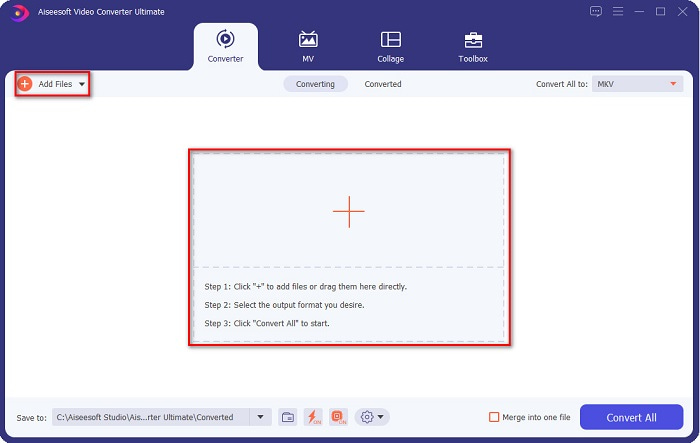
Krok 2. V dalším kroku klikněte na Add Files nebo na tlačítko se znakem +, abyste na hlavní rozhraní softwaru nahráli svůj soubor MPG.
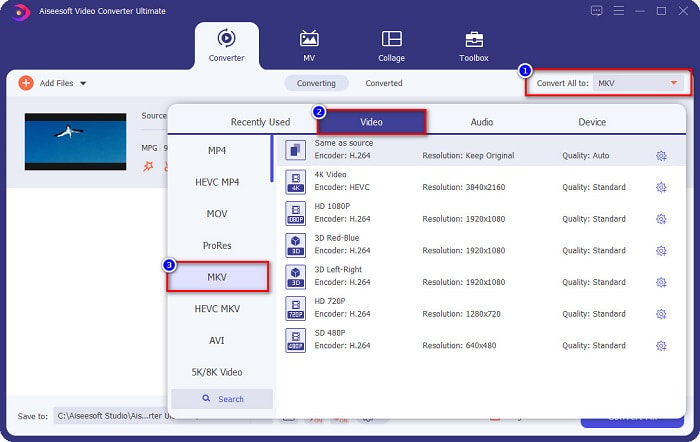
Krok 3. Po nahrání souboru MPG zvolte výstupní formát kliknutím na tlačítko Convert All to. Ve vašem případě vyberte formát souboru MKV.
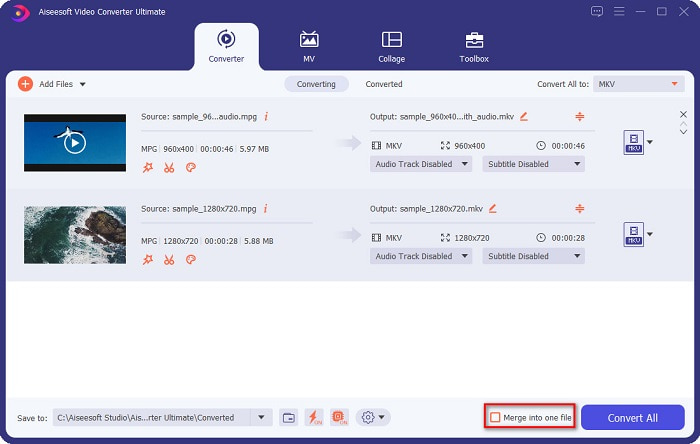
Volitelné. Pokud chcete převést více souborů MPG do jednoho, zaškrtněte políčko Merge into one file. Pokud ne, přejděte k dalšímu kroku.
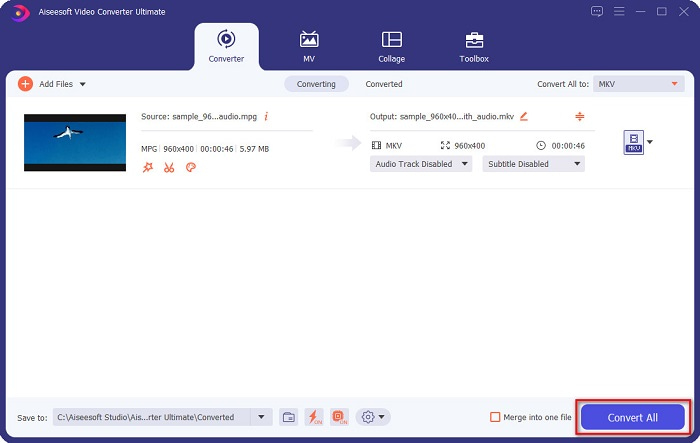
Krok 4. Pro dokončení klikněte na tlačítko Convert All, abyste převedli svůj soubor MPG na soubor MKV. Počkejte několik sekund a je to! Tak snadné je převést MPG na MKV.
Část 3. Převod MPG na MKV pomocí freewarového nástroje
Přemýšleli jste někdy, jaký je nejlepší bezplatný nástroj pro převod MPG na MKV? Zjistili jsme, že mnoho uživatelů používá jako první volbu HandBrake. Tento bezplatný software umí převést MPG na soubory MKV, WebM a MP4. Navíc má uživatelsky přívětivé rozhraní, což je výhoda, pokud jste začátečník. Může však převádět pouze omezené množství formátů. Přesto je to stále účinný nástroj pro převod MPG na MKV.
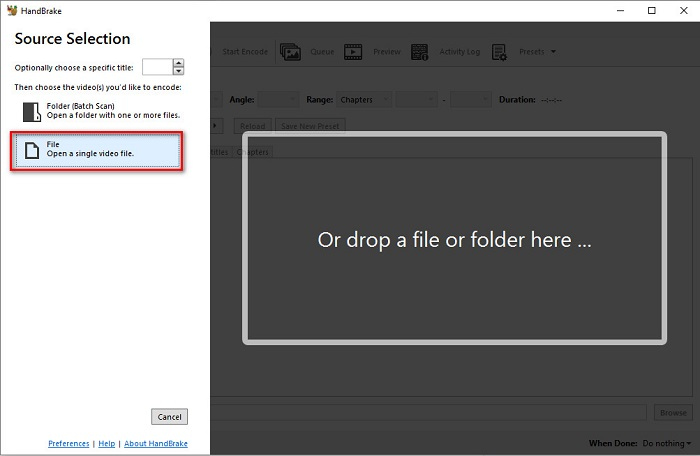
Krok 1. Stáhněte si HandBrake do svého zařízení a poté spusťte aplikaci. Po otevření aplikace klikněte na možnost File na pravé straně rozhraní softwaru. Když se zobrazí soubory ve vašem počítači, vyberte svůj soubor MPG.
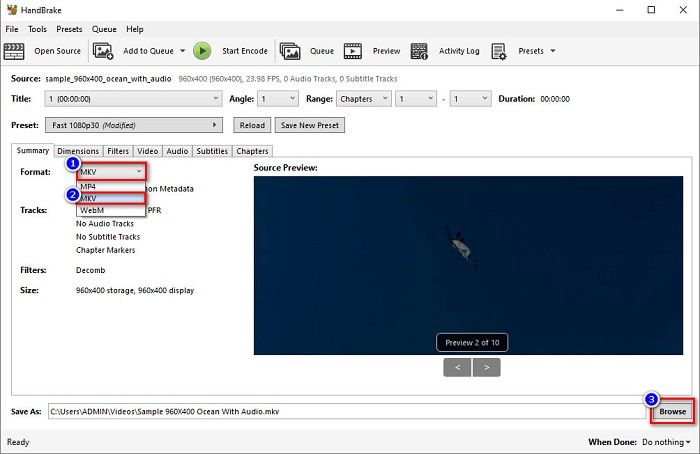
Krok 2. Poté vyberte požadovaný výstupní formát na rozbalovacím tlačítku vedle položky Format. A pak kliknutím na tlačítko Browse zvolte cílové umístění svého souboru.
Krok 3. Nakonec klikněte na tlačítko Start Encode, abyste převedli svůj soubor MPG do formátu MKV.
MPG můžete převést na MKV pomocí freewarového konvertoru podle jednoduchých kroků výše.
Část 4. 2 Metody převodu MPG na MKV Online
Převod prostřednictvím online převodníků může být nejpohodlnější možností. Navíc při použití online převodníků nebudete muset nic stahovat. Místo toho však můžete konvertovat přímo online. Rychlost konverze však bude záviset na tom, jak rychlé je vaše internetové připojení. Níže jsme však uvedli dva nejlepší způsoby převodu souboru MPG na MKV.
Metoda 1. Použijte FVC Free Online Video Converter
FVC Free Online Video Converter je bezplatný online převodník, který pohodlně převádí různé souborové formáty. Podporuje formáty jako MPG na MKV, AVI, MP4, MOV, MP3 a další. Je také vhodný pro začátečníky, protože má snadno použitelné grafické rozhraní. Kromě toho nabízí funkci, která umožňuje měnit datový tok videa a audia vašeho souboru. Pokud vás tedy tento online převodník MPG na MKV zajímá, postupujte podle kroků níže.
Krok 1. Ve svém prohlížeči vyhledejte FVC Free Online Video Converter nebo přejděte přímo na webovou stránku kliknutím na tento odkaz. Poté spusťte webovou aplikaci.
Krok 2. Po spuštění aplikace klikněte na tlačítko Add Files to Convert. Zobrazí se soubory ve vašem počítači, poté vyberte svůj soubor MPG.
Stáhněte si desktopovou verzi a převádějte soubory hromadně.
Krok 3. Poté zvolte MKV jako svůj výstupní formát.
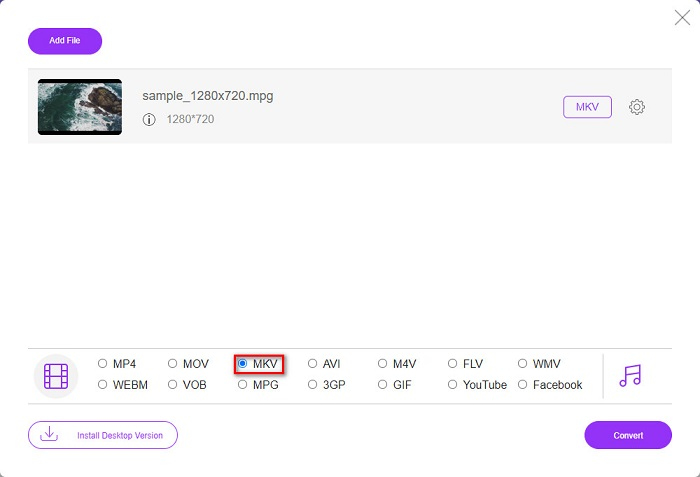
Krok 4. V posledním kroku klikněte na tlačítko Convert. Poté začne převod z MPG na MKV.
Metoda 2. Použijte CloudConvert
Dalším online převodníkem, který můžete použít, je CloudConvert. Tento převodník je velmi efektivní díky svému jednoduchému rozhraní. Kromě toho při jeho použití můžete své soubory také komprimovat. Podporuje však pouze omezené množství formátů. I tak jej však mnoho lidí používá kvůli pohodlí.
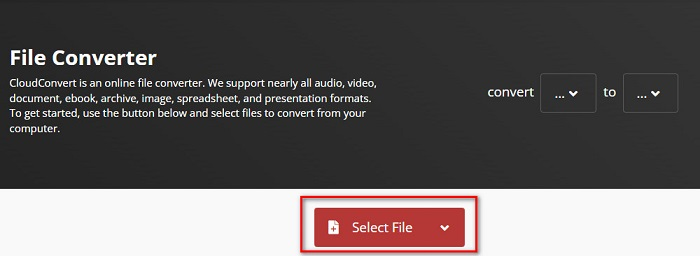
Krok 1. Ve svém prohlížeči vyhledejte CloudConvert. Jakmile budete na webové stránce, klikněte na tlačítko Select Files. Poté po zobrazení souborů ve vašem počítači vyberte svůj soubor MPG.
Krok 2. Poté na rozbalovacím tlačítku zvolte jako výstupní formát soubor MKV.
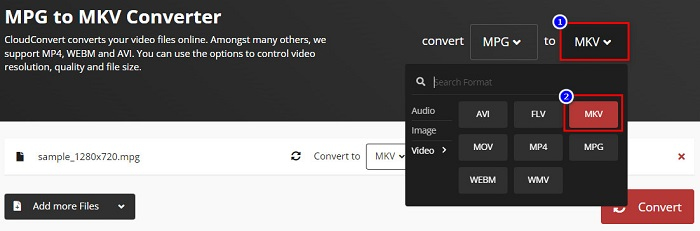
Krok 3. Nakonec klikněte na tlačítko Convert. Poté počkejte, až se váš soubor převede, a hotovo! Těmito třemi jednoduchými kroky můžete změnit MPG na MKV.
MPG vs. MKV
MPG, vytvořený Moving Picture Experts Group (MPEG), je běžný digitální video formát pro ukládání informací o videu, zvuku a metadatech. Je to docela užitečné při vytváření filmů pro sdílení na internetu. Tyto soubory v MPG obvykle obsahují MPEG-1 nebo MPEG-2 video/audio kompresi.
Formát multimediálního kontejneru Matroska, vydaný v roce 2002, je formát s otevřeným zdrojovým kódem, který může obsahovat řadu stop videa, zvuku, obrázků a titulků. Můžete jej tedy použít ke snadnému ukládání krátkých videoklipů, televizních pořadů a filmů. To je docela populární pro anime fan-subbing.
Část 5. Časté dotazy o převodu MPG na MKV
Má převod MPG na MKV vliv na velikost souboru?
Ano, i když to při převodu MPG do souboru MKV tolik neovlivní, velikost souboru se zvětší.
Která má větší velikost souboru?
Soubory MKV mají ve srovnání se soubory MPG větší velikost souboru, protože soubory MKV obsahují video, zvuk a více stop titulků do jednoho souboru.
Můžete komprimovat soubory MKV?
Soubory MKV můžete komprimovat pomocí nástroje na kompresi souborů. FVC Video Converter Ultimate má funkci, která umožňuje komprimovat vaše velké videosoubory.
Závěr
Tento článek vás dostal, pokud hledáte nejlepší způsoby, jak převést soubory MPG na MKV. Všechny výše uvedené převodníky vykazují slibný výkon při převodu souborů. Ale pokud hledáte konvertor s mnoha vynikajícími funkcemi, možná budete chtít zkusit použít FVC Video Converter Ultimate jako první řadu. Pokud ještě nejste přesvědčeni, stáhněte si jej a vyzkoušejte nejlepší převodník, který byste mohli použít.
-
 3 snadné způsoby, jak převést MPG na MOV na vašem Mac/Windows/Online
 Chcete převést své MPG soubory a později je přenést na iOS, iPod, iPad nebo Mac? Tento článek vám pomůže zjistit, jak převést MPG na MOV pomocí kroků.
-
 Jak převést MPG na FLV bez ztráty kvality [Osvědčeno]
 Na tomto přehrávači médií musíte sledovat svůj oblíbený film, ale nepodporuje MPG. Pokuste se převést svůj MPG soubor na FLV pomocí těchto převodníků, které tento článek představuje.
-
 2 Ultimate MPG převodníky pro převod MPG do WMV zdarma
 Chcete zdarma převést MPG do WMV? V tom případě máte štěstí, protože jsme zjistili, že existují dva nástroje, které můžete použít k převodu souborů MPG.

