


 Video Converter Ultimate
 Screen Recorder
 Oprava videa
Naučte se 4 různé metody, jak převést soubor MXF do AVI
MXF uchovává video a audio ve špičkové kvalitě, kterou většina profesionálních kameramanů ráda používá. Tento formát navíc může obsahovat metadata popisující, co je uvnitř souboru. Kromě toho vytvořila SMPTE formát MXF proto, aby bylo možné rychle přenést video do jiného zařízení a tam jej upravovat. Některé střižny a přehrávače médií však nepodporují kvalitu HD, kterou tento formát nabízí. V takovém případě je nejlepší převést soubor MXF do jiného formátu, který má širší podporu než MXF, například do AVI nebo jiných videoformátů. Nyní si tedy rozdělíme všechny převodníky a podíváme se, jak převést MXF na AVI.
Část 1. Jak převést MXF na AVI zdarma na Windows a Mac
FVC Video Converter Ultimate
Tento nástroj je považován za jeden z nejpokročilejších offline převodníků, které si můžete bez obav stáhnout do počítače. FVC Video Converter Ultimate je na trhu již několik let. Díky tomu už mnoha svým uživatelům pomohl. Celkový výkon tohoto nástroje byl výborný po celou dobu – před převodem, během něj i po něm. Další výhodou je, že všechny pokročilé funkce, které nástroj nabízí, jsou zjednodušené, takže i když nejste profesionál, získáte vynikající výsledek. Vypadá opravdu působivě, tak si teď vyzkoušejme, zda to zvládne, když budete podle níže uvedených kroků převádět MXF na AVI.
Kroky, jak převést MXF na AVI pomocí FVC Video Converter Ultimate
Krok 1. Nejprve klikněte na tlačítko pro stažení níže a zvolte platformu, kterou aktuálně používáte. Po stažení program nainstalujte a proveďte rychlé nastavení, abyste mohli pokračovat na další krok.
Zdarma ke staženíPro Windows 7 nebo novějšíBezpečné stažení
Zdarma ke staženíPro MacOS 10.7 nebo novějšíBezpečné stažení
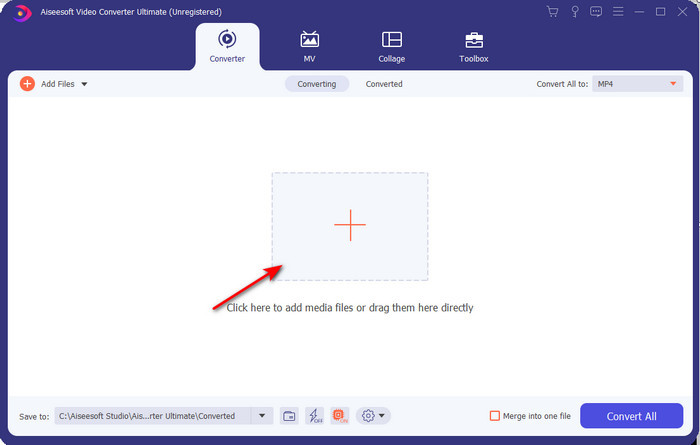
Krok 2. Otevřete převodník, abyste k němu získali přístup, klikněte na ikonu Add Files, v zobrazené složce vyhledejte soubor MXF a klikněte na Open, abyste jej importovali.
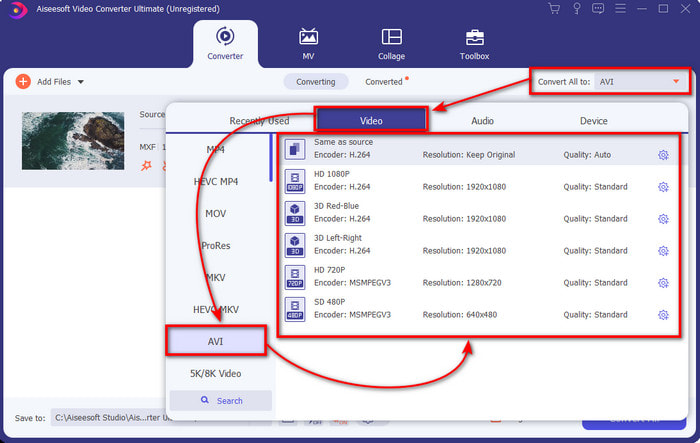
Krok 3. Pro výběr výstupního formátu klikněte na tlačítko drop-down; pod ním uvidíte formát AVI a další formáty, ze kterých si můžete vybrat.
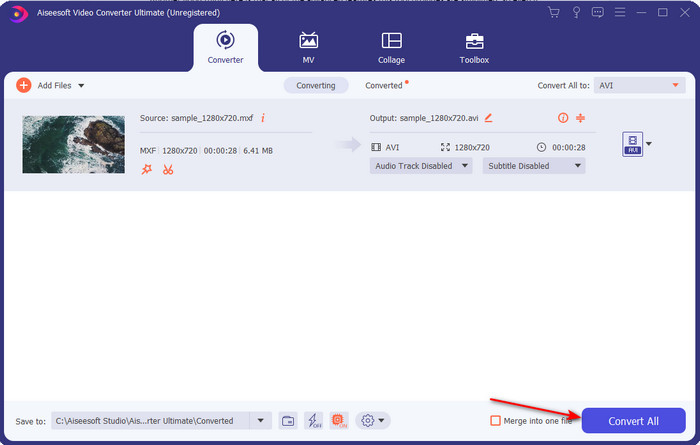
Krok 4. Pro spuštění procesu převodu klikněte na Convert All a několik sekund vyčkejte.
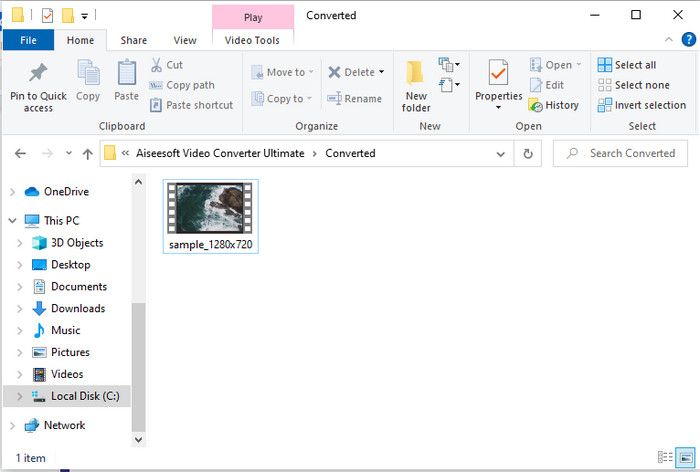
Krok 5. Po dokončení převodu se na obrazovce objeví složka s převedeným souborem. Klikněte na něj a video si přehrajte.
Část 2. 3 Online konvertory používané pro převod MXF do AVI zdarma
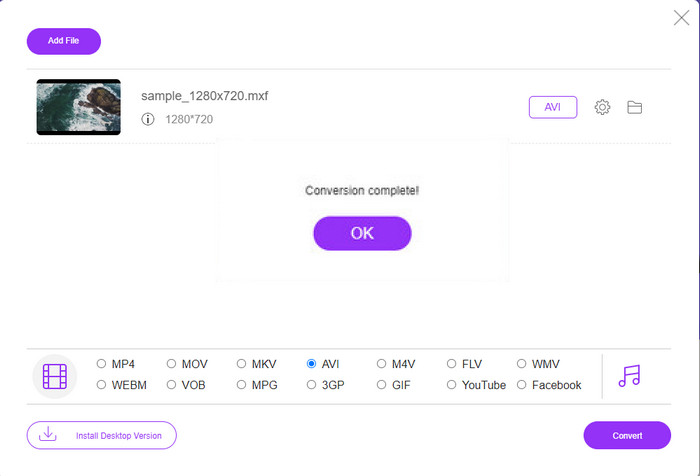
1. FVC Free Video Converter Online

Pokud hledáte nejlepší způsob, jak převést MXF na AVI online, pak je FVC Free Video Converter Online nejlepší volbou mezi online převodníky. Tento nástroj podporuje různé formáty, ze kterých si můžete vybrat, a nabídka je širší než u dvou níže uvedených online nástrojů. Můžete k němu přistupovat v prohlížeči na PC nebo Macu bez jakýchkoli poplatků a bez omezení počtu převodů. Nelze tu však převádět soubory dávkově, protože tato funkce není podporována. Některé editační funkce, které byste rádi použili, zde také nejsou k dispozici. Pokud ale chcete co nejjednodušší způsob převodu a nechcete nic instalovat, je to pro vás ideální volba. Nyní tedy přejděme ke krokům, jak převést váš soubor .mxf do nového formátu.
Krok 1. Klikněte na tento odkaz, abyste otevřeli webovou stránku převodníku.
Krok 2. Jakmile stránku otevřete, stiskněte Add Files to Convert, poté se na obrazovce zobrazí složka; v ní vyhledejte soubor .mxf a klikněte na Open.
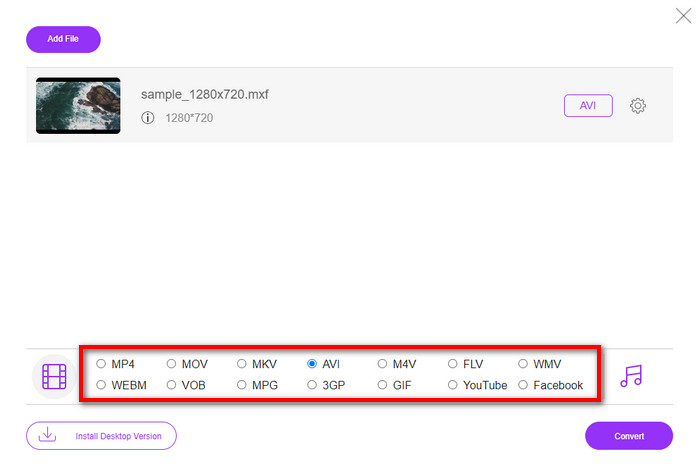
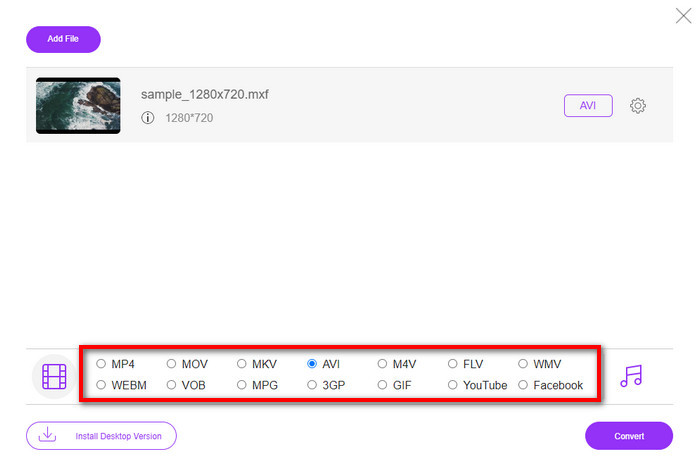
Krok 3. Po výběru souboru zvolte formát AVI z nabízených formátů níže.
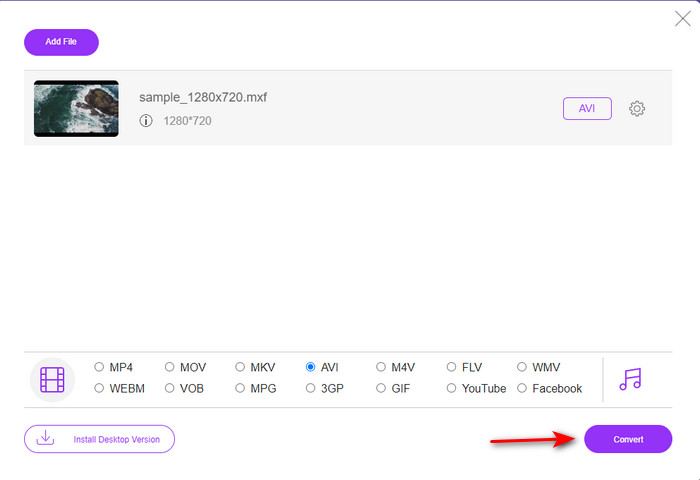
Krok 4. Pokud jste připraveni spustit proces převodu, klikněte na Convert.
Krok 5. Po dokončení převodu se zobrazí složka; poté otevřete novou verzi svého souboru MXF a přehrajte si ji.
2. Freefileconvert.com
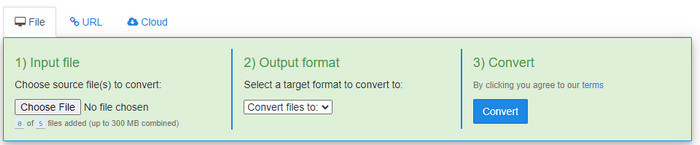
Dalším online převodníkem MXF na AVI, který můžete použít, je Freefileconvert.com. Jednou z funkcí tohoto nástroje je dávkový převod až 5 souborů najednou. Nemůžete však převádět těchto pět souborů do různých formátů – výstupní formát musí být pro všechny stejný. Webová stránka také obsahuje otravné reklamy a dalším nepříjemným problémem je upozornění antiviru, které se objevilo při našem pokusu o převod. Pokud tedy přesto chcete svůj formát MXF převést zde, postupujte podle těchto kroků.
Krok 1. Otevřete svůj oblíbený prohlížeč a vyhledejte Freefileconvert.com.
Krok 2. Pro nahrání souboru klikněte na Choose File. Pro změnu formátu klikněte na Convert Files to a zvolte AVI.
Krok 3. Stiskněte Convert, abyste spustili proces převodu.
3. Soubor cikcak
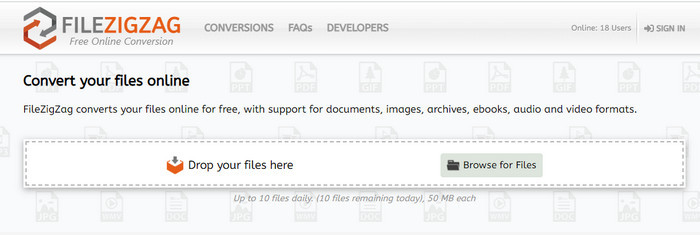
Pokud chcete převést MXF na AVI zdarma, můžete použít Filezigzag. Tento webový nástroj nabízí jednoduchý proces převodu a je uživatelsky přívětivý. Všechny zde uvedené webové nástroje jsou sice uživatelsky přívětivé, ale tento se od předchozích dvou výrazně liší. Rozhraní nástroje je výborné a stejně jako u FVC Free Video Converter Online je bez virů. Přestože nástroj působí velmi dobře, omezuje počet souborů i jejich velikost. Konkrétně můžete denně převést pouze deset souborů a každý z nich musí mít méně než 50 MB. Přejděme tedy nyní ke krokům, jak tento nástroj používat.
Krok 1. Spusťte webový prohlížeč a vyhledejte Filezigzag; musíte se ujistit, že jde o oficiální web.
Krok 2. Klikněte na Browse for File, abyste na webovém rozhraní našli soubor, a poté nastavte Target Format na AVI.
Krok 3. Klikněte na Start Converting, aby se proces spustil.
Část 3. Srovnávací tabulka
| Funkce | FVC Video Converter Ultimate | FVC Free Video Converter | Freefileconvert.com | Soubor cikcak |
| Konvertování |  | | | |
| Dávková konverze | |  | | |
| Malware zdarma | | | | |
| Dostupnost internetu | | | | |
| Funkce úprav | | | | |
| Rychlá konverze a hardwarová akcelerace | | | | |
Část 4. Časté dotazy o MXF a AVI
Mohu uložit soubor MXF na svém Macu?
Ano, můžete si to uložit na disk Mac, ale nezapomeňte, že to nemůžete sledovat v přehrávači QuickTime Player. Tento formát také nemůžete upravovat na vašem iMovie, protože není podporován. Pokud tedy chcete, aby váš MXF fungoval na vašem Macu, je ideální jej převést do nového formátu, který je podporován na Macu. Stejně jako MOV, AVI, MP4, MKV a mnoho dalších.
Proč jsou soubory .mxf tak velké?
Důvodem, proč jsou soubory MXF velké, je pouze to, že jsou nekomprimované. Má stejnou strukturu jako FOURCC implementovaná s Generic Container, aby bylo nahrávání, úpravy a streamování lepší na videokamerách. Naštěstí můžete použít některé video kompresory ke zmenšení souborů MXF.
Mohu použít soubor MXF na YouTube?
YouTube podporuje řadu formátů a na YouTube jich má více než 15. A v tomto seznamu nejsou zahrnuty soubory .mxf. Chcete-li být jasnější, vaše soubory MXF nejsou na YouTube podporovány a zveřejnit své video pod příponou souboru .mxf znamená převést soubor MXF do formátu MP4 nebo AVI.
Závěr
Když jsme uzavřeli všechny podrobnosti, zjistili jsme, že soubory MXF obsahují vysoce kvalitní video na každé videokameře. V tomto kontejneru jsou také uloženy některé informace, jako jsou metadata. Tento formát však získal malou podporu ve srovnání s jiným formátem. Nyní je tedy nejlepším způsobem, jak přehrát nebo upravit video na .mxf, převést jej do formátu .avi. Všechny online a offline nástroje fungují dobře při převodu souboru. Ale FVC Video Converter Ultimate je zdaleka nejpůsobivější. Chcete-li zažít dokonalé funkce tohoto nástroje, musíte si jej okamžitě stáhnout.
-
 4 bezplatné způsoby převodu videokamery MXF na MP4 pro univerzální přehrávání
 Tento příspěvek je podrobným průvodcem pro převod MXF na MP4 v počítači. Můžete získat 4 bezplatné převaděče MXF na MP4 pro překódování videokamery MXF na MP4 v jednoduchých krocích.
-
 3 snadné metody pro převod FLV na AVI na ploše a online
 Zde jsou tři metody, které vám pomohou efektivně převádět vaše video soubory FLV do formátu AVI ve Windows a Mac, abyste je mohli sledovat ve vysoké kvalitě.
-
 4 efektivní způsoby převodu MOV do AVI na PC a Mac [2021]
 Chcete vědět, jaký je nejlepší převodník MOV do AVI na webu? A proč FVC Ultimate Video Converter může být ten pravý pro vás.
