


 Video Converter Ultimate
 Screen Recorder
 Oprava videa
 Bezpečné stažení
Nejrychlejší metoda, jak převést MXF na M4V na počítači a online
Soubor MXF je průmyslový standardní formát pro audio a video. Tento formát však nepodporuje Apple QuickTime Player, takže pomocí tohoto programu není možné váš soubor MXF přehrát. Pokud nemůžete svůj soubor MXF přehrát v Apple QuickTime Playeru, je nutné jej převést do jiného formátu, například M4V. Máte štěstí, protože pro vás máme to nejlepší řešení. Tento článek vám poskytne nejúčinnější a nejužitečnější metody, jak převést MXF na M4V pomocí důvěryhodných převodníků offline i online. Kromě toho vám ukážeme, jak své videozáznamy zatraktivnit jejich jednoduchou úpravou. Přečtěte si tento článek hned a získejte potřebné informace.

Část 1: Skvělá metoda pro převod MXF na M4V online
Jedním z nejlepších online převodníků, které můžete použít k převodu MXF na M4V, je FVC Free Video Converter Online. Tento online software dokáže převádět různé video soubory, jako jsou MOV, MKV, AVI, FLV, MP4, WEBM, VOB a další. Také můžete v jednom kroku převádět více souborů, protože tento převodník podporuje dávkový převod. Navíc můžete před převodem svá videa upravit – změnit rozlišení, datový tok a snímkovou frekvenci podle svých preferencí. Má také uživatelsky přívětivé rozhraní a jednoduchý způsob převodu souborů. Díky tomu může tento online převodník používat každý, jak pokročilý, tak i začínající uživatel. Kromě toho je tento online převodník dostupný ve všech prohlížečích, jako jsou Google Chrome, Mozilla Firefox, Microsoft Edge a další, což jej činí pro uživatele snadno přístupným.
Kromě převodu videa můžete také převádět četné zvukové formáty, včetně AAC, MP3, M4A, M4B, FLAC a dalších. Má také nastavení zvuku, které vám umožní upravit jejich vzorkování a bitové rychlosti. Díky těmto funkcím můžete říct, že FVC Free Video Converter Online je spolehlivý.
Funkce
◆ Převod různých video formátů, jako jsou MP4, AVI, M4V, MXF, MOV, WMV, MKV, FLV a další.
◆ Schopnost upravovat rozlišení videa, přenosovou rychlost a snímkovou frekvenci.
◆ Nabízí proces dávkové konverze.
◆ Převeďte zvukové soubory jako MP3, AAC, AC3, M4B, FLAC a další.
◆ Může upravit vzorkovací frekvenci a bitovou rychlost zvuku.
V níže uvedených krocích se dozvíte o převodu souboru MXF do formátu M4V pomocí FVC Free Video Converter Ultimate.
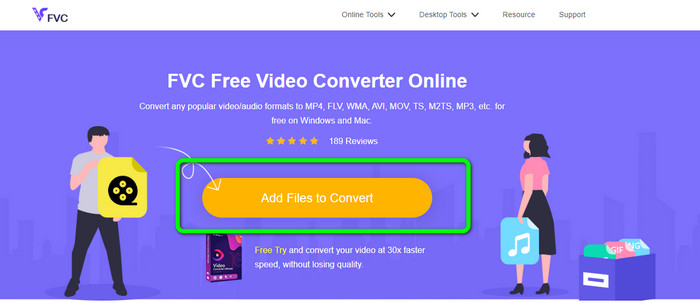
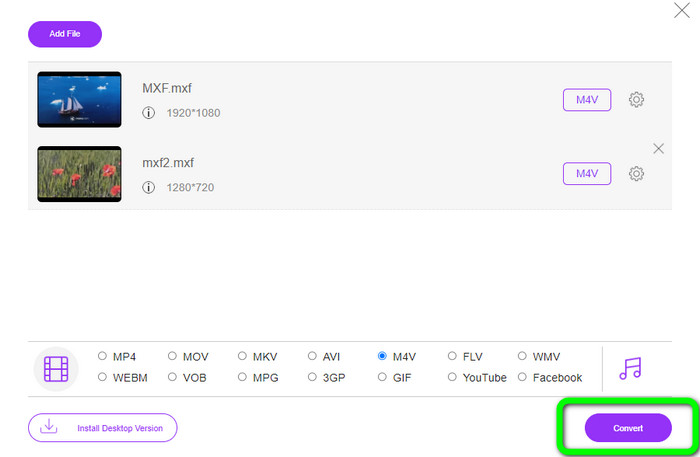
Krok 1: Přejděte do prohlížeče a navštivte web FVC Free Video Converter Online. Jakmile budete na hlavní stránce, klikněte na Add Files to Convert pro nahrání video souboru MXF, který chcete převést.
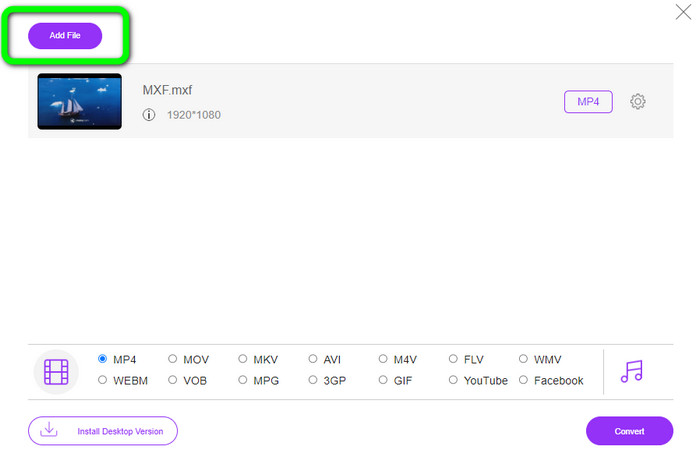
Krok 2: Tento převodník nabízí dávkový převod. Pokud tedy chcete nahrát více souborů MXF, klikněte na tlačítko Add File.
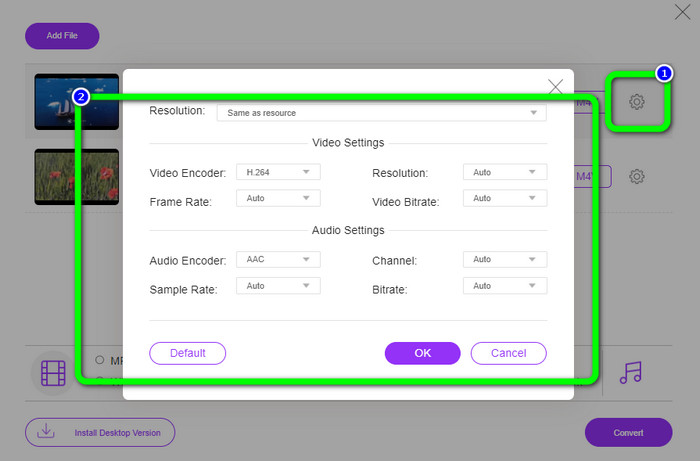
Krok 3: V této části můžete video upravit kliknutím na ikonu Setting. Po kliknutí na tuto ikonu můžete změnit snímkovou frekvenci, rozlišení a datový tok videa. Také můžete upravit vzorkovací frekvenci a datový tok audia. Poté klikněte na tlačítko OK.
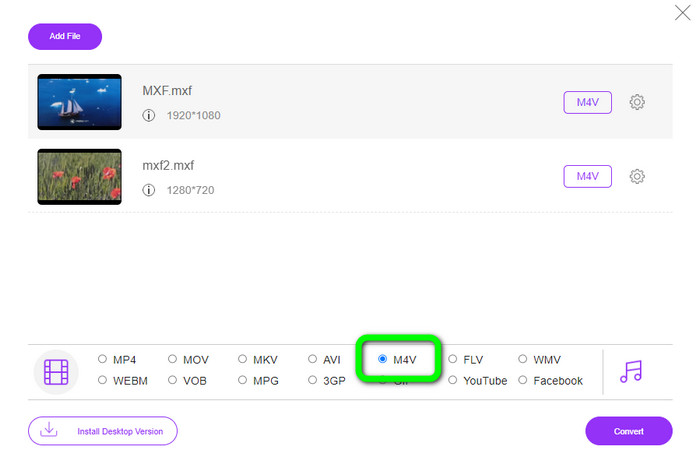
Krok 4: Po úpravě videí můžete změnit výstupní formát kliknutím na formát M4V z nabídky formátů v dolní části rozhraní.
Krok 4: V posledním kroku stiskněte tlačítko Convert. Počkejte na dokončení převodu a uložte video do požadovaného umístění.
Část 2: Nejrychlejší způsob, jak bezeztrátově převést MXF na M4V
Pokud chcete stažitelný nástroj pro bezztrátový převod MXF na M4V, je Video Converter Ultimate nejlepší volbou. Tento špičkový převodník dokáže převádět různé soubory velmi rychle, protože disponuje rychlým převodním procesem – ne 10×, ne 20×, ale 30× rychlejším než průměrná rychlost převodu. Kromě toho nabízí další skvělou funkci, kterou můžete využít: lze převádět více souborů najednou, protože tento převodník podporuje dávkový převod. A kromě MXF a M4V tento nástroj podporuje i řadu dalších video formátů, včetně MP4, FLV, AVI, MKV, MOV, WMV, VOB a dalších. Navíc je Video Converter Ultimate dostupný pro Windows i Mac, což je skvělé pro uživatele obou platforem.
Kromě toho má tato aplikace ke stažení kromě převodu videí další skvělé funkce. Pokud si přejete vytvořit hudební video pro svého partnera, rodinu, přátele atd., můžete použít tento nástroj. Video Converter Ultimate nabízí tvůrce hudebního videa, ve kterém můžete vytvářet úžasné filmy s hudbou. Poskytuje také bezplatná témata, jako jsou šťastné, elegantní, jednoduché, zasněžené noci, romantické a další. Také, pokud máte video s velkou velikostí souboru, můžete jej komprimovat pomocí Video Compressor. S pomocí tohoto nástroje můžete snadno změnit velikost videa.
Funkce
◆ Převeďte více než 100 formátů video souborů, včetně M4V, MXF, FLV, AVI, MP4, XVID, VOB, MOV, SWF, MKV a dalších.
◆ Převod více souborů současně.
◆ Nabízí tvůrce hudebního videa.
◆ Vytvořte fantastickou koláž.
◆ Nabídka nástrojů pro úpravu videa, jako je ořezávání videa, kompresor, zesilovač, korekce barev atd.
◆ Převod obrazových formátů jako BMP, PNG, JPG a další.
Postupujte podle podrobných kroků níže a převeďte MXF na M4V bezeztrátově pomocí FVC Video Converter Ultimate.
Krok 1: Stáhněte Video Converter Ultimate do svého zařízení kliknutím na tlačítko Download. Níže jsou k dispozici dvě tlačítka ke stažení. Pokud používáte Windows, klikněte na verzi pro Windows. A pokud používáte Mac, klikněte na verzi pro Mac. Poté aplikaci spusťte.
Zdarma ke staženíPro Windows 7 nebo novějšíBezpečné stažení
Zdarma ke staženíPro MacOS 10.7 nebo novějšíBezpečné stažení
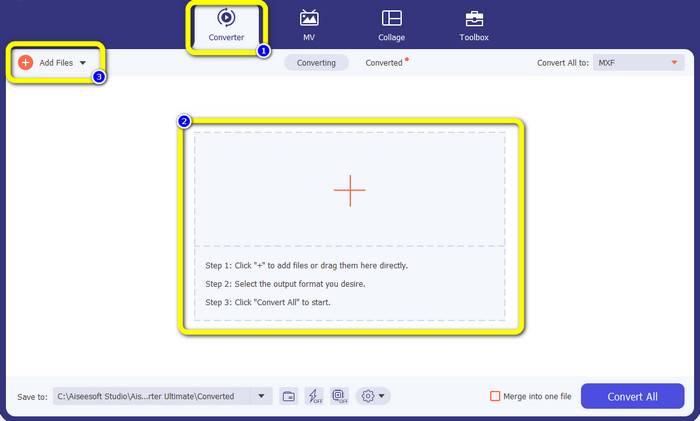
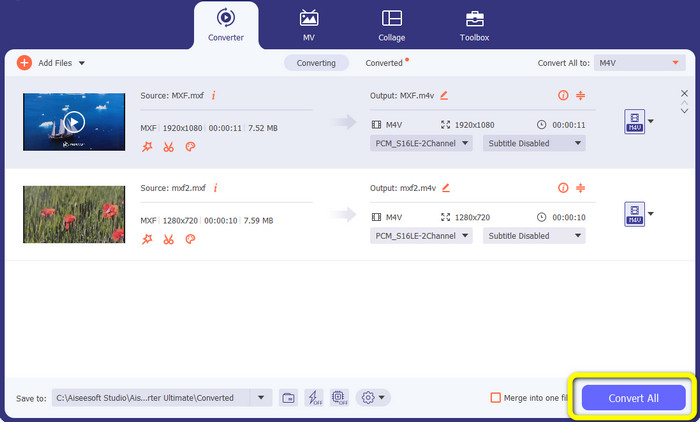
Krok 2: Poté zvolte panel Converter. Klikněte na ikonu + nebo na tlačítko Add File pro import video souboru MXF.
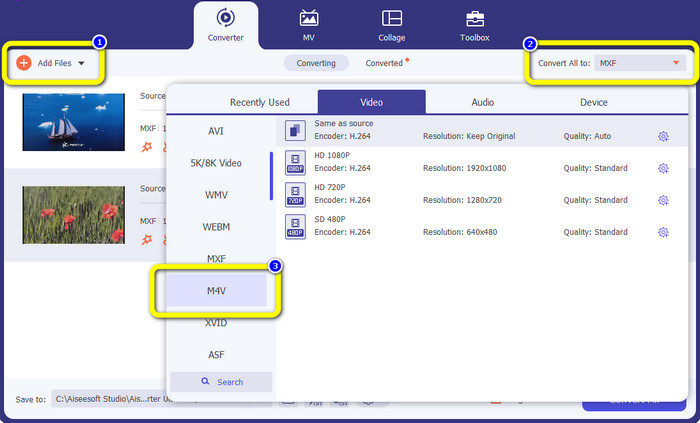
Krok 3: Pokud chcete převádět více souborů současně, klikněte na tlačítko Add File. Poté klikněte na tlačítko Convert All a vyberte formát souboru M4V. Můžete si také zvolit požadované rozlišení pro své video.
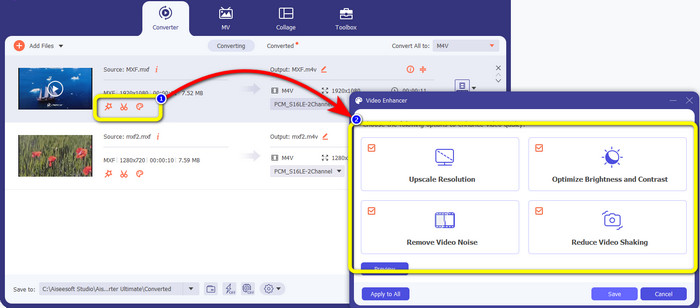
Krok 4: Pokud chcete videa před převodem upravit, můžete tak učinit. Klikněte na nástroje pro úpravu v prvním poli. Poté vyberte ikonu video enhance. Následně zaškrtněte všechna pole pro vylepšení rozlišení, optimalizaci jasu a kontrastu a pro snížení obrazového šumu a chvění videa.
Krok 5: Jakmile dokončíte úpravy a změnu výstupního formátu videí, klikněte na tlačítko Convert All a uložte video do svého zařízení.
Část 3: Co je MXF?
Sdružení SMPTE vytvořilo kontejner médií MXF pro obchodní použití. MXF implementuje část datového schématu Advanced Authoring Format (AAF) a nedávno se stal průmyslovým standardem pro nelineární profesionální střih videa. Soubory MXF lze snadno převést do jakéhokoli běžného formátu videa a komprimovat pomocí téměř jakéhokoli kodeku. Je důležité poznamenat, že implementace tohoto formátu společností Sony, Panasonic a Canon měla četné nekompatibility, což je hlavní slabina tohoto kontejneru. Revize normy z roku 2009 tyto problémy řeší.
Část 4: Co je M4V?
M4V je typ video kontejneru, který používají soubory iTunes k ukládání zvukových i obrazových dat. Nejlepší je zakoupit audio nebo video soubory z obchodu iTunes, pokud jsou chráněny Apple FairPlay DRM proti neoprávněnému prohlížení a kopírování. Vzhledem k tomu, že formát je založen na struktuře MPEG-4, může prakticky každý současný přehrávač zobrazit nechráněné soubory.
Další čtení:
Nejlepší převodníky MXF na WMV pro bezplatný převod MXF na WMV
4 nejlepší řešení pro převod MXF na MKV [Vyřešeno]
Část 5: Časté dotazy o převodu MXF na M4V
Jak velký je soubor MXF?
MXF podporuje velikost souborů až 2 gigabajty. MXF navíc podporuje delší soubory. Maximální doba zachycení mediálního souboru pro formát OMF jsou tři hodiny. MXF zvládne 12 hodin zvuku na dvou kanálech při 48 kHz.
Kdo používá soubory MXF?
Použilo to několik produkčních reklam, včetně SONY MSW 2000 Series videorekordérů IMX. Editační zařízení Avid také podporuje určitou variantu MXF.
Jak převedu MXF na MOV?
Můžete použít FVC Free Video Converter Online. Nahrajte svůj soubor MXF, zvolte formát MOV z nabídky formátů a klikněte na tlačítko Convert. Tímto způsobem můžete převést MXF na MOV okamžitě.
Závěr
Existuje mnoho způsobů, jak převést MXF na M4V. Pokud však chcete ty nejlepší a nejspolehlivější převodníky, můžete použít výše zmíněné aplikace: Video Converter Ultimate a FVC Free Video Converter Online. Tyto dva převodníky dokážou soubory převádět rychleji než jiné nástroje a můžete je používat zdarma.
-
 Různé metody, jak změnit formát souboru MOV na M4V
 Přejete si efektivní způsob převodu souboru MOV do formátu M4V? Pak vám tento článek splní vaše přání. Zde jsou nejlepší převodníky, které můžete použít.
-
 Vynikající techniky pro okamžitý převod GIF na M4V
 Tento průvodce vám poskytuje nejúčinnější strategie pro převod GIF na M4V. Navíc vám představíme dva nejlepší převodníky, které můžete vyzkoušet.
-
 Top 2 výjimečné způsoby, jak převést M2TS na M4V
 Myslíte si, že je možný převod souboru M2TS do jiného formátu? Ukážeme vám, jak převést M2TS do formátu M4V, pokud chcete nejlepší řešení.
