


 Video Converter Ultimate
 Screen Recorder
 Oprava videa
 Bezpečné stažení
Jednoduchý návod, jak převést OGV na MKV
Chcete vědět, jak převést OGV na MKV a otevřít jej v jiném přehrávači? Pak máte štěstí, protože vám v tomto článku představíme vynikající programy a základní kroky k převodu různých souborů. Nemusíte se také ničeho obávat; tyto nástroje se rozhodně vyplatí používat a nebudete zklamaní. Nejlepší bude přejít rovnou k hlavní části, protože nechceme, abyste museli déle čekat. Objevme tyto metody a přečtěte si tento článek hned teď.

Část 1: Informace o formátu OGV a MKV
Před převodem souboru OGV do formátu MKV, pojďme nejprve dát jejich cenné informace.
Co je OGV?
Bezplatný, open-source, nepatentovaný formát multimediálního kontejneru a kodek je Ogg Vorbis (OGV). Patří do rodiny formátu a kodeků Ogg, kterou nezisková nadace Xiph.Org Foundation vytvořila, aby převzala patentované kodeky. OGV může časově řídit multiplexní (TDM) text (titulky) a metadata. Navíc ke ztrátové a bezztrátové kompresi podporuje streamování.
Co je MKV?
MKV je open-source kontejner, který pojme mediální materiál, který byl komprimován pomocí různých kodeků. Oproti tradičnímu AVI kontejneru má mnoho výhod, včetně schopnosti zahrnout zvukové stopy a titulky v mnoha jazycích, které lze přepínat bez pozastavení přehrávání a rychlého vyhledávání a přetáčení souborů. Kromě toho lze formát snadno měnit, což usnadňuje extrahování zvukových a obrazových dat.
Část 2: Jak bezeztrátově převést OGV na MKV
Jestli jste zde proto, abyste se naučili, jak bezztrátově převést OGV na MKV, jste na správném místě. Nejlepší konvertor ke stažení, který můžete najít, je Video Converter Ultimate. Patří mezi nejspolehlivější převodníky pro počítače s Windows i Mac. Kromě toho tento nástroj podporuje více než 100 formátů, jako jsou FLV, MP4, M4V, MOV, SWF, AVI, MTS a další. Není omezen pouze na převod videí. Můžete v něm převádět i obrázky, protože podporuje JPG, PNG, GIF, WEBP atd. Nejlepší na tom je, že umožňuje převádět soubory až 30× rychleji než jiné nástroje s běžnou rychlostí převodu. Navíc podporuje hromadný převod, což znamená, že můžete připojit více video souborů a převést je v jednom procesu.
Kromě toho existuje více věcí, které můžete se svým souborem OGV dělat. Pokud chcete změnit velikost videa, protože velikost souboru je příliš velká, můžete použít tuto aplikaci, protože nabízí funkci Video Compressor, ve které můžete změnit velikost videa. Existuje více funkcí, které si můžete užít pro vylepšení souboru OGV před nebo po převodu do formátu MKV.
Funkce
◆ Převod video formátů, jako je MP4, M4V, AVI, FLV a 1000+ dalších.
◆ Poskytněte různá témata pro vytvoření hudebního videa.
◆ K dispozici je vytvoření koláže.
◆ Schopnost kombinovat zvuk a video.
◆ Nabízí různé funkce pro vylepšení videa, jako je vylepšení videa, odstraňovač vodoznaku, regulátor rychlosti videa atd.
◆ Umožňuje změnit rychlost videa.
Klady
- Má srozumitelné rozhraní, které je ideální pro začátečníky.
- Proces převodu je 30x rychlejší.
- Nabízí dávkovou konverzi.
- Převádějte soubory bez ztráty kvality.
Nevýhody
- Abyste mohli zažít mimořádné funkce, musíte si pořídit profesionální verzi.
Chcete-li převést soubor OGV do formátu MKV pomocí Video Converter Ultimate, postupujte podle podrobných pokynů níže.
Krok 1: Stáhněte si Video Converter Ultimate do počítače Mac nebo Windows. Po dokončení instalace program spusťte.
Zdarma ke staženíPro Windows 7 nebo novějšíBezpečné stažení
Zdarma ke staženíPro MacOS 10.7 nebo novějšíBezpečné stažení
Krok 2: Po spuštění programu zvolte panel Converter. Existují dvě možnosti, jak přidat soubor OGV. Můžete kliknout na tlačítko Add Files nebo na ikonu Plus.
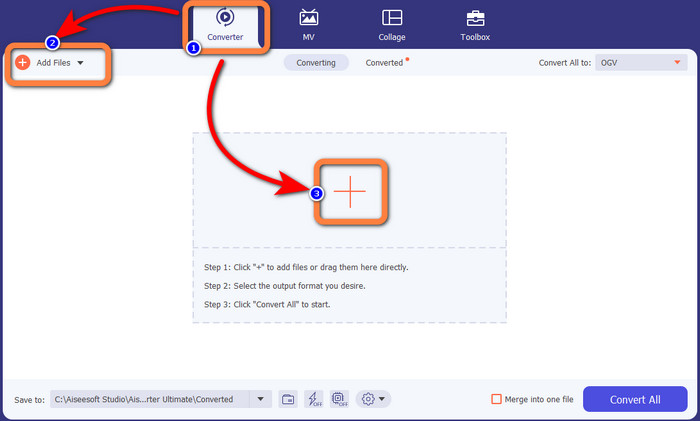
Krok 3: Přejděte do možností formátu kliknutím na rozbalovací ikonu vedle Convert All to a pro další krok vyberte formát souboru MKV.

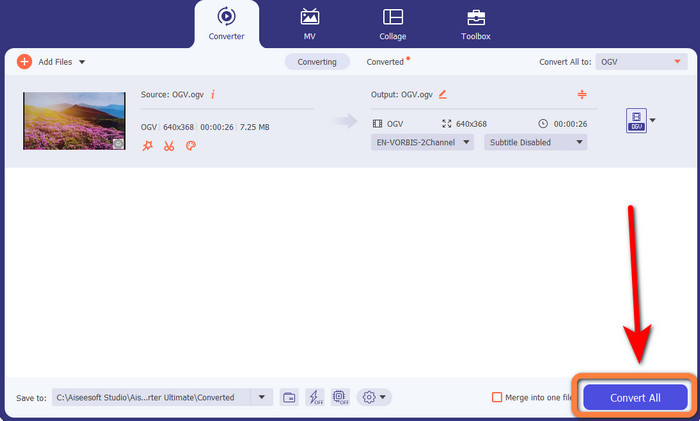
Krok 4: Posledním krokem je převod souboru kliknutím na tlačítko Convert All. Poté můžete své video uložit jako soubor MKV.
Část 3: Snadná online řešení pro převod OGV na MKV
Pomocí nástroje Converthelper
Pokud vás Video Converter Ultimate zaujal, je uklidňující, že budete spokojeni i s používáním nástroje Converthelper. Tento online nástroj vám umožní převést OGV na MKV snadno a efektivně. Podporuje také různé další soubory, jako WMA, FLV, AVI, MP4, 3GP a další. Nabízí navíc jednoduché metody převodu, takže ani začátečník by neměl mít problém s jeho používáním. Tento bezplatný video konvertor dokáže také převádět videa bez ztráty kvality. Díky tomu si můžete být jisti, že vaše video bude vypadat stejně dobře i po převodu. V některých případech však Converthelper nepracuje zcela spolehlivě, zejména pokud máte pomalejší připojení k internetu. Také proces převodu bývá pomalý, což je pro uživatele časově náročné. Vyzkoušejte převod svého souboru OGV na MKV pomocí tohoto softwaru.
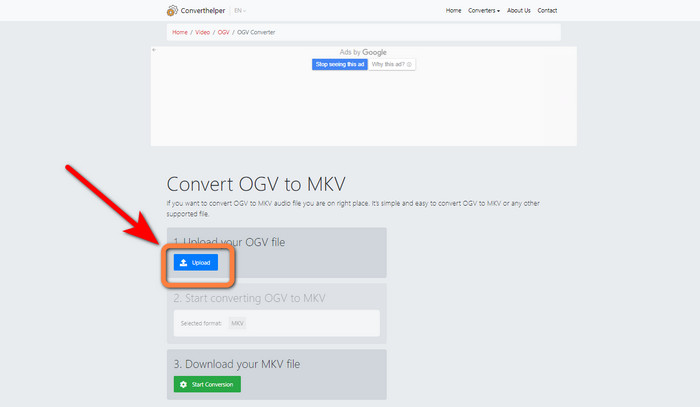
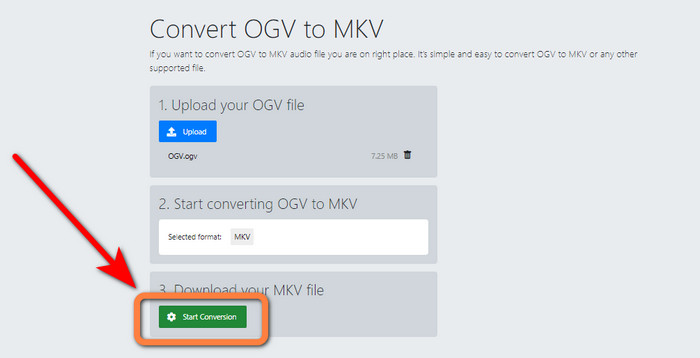
Krok 1: Navštivte webové stránky Converthelper. Poté klikněte na tlačítko Upload a naimportujte soubor ve formátu OGV.
Krok 2: Pokračujte k bodu číslo 2. Z možností formátu vyberte souborový formát MKV.
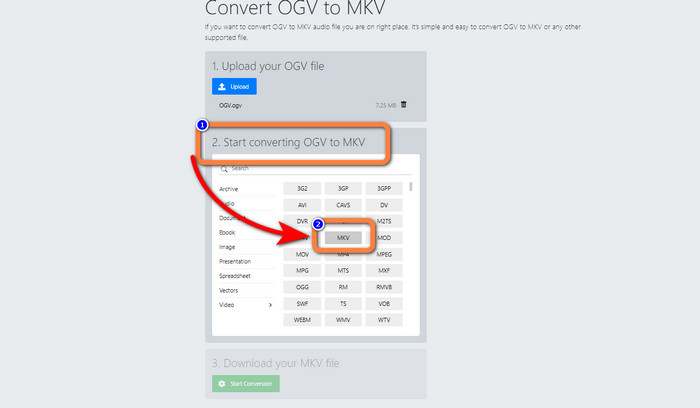
Krok 3: V posledním kroku klikněte na tlačítko Start Conversion a vyčkejte na dokončení převodu. Tento nástroj vám také umožní převádět OGV na FLV.
Pomocí FreeConvert
FreeConvert vám umožní převést OGV na MKV okamžitě. Tento nástroj můžete také použít k převodu dalších formátů souborů, jako jsou MP4, WMV, AVI, WEBM, 3GP, MOV atd. Nabízí i jednoduché kroky pro převod, což je ideální pro začátečníky. Kromě převodu umí FreeConvert také komprimovat videa, obrázky, zvuk, dokumenty a další. Navíc můžete své video upravit pomocí editačních nástrojů, jako je ořez videa nebo zastřihovač videa. Bohužel, pokud jde o samotný převod, zvládne pouze soubory o maximální velikosti 1 GB. Z tohoto důvodu můžete převádět jen omezené množství souborů. Pokud chcete maximální velikost souboru zvýšit, musíte si zakoupit předplatné. Jelikož jde o webovou aplikaci, je také nezbytné mít k dispozici internetové připojení. Postupujte podle níže uvedených kroků pro převod OGV na MKV.
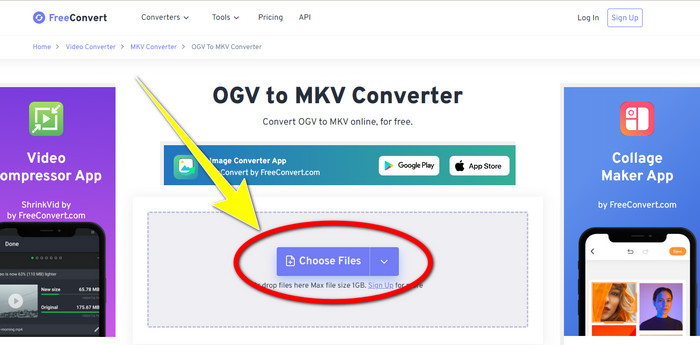
Krok 1: Přejděte na webovou stránku FreeConvert. Klikněte na tlačítko Choose File a přidejte soubor OGV.
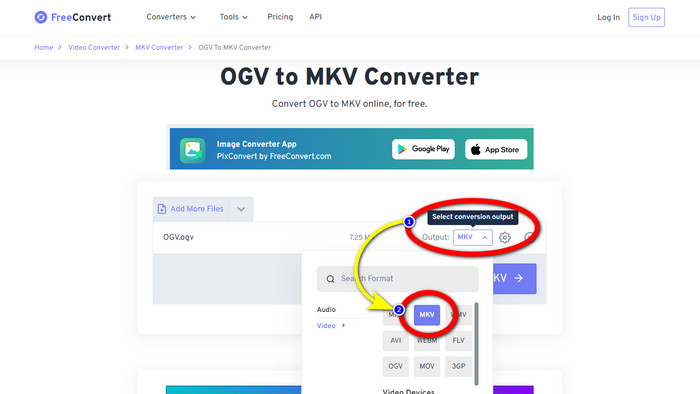
Krok 2: Dále přejděte k tlačítku Output. Klikněte na něj, zobrazí se možnosti formátu, a vyberte formát souboru MKV.
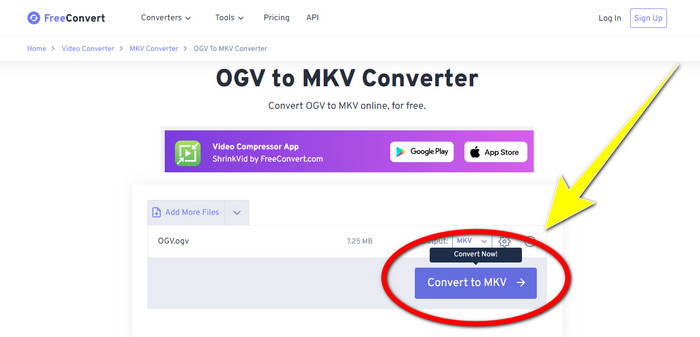
Krok 3: Po výběru formátu MKV klikněte na tlačítko Convert to MKV. Následně se spustí proces převodu a uloží se vaše finální video.
Část 4: Časté dotazy o převodu OGV na MKV
1. Mohu použít FFmpeg k převodu OGV na MKV?
Samozřejmě že ano. Stáhněte si FFmpeg. Jde o nástroj založený na příkazovém řádku, který dokáže převádět různé video soubory, včetně OGV, MKV, MOV, MP4, AVI a dalších.
2. Je MKV běžný formát?
Většina současných zařízení je s tímto formátem kompatibilní. Mnoho zvukových stop a stop titulků lze uložit do jednoho souboru pomocí formátu MKV nebo Matroska Video. Je neuvěřitelně oblíbený pro uchovávání filmů. Poměrně malá velikost souboru a vysoce kvalitní video.
3. Je OGV OGG?
Ne. OGG je formát s otevřeným zdrojovým kódem, který používá kontejner OGV. Jedním z primárních cílů vývoje společnosti OGG bylo osvobození od omezení softwarových patentů. Video stream se zvukem nebo bez něj, který byl komprimován pomocí metody Opus, Vorbis, Theora nebo Speex, je uložen pomocí přípony souboru OGV.
Závěr
Používání online nástrojů ke konverzi OGV na MKV je účinné, ale nelze přehlédnout, že se při převodu neustále zobrazují otravné reklamy. Pokud tedy chcete převádět soubory bez rušení reklamami, můžete použít Video Converter Ultimate.
-
 Top 4 nejlepší řešení pro převod MXF na MKV [Vyřešeno]
 Seznamte se s těmito čtyřmi skvělými metodami, jak snadno převést MXF na MKV online a offline. Aplikace zahrnuté v tomto příspěvku vám mohou pomoci převést soubory bez potíží.
-
 4 způsoby, jak převést MPG na MKV pomocí online/offline převodníků
 Hledáte snadno použitelný převodník, který dokáže převést soubory MPG na MKV? Tento článek uvádí nejlepší a nejjednodušší způsoby, jak rychle převést soubory MPG na MKV
-
 Nejjednodušší způsoby, jak převést MOV na MKV zdarma na Mac
 Chcete převést MOV na MKV zdarma na Mac? Přečtěte si tento článek a zjistěte nejjednodušší a nejjednodušší způsoby, jak převést soubor MOV na MKV.
