


 Video Converter Ultimate
 Screen Recorder
 Oprava videa
 Bezpečné stažení
Vynikající průvodci pro úplnou konverzi VOB na DIVX
Soubory, které se na DVD vyskytují nejčastěji, se nazývají soubory VOB a mohou obsahovat prakticky všechna data, včetně navigace, nabídek, titulků, videa a audia. Zabírají však v zařízení příliš mnoho místa. Pokud tedy chcete mít menší velikost souboru, musíte svůj soubor VOB převést do jiných formátů, například do formátu DIVX. Naštěstí vám tento článek nabízí nejlepší metody, jak převádět různé soubory. Chcete‑li převést VOB na DIVX, přečtěte si tento článek a seznamte se s nástroji, které můžete využít online i offline.

Část 1: Vynikající převodník VOB na DIVX bez ztráty kvality
Chcete převést VOB na DIVX bez ztráty kvality? Pak je tento článek pro vás tou nejlepší volbou. Nejvhodnějším a nejpraktičtějším konvertorem, který můžete použít, je Video Converter Ultimate. Pomůže vám převádět řadu souborů, jako jsou VOB, MT2S, DV, ASF, OGV, DIVX, MTV, MP4, M4V, AVI, AMV, GIF a další. Umožňuje také hromadnou konverzi, takže můžete převést více souborů jedním kliknutím. Kromě toho tento offline nástroj dokáže převádět soubory vysokou rychlostí, až 30× rychleji než jiné konvertory. Navíc si jej můžete stáhnout jak na Mac, tak na Windows, takže jej může využívat každý uživatel.
Kromě toho má Video Converter Ultimate mnoho funkcí, jako je tvůrce hudebního videa, tvůrce koláží a další. S pomocí tohoto offline nástroje můžete s videem dělat, co chcete. Přečtěte si další podrobnosti o tomto offline konvertoru níže.
Funkce
◆ Převod mnoha formátů videa, jako jsou VOB, DIVX, MP4, AVI, MTS a další.
◆ Nabízí proces dávkové konverze.
◆ Vytvořte skvělou a krásnou koláž.
◆ Nabízí různé editační nástroje, jako je kompresor videa, zesilovač, regulátor rychlosti videa, ořezávače atd.
Klady
- Dokáže efektivně využívat Mac a Windows.
- Přístupné pro začátečníky i pokročilé uživatele.
- Dokáže převádět až 30x rychleji.
Nevýhody
- Pokročilé funkce lze využívat pomocí placené verze.
Nabízí různé editační nástroje, jako je kompresor videa, zesilovač, regulátor rychlosti videa, ořezávače atd.
Krok 1: Stáhněte si Video Converter Ultimate do svého Macu nebo Windows kliknutím na tlačítko Download níže. Nainstalujte jej a spusťte aplikaci.
Zdarma ke staženíPro Windows 7 nebo novějšíBezpečné stažení
Zdarma ke staženíPro MacOS 10.7 nebo novějšíBezpečné stažení
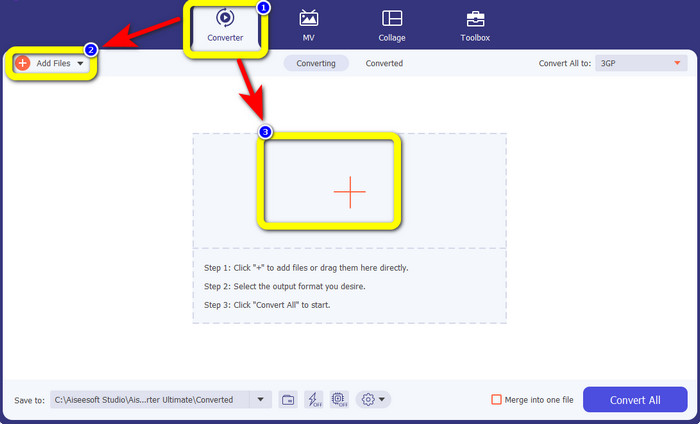
Krok 2: Zvolte panel Converter. Poté klikněte na tlačítko Add Files a nahrajte svůj soubor VOB. Soubor můžete nahrát také kliknutím na tlačítko se znakem Plus.
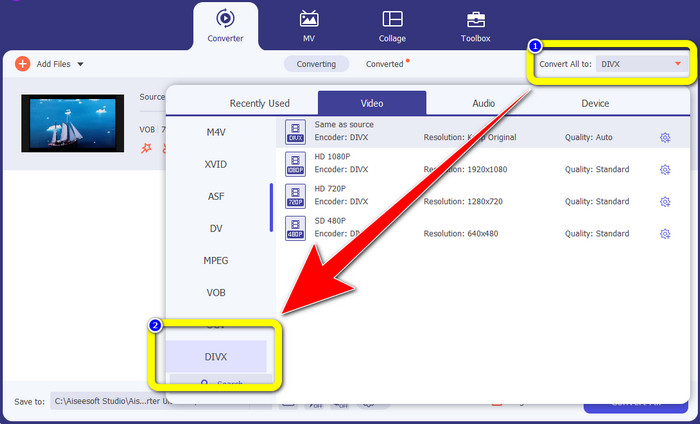
Krok 3: Po nahrání souboru přejděte na tlačítko Convert All to. Zobrazí se možnosti formátů, poté zvolte formát souboru DIVX.
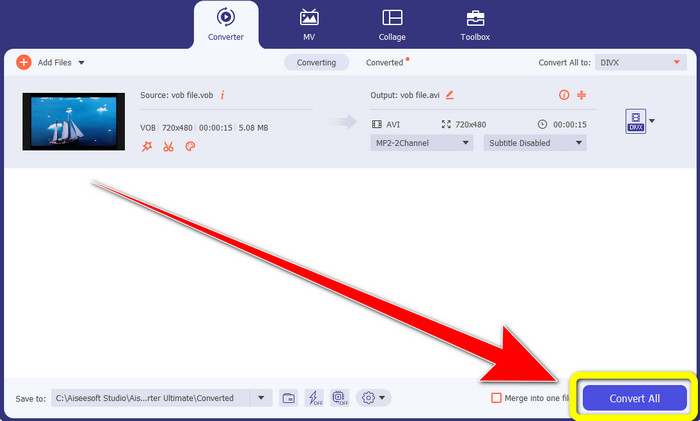
Krok 4: Klikněte na Convert All, abyste soubor převedli a uložili finální výstup.
Část 2: Bezplatné online nástroje pro převod VOB na DIVX
Media.io
Pokud přemýšlíte, jaký konvertor můžete použít bez instalace do Windows nebo Macu, můžete využít Media.io. Tento bezplatný online nástroj dokáže převádět VOB na DIVX. Je velmi snadný na použití, protože ke konverzi různých souborů stačí tři jednoduché kroky. Tento online konvertor navíc podporuje různé formáty videa a audia, jako MOV, AVI, XVID, DIVX, FLV, MP4, M4V, MP3, WAV, WMA a další. Tento online nástroj navíc není pouze konvertor. Můžete s ním dělat mnoho dalších věcí, například upravovat svá videa pomocí řady nástrojů, jako je video editor, slučovač, ořezávač, zastřihovač atd. Media.io je však webová aplikace, takže jste vždy závislí na přístupu k internetu. Bez připojení k internetu tento konvertor nepoužijete. Také nabízí pouze běžnou rychlost převodu, takže konverze více souborů zabere trochu více času. Chcete‑li převést soubor VOB do formátu DIVX, postupujte podle níže uvedených jednoduchých kroků.
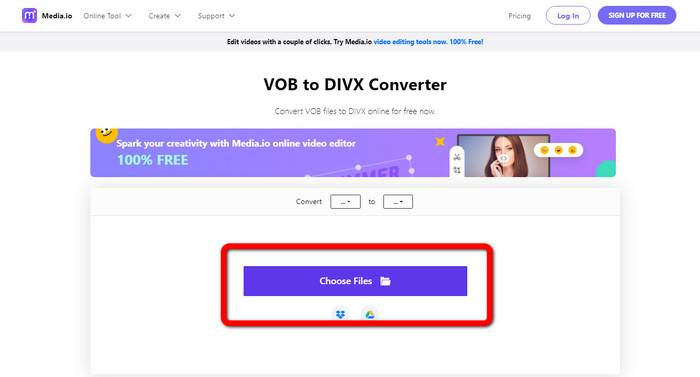
Krok 1: Přejděte na web Media.io. Klikněte na tlačítko Choose Files. Na obrazovce se zobrazí vaše soubory. Vyberte soubor ve formátu VOB, který chcete převést.
Krok 2: Po dokončení nahrávání souboru VOB vyberte z možností formátů soubor DIVX.
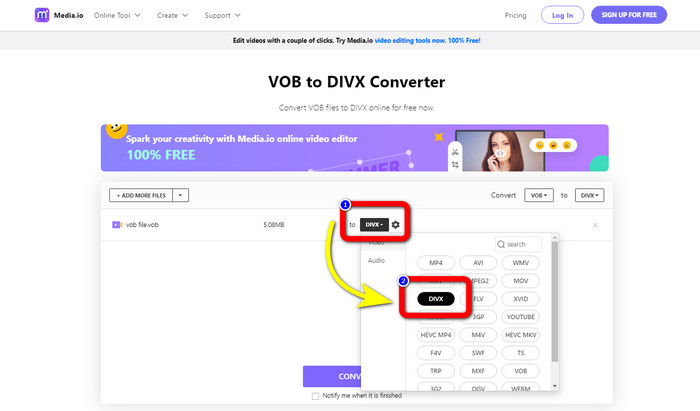
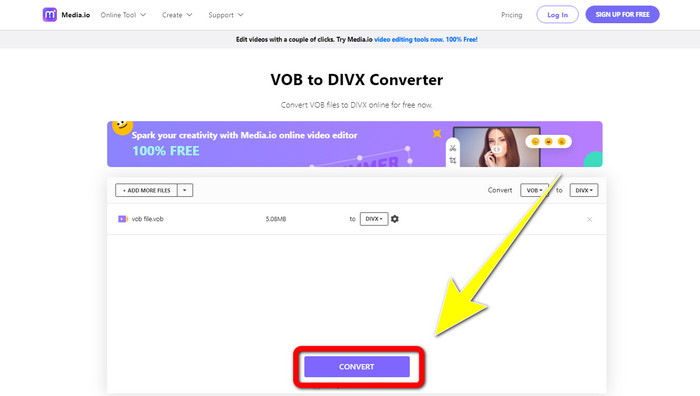
Krok 3: V posledním kroku klikněte na tlačítko Convert. Poté jej uložte do svého počítače.
Convertio
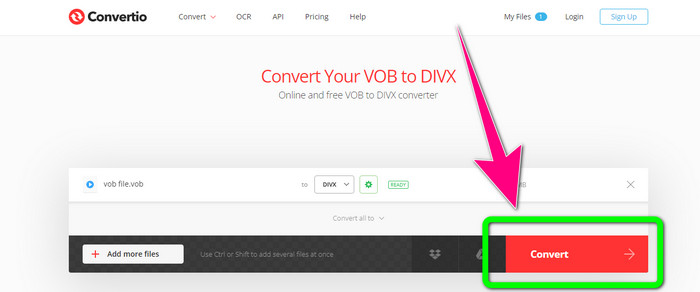
Dalším online softwarem, který můžete použít k převodu VOB na DIVX, je Convertio. Tento online nástroj podporuje různé formáty souborů, jako jsou FLV, MP4, DIVX, VOB, MOV, MTS, WMV a další. Tento software se také snadno používá a je ideální pro každého uživatele. Kromě toho můžete také převádět různé formáty z audio, obrázky, prezentace, dokument, e-knihy atd. Použití tohoto online převodníku má bohužel nevýhodu. Pomocí bezplatné verze můžete pouštět pouze soubory o maximální velikosti 100 Mb. Jediným způsobem, jak zvýšit maximální velikost souboru, je zakoupení předplatného. Tímto způsobem si můžete vychutnat převod mnoha souborů bez obav z omezení velikosti souboru. Chcete-li převést soubor VOB na DIVX pomocí nástroje Convertio, postupujte podle následujících kroků.
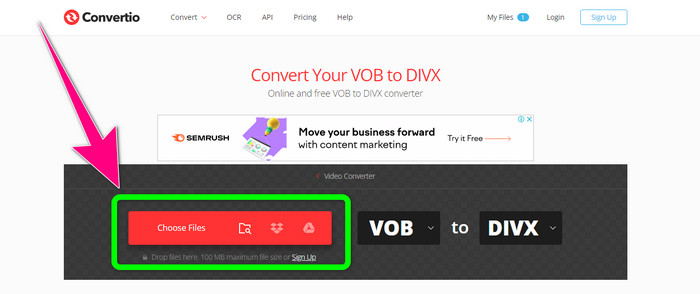
Krok 1: Navštivte web Convertio. Klikněte na tlačítko Choose Files a přetáhněte soubor VOB.
Krok 2: Ve druhém kroku zvolte z možností formátů formát DIVX.
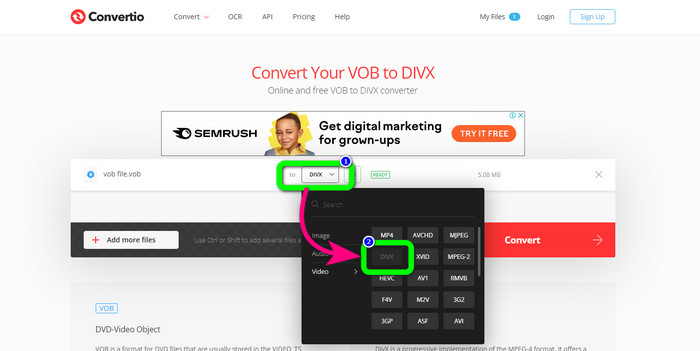
Krok 3: V posledním kroku klikněte na tlačítko Convert. Počkejte na dokončení převodu a uložte svůj soubor DIVX. Pokud potřebujete převést VOB na 3GP, můžete tento nástroj použít také.
Část 3: VOB vs. DIVX
| VOB | DIVX | |
| Přípona souboru | Formát kontejneru digitálního videa VOB (Video Object) je typicky vidět na DVD video materiálu. VOB multiplexuje dohromady DVD video, audio, menu a textové informace, jako jsou titulky. Často se používají audio kodeky AAC a video kodeky MPEG-1 nebo MPEG-2 Part 2. Přestože je tento formát zdarma, mohou být určité verze tohoto formátu zašifrovány. | Video kodek DivX, vytvořený společností DivX, LLC, je primárně kompatibilní se softwarem Windows, ale může být také integrován s herními konzolemi, budíky, stereo vozidly a dalšími zařízeními. V současné době existují tři hlavní kodeky DivX: video kodek H.264/MPEG-4 AVC DivX Plus High Definition, HEVC Ultra HD a MPEG-4 Part 2 (DivX Plus). |
| Přidružené programy | KM Player VLC Media Player Media Player Klasický GOM přehrávač | DVD/Blu-ray přehrávače Stereo budíky do auta XBox 360 |
| Vyvinul | DVD fórum | Společnost DIVX Networks Inc. |
| Typ MIME | Video/MPEG, VIDEO/DVD | DIVX/VIDEO |
Část 4: Nejčastější dotazy o převodu VOB na DIVX
1. K čemu se DIVX používá?
Firma DivX vyrábí zboží pod značkou DivX. Toto slovo se někdy používá k označení známého kodeku DivX, který komprimuje zdlouhavá videa, aby se zmenšila jejich velikost souborů při zachování rozumné úrovně kvality videa.
2. Jak převedu MP4 do formátu DIVX?
Pomocí Video Converter Ultimate můžete převést MP4 do formátu DIVX. Tímto způsobem můžete snadno změnit formát svého videa.
3. Je DIVX totéž jako AVI?
Ačkoli formát souboru DivX může také obsahovat funkce, jako jsou titulky a kapitoly XSUB, je také založen na kontejneru AVI. Všechna zařízení s certifikací DivX, včetně televizorů a miniaplikací do auta, budou podporovat přehrávání videí ve formátu AVI a DIVX.
Závěr
Toto jsou nejlepší metody, jak převést VOB na DIVX bez ztráty kvality pomocí offline i online nástrojů. Jak však vidíte, online nástroje mají i své nevýhody. Nejlepším řešením je proto stáhnout si do Windows nebo Macu kvalitní konvertor, například Video Converter Ultimate.
-
 Jak převést VOB na soubor WMV na Windows a Mac [rychle]
 Jste jedním z lidí, kteří chtějí převést svůj soubor VOB do formátu WMV? Vyzkoušeli jsme offline a online převodníky a vybrali jsme nejlepší převodníky VOB na WMV.
-
 3 způsoby, jak převést VOB na MKV na Windows, Mac a online
 Chcete převést DVD VOB na MKV? Tento článek vám poskytuje tři nejlepší způsoby, jak převést soubor VOB na MKV, aniž byste měli potíže s převodem souborů.
-
 Jak převést DIVX na 3GP na Windows, Mac a online
 Jak převést DIVX na 3GP? Pokud hledáte odpověď, přečtěte si tento článek. Ukážeme si skvělé postupy pomocí různých převodníků.
