


 Video Converter Ultimate
 Screen Recorder
 Oprava videa
 Bezpečné stažení
Nejrychlejší postupy pro převod VOB na M4V na Windows a Mac
DVDs typically employ the file format VOB or Video Object. This file is often retained in the DVD's root-level VIDEO TS folder. However, the internet now has a considerable number of media files. Additionally, DVDs are less prevalent today and are not widely supported by devices and programs. If that is the reason, you need a format supported by numerous devices and programs like the M4V file format. You will be grateful because you will learn the most useful methods to convert VOB to M4V using online and downloadable software.

Část 1: Rozdíly mezi VOB a M4V
| VOB | M4V | |
| Celé jméno | Video objekt | Video MPEG-4 |
| Přípona souboru | .vob | .m4v |
| Popis | Video, zvuk, titulky, nabídky DVD a další obsah jsou obsaženy v jediném souboru pomocí kontejnerového formátu VOB. Formát VOB, založený na tocích systému MPEG-2 a lze jej přehrávat na mnoha mediálních zařízeních, je obvykle uložen ve složce VIDEO TS v kořenovém adresáři disku. | Apple vytvořil formát M4V video kontejner, který se používá k distribuci audio a video obsahu přes iTunes. Kromě možnosti použití ochrany proti kopírování DRM k ochraně vlastnictví televizních epizod, filmů a dalšího mediálního materiálu z obchodu iTunes jsou soubory M4V totožné se soubory MP4. |
| Vyvinul | DVD fórum | Jablko |
| Typ MIME | video/DVD video/Mpeg | video/x-m4v |
| Video kodek | MPEG-1 MPEG-2 | H.264 |
| Audio kodek | MP2 AC-3 DTS | AAC Dolby digital |
| Přidružené programy | Klasický přehrávač médií Windows přehrávač médií Přehrávač VLC Media Player Potplayer GOMPplayer | QuickTime Player iTunes Klasický přehrávač médií K-Multimediální přehrávač MPlayer Přehrávač VLC Media Player |
Část 2: Proč potřebujete převést VOB na M4V
Hlavním důvodem, proč potřebujete převést VOB na M4V, je to, že mnoho aplikací nepodporuje soubor VOB. Bez ohledu na to, pokud máte video VOB na Macu, můžete mít problémy. Pusťte jej do QuickTime pro přehrávání nebo iMovie/FCP pro úpravy. Proto musíte soubor .vob převést do formátu, který mohou podporovat počítače Mac, jako je M4V.
Část 3: Jak převést VOB na M4V pomocí Mac
The best converter you can use to convert VOB to M4V using Mac is the FVC Video Converter Ultimate. This converter is not the same as the other converter you can see on the internet. The other converter only offers a normal conversion speed process. But in this application, you will experience more exciting things. Video Converter Ultimate offers an ultra-speed conversion process, which is 30x faster than the average speed. Also, assuming that you want to convert two or more files, this application is for you. It allows batch conversion, wherein you can upload more files and convert them in a single procedure. With this batch conversion, you can save more time. Moreover, while converting, you can still edit your video. You can enhance, edit, and crop your video because it has more options while you are in the Converting process. In addition, you can still improve your VOB video file using this converter.
Funkce
◆ Převod 100+ formátů video souborů, včetně MP4, VOB, M4V, WMV, MKV, AVI, FLV, MTS atd.
◆ Nabízí tvorbu koláží s dostupnými šablonami a filtry.
◆ Schopnost vytvořit hudební video s tématy zdarma. Může kombinovat videa a obrázky.
◆ Poskytuje Toolbox s mnoha editačními nástroji, jako je vylepšovač videa, ořez, ořezávačka atd.
◆ Převod obrazových souborů jako PNG, JPG, BMP, TIFF a další.
◆ Vytvořte přizpůsobené 3D video z 2D.
◆ It can slow down and speed up a video from 0.125x to 8x faster.
Pro převod VOB na M4V na Macu pomocí FVC Video Converter Ultimate postupujte podle níže uvedených základních postupů.
Step 1: Search the FVC Video Converter Ultimate on your browser. You can also click the Download button below. Choose the Mac version. Then, launch the application.
Zdarma ke staženíPro Windows 7 nebo novějšíBezpečné stažení
Zdarma ke staženíPro MacOS 10.7 nebo novějšíBezpečné stažení
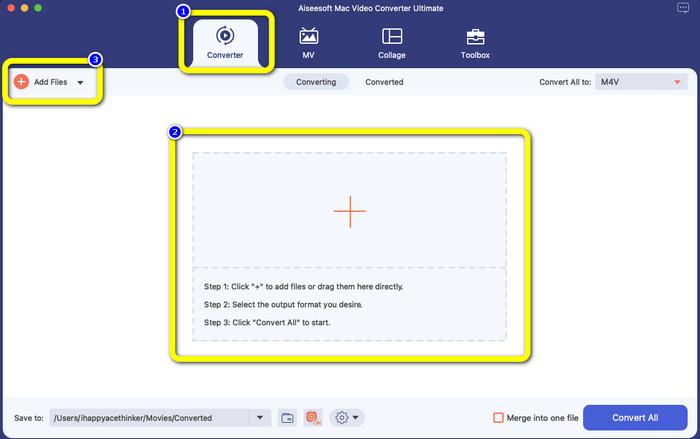
Step 2: Select the Converter panel when the interface already pops up. Click the Plus icon or the Add Files button to add your VOB file. You can also drag your video file directly to the box.
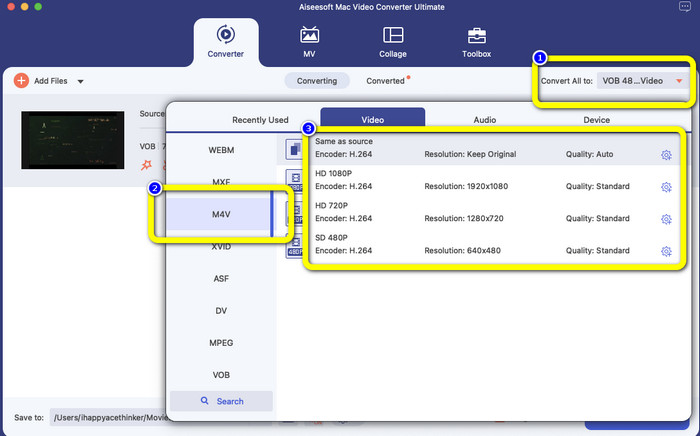
Step 3: Click the Convert All to button to see the format options. After that, select the M4V file format. You can also choose the resolution for your video from 480p to 1080p, or you can stay on the original quality.
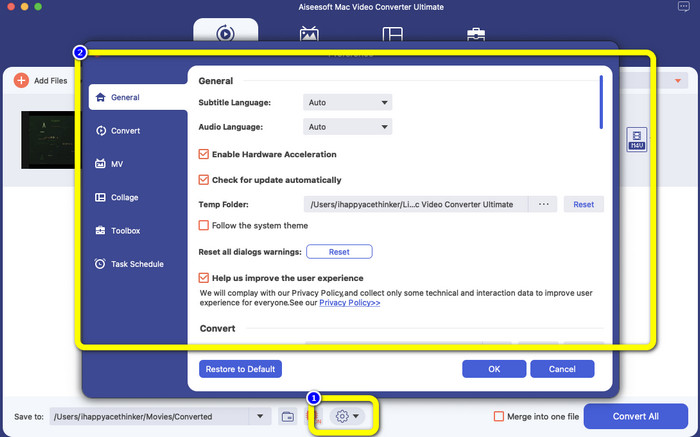
Step 4: Before converting, you can edit your video, like putting a subtitle or audio language and more, by clicking the Preference icon on the lower part of the interface.
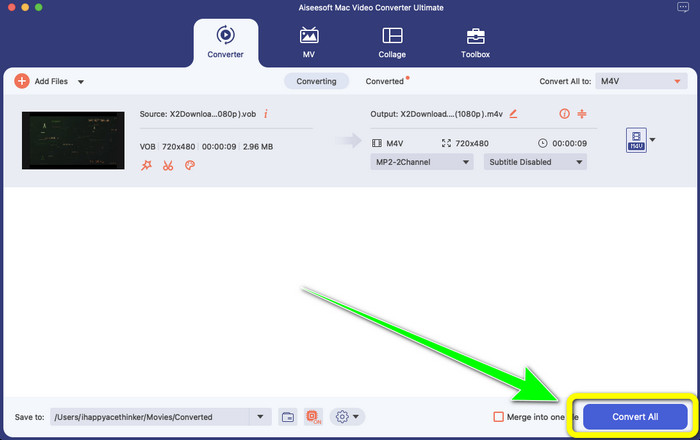
Step 5: If you are done making some changes to your VOB video, click the Convert button to convert your VOB file to M4V format. Then, save your video on your Mac.
Část 4: Jednoduché způsoby, jak převést VOB na M4V online zdarma
If you want to convert VOB to M4V for free online, you can try FreeFileConvert. This online converter can easily convert different files. It only has three steps to convert your VOB video file to M4V format, which makes it perfect for non-professional users. Also, after 24 hours, all converted files are deleted from the server and are no longer available. You can also delete your file using the Delete button after a file has been converted. Moreover, FreeFileConvert is not only good for video conversion. It also allows you to convert images, documents, vectors, audio, archive, e-book, and presentation, which makes it convenient for users. However, this online tool has a slow conversion process, so you must consume more time. It also requires an internet connection to operate.
Step 1: Visit the FreeFileConvert website.
Step 2: Select the Choose File button to add your VOB video file.
Step 3: Click the Convert File to button to see the format options and select M4V file format.
Step 4: For the last step, select the Convert button. Download the final video after the conversion process.
Část 5: Nejčastější dotazy o převodu VOB na M4V
1. Jaký je běžný formát souboru pro převod souboru VOB?
Vzhledem k tomu, že MP4 je běžná přípona multimediálního souboru a formát kontejneru pro ukládání dat videa, zvuku a titulků, byl by to nejlepší formát videa pro převod vašich nepodporovaných video souborů VOB do něj. Mnoho přenosných zařízení, včetně produktů Apple, podporuje formát MP4.
2. Jak převedu formát souboru VOB bez ztráty kvality?
Můžete použít FVC Video Converter Ultimate. Tento offline nástroj dokáže převést více souborů bez změny kvality videa.
3. Lze soubory VOB přehrát na Androidech?
No. Videos are stored on DVDs using the VOB (Video Object) container format. VOB files are typically not supported by Android. You need to convert your VOB to MP4 or other video formats supported by Android devices if you wish to play them on Android smartphones or tablets.
Závěr
Now you have learned the differences between VOB and M4V. Also, this article shows you the easiest procedure to convert VOB to M4V. If you prefer an application with a fast conversion process, you can use FVC Video Converter Ultimate. This converter can convert various files 30x faster than other converters.
-
 Jak komprimovat soubory VOB online a zdarma [bez stahování]
 Hledáte způsoby, jak komprimovat soubory VOB? V tomto článku se dozvíte nejlepší způsob, jak zmenšit velikost souborů VOB
-
 Konkrétní průvodce připojením souborů M4V ve Windows a Mac zdarma
 Pokud hledáte řešení, jak spojit video soubory M4V do jednoho, nikdy si tuto pasáž nenechte ujít. Zde budeme hovořit o dvou nejlepších metodách, jak kombinovat video soubory M4V
-
 Převeďte VOB na 3PG na Windows a Mac zdarma [bezeztrátově]
 Jak převést VOB na 3GP na Windows a Mac? Tento článek poskytuje nejlepší řešení pro převod VOB na 3GP
