


 Video Converter Ultimate
 Screen Recorder
 Oprava videa
 Bezpečné stažení
Skvělé způsoby, jak pomocí konečných nástrojů převést XviD na 3GP
Nemůžete na svém mobilním telefonu přehrát soubor .xvid? Pak ho vaše zařízení možná nepodporuje. Abyste mohli video v telefonu přehrát, musíte soubor XviD převést na 3GP. Pokud jde o mobilní telefony, nejrozšířenějším formátem pro přehrávání videí je právě 3GP. Tento příspěvek vám nabídne přehled nejlepších způsobů, jak převést XviD na 3GP rychle a bez námahy pomocí špičkových nástrojů pro Windows, Mac i online. Pojďme si toho přečíst a naučit co nejvíce.

Část 1: Nejlepší způsob, jak převést XviD na 3GP
Nejlepším způsobem, jak převést XviD na 3GP, je použití programu Video Converter Ultimate. Jde o jeden z nejlepších převodníků, které si můžete stáhnout do počítače s Windows nebo Mac. Pokud máte tuto aplikaci, nemusíte se už obávat převodu velkého množství souborů, protože Video Converter Ultimate dokáže převádět více než 1000 formátů, včetně FLV, MKV, DIVX, XviD, 3GP, M4V, MTS, SWF, MP4 a dalších. Kromě toho nabízí až 30× vyšší rychlost převodu než jiné převodníky, což je pro uživatele velmi užitečné. Také můžete převádět více souborů najednou, protože nabízí funkci hromadného převodu, takže nemusíte každý soubor převádět ručně. Dále, pokud chcete otočit své XviD video, můžete k tomu použít tento nástroj, protože obsahuje funkci pro otáčení videa (Video Rotator). S pomocí tohoto rotátoru můžete video snadno otočit. Kromě toho můžete video sestříhat na ideální délku pomocí nástroje Video Trimmer. Díky těmto funkcím lze říct, že Video Converter Ultimate je komplexní nástroj pro převod a úpravu vašich videí.
Funkce
◆ Převeďte video formáty jako XviD, 3GP, MP4, M4V, DIVX, FLV, AVI, SWF a více než 100 dalších.
◆ Má schopnost vytvořit hudební video.
◆ Může pomoci vytvořit koláž.
◆ Má skvělé editační nástroje, jako jsou vylepšení videa, korekce barev, trimmer a další.
◆ Upravte ovladač rychlosti videa.
◆ Může změnit velikost souboru pomocí kompresoru.
Klady
- Dokáže převádět video soubory 30x rychleji než jiné převodníky.
- Vhodné pro neprofesionální uživatele a má jednoduché rozhraní.
- Dokáže převádět formát obrázku mezi JPG, PNG, WEBP, BMP a TIFF.
- Dokáže převést více souborů najednou.
Nevýhody
- Získejte placenou verzi a užijte si skvělé funkce.
Převeďte váš soubor XviD na 3GP pomocí níže uvedených užitečných metod.
Krok 1: Nejprve si musíte stáhnout Video Converter Ultimate do Windows nebo Mac kliknutím na tlačítko Download níže. Aplikaci nainstalujte a spusťte.
Zdarma ke staženíPro Windows 7 nebo novějšíBezpečné stažení
Zdarma ke staženíPro MacOS 10.7 nebo novějšíBezpečné stažení
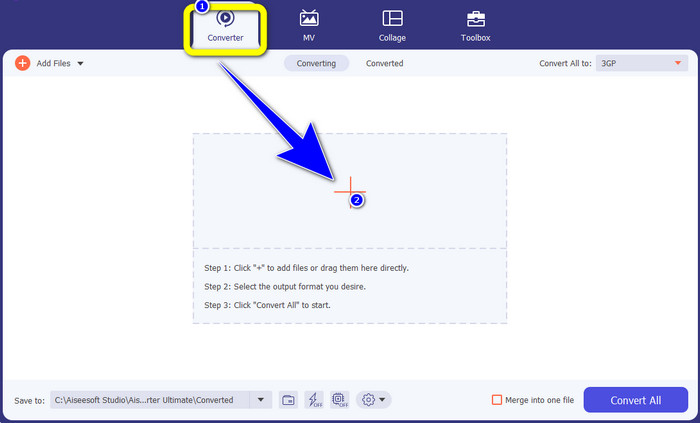
Krok 2: V horní části rozhraní jsou čtyři možnosti: Converter, MV, Collage a Toolbox. Vyberte panel Converter a klikněte na ikonu Plus pro přidání souboru XviD, který chcete převést.
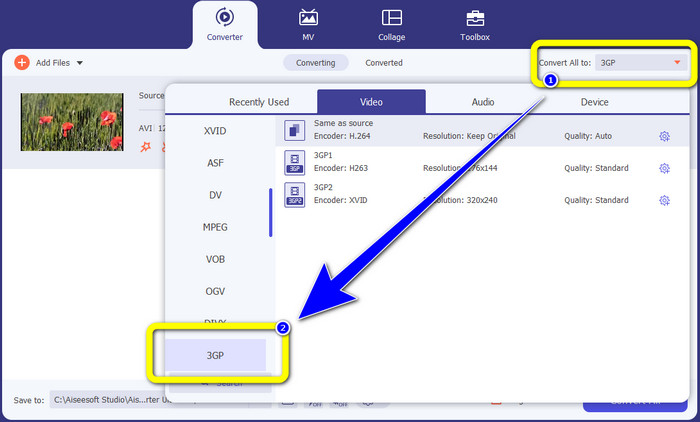
Krok 3: Po přidání souboru XviD se podívejte na pravou stranu rozhraní a klikněte na tlačítko Convert all to. Zobrazí se možnosti formátů a vyberte formát souboru 3GP.
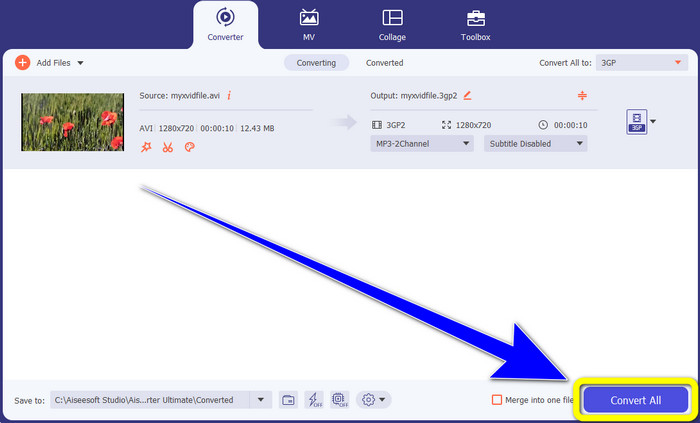
Krok 4: Ve čtvrtém a posledním kroku klikněte na tlačítko Convert All a převeďte soubor XviD na 3GP. Počkejte na dokončení převodu a poté video uložte.
Část 2: Převod XviD na 3GP online
Použití FVC Free Video Converter online
Kromě nejlepšího převodníku, který jste poznali v první části, existují také online převodníky, které můžete používat zdarma. Nejlepším online nástrojem je FVC Free Video Converter Online. Tento užitečný software vám umožní snadno převést XviD na 3GP. Podporuje audio i video formáty souborů, jako jsou MP4, M4V, WMV, AVI, MOV, VOB, WEBM, MP3, AAC, AC3, WMA, FLAC atd. Navíc je tento převodník snadno použitelný, protože nabízí jen tři jednoduché kroky pro převod různých souborů. Díky tomu nebude mít žádný uživatel problém tento online převodník ovládat. Pokud chcete vědět, jak snadno převést XviD na 3GP pomocí FVC Free Video Converter Online, podívejme se na tři jednoduché kroky níže.
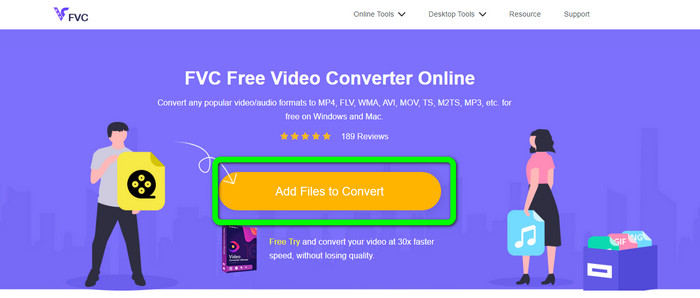
Krok 1: Navštivte webové stránky FVC Free Video Converter Online. Klikněte na tlačítko Add Files to Convert a nahrajte soubor XviD, který chcete převést do formátu 3GP.
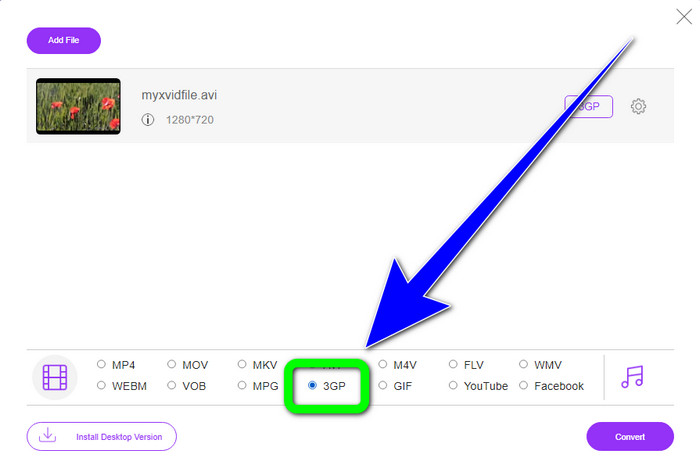
Krok 2: Po nahrání souboru uvidíte v dolní části rozhraní možnosti formátů. Zvolte formát souboru 3GP.
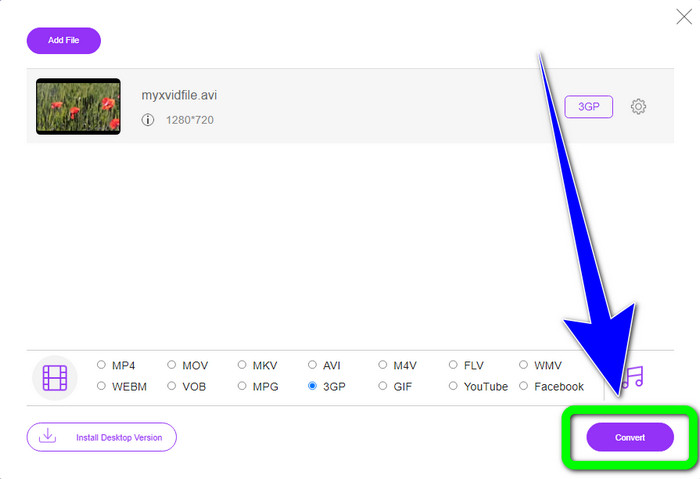
Krok 3: Musíte kliknout na tlačítko Convert, abyste soubor XviD převedli na 3GP. Vyčkejte na dokončení procesu převodu a uložte výsledný soubor do Windows nebo Mac.
Pomocí OnlineConvertFree.com
Dalším online nástrojem, který můžete použít pro převod XviD na 3GP, je Onlineconvertfree.com. Tato aplikace je také vhodná pro převod audio souborů, obrázků, dokumentů a videí, což je pro uživatele velmi pohodlné. Podporuje řadu formátů, jako AVCHD, MT2S, MPEG, MKV, M4V, MP4, FLV, DIVX, XviD, 3GP a další. Nemusíte se také obávat o svůj soubor, protože v tomto softwaru je v bezpečí – vaše video bude automaticky smazáno po 24 hodinách. Tento nástroj můžete rovněž použít k převodu XviD na FLV.
Musíte však vzít v úvahu, že Onlineconverterfree.com je webový nástroj, pro jehož provoz musíte mít rychlé připojení k internetu. Limit úložiště tohoto softwaru je také pouze 100 Mb, takže si musíte zakoupit předplatné, aby byl limit úložiště vyšší. Pro převod XviD na 3GP pomocí Onlineconverter.com postupujte podle následujících kroků.
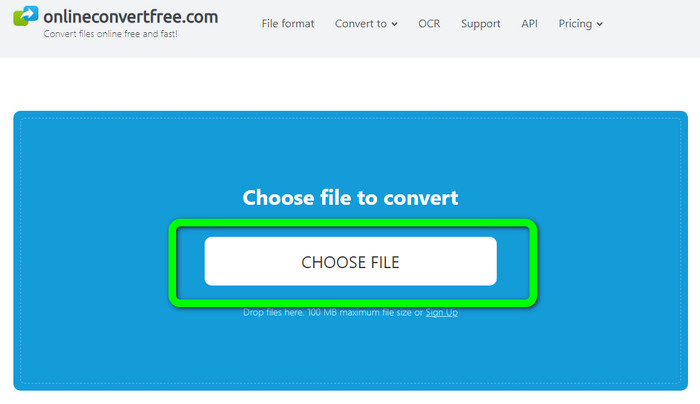
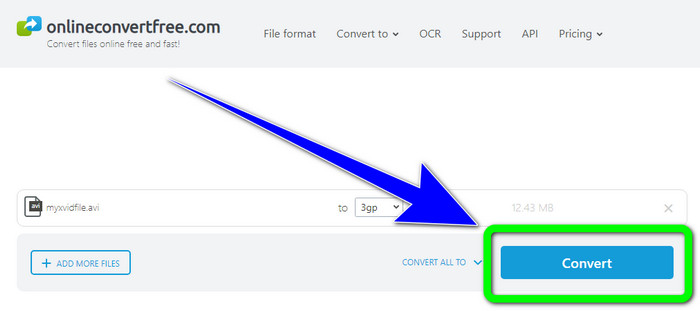
Krok 1: Přejděte na web Onlinecovnerter.com. Klikněte na tlačítko Choose File a vložte soubor XviD.
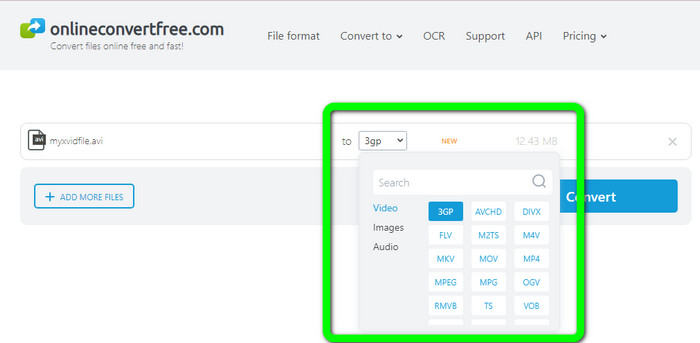
Krok 2: Klikněte na soubor 3GP v nabídce formátů.
Krok 3: V posledním kroku klikněte na tlačítko Convert. Počkejte na dokončení převodu a uložte výsledný soubor do svého zařízení. Kliknutím sem se dozvíte, jak převést M4V na 3GP.
Část 3: Rozšířené znalosti o XviD
Co je XviD?
Tento kodek, XviD, je založen na standardu MPEG-4. I když deformuje barvy, má skvělé rozlišení v dynamických scénách. Vzhledem k tomu, že se jedná o kodek s otevřeným zdrojovým kódem, mohou zainteresované strany přispívat k jeho vývoji a podporovat průběžné aktualizace. Film na DVD lze dostatečně zkomprimovat, aby se vešel na disk CD, a přitom si zachovat kvalitu DVD díky kompresi povolené v Xvid. Program Xvid komprimuje a dekomprimuje video data do MPEG-4 ASP. Přípona .xvid se používá k uložení komprimovaného videa. Pokud jde o video soubory, Xvid je srovnatelný se ZIP. Xvid komprimuje video v poměru 200:1 nebo vyšším. To umožňuje rychlejší síťový přenos a efektivnější ukládání na disk.
Část 4: Nejčastější dotazy o převodu XviD na 3GP
1. Jak dlouho mám čekat na převod XviD na 3GP?
Proces převodu bude záviset na konvertoru, který používáte, a velikosti souboru videa. Pokud chcete rychlejší konvertor, stáhněte si Video Converter Ultimate do svého Windows nebo Mac. Tato aplikace má 30x vyšší rychlost převodu než jiné převodníky.
2. Existuje bezplatný převodník, který mohu použít s neomezeným úložištěm souborů?
Ano, rozhodně! Nejlepším bezplatným převodníkem, který můžete použít, je FVC Free Video Converter Online. Tento online nástroj vám umožní převádět neomezené množství souborů, takže se nemusíte obávat žádného omezení velikosti.
3. Co je lepší, Xvid nebo 3GP?
Oba dva jsou lepší. Pokud chcete přehrávat video na 3G zařízení, je vhodnější přehrávat video s 3GP videosouborem. A pokud chcete svá videa přehrávat na video přehrávačích, video se souborem XviD je perfektní.
Závěr
Tento článek vám poskytl nejlepší postupy, jak převést XviD na 3GP. Pokud chcete převádět více souborů ve Windows a Mac, můžete si stáhnout Video Converter Ultimate. A pokud hledáte bezplatný online převodník, můžete použít FVC Free Video Converter Online.
-
 Najděte nejlepší a jednoduché metody pro převod TS na 3GP
 Tento článek nabídne úžasný převodník TS na 3GP ke stažení zdarma, který si můžete vyzkoušet na svém zařízení. Přečtěte si tento článek a zjistěte další důležité podrobnosti, které potřebujete
-
 Převeďte MTS na 3GP pomocí těchto Ultimate konvertorů
 Chcete nekomplikovaný proces převodu MTS na 3GP? Už se nebojte! Tento článek nabídne převodníky MTS na 3GP, které můžete používat online i offline
-
 WebM to 3GP: Nejúčinnější způsoby použití těchto nástrojů
 Hledáte vynikající převodník WebM na 3GP? Tento článek zajistí, že získáte nejlepší efektivní metody pro převod vašeho WebM na 3GP
