


 Video Converter Ultimate
 Screen Recorder
 Oprava videa
Krátká diskuze o tom, jak přidat obrázek do videopříspěvku Tiktok jako profesionál
Tiktok has already received more than one billion downloads worldwide, and it is still growing up to date. Users became delighted to use this app because it allows us to film videos for 3 minutes or less and watch other people in the entire world. As it pursues to become better, there are many features you can use to make your Tiktok video unique; one of them is to add an image on a video. However, adding images while filming on Tiktok could be a little bit tricky for some users. Luckily, we found a way to teach you how to add a picture to a Tiktok video with the three methods and learn from it.

Část 1. Jak umístit fotografii na video TikTok pomocí dvou vestavěných funkcí Tiktok
Než začneme, rádi bychom vás informovali, že dva způsoby, které jsme přidali v tomto článku, jsou již v Tiktoku. Nyní si tedy laskavě vyberte, který způsob se vám nejvíce hodí, a užijte si natáčení videa s jeho obrazem.
1. způsob. Jak použít fotografii jako pozadí na videu Tiktok
Předpokládejme, že chcete použít obrázek, který máte, jako pozadí; dobře, dostali jsme vás. Přečtěte si prosím podrobné kroky, které jsme uvedli níže, a zjistěte, jak skládat videa a obrázky na Tiktok.
Step 1. Download the Tiktok app from the Play Store or App Store, then open it next.
Step 2. After that, click the + button, and go to the Effects.
Step 3. Slide the menu to see the options, look for the Green Screen and click it. Hit the choose one in the options, then choose the image you want to use as a background.
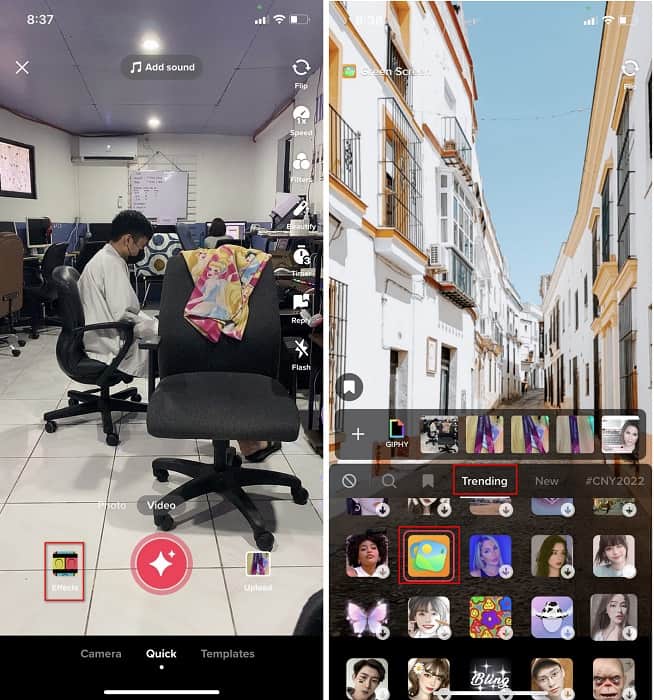
Step 4. Click the round REC button to record the video with the image background, re-click it to stop, click Next, then Drafts to save it on your accounts folder.
2. cesta. Jak přidat obrázek na Tiktok při natáčení videí
Tento způsob je trendy, protože většina uživatelů používá tento přidaný obrázek svého oblíbeného umělce, přátel, rodiny, gadgetů atd. Možná už máte nápad a nyní vás naučíte, jak přidávat fotografie do videa TikTok, postupujte podle níže uvedených kroků.
Step 1. On your Play Store or App Store, download the Tiktok, and after that, open it to follow the following steps.
Step 2. Press the + button and click the Effects next.
Step 3. Click the Trending and look for this image icon and click it. Next, please select the image you want and place it where you desire on the screen.
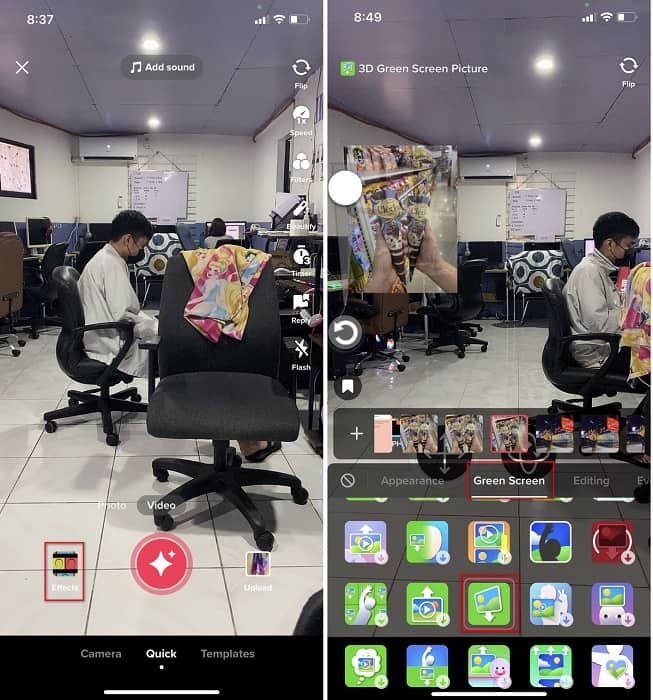
Step 4. Tap the red button to start the recording; if you've done recording, click the same button again to stop it. Press Next then Drafts to not post it yet on your TikTok account.
Část 2. Jak přidat obrázek do videa TikTok pomocí Ultimate Way na Windows a Mac
Want to know the secret and learn how to put a picture in a TikTok video? Not satisfied with the built-in editor Tiktok provides? In that case, you must use the Video Converter Ultimate. If you enjoy doing editing, you can use this tool to add images, effects, filters, and more to your Tiktok videos before posting them on Tiktok.
Pomocí tohoto nástroje můžete vytvořit působivé video, které zapůsobí na ostatní uživatele konečným výstupem. Nástroj si však nemůžete stáhnout do telefonu, protože není podporován. Ale můžete udělat více, pokud máte desktop a tento nástroj. Chcete přidat obrázek do svých videí Tiktok? Postupujte podle níže uvedeného návodu, abyste věděli, jak přidat obrázek do videa Tiktok.
Step 1. You can now directly download the ultimate on your Windows and Mac by clicking the download button below. Next, install it promptly, then run the tool on your system by opening the tool. Before we proceed to the following steps, you'll need to get familiarized with the tool interface first. If you've already gotten familiarized, move to the next step.
Zdarma ke staženíPro Windows 7 nebo novějšíBezpečné stažení
Zdarma ke staženíPro MacOS 10.7 nebo novějšíBezpečné stažení
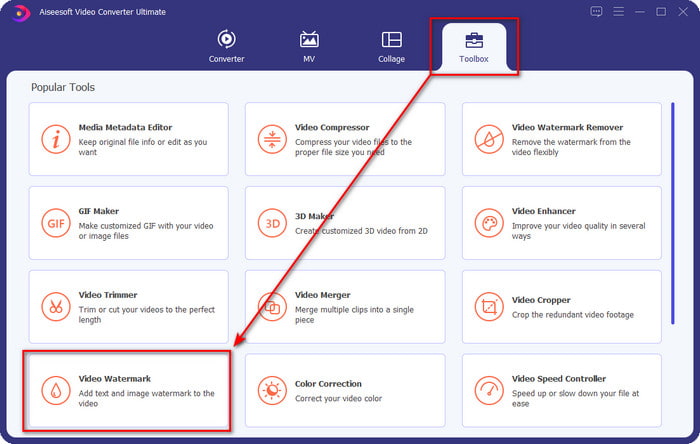
Step 2. Click the Toolbox part and find the Video Watermark.
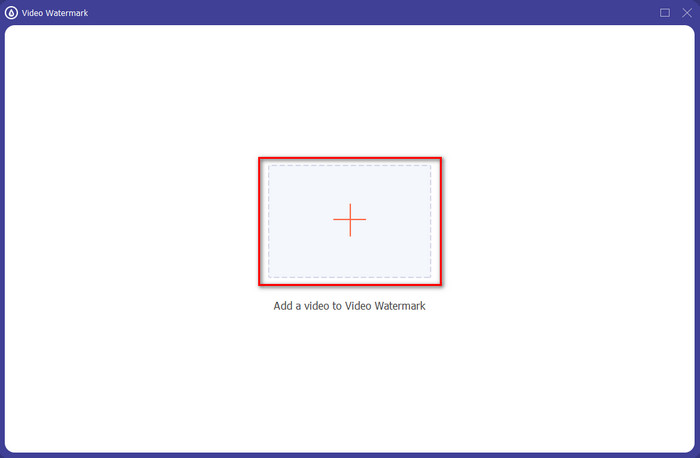
Step 3. Add the video file by clicking the + sign, locate the file on the folder that will show on your screen, click it, and press Open to upload the file.
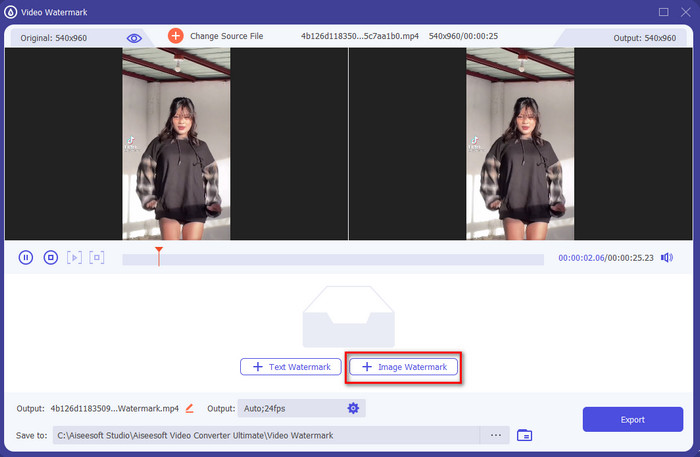
Step 4. On the new window, click the Image Watermark. Another computer folder will show on your screen; find the image you've wanted to add and press Open.
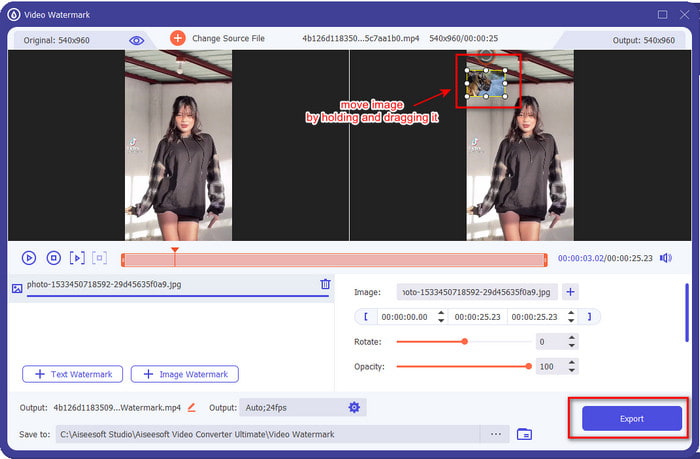
Step 5. Adjust the image size by dragging the frame ratio of the image. Hold and move the image and place it where you want it to be. After all, click the Export button to save the TikTok video with the picture included.
Část 3. Časté dotazy o tom, jak přidat fotografie do videí TikTok
Jak mohu odstranit vodoznak Tiktok?
To learn how to remove the watermark of the Tiktok, you can click and read this article to know the method on how to do it. The details in this post will provide an effective way of removing the watermark of the TikTok on the exported video; no need to worry because it is easy to follow and understand.
Je bezpečné používat TikTok?
Je bezpečné používat TikTok. Některá videa však vyzývají ostatní uživatele, aby prováděli smrtící kousky, které nejsou bezpečné pro jakýkoli věk. Aplikace také nemá šifrování typu end-to-end, takže komunikace mezi příjemcem a odesílatelem není šifrována, nebo je jednoduše chráněna. Kromě toho některé útržky důkazů říkají, že TikTok shromáždil biometrické údaje uživatelů; abych byl konkrétní, krade hlasové otisky a tváře. Nezapomeňte tedy aplikaci používat moudře a nikdy o sobě nepřidávejte příliš mnoho důležitých informací.
Proč se Tiktok stal toxickým?
Kultura, kterou uživatelé Tiktok vytvořili v této generaci, se stala toxickou a někteří uživatelé považují aplikaci pro sdílení videí za nezdravou, zejména pro malé děti. Bylo nevyhnutelné vidět nevhodný obsah, jako jsou předsudky o národnosti člověka, sexismus, standard krásy pro všechny a šikana. Ačkoli je to nevyhnutelné, stále existuje obsah, který dokazuje, že ne všichni uživatelé TikTok jsou jedovatí. A stále věříme, že existuje šance tuto toxicitu změnit a proměnit ji v mírumilovnou a milující komunitu.
Závěr
Now that we know how to add a picture to a Tiktok video, it is time to share your Tiktok videos with images to bring good vibes or unique videos to everyone. However, filming with the picture will limit your movements because the image becomes a blockage on the screen. But wait, don't be sad, because you can film first, transfer it to your computer, and use the Video Converter Ultimate to add the image later. With it, you can do more on your Tiktok videos and make them look outstanding than the other videos. So, what are you waiting for? Download it now on your desktop to start making the ultimate and most impressive Tiktok video ever!
-
 Nejlepší způsob, jak přidat vodoznak do videa ve Photoshopu na Windows a Mac
 Chcete vědět, jak přidat vodoznak do videa ve Photoshopu? V takovém případě vám tento článek poskytne jednu nebo dvě věci, které potřebujete vědět.
-
 3 nejlepší řešení, jak snadno odstranit vodoznak z videí
 Chcete odstranit otravný vodoznak z videa? Na tomto blogu se můžete naučit různé nápady na odstranění vodoznaku z videa.
-
 4 nejlepší způsoby, jak rychle přidat vodoznak do jakéhokoli videa
 Pokud si přečtete tento článek, naučíme se, jak přidat vodoznak do všech videí v systémech Windows, Mac, Online, iOS a Android.
