


 Video Converter Ultimate
 Screen Recorder
 Oprava videa
 Bezpečné stažení
Snadná komprese MP4 videí pro e-maily 5 způsoby [2025]
Odesílání video souborů e-mailem může být někdy kvůli omezením velikosti souborů zahlcující. E-mail obvykle zvládne pouze soubor o velikosti 25 MB na přílohu. Jakákoli příloha, která tuto velikost přesáhne, bude převedena na odkaz na Disk Google. Pokud tedy hledáte způsob, jak tento problém vyřešit, jste na správném místě.
V tomto článku se seznámíte s pěti způsoby, jak snadno komprimovat video pro e‑mail. Díky tomu už při odesílání video souborů e‑mailem nenarazíte na žádné záseky ani problémy. Na co tedy čekáte? Pojďme se do toho pustit!

Část 1. Komprimujte soubor videa pro e-mail pomocí video kompresoru
Kompresi video souboru pro e-mail pomocí video kompresoru lze snadno provést pomocí vhodných a specializovaných nástrojů pro kompresi videa. K dispozici je řada nástrojů pro kompresi videa, z nichž každý nabízí různé úrovně komprese, zachování kvality a snadné použití. Některé nástroje poskytují přednastavené profily pro kompresi vhodnou pro e-maily, zatímco jiné umožňují ruční úpravy pro vyvážení velikosti a kvality. Níže uvádíme tři metody, které můžete vyzkoušet pro kompresi video souboru pro e-mail:
Nejlepší způsob, jak komprimovat video pro e-mail
Nejlepší způsob, jak komprimovat video pro e‑mail, je pomocí FVC doporučeného nástroje Video Converter Ultimate. Tento plnohodnotný převodník videa má v nástrojové sadě funkci kompresoru videa. Když s tímto nástrojem komprimujete video, můžete ho snadno zpracovat. Nástroj má uživatelsky přívětivé rozhraní, které uživatelům umožňuje provést při kompresi videí jen 2–3 kroky. Abyste tento nástroj lépe poznali, podívejte se na jeho funkce níže:
Hlavní funkce:
• Komprimujte velikosti video souborů pro e-maily při zachování vysoké kvality.
• Zajistěte kompatibilitu videa s jakoukoli e-mailovou platformou konverzí formátů.
• Používejte přednastavené profily optimalizované pro e-maily nebo upravte nastavení komprese ručně.
• Dokáže dávkově komprimovat více video souborů.
Nyní, když víte, co FVC dokáže, pojďme se podívat na to, jak ho můžete používat.
Krok 1. Nejprve je třeba nástroj stáhnout a nainstalovat do počítače.
Stáhnout zdarmaPro Windows 7 nebo novějšíBezpečné stažení
Stáhnout zdarmaPro MacOS 10.7 nebo novějšíBezpečné stažení
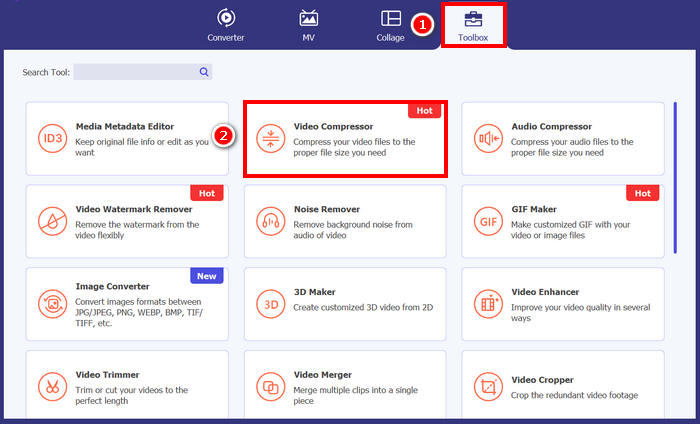
Krok 2. Otevřete nástroj, přejděte do Toolbox a klikněte na Video Compressor. Poté klikněte na tlačítko Red Plus a přidejte video, které chcete komprimovat.
Krok 3. Poté, abyste zkomprimovali velikost video souboru, můžete v možnosti Size jednoduše posunout Slider a upravit tak velikost souboru videa, případně ji ručně zadat do Box. Jakmile skončíte, klikněte na tlačítko Compress.
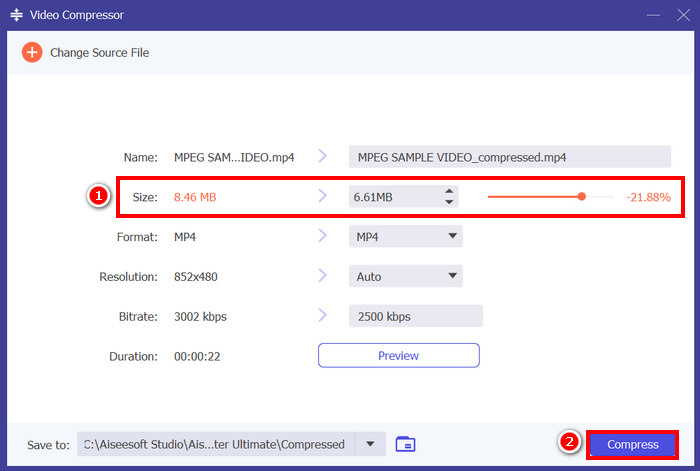
Poznámka: Pokud chcete své video při kompresi ještě vylepšit, můžete upravit i jeho rozlišení, datový tok (bitrate) atd.
FVC si vybral Video Converter Ultimate, což je skutečně jeden z nejlepších nástrojů pro kompresi videa pro e-maily. Je rychlý, snadno se používá a zachovává kvalitu videa. Navíc nabízí další funkce, jako je dávková komprese a převod formátů, což z něj činí všestranné řešení pro práci s video soubory.
Komprese videa pro e-mail [zdarma]
Pokud hledáte bezplatný způsob, jak komprimovat video pro e-mail, můžete použít VLC Media Player. Tento nástroj není jen přehrávač médií, který přehrává a streamuje více médií. Lze jej také použít ke kompresi videí. Postupujte podle následujících kroků:
Krok 1. Nejprve otevřete VLC Media Player; pokud ho nemáte, stáhněte a nainstalujte si ho.
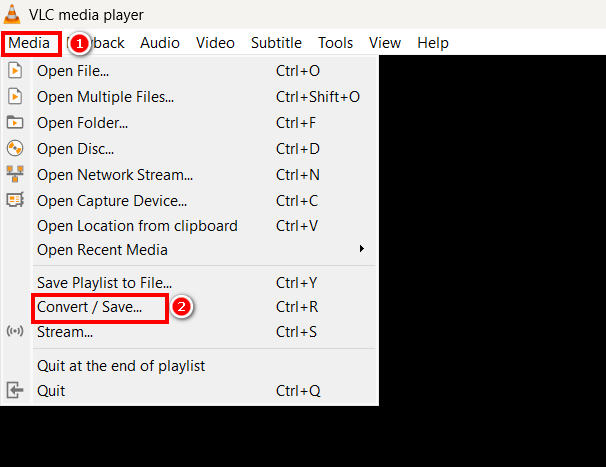
Krok 2. Poté přejděte na kartu Media a dole vyberte možnost Convert/Save.
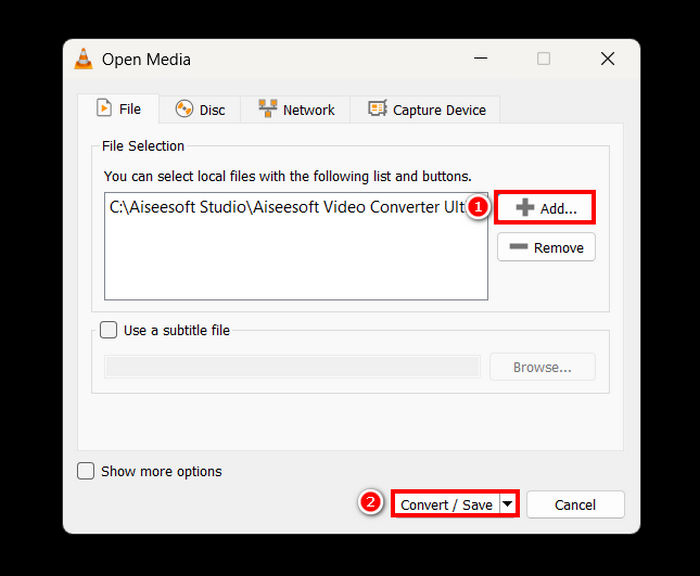
Krok 3. Nyní klikněte na tlačítko Add a importujte video, které chcete komprimovat pro e‑mail, a klikněte na tlačítko Convert/Save.
Krok 4. V novém panelu vyberte možnost Edit Selected Profile a poté přejděte na kartu Video Codec, kde můžete změnit rozlišení, datový tok (bitrate) a snímkovou frekvenci videa.
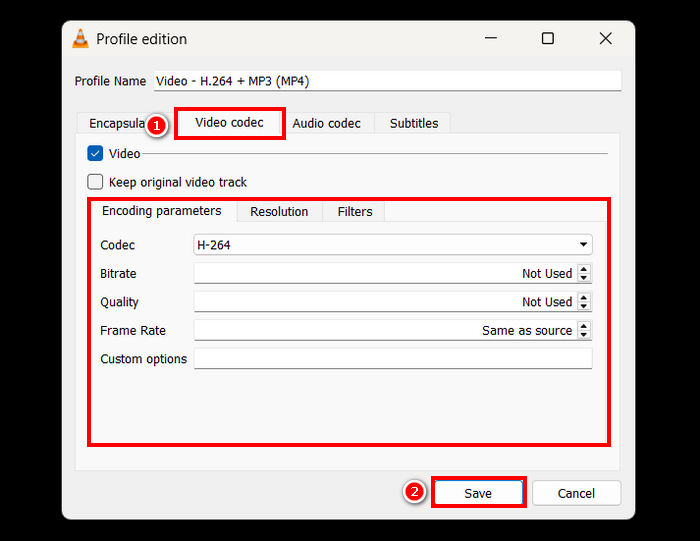
Krok 5. Až vše nastavíte, uložte profil a klikněte na tlačítko Start, čímž spustíte kompresi videa.
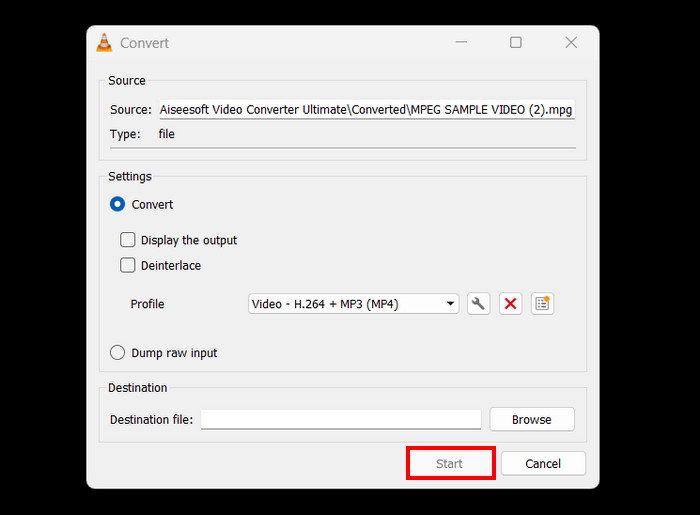
Omezení: Ve srovnání s vyhrazeným kompresorem videa není komprese videí ve VLC přímočará a nenabízí přednastavený profil pro e‑mail. Vyžaduje spíše ruční nastavení, což může být pro mnoho uživatelů matoucí a nehodí se pro ty, kteří potřebují rychlé a přímé řešení.
Jak zkrátit video pro online e-mail
Pokud chcete online metodu, můžete použít Video Compressor od FreeConvert. Tento webový kompresní nástroj na video umožňuje uživatelům komprimovat video pro e‑mail. Rozdíl mezi tímto nástrojem a softwarovou aplikací spočívá v tom, že nevyžaduje instalaci programu, což může být pro některé uživatele pohodlné. Tento nástroj má však omezení, pokud jde o velikost videa, které lze komprimovat. Chcete‑li tento nástroj použít, postupujte podle následujících kroků:
Krok 1. Přejděte na oficiální web FreeConvert. Stačí ve svém internetovém prohlížeči vyhledat FreeConvert Video Compressor.
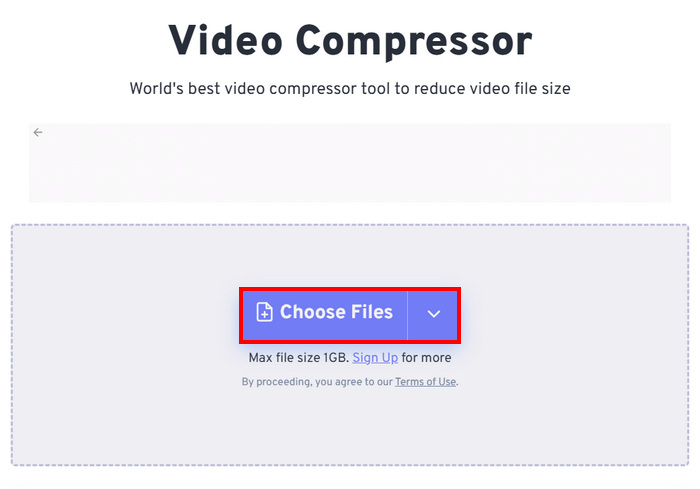
Krok 2. Poté kliknutím na tlačítko Choose Files importujte video, které chcete zkomprimovat pro e‑mail.
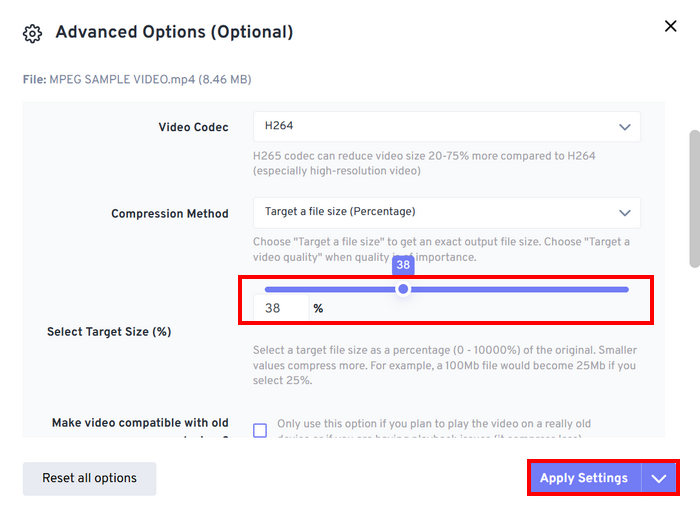
Krok 3. Nyní přejděte do nabídky Advanced Settings, kterou představuje ikona Gear, a zde můžete upravit velikost videa. Posuňte Slider doleva, abyste velikost videa zmenšili. Nakonec pro spuštění komprese videa klikněte na tlačítko Apply Settings button.
Krok 4. Nakonec klikněte na tlačítko Compress Now, čímž spustíte kompresi videa pro e‑mail.
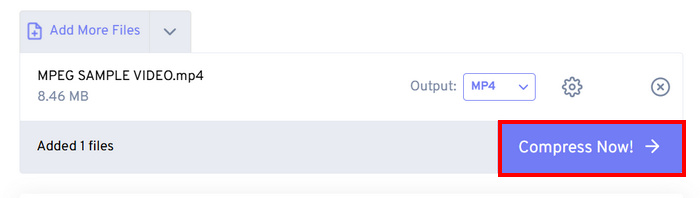
Omezení: Uživatelé mohou komprimovat pouze videa do velikosti 1 GB; jakýkoli soubor, který tuto velikost překročí, vyžaduje předplatné některého z prémiových tarifů. Navíc, protože jde o webový kompresor videa, rychlost kompresního procesu se může lišit v závislosti na připojení k internetu, které uživatel používá.
Část 2. Jak zmenšit velikost videa pro e-mail pomocí ZIP video souboru
Dalším způsobem, jak snadno zmenšit velikost videa pro e-mail, je vytvoření souboru ZIP. Tato metoda funguje dobře pro mírné zmenšení velikosti souboru a seskupení více videí do jedné přílohy. Tuto metodu lze také snadno provést. Tato metoda však není tak efektivní ve srovnání s použitím specializovaných nástrojů pro kompresi videa. Postupujte podle následujících kroků:
Krok 1. Nejprve ve své Knihovně (Library) vyhledejte video, které chcete komprimovat pro e‑mail.
Krok 2. Poté na něj klikněte pravým tlačítkem myši a vyberte možnost Compress to, a následně zvolte ZIP File.
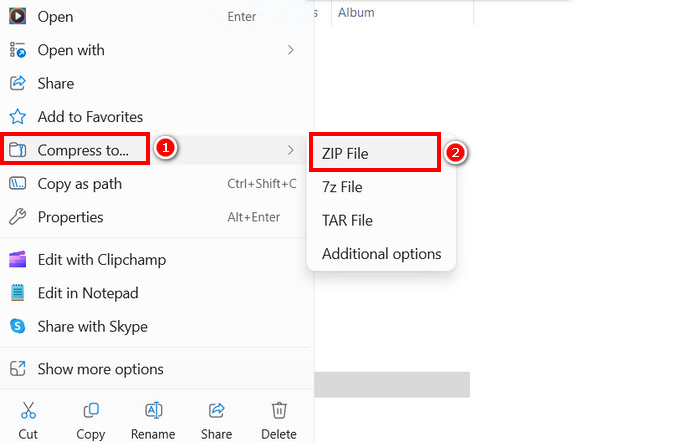
Omezení: Vytvoření souboru ZIP je sice rychlý způsob komprese videí pro e‑mail, ale na rozdíl od nástrojů pro kompresi videa, které mění datový tok, rozlišení nebo formát, nesníží velikost souboru výrazně. Pokud je váš ZIP soubor stále příliš velký, je lepším řešením specializovaný kompresor videa.
Část 3. Jak zmenšit video pro e-mail přes Disk Google
Pro Disk Google není možné přímo komprimovat video tak, jak to dělají specializované video kompresory. Stažením se však video nahrané na disk uloží do souboru ZIP. Tím se velikost videa pro uložení a přenos mírně zmenší.
Poznámka: Tento postup vede jen k minimálnímu zmenšení velikosti a u velkých video souborů nemusí být dostačující.
Jak zmenšit video pro e‑mail přes Google Drive:
Krok 1. V Google Drive nejprve nahrajte videa, která chcete zmenšit.
Krok 2. Poté klikněte pravým tlačítkem na videa, u nichž chcete zmenšit jejich velikost.
Krok 3. Po stažení budou tyto video soubory uloženy v souboru ZIP.
Omezení: Jak už bylo řečeno, Google Drive nemá přímou možnost komprese videí pro e‑mail. Stažení jako ZIP navíc stále není efektivním řešením.
Část 4. Nejčastější dotazy ohledně komprese videa pro e-mail
Jaký je nejlepší způsob, jak komprimovat video pro e-mail?
Nejlepší způsob, jak komprimovat video pro e‑mail, je použití specializovaného kompresoru videa, jako je FVC Video Converter Ultimate. Tento převodník videa je určen ke kompresi různých video souborů, takže uživatelé mohou snadno pracovat s velkými videi při jejich odesílání e‑mailem.
Proč nemohu poslat velký video soubor e-mailem?
Je důležité si uvědomit, že většina e-mailových služeb, včetně Gmailu, má limit velikosti souboru na přílohu 25 MB. Proto se odesílatelé, kteří mají větší soubory, než je nutné, rozhodnou nejprve komprimovat svá videa. To je také důvod, proč je potřeba komprimovat video pro e-maily.
Snižuje komprese videa jeho kvalitu?
Ano, komprese videa pro e-mail může mírně snížit jeho kvalitu, protože v podstatě snižujete rozlišení, bitrate a další parametry kódování, abyste zmenšili velikost souboru. Existují však pokročilé video kompresory, jako je FVC picked Video Converter, které vám umožňují ovládat rozlišení, bitrate a formát, abyste minimalizovali ztrátu kvality.
Mohu komprimovat video pro online e-mail?
Ano. Můžete použít online nástroje, jako je Video Compressor od FreeConvert, ke kompresi videí bez instalace jakéhokoli softwaru. Bezplatné verze však mohou mít omezení velikosti souboru.
Jak odeslat velké video, když komprese není dostatečná?
Pokud komprese nestačí, zvažte nahrání videa na Disk Google, OneDrive nebo Dropbox a sdílení odkazu e-mailem namísto přikládání souboru.
Závěr
Vzhledem ke všem omezením velikosti video souborů u jednotlivých e‑mailových služeb je možnost jejich komprese nezbytností. Pokud jste ve stejné situaci a marně hledáte nástroj, který dokáže komprimovat video pro e‑mail, vyzkoušejte všechny metody uvedené v tomto článku a najděte si tu, která vám nejlépe vyhovuje.
Začněte komprimovat svá videa ještě dnes a odesílejte je bez problémů!
-
 Jak komprimovat video GoPro ze 4K na 1080p (zdarma a online)
 Pokud k natáčení videa používáte kameru GoPro, je obvykle velikost natáčeného videa extrémně velká, což bude obtížné sdílet s ostatními. Tento příspěvek vám tedy ukáže, jak komprimovat video GoPro.
-
 2 způsoby, jak komprimovat video pro YouTube
 Videa na YouTube jsou velká a pomalu se nahrávají? Stačí komprimovat velikost video souboru na menší pro YouTube dvěma způsoby online a na počítači.
-
 Adobe Premiere Compress Video: Věci, které musíte zvážit
 Tento článek obsahuje nejlepší a nejvhodnější metody pro kompresi GIF Premiere. Zjistěte řešení a různé alternativy k Adobe Premiere Compress.
