


 Video Converter Ultimate
 Screen Recorder
 Oprava videa
 Bezpečné stažení
Jak sloučit soubory MPG v počítači
Když se pokusíte zkopírovat film z DVD do počítače, obvykle se uloží ve formátu MPG. Protože jsou zkopírované filmy vždy rozdělené do několika krátkých klipů MPG, možná budete chtít několik filmových klipů ve formátu MPG spojit do jednoho, abyste získali kompletní soubor filmu. V tomto článku vám ukážeme, jak spojit soubory MPG dvěma způsoby.

Část 1. Jak se připojit k souborům MPG pomocí aplikace Video Converter Ultimate
Chcete-li sloučit filmy MPG a upravit je, možná budete potřebovat profesionální software pro připojení videa. Video Converter Ultimate je nejlepší způsob, jak vyřešit váš problém. Díky výkonným funkcím slučování, převodu a úprav videa se můžete bez obav připojit k mnoha souborům MPG a upravit je na svém počítači.
- 1. Připojte se a převeďte různé typy video formátů včetně souborů MPG jedním kliknutím.
- 2. Více funkcí pro úpravu videa MPG včetně ořezávání, rozdělení rotace a přidání vodoznaku a titulků.
- 3. Speciální sada nástrojů, která vám poskytuje vylepšovač videa MPG ke zvýšení kvality videa.
- 4. Přidejte motiv a filtry, které zdobí vaše filmové klipy mpg
Zdarma ke staženíPro Windows 7 nebo novějšíBezpečné stažení
Zdarma ke staženíPro MacOS 10.7 nebo novějšíBezpečné stažení
Krok 1. Stáhněte a nainstalujte Video Converter Ultimate. Zvolte rozhraní Converter. Potom můžete přidat soubory MPG, které chcete sloučit, kliknutím na čtverec Add Files uprostřed rozhraní. Můžete také přetáhnout několik souborů MPG do tohoto čtverce. Podporuje přidání více souborů MPG a jejich sloučení do jednoho.
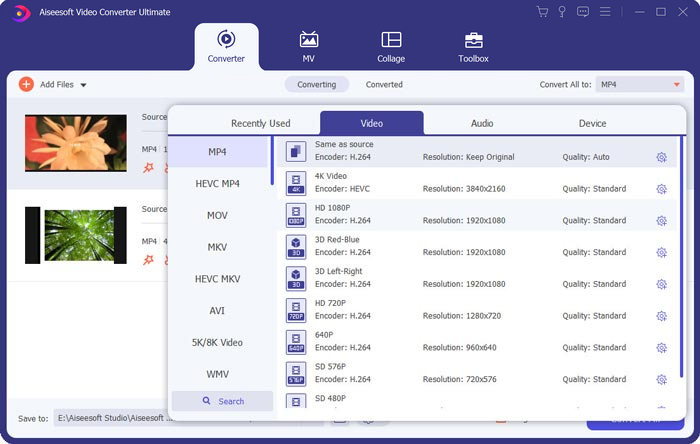
Krok 2. Poté zvolte výstupní videoformát kliknutím na pole Convert All to na pravé straně. V nabídce si můžete vybrat různé typy formátů včetně MP4, MOV, MKV atd. Parametry zvoleného formátu můžete ručně upravit kliknutím na ikonu gear.
Krok 3. Pokud chcete videa upravit, klikněte na ikonu scissor pro otevření editačního rozhraní. Můžete nastavit počáteční a koncový čas videí a oříznout je. Videa MPG na levém panelu jsou seřazena v chronologickém pořadí. Pokud chcete změnit pořadí videí, můžete je přetáhnout a uspořádat v jiném sledu. Video umístěné výše bude ve výsledném sloučeném videu přehráno před videem umístěným níže.
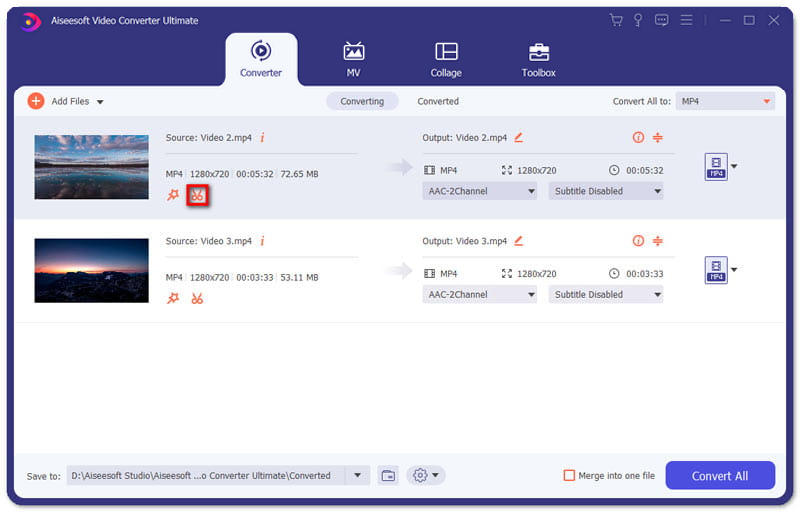
Krok 4. Jakmile úpravy dokončíte, můžete videa sloučit a exportovat finální projekt. Měli byste vědět, že videa budou sloučena v chronologickém pořadí podle jejich sledu v editačním rozhraní. Pro zahájení sloučení zaškrtněte políčko Merge into One File a klikněte na tlačítko Convert All. Po dokončení najdete sloučené video ve složce.
Poté můžete soubory MPG přímo přehrát pomocí přehrávače MPG MPEG.
Část 2. Jak se zdarma připojit k souborům MPG
Pokud chcete sloučit soubory MPG online zdarma, můžete použít Free Online Video Merger. Jednoduché a dobře navržené rozhraní je přívětivé pro všechny uživatele.
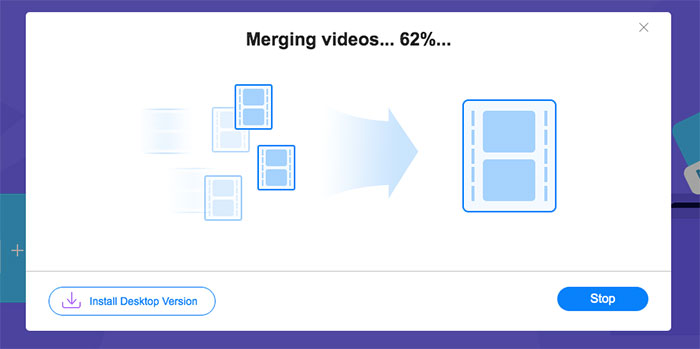
Krok 1. Stáhněte spouštěč a nainstalujte nástroj pro slučování. Potom můžete přidat soubory MPG kliknutím na + v rozhraní. Ve spodní části obrazovky můžete v nabídce upravit rozlišení a formát sloučeného videa. Pořadí videí je chronologické zleva doprava na obrazovce.
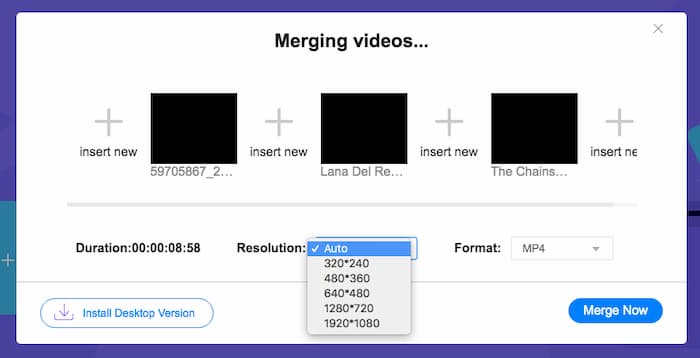
Krok 2. Pro zahájení spojování klikněte na tlačítko Merge Now. Jakmile je slučování dokončeno, najdete video ve výchozí složce Download ve vašem počítači.
Část 3. Časté dotazy týkající se připojení souborů MPG
1. Jak mohu otevřít video soubor MPG?
Video soubor MPG má obvykle verzi MPEG-1 a MPEG-2. MPEG-1 je kompatibilní s většinou běžných přehrávačů médií, jako jsou Windows Media Player a VLC Media Player. MPEG-2 je určen pro DVD videa. Můžete si stáhnout dekodér DVD jiného výrobce a otevřít jej.
2. Co je soubor MPG?
Soubor MPG je divoce používaný video soubor pro ukládání obrazových a zvukových dat. Může ukládat a komprimovat velká zvuková a obrazová data v malé velikosti bez ztráty kvality. Je standardizován skupinou Moving Picture Experts Group (MPEG). MPG se používá k ukládání a distribuci filmů na internetu. Soubory MPG se ukládají jako PS nebo MPEG-PS ve formátu kontejneru streamu programu.
3. Jak mohu sloučit video soubory MPG zdarma?
Na internetu existuje mnoho bezplatných nástrojů pro připojení videa. Výše uvedené bezplatné online sloučení videa je bezplatný nástroj se snadným a jasným rozhraním, který uspokojí váš požadavek.
Závěr
Když chcete spojit několik souborů MPG do jednoho, potřebujete profesionální nástroj pro spojování videí. V tomto článku se dozvíte, jak tyto nástroje používat, abyste dosáhli požadovaného výsledku. Pokud máte jakékoli dotazy k nástrojům na slučování videí nebo se chcete dozvědět více o spojování souborů MPG, zanechte prosím dole komentář.
-
 2 nejlepší způsoby, jak se připojit k videím MXF od Sony X70
 Pokud jste pořídili některá videa MXF ze Sony X70, jaké jsou nejlepší způsoby připojení souborů MXF? Zde jsou 2 účinné metody, jak kombinovat videa s vysokou kvalitou.
-
 2 způsoby, jak komprimovat video pro YouTube
 Videa na YouTube jsou velká a pomalu se nahrávají? Stačí komprimovat velikost video souboru na menší pro YouTube dvěma způsoby online a na počítači.
-
 GIF Player - 5 nejlepších GIF přehrávačů pro Windows PC, Mac, Android a iPhone
 Jaký program otevírá soubory GIF? Jak zobrazím soubory GIF v systému Android? Má iPhone přehrávač GIF pro otevírání souborů GIF? Tento příspěvek za vás sdílí 5 nejlepších hráčů GIF.
