


 Video Converter Ultimate
 Screen Recorder
 Oprava videa
Jak upravovat značky MP3 pomocí nejlepšího editoru značek MP3 [Snadné a efektivní]
Když stojíte před úkolem, jako je úprava MP3 tagů, můžete snadno měnit informace o skladbě pomocí vestavěného editoru hudebních tagů, ale tyto vestavěné nástroje mají svá omezení. Stejně tak při práci s více soubory MP3 nebo jinými audio soubory nemusí být použití vestavěného řešení tím nejlepším krokem. V takovém případě je potřeba použít specializovaný editor audio tagů, který si můžete stáhnout nebo používat přímo na webu, abyste tento problém vyřešili. Abyste nemuseli ztrácet čas hledáním na internetu a měli produktivnější den, níže najdete nejlepší volby, na které se můžete spolehnout – jedná se o dostupné možnosti MP3 tag editorů na dnešním trhu.

Část 1. Nejlepší editor značek MP3 pro snadnou a snadnou úpravu značek MP3 [Vysoce doporučeno]
Video Converter Ultimate je multifunkční editor metadat MP3, který si můžete stáhnout pro Windows nebo Mac. Tento nástroj dokáže problém vyřešit, aniž by vyžadoval od uživatele velké úsilí. Efektivní, že? Přesně to získáte, pokud máte k dispozici nejlepší editor tagů na trhu. Pomocí tohoto nástroje můžete nahrát různé audio i video formáty a poté změnit jejich metadata podle svých potřeb.
Na rozdíl od jiných editorů značek, které si můžete stáhnout nebo použít na webu, dokáže tento nástroj ošetřit různé problémy s videem a zvukem. Máte potíže, protože zvuk zní trochu potichu, synchronizuje se s videem, má nízkou kvalitu zvuku a videa nebo formáty, které nelze přehrát? Překvapivě jsou všechny problémy vyřešeny pomocí tohoto nástroje typu vše v jednom. Chcete vědět, jak používat nejlepší editor značek MP3? Pokud ano, postupujte podle níže uvedených kroků, abyste dosáhli úspěchu během několika minut.
- 1. Je to nejspolehlivější editor metadat, který můžete použít a který se osvědčil s více než miliony uživatelů po celém světě.
- 2. Má několik pokročilých funkcí, které můžete najít na Toolbox, jako je zrychlení videa, zpětný chod, vylepšení, korekce barev a mnoho dalších.
- 3. Je to perfektní volba pro začátečníky a experty týkající se uvedeného úkolu.
- 4. Funguje na obou operačních systémech, Windows i Mac, se stejnými funkcemi a pokročilými funkcemi.
Krok 1. Software si můžete stáhnout kliknutím na tlačítko pro stažení a zvolením vhodné verze. Postupujte podle instalačního procesu a klikněte na Start Now, abyste mohli začít upravovat MP3 tagy.
Zdarma ke staženíPro Windows 7 nebo novějšíBezpečné stažení
Zdarma ke staženíPro MacOS 10.7 nebo novějšíBezpečné stažení
Krok 2. Otevřete Toolbox a v seznamu dostupných editačních funkcí vyhledejte Media Metadata Editor. Nemusíte se obávat, tato funkce je již v nástroji nainstalována, takže nejsou potřeba žádné další zdroje.
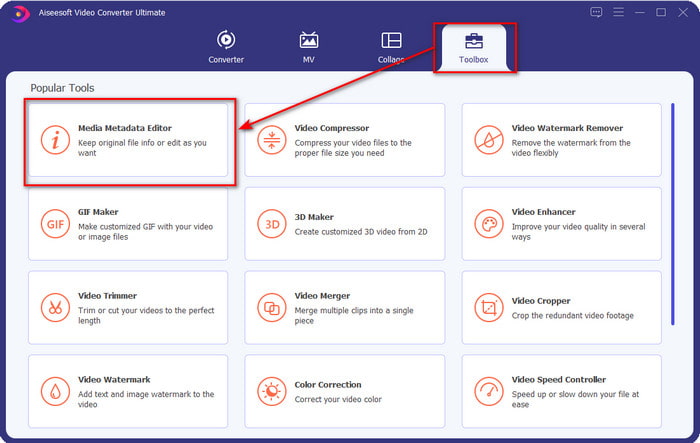
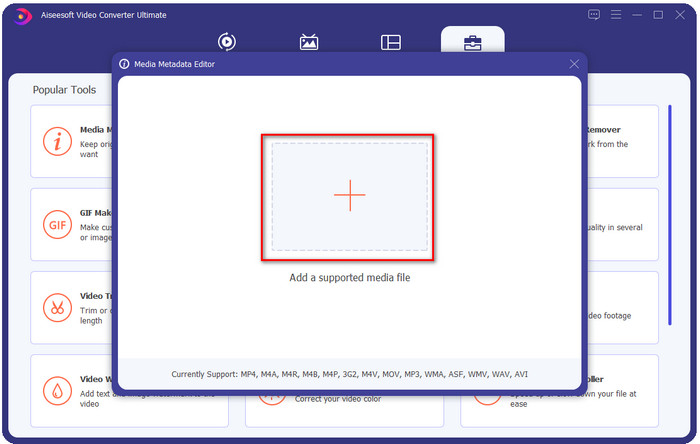
Krok 3. Klikněte na +, vyhledejte v otevřené složce MP3 audio soubor, vyberte jej a klikněte na Open pro pokračování.
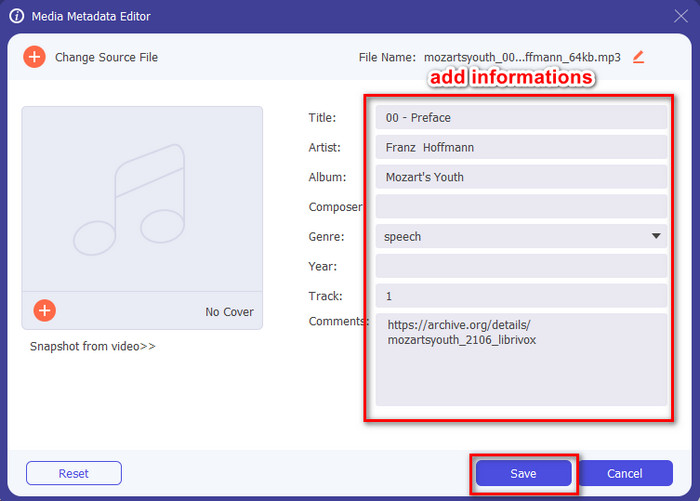
Krok 4. Poté změňte nebo odstraňte tagy souboru v textových polích. Pokud jste s tagy spokojeni, nakonec klikněte na Save. Tento nástroj nevytvoří duplikát vašeho MP3 souboru s metadaty, ale metadata aplikuje přímo na původní soubor.
Související:
Část 2. 4 Volitelné editory značek MP3, které byste měli vědět, Dostupné na Windows, Mac a online
TagMP3
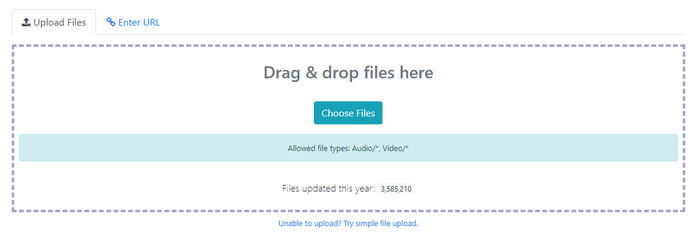
TagMP3 je známý online MP3 tag editor, který můžete kdykoli volně používat na webu. S tímto online nástrojem nemusíte nic stahovat, protože je webový. Dokáže také rozpoznat id3v1 a id3v2 vašich MP3 souborů a následně je aktualizovat do id3v2, i když je id3v1 zastaralé. Přestože má působivé funkce, někteří uživatelé ho považují za méně spolehlivý, protože údajně přidává informace, které s audio souborem nesouvisejí – zatím je to ale jen pověst. Většina uživatelů je však s možnostmi nástroje spokojená a jeho používání je bezpečné a snadné.
Krok 1. Ve svém prohlížeči vyhledejte TagMP3 a otevřete jej.
Krok 2. Nahrajte soubor MP# kliknutím na Choose Now!
Krok 3. Doplňte potřebné informace a klikněte na Done! Generate New Files.
MetaBliss
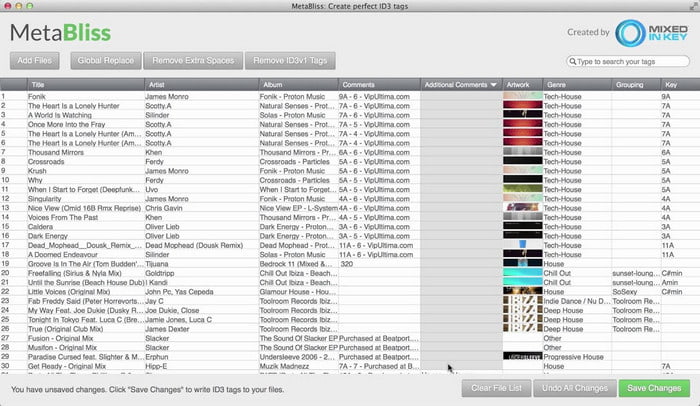
MetaBliss je tabulkový MP3 tag editor dostupný pro Mac. Tento nástroj zvládne úkol v kterýkoli den; bez ohledu na to, kolik souborů vložíte, snadno si s nimi poradí. Pomocí něj můžete hromadně odstraňovat nebo upravovat tagy u MP3 souborů tak, že je všechny vyberete, čímž ušetříte spoustu času. Přestože nástroj podporuje dávkovou editaci, jeho rozhraní je poněkud zastaralé, což znamená, že jeho GUI není tak atraktivní, jak byste čekali. Ale pokud toto pominete, lze jej bez problémů používat, pokud vám nevadí tabulkové rozhraní.
Krok 1. Stáhněte editor tagů na Mac a otevřete jej.
Krok 2. Klikněte na Add Files a vyhledejte MP3 soubor.
Krok 3. Nahraďte informace v jednotlivých sloupcích a kliknutím na Save Changes uložte tagy.
MetaTOGGer
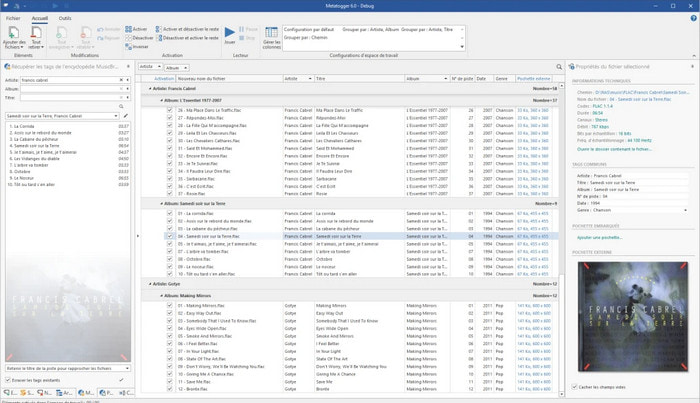
MetaTOGGer je editor tagů pro soubory Speex, OGG, FLAC a MP3 pro Windows 10. S pomocí tohoto nástroje můžete automaticky přidávat metadata na základě dostupných online databází, ale pokud chcete, můžete je zadávat i ručně. Pokud se rozhodnete nástroj používat, očekávejte podobné uživatelské rozhraní jako u Microsoft Office. I když je GUI podobné, naučit se s ním pracovat chvíli trvá a pro jeho použití budete muset stáhnout další komponenty, konkrétně Microsoft .Net 3.5 Framework.
Krok 1. Po instalaci frameworku si stáhněte samotný nástroj.
Krok 2. Přetáhněte soubory do okna nástroje a poté upravte dostupné tagy v seznamu.
Krok 3. Přejděte do nabídky File a klikněte na Save.
Dítě3
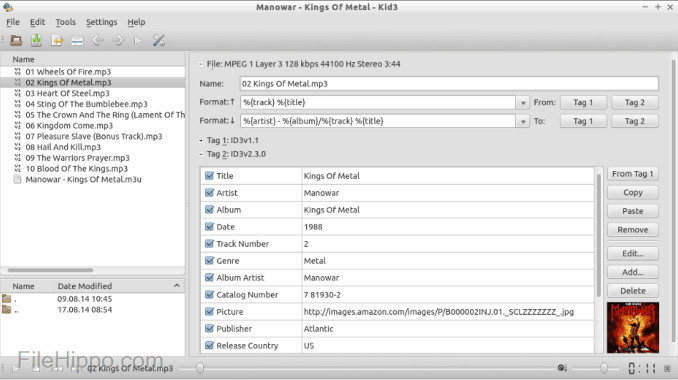
Posledním nástrojem v našem seznamu, který vám pomůže upravovat MP3 metadata v Linuxu a na dalších zařízeních, je Kid3. S tímto nástrojem můžete snadno měnit tagy u různých mediálních souborů. Podobně jako MetaBliss podporuje tento nástroj hromadné tagování, což znamená, že můžete vložit více souborů najednou a upravovat je. Ačkoli je tento nástroj pro daný úkol velmi dobrý, nejlépe funguje v Linuxu ve srovnání s ostatními podporovanými systémy. Také budete muset projít více funkcemi, než budete moci metadata souboru změnit nebo upravit.
Krok 1. Stáhněte software do počítače a klikněte na Add Files.
Krok 2. Klikněte na přidaný MP3 soubor a zvolením Edit změňte metadata audio souboru.
Krok 3. Stiskněte Save a stáhněte soubor s upravenými metadaty.
Část 3. Časté dotazy o editorech metadat MP3
Je bezpečné stáhnout si editor metadat MP3?
Ujistěte se, že web, ze kterého software pochází, je bezpečný. Informace o tomto webu můžete zkontrolovat kliknutím na ikonu zámku ve webovém prohlížeči. Tímto způsobem můžete zkontrolovat, zda je vaše síť bezpečná a zda jsou data daleko od hackerů. Pokud si nejste softwarem jisti, musíte jej okamžitě ukončit a neklikat na nic na dané webové stránce, aby nedošlo k nepředstavitelnému poškození vašeho zařízení.
Jaký je účel úpravy tagů na MP3?
Řekni to takhle; pokud máte správný tag, nebudete se muset starat o uspořádání souboru v knihovně podle tagů vázaných na vaše MP3 soubory. Chcete-li mít uspořádanou knihovnu, je jedním z důvodů, proč musíte upravit značky; druhý může být, že zvukové informace byly aktualizovány, takže je budete muset aktualizovat a mnoho dalších.
Proč moje MP3 nemá tagy?
Existuje mnoho důvodů, proč váš zvukový soubor nemá značky. Pokud je stažen z webu, očekávejte, že jej autor z důvodu ochrany osobních údajů odstraní. Pomocí metadat můžete využít informace o sobě, pokud jste jejich autorem, takže jejich odstranění je skvělá možnost. I když stále existuje mnoho důvodů, potřebujeme tagy, aby se naše MP3 uspořádaly.
Závěr
S těmito nejlepšími editory značek MP3 můžete snadno a efektivně upravit značky ve svých souborech MP3, které jiný editor na trhu nemůže nabídnout. Kroky pro každý nástroj vám také mohou zajistit úspěšné provedení úkolu co nejrychleji. Pokud však porovnáme každý z nich, uvidíme, že konečný nástroj je mnohem spolehlivější a lepší než nástroje na seznamu. Bezdůvodně se to příliš nedoporučuje. Pokud tedy chcete nástroj používat, musíte postupovat podle pokynů, pečlivě si je přečíst a dokončit úkol během mrknutí oka.
-
 5 nejlepších extraktorů metadat dostupných online a offline [2022]
 Na trhu můžete najít několik extraktorů metadat, ale dnes vybíráme pouze pět nejvybranějších extraktorů značek podle publika.
-
 5 nejlepších editorů metadat videa pro rok 2022 [Nezaujatá recenze]
 Chcete zobrazit metadata svého videa? Pokud ano, přečtěte si podrobnosti níže, abyste téma plně pochopili a věděli, který nástroj vám nejlépe vyhovuje.
-
 7 oblíbených editorů hudebních značek na Windows, Mac a mobilních zařízeních
 Hudební značky jsou oblíbené pro uspořádání hudby ve vaší knihovně podle dat uvnitř. Co když to chcete změnit? Přečtěte si podrobnosti níže a dozvíte se více.
