


 Video Converter Ultimate
 Screen Recorder
 Oprava videa
 Bezpečné stažení
3 Odstraňovače vodoznaku Shutterstock pro použití a odstranění vodoznaku z videí
Potřebujete pro svůj projekt vysoce kvalitní, licencovaná videa ze Shutterstocku, ale mají na sobě vodoznak Shutterstock? S pomocí odstraňovače vodoznaku Shutterstock můžete snadno odstranit vodoznak z staženého videa. Profesně i osobně nemáme rádi, když mají naše videa vodoznak, protože to kazí celkový dojem z videa. Pokud se tedy chcete zbavit vodoznaku Shutterstock, pokračujte ve čtení informací a krátkého návodu, které uvádíme v tomto článku.

Část 1. Jak odstranit vodoznak Shutterstock pomocí Ultimate Watermark Remover in Market [Volba editora]
FVC Video Converter Ultimate vám může přesně pomoci a poradit, jak odstranit vodoznak Shutterstock z videa, které jste uložili. Jde o komplexní řešení, které si můžete stáhnout do Windows i Macu a upravovat jím video, například odstraňovat vodoznaky. Přestože je tento software univerzální, jeho vývojář udržuje uživatelskou přívětivost na vysoké úrovni, aby jej mohl používat každý i bez rozsáhlých znalostí.
I s dovednostmi na nízké úrovni můžete mít na konci špičkový výstup, jakmile použijete tento editor. Stále nejste přesvědčeni informacemi, které jsme přidali? Abychom to dokázali, naučíme vás, jak pomocí tohoto video editoru zdarma odstranit vodoznak Shutterstock.
Krok 1. Abyste odstranili vodoznak z videa, které jste stáhli, musíte si nejprve stáhnout tento editor kliknutím na příslušné tlačítko pro stažení pro váš operační systém. Proběhne krátká instalace a poté můžete začít software používat.
Zdarma ke staženíPro Windows 7 nebo novějšíBezpečné stažení
Zdarma ke staženíPro MacOS 10.7 nebo novějšíBezpečné stažení
Krok 2. Dále použijte Video Watermark Remover, tuto funkci najdete v části Toolbox. Jak vidíte, můžete využít více editačních funkcí a nástrojů, abyste upravili své video podle svých představ.
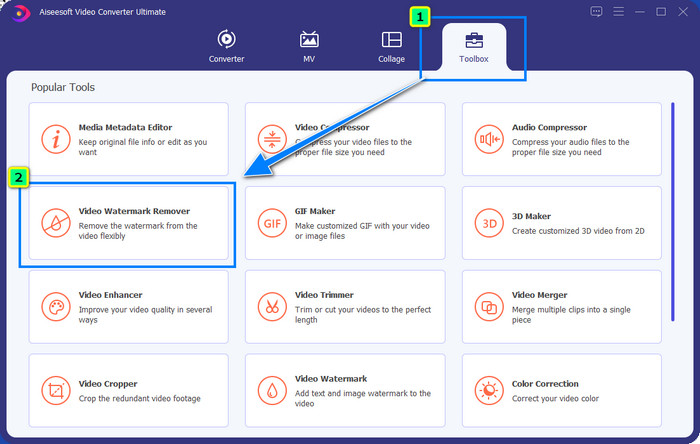
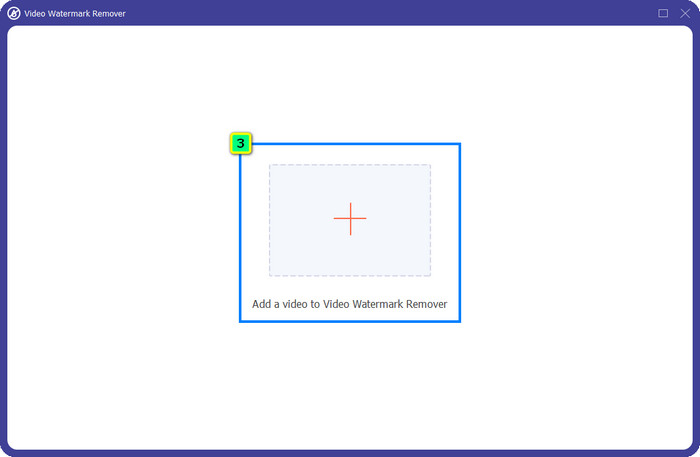
Krok 3. Klikněte na ikonu plus a na obrazovce se zobrazí správce souborů. Vyberte videosoubor s vodoznakem a poté klikněte na Open, abyste jej nahráli.
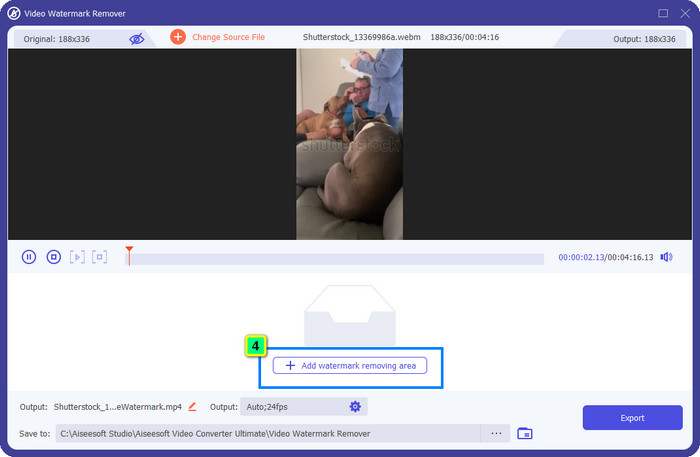
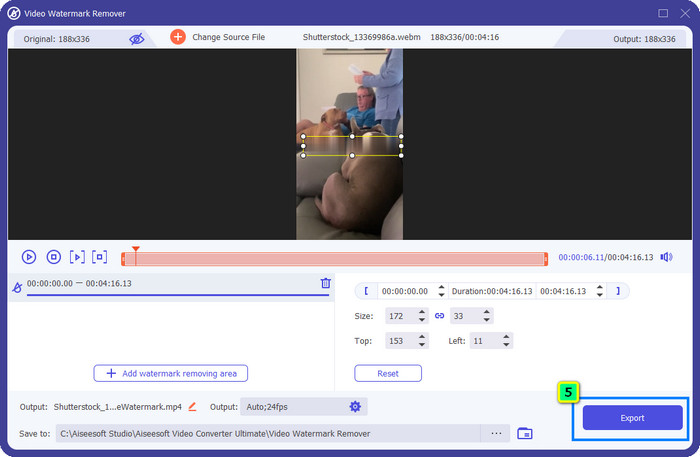
Krok 4. Chcete-li odstranit vodoznak z videa, které jste nahráli, stiskněte Add Watermark Removing Area a objeví se nové okno.
Krok 5. V této části se na videu zobrazí čtvercový tvar; umístěte jej na vodoznak. Můžete jej změnit velikost, táhnout, zmenšit nebo zvětšit tak, aby přesně zakryl vodoznak, který chcete odstranit.
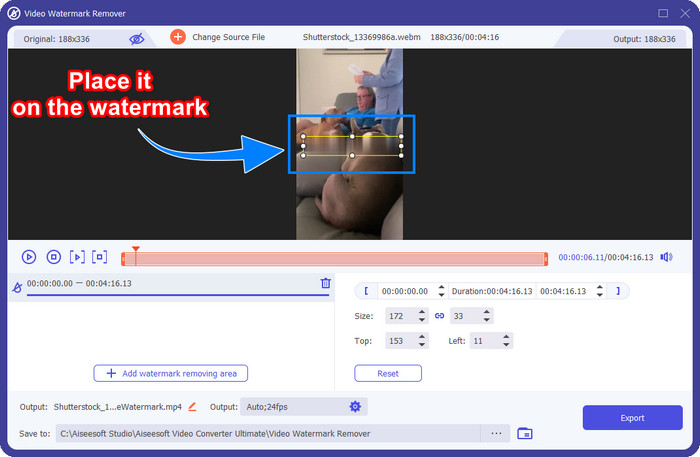
Krok 6. Nakonec klikněte na tlačítko Export, abyste stáhli finální výstup videa ze Shutterstocku do svého zařízení. Nyní si jej můžete užívat bez obav z vodoznaku, protože byl odstraněn.
Část 2. Jak odstranit vodoznak Shutterstock online zdarma
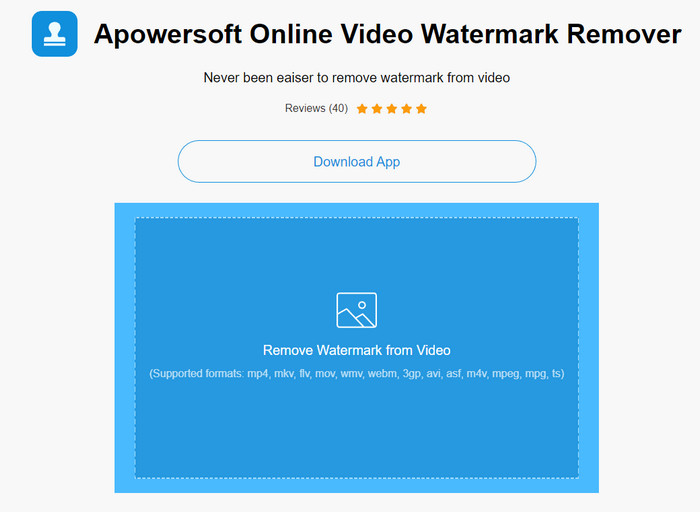
Nelíbí se vám představa stahování odstraňovače vodoznaku do počítače? V tom případě můžete použít Apowersoft Online Watermark Remover a my vám ukážeme, jak odstranit vodoznak Shutterstock online. Je to skvělá volba pro každého, kdo potřebuje odstranit vodoznak z videa nebo z obrázku. Uvádíme jej proto, že je tento software snadno dostupný a kompatibilní s různými operačními systémy, které můžete používat.
Na rozdíl od offline nástrojů budete k jejich používání potřebovat stabilní a robustní připojení k internetu. Jak slibujeme, níže je návod na použití tohoto odstraňovače vodoznaku k odstranění vodoznaku, který na něm Shutterstock zanechává.
Krok 1. Otevřete oficiální web Apowersoft Online Watermark Remover pomocí svého oblíbeného vyhledávače a poté klikněte na tlačítko + vpravo pro nahrání videosouboru.
Krok 2. Umístěte výběrové pole na vodoznak Shutterstock ve videu.
Krok 3. Poté klikněte na Erase, abyste odstranili vodoznak a zobrazili si výsledek.
Krok 4. Stiskněte Download File, abyste získali video ze Shutterstocku bez vodoznaku.
Část 3. Jak odstranit vodoznak Shutterstock pomocí Photoshopu [Placeno]
Mnoho uživatelů se ptá, jak odstranit vodoznak Shutterstock pomocí Photoshopu, a my vám s tím pomůžeme! Adobe Photoshop podporuje profesionální funkci pro odstraňování vodoznaků, kterou si jistě oblíbíte. Stejně jako software představený v tomto článku úkol splní, ale jeho přístup k odstraňování vodoznaků je snímek po snímku. To znamená, že budete muset věnovat čas odstranění vodoznaku v každém snímku videa; čím delší video, tím více snímků. Pokud chcete vědět, jak tento nástroj funguje, přečtěte si níže uvedené podrobné kroky.
Krok 1. Stáhněte si aplikaci do počítače a klikněte na File. V nabídce zvolte Open a nahrajte video uložené ve vašem počítači.
Krok 2. Vlevo vyberte Magic Wand Tool a klikněte na vodoznak, který chcete odstranit. Tato funkce automaticky označí vodoznak v daném snímku.
Krok 3. Přejděte na Edit a po označení vodoznaku stiskněte Content-Aware Fill.
Krok 4. Po otevření Content-Aware Fill se vodoznak, který jste vybrali, automaticky odstraní, poté stiskněte OK.
Další čtení:
Snadné metody, jak odstranit vodoznak Shootproof
Jak bez námahy odstranit vodoznak Bandicam [3 účinné způsoby]
Část 4. Často kladené otázky o tom, jak odstranit vodoznak Shutterstock
Jak odstranit vodoznak Shutterstock bez Photoshopu?
K odstranění Shutterphoto vázaného na vaše video můžete použít FVC Video Converter Ultimate. Má výkonnou gumu vodoznaků, kterou byste rádi vyzkoušeli. Postupujte podle kroků, které přidáme v tomto článku, abyste to udělali stejně efektivně jako Photoshop.
Bude oříznutí vodoznaku Shutterstock fungovat na videu?
Pokud chcete změnit velikost videa změnou rozměru, můžete video oříznout pomocí několika video editorů online i offline. Vzhledem k tomu, že vodoznak Shutterstock je uprostřed, je lepší nepoužívat funkce oříznutí. Četné odstraňovače vodoznaků jsou zde, aby vám pomohly; můžete si přečíst a zkopírovat výukový program, který přidáváme, abyste jej mohli efektivně vymazat, aniž byste na něm zanechali šmouhu.
Je legální odstranit vodoznak Shutterstock?
Odstranění vodoznaku Shutterstock není legální, ale pokud jej chcete použít pro nekomerční účely, můžete to udělat pomocí odstraňovače vodoznaku. Je lepší zakoupit fotografii, kterou chcete, na Shutterstock, pokud ji budete používat pro komerční účely; i když by vás to stálo, alespoň vám to umožní mít zákonná práva jej používat.
Závěr
Nyní už víte, jak odstranit vodoznak Shutterstock pomocí softwaru uvedeného v tomto článku. Který software tedy upřednostňujete – placený, bezplatný online, nebo ultimátní řešení? Ať už si vyberete cokoli, můžete získat fotografii ze Shutterstocku bez produktového loga. Pokud byste se ale zeptali nás, co použít, bez váhání bychom zvolili FVC Video Converter Ultimate, protože při dokončení úkolu odvádí nejuspokojivější práci. Přestože jde o výkonný nástroj pro odstranění vodoznaků, stále se snadno používá. Pokud tedy chcete tento software vyzkoušet, můžete kliknout na tlačítko pro stažení a nainstalovat si jej do svého počítače.
-
 Nejlepší nástroje pro odstranění vodoznaku z exportovaných videí Renderforest
 K odstranění vodoznaku z Renderforest budete potřebovat odstraňovač vodoznaku na vašem zařízení, všechny nástroje, které můžete použít, jsou zde.
-
 Snadné kroky, jak odstranit vodoznak jezdce WOW [Vyřešeno]
 WOW Slider je aplikace pro vytváření fantastické prezentace. Na svůj výstup však vkládá vodoznaky. Níže si přečtěte, jak odstranit vodoznak WOW Slider.
-
 Jak se zdarma zbavit vodoznaku Power Director [Dokončit]
 Jak se zbavit vodoznaku Power Director zdarma? Nejlepší nástroje k odstranění vodoznaku jsou zde, takže se je naučte čtením tohoto.
