


 Video Converter Ultimate
 Screen Recorder
 Oprava videa
 Bezpečné stažení
Nejlepší způsoby, jak odstranit logo VideoScribe z videa
Chcete se naučit, jak odstranit logo VideoScribe ze svých videí? Někdy se ve videích setkáte s logem. Tomu se nelze vyhnout, zvlášť když chce vlastník videa svá videa chránit a propagovat svou značku. S logem se můžete setkat také při používání bezplatné verze určité aplikace. Nejlepším příkladem je aplikace VideoScribe. Pokud používáte její bezplatnou verzi, vaše video bude mít logo VideoScribe, dokud si aplikaci nekoupíte. Než k tomu ale dojde, můžete použít jiné bezplatné programy, které logo z videí odstraní. Přečtěte si tento článek, abyste zjistili, jak logo odstranit, aniž byste museli cokoli kupovat.

Část 1: Jak odstranit logo VideScribe z videa offline
Pokud chcete logo VideoScribe z videí odstranit offline, můžete použít Video Converter Ultimate. Tato aplikace vám pomůže logo VideoScribe z vašich videí odstranit snadno a rychle. Tento software můžete také použít k úpravám videí bez ztráty kvality. Kromě toho má jednoduché rozhraní a poskytuje vysoce kvalitní výstup. Video Converter Ultimate je k dispozici pro Mac i Windows. Přestože má mnoho funkcí, je stále vhodný i pro začátečníky. Aplikace podporuje mnoho formátů souborů, jako jsou FLV, MOV, MP4, MTS, DivX, XviD a mnoho dalších. Kromě toho tato aplikace nabízí řadu editačních nástrojů, kterými můžete svá videa vylepšit, například vylepšení obrazu, ořezávání, střih, korekci barev, otáčení videa a mnoho dalšího. Video Converter Ultimate vám také umožní dvěma způsoby odstranit logo VideoScribe z vašich videí.
Použití Video Watermark Remover
Krok 1: Klikněte na tlačítko pro stažení níže a stáhněte si Video Converter Ultimate do Windows nebo Macu. Poté software nainstalujte do zařízení a spusťte aplikaci.
Zdarma ke staženíPro Windows 7 nebo novějšíBezpečné stažení
Zdarma ke staženíPro MacOS 10.7 nebo novějšíBezpečné stažení
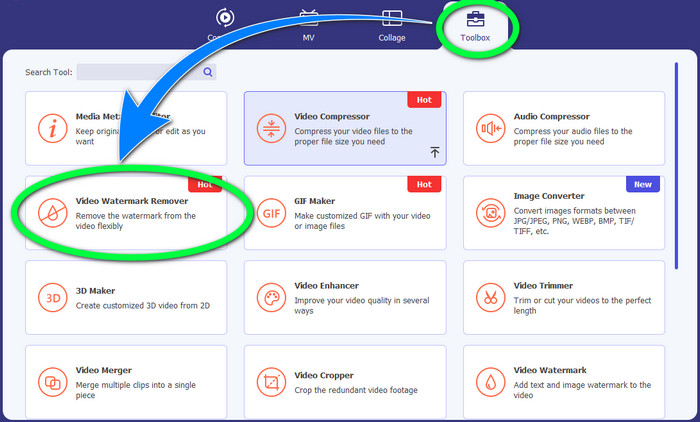
Krok 2: Poté přejděte na panel Toolbox a klikněte na tlačítko Video Watermark Remover. Na obrazovce se objeví nové rozhraní.
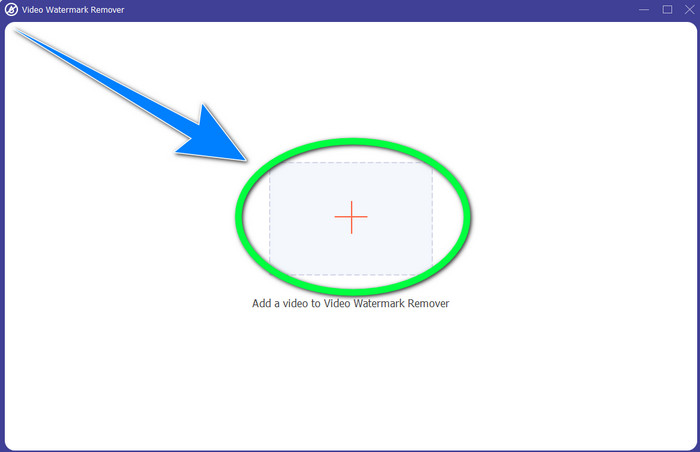
Krok 3: Kliknutím na tlačítko + importujte videosoubor s logem VideoScribe, které chcete odstranit.
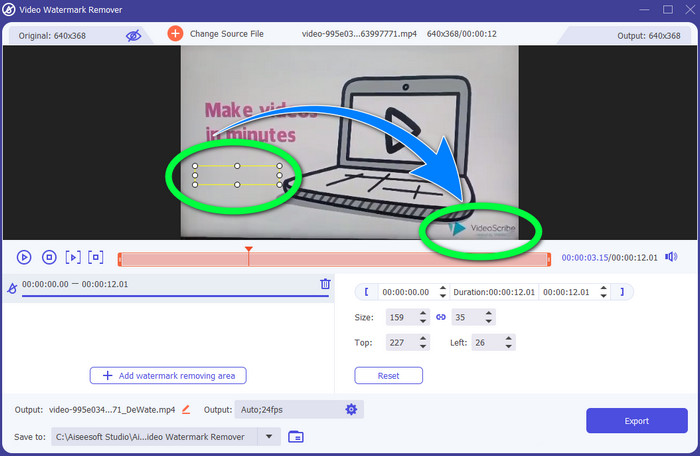
Krok 4: Po dokončení importu videa klikněte na Add Watermark Removing Area a umístěte malý výběrový rámeček na logo. Velikost rámečku můžete upravit.
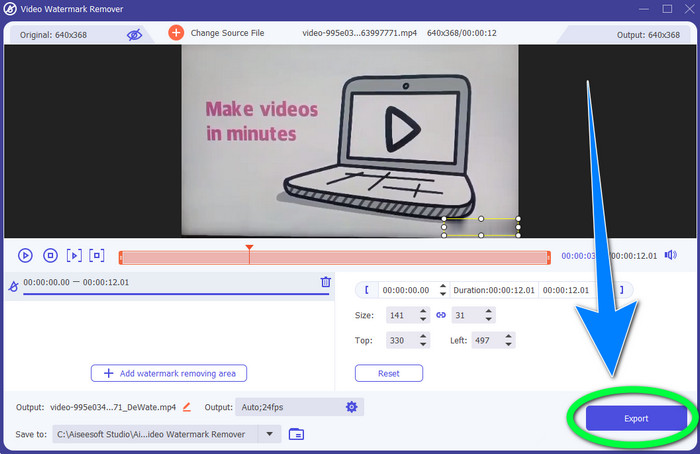
Krok 5: V posledním kroku klikněte na tlačítko Export, abyste mohli video uložit a logo se v něm již nezobrazovalo.
Použití funkce Video Cropper
Krok 1: Nástroj pro ořez je další možností, jak logo VideoScribe odstranit. V části Toolbox klikněte na tlačítko Video Cropper.
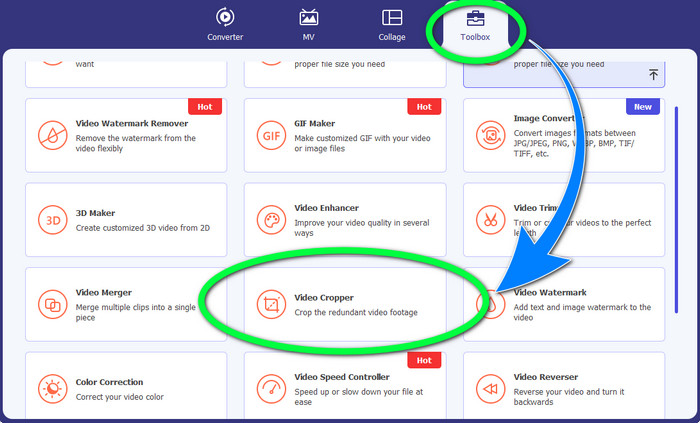
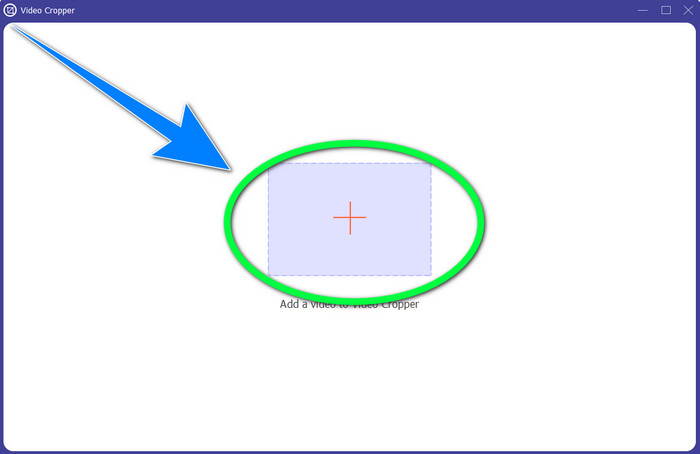
Krok 2: Na obrazovce se objeví nové rozhraní. Vyberte tlačítko se symbolem + a vložte své video s logem VideoScribe.
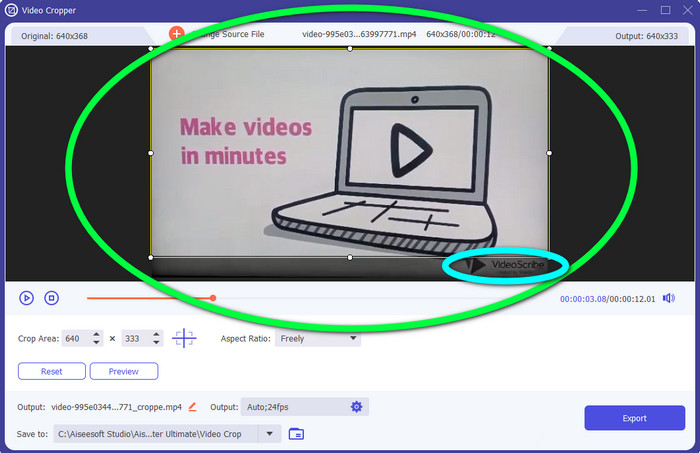
Krok 3: Nástroj pro ořez vám umožní oříznout okraj videa. Pokud se logo nachází na okraji videa, můžete tento okraj odříznout a logo tak odstranit.
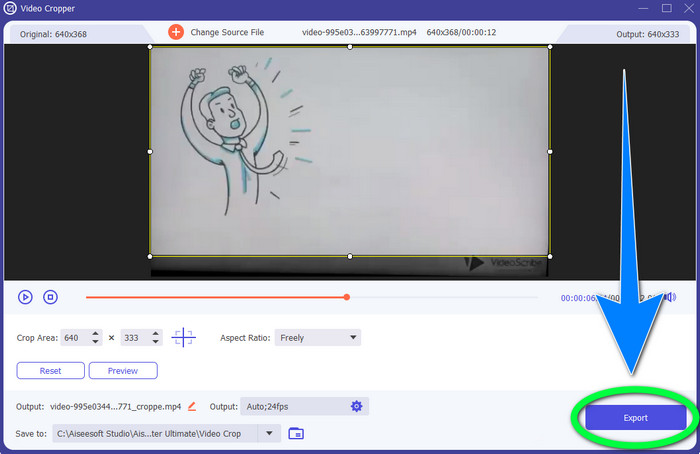
Krok 4: Pokud máte pocit, že jste logo VideoScribe již odstranili, klikněte na tlačítko Export a uložte finální video do svého zařízení.
Část 2: Jak odstranit logo VideoScribe z Video Online
Použití BeeCut-Online Watermark Remover
Chcete logo VideoScribe ze svých videí odstranit online? BeeCut-Online Watermark Remover je jedním z úžasných a užitečných online nástrojů, které můžete využít. Tento online nástroj vám pomůže odstranit rušivé objekty z videí, jako jsou loga, vodoznaky, texty, datová razítka a další. Díky jednoduchému rozhraní tak můžete logo VideoScribe z videí odstranit bez námahy. BeeCut-Online Watermark Remover navíc podporuje řadu formátů souborů, jako jsou FLV, MOV, MP4, WebM, ASF, AVI, 3GP, MPG a další. Pomocí tohoto nástroje můžete také odstraňovat rušivé prvky z obrázků. Bohužel se jedná o nástroj závislý na internetu, což znamená, že jej nemůžete používat bez přístupu k internetu nebo bez internetového připojení. Co se týče procesu odstraňování, může být někdy časově náročný, a to podle toho, zda máte rychlé nebo pomalé připojení. Níže jsme pro vás připravili postupné kroky.
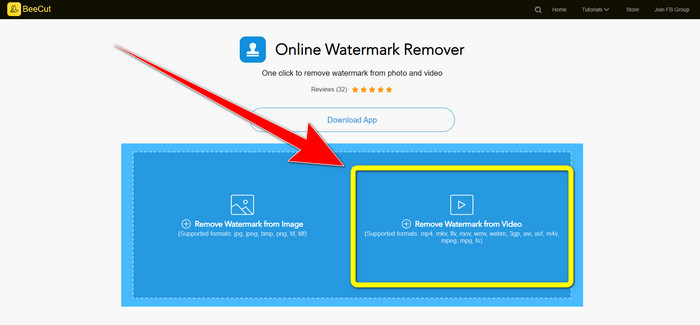
Krok 1: Přejděte na webové stránky BeeCut-Online Watermark Remover. Klikněte na tlačítko Remove Watermark from Video a připojte své video s logem VideoScribe.
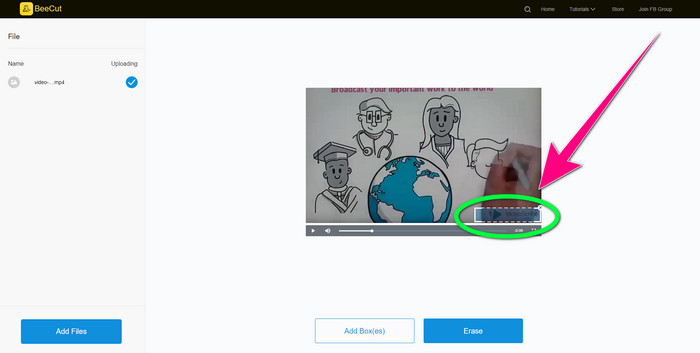
Krok 2: Po přidání videa použijte malý rámeček, který vidíte ve videu, a přetáhněte jej tak, aby zakryl logo.
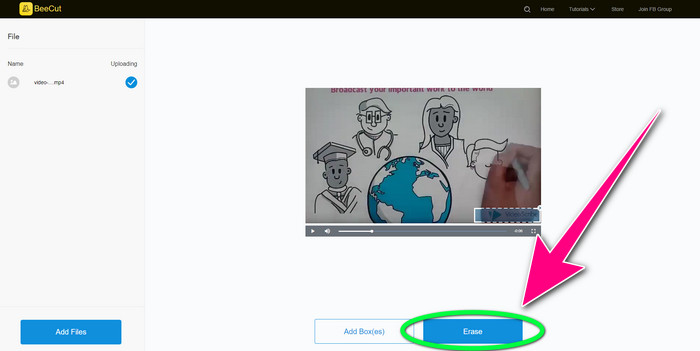
Krok 3: Jakmile logo malým rámečkem zakryjete, klikněte na tlačítko Erase, abyste video uložili a stáhli bez loga VideoScribe.
Použití Video Watermark Remover Online
Video Watermark Remover Online je další online nástroj, který můžete použít k odstranění loga VideoScribe z vašich videí. Má jednoduché rozhraní a je vhodný pro začátečníky. Kromě toho můžete odstranit loga ze svých videí bez ztráty kvality, což je skvělé. Tento online nástroj má však v bezplatné verzi omezené funkce. Můžete odstranit loga pouze z 5 videí a nemůžete je exportovat do jiných formátů souborů. A protože jde o online aplikaci, bez internetového připojení ji nepoužijete. Nástroj také někdy nefunguje správně. Pokud se chcete naučit, jak odstraňovat loga ze svých videí, postupujte podle jednoduchých kroků níže.
Krok 1: Přejděte na webové stránky Video Watermark Remover Online. Klikněte na tlačítko Click or Drag Videos Here a vložte své video s logem VideoScribe.

Krok 2: Klikněte na tlačítko Remove Watermark a vyčkejte na dokončení procesu. Poté můžete své video uložit.
Část 3: Nejčastější dotazy k odstranění loga VideoScribe z videa
Mohu důvěřovat online nástrojům pro odstranění log z mých videí?
Ano můžeš. Online nástroje jsou bezpečné a mohou zabezpečit váš video soubor. Některé nástroje mohou po procesu automaticky smazat vaše soubory, takže se nemusíte bát. Ne všechny online nástroje jsou však stejné, takže stále musíte hledat recenze, abyste věděli, zda můžete konkrétnímu nástroji důvěřovat.
Jak se zbavíte log z videa?
Pokud se chcete loga zbavit, stáhněte si Video Converter Ultimate do počítače nebo Macu. Můžete použít odstraňovač vodoznaku videa nebo nástroj pro ořezávání videa. Tyto dva způsoby vám mohou pomoci zbavit se loga z vašeho videa.
Mohu odstranit logo VideoScribe bez předplatného?
Ano, samozřejmě! Logo VideoScribe můžete odstranit pomocí Video Converter Ultimate. K odstranění loga si tuto aplikaci nemusíte kupovat, protože je zdarma.
Závěr
Tento článek vám poskytl informace o odstranění loga VideoScribe z videa pomocí stažitelného programu i online nástrojů. Pokud ale chcete logo z videí odstranit rychle a bez námahy, můžete použít Video Converter Ultimate.
-
 3 z nejnovějších odstraňovačů vodoznaků Shutterstock, které budete kdy potřebovat
 Nelíbí se vám vodoznak Shutterstock připojený k exportovanému videu? K účinnému vymazání můžete použít odstraňovač vodoznaku Shutterstock.
-
 Jak odstranit Powtoon vodoznak pomocí 4 účinných metod
 Přečtěte si tento článek a zjistěte, jak odstranit vodoznak Powtoon pomocí nejlepších nástrojů, které jsme zde uvedli, a tutoriálu.
-
 Recenze odstraňovače vodoznaků Apowersoft – funkce, výhody a nevýhody a ceny
 Apowersoft Watermark Remover je jedním z nejlepších odstraňování vodoznaků, který podporuje online i offline, kliknutím na toto se dozvíte více!
