


 Video Converter Ultimate
 Screen Recorder
 Oprava videa
Hluboké porozumění 5 dostupným editorům zpomaleného videa
Máte rádi sledování rychlých úderných sportů, jako jsou závody, box, baseball, volejbal a další? Všechny tyto sporty potřebují vysokorychlostní kameru jen kvůli analýze pohybu. Pokud tedy chcete analyzovat každý pohyb každého sportovce, zkuste si přečíst o nejlepším tvůrci zpomalených videí, který můžete použít. Navíc s pomocí nástroje níže nebudete potřebovat žádné další vybavení kromě stolního počítače, internetu nebo telefonu. Jak budeme pokračovat, pozorně si přečtěte popis nástrojů a vyberte si ten, který je pro vás nejvhodnější.

Část 1. 3 Nejlepší Slow-Motion Video Maker pro Windows PC, Mac a online
1. Video Converter Ultimate
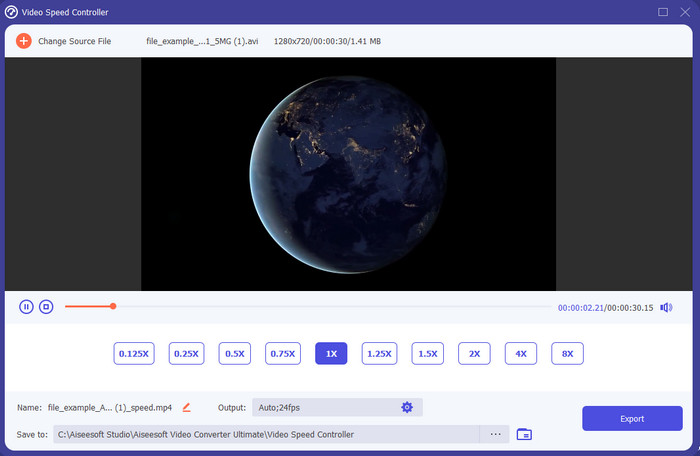
Chcete vědět, který z editorů zpomalených videí je nejlepší pro změnu přehrávání na zpomalený záběr? Pak zkuste použít Video Converter Ultimate, protože tento nástroj není jen nejlepší, ale přímo výjimečný. Tento nástroj již nabízí mnoho pokročilých funkcí, které budete chtít používat, i když nejste profesionál v oblasti střihu. A i když profesionál jste, tento software je nejlepší volbou bez ohledu na úroveň vašich editačních dovedností. Kromě toho můžete na své video velmi rychle přidat efekty zpomalení, aniž byste museli číst manuál nebo sledovat návody, jak na to. Protože nástroj nabízí mnohem jednodušší pokyny než nástroj uvedený níže. Ačkoli je potřeba software před používáním zaplatit, jeho cena není nijak zvlášť vysoká. Pokud se o tomto nástroji chcete dozvědět více, přečtěte si klíčové funkce níže.
Klíčové vlastnosti Video Converter Ultimate:
◆ Pokročilá aplikace pro tvorbu zpomalených videí se základními pokyny.
◆ Uživatelsky přívětivé rozhraní nástroje.
◆ Nastavte rychlost videa snadno na ovladači rychlosti videa.
◆ Podporuje více než 200+ video a audio formátů.
◆ Lze jej stáhnout a používat v operačních systémech PC a Mac.
Zdarma ke staženíPro Windows 7 nebo novějšíBezpečné stažení
Zdarma ke staženíPro MacOS 10.7 nebo novějšíBezpečné stažení
2. Boris Continuum Time Unit
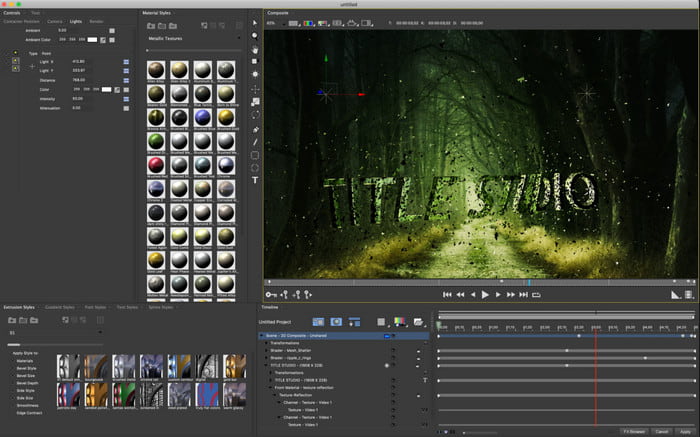
Boris Continuum Time Unit je nejlepší volbou, pokud chcete mít robustní aplikaci pro tvorbu zpomalených videí. Neexistuje jiný nástroj, který by dokázal to, co tento, a poskytl tak profesionální výstup. Dále má tento nástroj špičkové detailní editační funkce, které si určitě budete chtít vyzkoušet. Přestože je tento nástroj lepší než ostatní, je doslova velmi drahý. Také pokud jej chcete vyzkoušet, musíte mít výkonný stolní počítač, protože na starších počítačích jej nebudete moci používat.
Klady
- Nejlepší nástroj k provádění náročných úprav.
- Je kompatibilní se všemi platformami.
- Rozhraní nástroje vypadá spíše jako profesionální nástroj.
Nevýhody
- Tento software je v tomto zápisu nejdražší.
- Potřebuje vysoce kvalitní systémovou jednotku.
- Není to nejlepší volba pro začátečníky, kteří nemají znalosti o úpravách.
3. VEED.IO
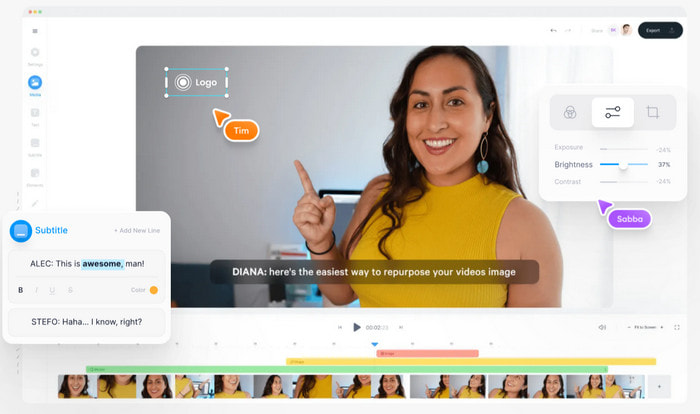
Pokud nechcete utratit ani korunu a máte přístup k internetu, zkuste využít VEED.IO. Jedná se o nejlepší software pro tvorbu zpomalených videí online, protože je jednoduchý a snadno dostupný. Celkové rozhraní nástroje je velmi přehledné s jasnými, přímočarými pokyny, takže je velmi pohodlný pro každého. Můžete však nahrávat pouze soubory menší než 50 MB, a pokud chcete přidat soubor s větší velikostí, nástroj po vás bude požadovat upgrade. A pokud si nástroj nezakoupíte, počítejte s tím, že výsledné video bude mít vodoznak.
Klady
- Může být snadno dostupný pro každého, kdo má připojení k internetu.
- Žádné otravné reklamy na webu.
- Snadno se s nimi vypořádají nováčci v úpravě.
Nevýhody
- Funkce nástroje jsou u bezplatné verze nástroje velmi omezené.
- Závislá na internetu. Pokud je tedy váš internet pomalý, očekávejte pomalé tempo nahrávání, stahování a úprav. K tomuto nástroji také nemáte přístup, pokud nemáte připojení k internetu.
Část 2. 2 nejlepší aplikace pro zpomalené video pro Android a iOS
1 SloPro
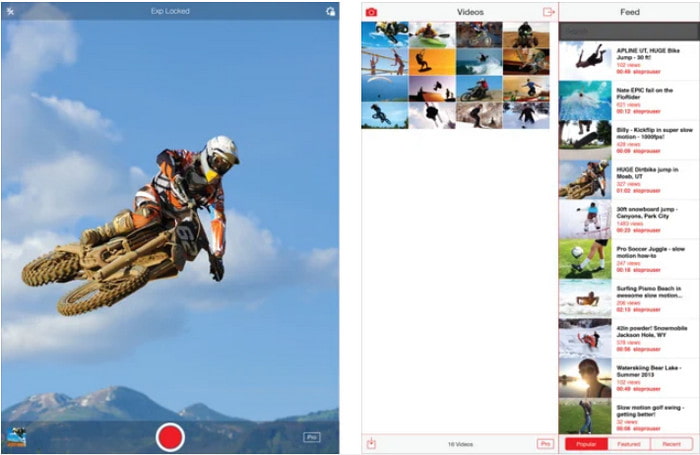
SloPro je nejlepší aplikace pro zpomalená videa, kterou si můžete zdarma stáhnout na iOS. Aplikace dokáže přehrávat zpomalené záběry až do 500 až 1000 fps. Dále můžete video upravovat z rychlého na zpomalené přehrávání nebo naopak. Přestože může být tento nástroj skvělou volbou, má stále mnoho nevýhod. Například video výstup se uloží do galerie aplikace, a ne do filmového pásu (Camera Roll). Také pokud se pokusíte použít 1000 fps, video podle uživatelů, kteří to již zkoušeli, začne být chybové a zasekávat se. Přesto je tento nástroj stále skvělý, protože je zdarma a zpomalení videa lze v něm provést velmi snadno.
Klady
- Nejlepší zpomalené přehrávání, které můžete zdarma používat na iOS.
- Už dostává spravedlivé hodnocení a 3,3 hvězdičky.
- Jednoduché a snadné použití.
Nevýhody
- Konečný výstup se přímo neukládá do galerie.
- Všechna videa uložená v galerii SloPro jsou náhodná a nejsou správně kategorizována.
- Pokud používáte 1000 fps, pak očekávejte chybný video výstup.
2. Slow Motion Video Maker
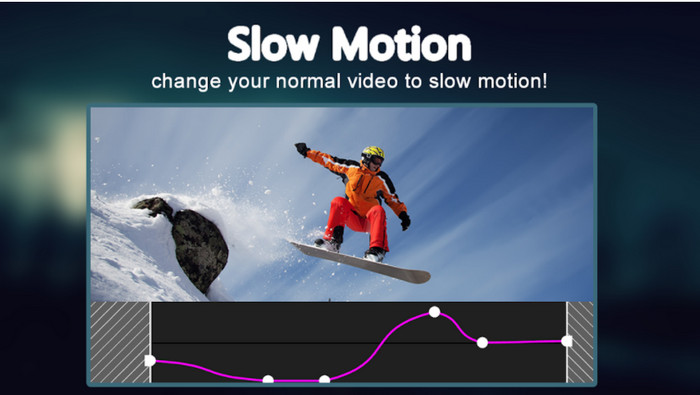
Jedním z nejlepších tvůrců zpomalených videí, které si můžete zdarma stáhnout do telefonu s Androidem, je Slow Motion Video Maker. S pomocí této aplikace můžete své video snadno přehrávat rychle vpřed nebo ve zpomaleném režimu. Aplikace má ale spoustu obtěžujících reklam, které vyskakují odnikud. Také zpomalené přehrávání můžete nastavit pouze na 0,5násobek rychlosti. Celkově je však aplikace skvělá pro zpomalení videa na Androidu, ale reklamy její použitelnost výrazně snižují.
Klady
- Aplikace je zdarma ke stažení v obchodě Play.
- Skvěle se hodí pro plynulé zpomalení videa.
- Aplikace se snadno spravuje.
Nevýhody
- Má spoustu otravných reklam, které se objevují z ničeho nic.
- Stažení videa může trvat hodně času, protože nezrychluje zpracování.
Část 3. Nejčastější dotazy o aplikaci Slow Motion Video Maker
Jaká je role FPS?
Používá se k výpočtu po sobě jdoucích sérií snímků, které se zobrazují na vašem zobrazovacím panelu. Nejčastěji je to vidět při každém zachycení pohybu jako ve videohrách, fotoaparátech, filmech a dokonce i naše oko může vidět 30 až 60 snímků za sekundu.
Jaká je nejlepší rychlost FPS při zpomaleném záběru?
Ideální FPS, které můžete použít ke sledování videa ve zpomaleném přehrávání, je mezi 120 nebo 240 fps. Pokud tedy chcete mít podrobnější zpomalené přehrávání, zvyšte FPS.
Jak přehrát video ve zrychleném přehrávání?
Chcete-li získat představu o tom, jak přehrávat video ve zrychleném režimu, klikněte na tento odkaz. Zjistěte, jaké jsou nejlepších 5 nástrojů, které můžete použít ke zrychlení videa.
Závěr
Na závěr lze říci, že všechny zde uvedené nástroje patří mezi nejlepší tvůrce zpomalených videí, které na webu najdete. Tento článek vám také pomohl a vaše hledání díky němu bylo mnohem snazší. Existuje však jeden konkrétní nástroj, který možná budete chtít použít, abyste svá videa ještě vylepšili – Video Converter Ultimate. Všechny pokročilé funkce, které zde můžete využít, jsou výjimečné a přitom snadno použitelné. A pokud tomu stále nevěříte, stáhněte si nástroj a vyzkoušejte si ho sami.
-
 Nejlepší aplikace pro Android pro přehrávání souborů MOV na mobilních telefonech
 Máte potíže, protože záznam MOV nelze přehrát ve vašem Androidu? Takže v tomto případě hledáte nejlepší MOV přehrávač pro Android.
-
 5 výkonných AVI přehrávačů pro sledování a přehrávání souborů AVI [Web & Desktop]
 Přečtěte si, jaké AVI přehrávače můžete použít k přehrávání a sledování souborů .avi. Pokračujte ve čtení níže a vyberte si, který přehrávač médií je lepší než ten druhý.
-
 Efektivní způsoby, jak MKV soubory na Xbox One S 2021
 Objevte způsoby, které vám mohou pomoci při přehrávání souborů MKV na konzole Xbox One S pomocí některých z nejlepších převodníků.
